
touchpoint

In addition to terminal devices, all personnel, places, and things connected to the network should also be considered.

View Details

resource

Understand best practices, explore innovative solutions, and establish connections with other partners throughout the Baker community.

×

touchpoint

touchpoint

In addition to terminal devices, all personnel, places, and things connected to the network should also be considered.

Learn more

resource

resource

Understand best practices, explore innovative solutions, and establish connections with other partners throughout the Baker community.

Contact Us
IndustryInsights
2026-04-12 18:59:55
Internal Telephone System: An Essential Office Tool for Enterprise Communication
Discover what an internal telephone system is, how it improves enterprise communication, and why it remains an essential office tool for faster coordination, better call handling, and scalable business connectivity.

Becke Telcom

Internal Telephone System: An Essential Office Tool for Enterprise Communication

An internal telephone system remains one of the most practical and dependable communication tools in the modern workplace. Even though businesses now use email, team chat, video meetings, and mobile apps every day, voice communication inside the organization still plays a central role in fast decision-making, daily coordination, and customer response. In many office environments, the fastest way to solve a problem is still to call the right person immediately.

For enterprises of all sizes, an internal telephone system creates a structured communication environment. It connects employees, departments, front desks, managers, branch offices, and service teams through a unified voice network that is easier to manage than scattered mobile calls or disconnected tools. Whether the business operates from a single office or across multiple sites, the system helps people communicate more clearly, more professionally, and with less delay.

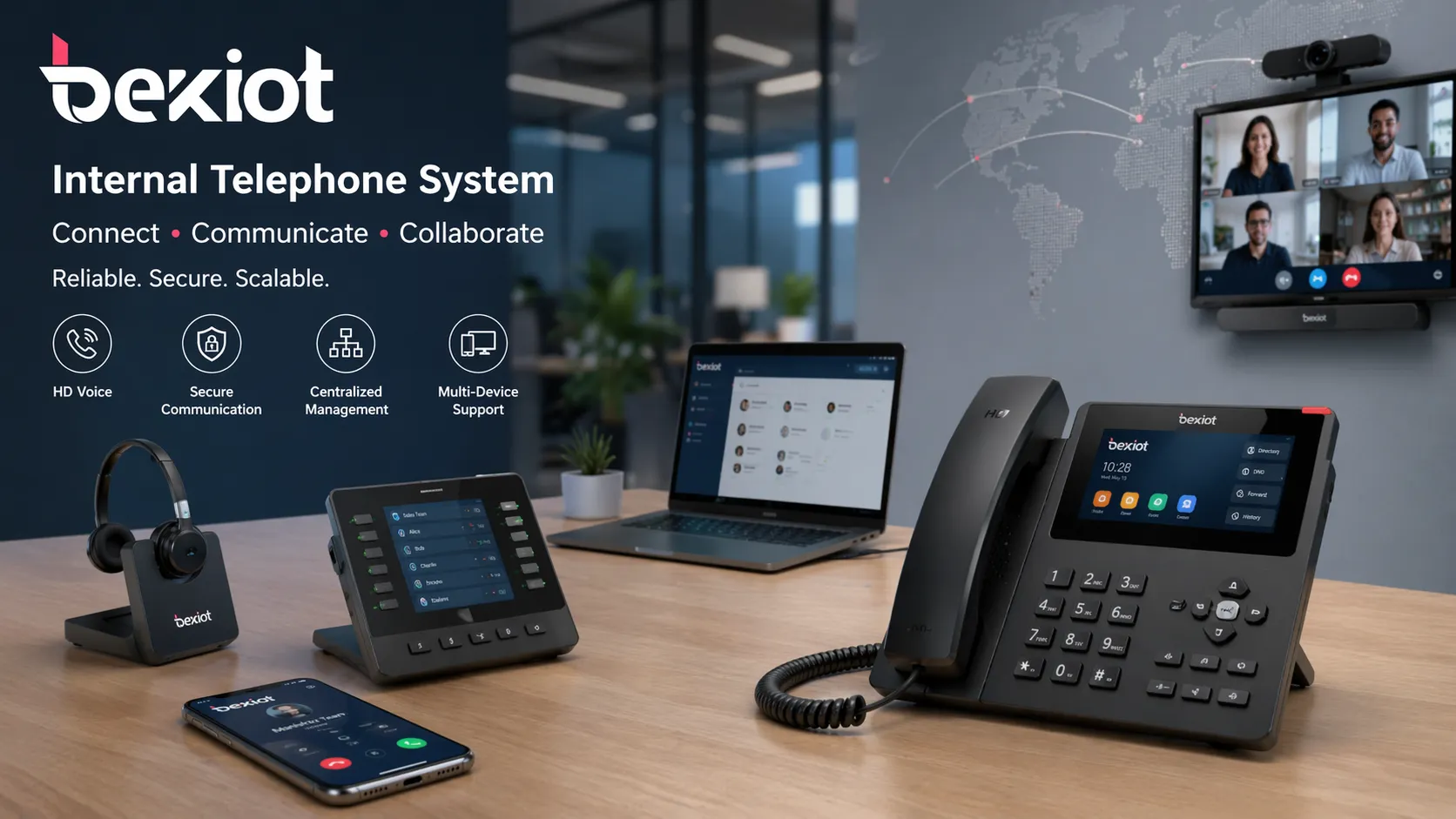
Internal telephone system with office desk phones and enterprise communication endpoints
An internal telephone system helps connect employees, departments, and office functions through a unified communication structure.

What Is an Internal Telephone System?

The basic concept

An internal telephone system is a business communication system that allows users inside an organization to call each other through extensions instead of relying on public external numbers for every conversation. It is typically built around a PBX, IP PBX, or cloud-based calling platform that manages call routing, extension dialing, transfers, voicemail, and other office communication functions.

In simple terms, it gives each employee, department, or location a place within a structured call network. Reception can transfer callers to finance, HR can reach operations with a short extension, managers can contact support teams immediately, and staff can collaborate without unnecessary friction. This structure is what makes the system especially valuable for growing organizations.

How it supports enterprise communication

Enterprise communication is not only about talking to customers. It is also about how teams coordinate internally, how requests move from one department to another, and how quickly staff can respond when time matters. An internal telephone system supports this by turning communication into an organized process rather than a collection of random devices and personal phone numbers.

It also creates consistency. Employees know how to reach one another, departments can be grouped logically, incoming calls can follow clear routing rules, and managers can maintain better visibility over communications. This improves both internal efficiency and the external impression the company gives to customers and partners.

Why Internal Telephone Systems Still Matter in Modern Offices

Faster coordination across teams

In many workplaces, messaging tools are useful for updates, but they are not always the fastest way to resolve urgent matters. When staff need an answer immediately, a direct call is often more effective than waiting for someone to notice a chat notification or respond to an email thread. Internal calling reduces delays and helps teams act quickly.

This is especially important for departments that depend on real-time collaboration, such as administration, customer service, facilities, operations, procurement, sales, and management. A well-structured extension system makes the organization feel more connected and responsive throughout the day.

A more professional customer experience

When external callers reach a business, the internal telephone system helps guide them to the right person or department in a professional way. Reception desks, auto attendants, call transfer functions, ring groups, and voicemail all contribute to a smoother and more organized experience. Instead of callers being passed around informally, the business can manage communication with clear logic and consistent routing.

This matters because communication quality affects brand perception. A company that answers efficiently, transfers accurately, and responds quickly appears more capable, reliable, and service-oriented. An internal telephone system therefore supports not only internal operations, but also the public-facing image of the business.

A strong internal telephone system does more than connect calls. It connects people, responsibilities, and response paths across the business.

Lower operating costs and better control

Another major benefit is cost efficiency. Calls between extensions are handled within the company’s own system, which can reduce dependence on external call charges. For multi-department offices or businesses with several branches, this can lead to meaningful savings over time while improving communication between locations.

The system also offers better control. Administrators can add or remove extensions, define call permissions, configure routing rules, monitor system status, and expand capacity as the organization grows. Compared with unmanaged communication habits, this gives the enterprise a clearer and more scalable structure.

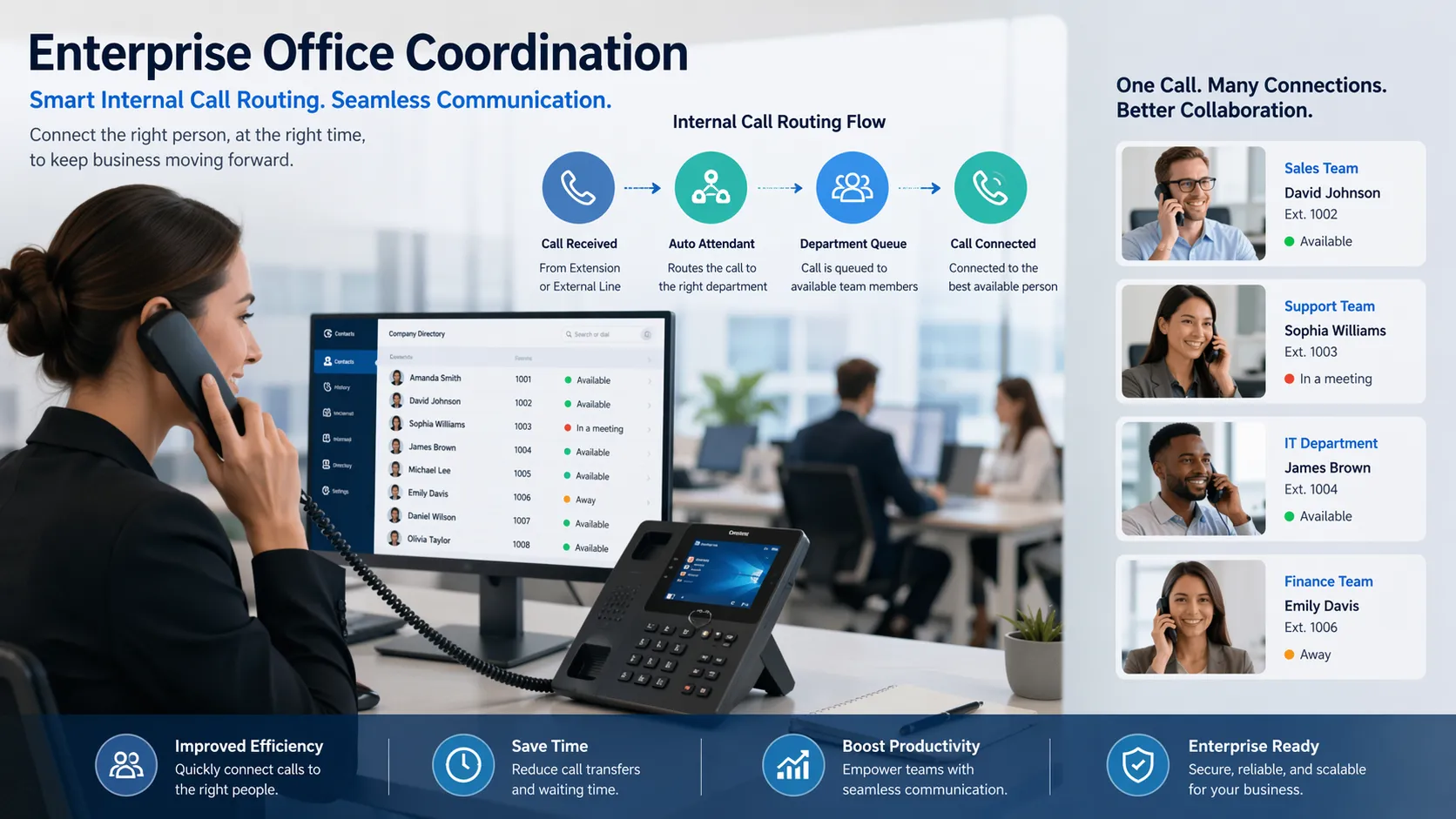
Enterprise office staff using internal call routing and desk phone communication
Extension dialing, transfer, and organized call routing help reduce delays and improve daily office coordination.

Key Features of a Modern Internal Telephone System

Core office telephony features

Modern systems typically include the essential tools businesses need every day. These commonly include extension dialing, call transfer, call hold, call park, voicemail, caller ID, call forwarding, ring groups, and conference calling. These functions allow teams to communicate efficiently without depending on ad hoc workarounds.

For businesses that receive a steady volume of incoming calls, features such as IVR menus, queue handling, operator assistance, and department routing can make a significant difference. These tools help distribute calls properly, reduce missed opportunities, and improve response quality across the organization.

  • Extension-to-extension calling
  • Call transfer and forwarding
  • Voicemail and missed call handling
  • Conference and group calling
  • Reception and department routing
  • Auto attendant or IVR functionality

Advanced features for growing enterprises

Today’s internal telephone systems often go beyond basic voice communication. Many platforms can support softphones, mobile extensions, call recording, paging, reporting, remote user access, multi-site deployment, and integration with other enterprise communication tools. This makes the system more useful for hybrid work, distributed teams, and businesses that need centralized management across locations.

In more advanced environments, internal telephony can also work alongside video communication, intercom, paging, and operational workflows. This is particularly valuable in organizations that need communication to support not only administration, but also service response, internal dispatching, facility coordination, or site-wide announcements.

Where Internal Telephone Systems Are Commonly Used

Corporate offices and administrative environments

In office settings, internal telephone systems are used to connect front desks, management teams, departments, meeting rooms, support teams, and branch contacts. They simplify everyday communication and help create a reliable operational rhythm. Staff can reach the right extension quickly, supervisors can escalate issues faster, and departments can stay coordinated without unnecessary delay.

These systems are especially useful for enterprises with structured teams and formal communication needs, where professionalism, availability, and clear routing matter. Even in highly digital offices, internal calling remains one of the most efficient tools for fast collaboration.

Multi-site businesses and hybrid organizations

For organizations operating across more than one office, the internal telephone system can function as a unifying communication backbone. Branch teams can communicate as if they are in the same office, managers can stay connected across regions, and customer calls can be routed to the right site or department without confusion.

This flexibility also supports hybrid work. Employees working remotely can use softphone apps or registered endpoints to stay connected to the same internal call environment. As a result, the business maintains a consistent communication structure even when the workforce is distributed.

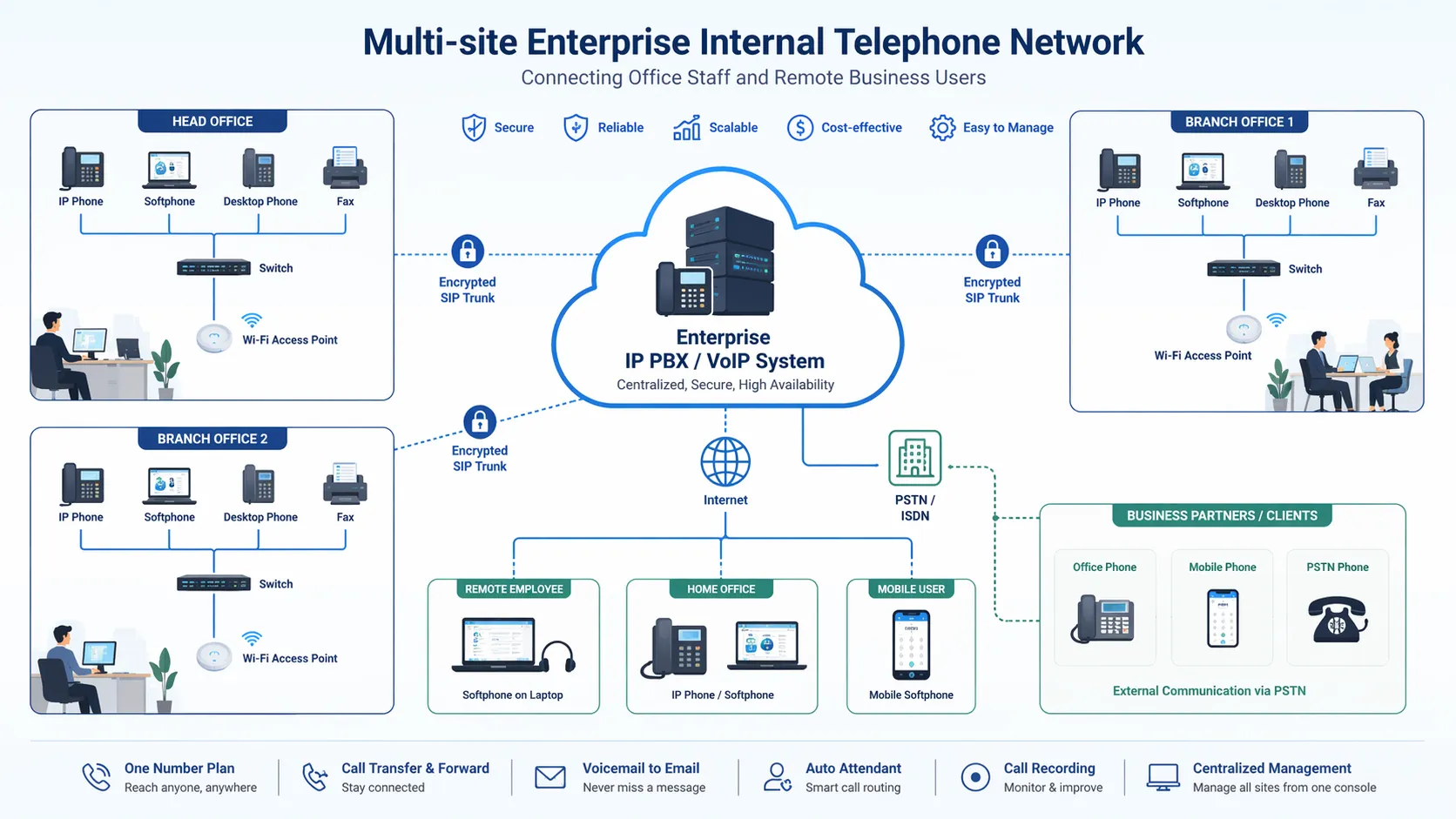
Multi-site enterprise internal telephone network connecting office staff and remote users
Modern internal telephone systems can support branch offices, remote users, and centralized call management within one business environment.

How to Choose the Right Internal Telephone System

PBX, IP PBX, or cloud-based platform

Choosing the right system starts with understanding the available architecture. Traditional PBX systems are often associated with legacy telephony environments. IP PBX systems use IP networks to provide more flexibility, easier scalability, and broader feature sets. Cloud-based systems reduce on-site infrastructure requirements and can simplify remote access and multi-site deployment.

The right choice depends on the size of the organization, the existing network, the required features, budget expectations, and future growth plans. For most modern enterprises, flexibility and scalability are major decision factors, especially when remote work, branch connectivity, or system integration are important.

What businesses should evaluate before deployment

Before selecting a solution, companies should assess how many users need extensions, how incoming calls should be handled, whether reception or IVR is required, how often teams need conference calling, and whether mobile or remote users must be included. It is also important to consider audio quality, ease of management, future expansion, and compatibility with existing endpoints.

Businesses should also think beyond the first installation. A good internal telephone system should be easy to expand, simple to manage, and reliable enough for everyday use. The long-term value comes not only from features, but from how well the system fits the organization’s communication habits and growth path.

The best internal telephone system is not the one with the longest feature list. It is the one that fits the way your teams actually communicate.

Conclusion

An internal telephone system is still an essential office tool for enterprise communication because it solves a very practical business problem: how to help people connect quickly, clearly, and professionally. It improves internal coordination, supports customer communication, creates a more organized calling structure, and provides a foundation that can grow with the business.

While digital collaboration tools continue to evolve, voice communication remains central to efficient operations. For enterprises that want faster response, clearer call handling, and a more professional communication environment, an internal telephone system continues to offer real and lasting value.

If your business is evaluating a new communication platform, this topic can also be extended into a broader solution page covering PBX, IP PBX, paging, intercom, multi-site calling, and unified enterprise communications.

FAQ

What is the difference between an internal telephone system and a regular office phone setup?

A regular office phone setup may simply refer to a collection of phones with external numbers, while an internal telephone system is a structured communication environment built around extensions, call routing, transfer logic, voicemail, and centralized management. It is designed to support the organization as a whole rather than individual devices only.

Is an internal telephone system still useful if a company already uses chat and video tools?

Yes. Chat and video platforms are useful for collaboration, but voice calling remains important for immediate coordination, quick escalation, receptionist workflows, and customer-facing communication. An internal telephone system complements digital collaboration tools rather than replacing them.

Can an internal telephone system support remote employees?

Modern systems often can. Many IP-based and cloud-based solutions support softphones, mobile clients, and remote registration, allowing employees outside the office to remain part of the same extension and call routing environment.

What types of businesses benefit most from an internal telephone system?

Almost any organization with multiple employees or departments can benefit, especially corporate offices, customer service teams, healthcare facilities, schools, hotels, industrial sites, and multi-branch businesses. The system becomes more valuable as communication needs become more structured and time-sensitive.

Recommended Products
catalogue
Professional industrial communication manufacturer, providing high reliability communication guarantee!
Cooperation Consultation
customer service Phone
We use cookie to improve your online experience. By continuing to browse this website, you agree to our use of cookie.

Cookies

This Cookie Policy explains how we use cookies and similar technologies when you access or use our website and related services. Please read this Policy together with our Terms and Conditions and Privacy Policy so that you understand how we collect, use, and protect information.

By continuing to access or use our Services, you acknowledge that cookies and similar technologies may be used as described in this Policy, subject to applicable law and your available choices.

Updates to This Cookie Policy

We may revise this Cookie Policy from time to time to reflect changes in legal requirements, technology, or our business practices. When we make updates, the revised version will be posted on this page and will become effective from the date of publication unless otherwise required by law.

Where required, we will provide additional notice or request your consent before applying material changes that affect your rights or choices.

What Are Cookies?

Cookies are small text files placed on your device when you visit a website or interact with certain online content. They help websites recognize your browser or device, remember your preferences, support essential functionality, and improve the overall user experience.

In this Cookie Policy, the term “cookies” also includes similar technologies such as pixels, tags, web beacons, and other tracking tools that perform comparable functions.

Why We Use Cookies

We use cookies to help our website function properly, remember user preferences, enhance website performance, understand how visitors interact with our pages, and support security, analytics, and marketing activities where permitted by law.

We use cookies to keep our website functional, secure, efficient, and more relevant to your browsing experience.

Categories of Cookies We Use

Strictly Necessary Cookies

These cookies are essential for the operation of the website and cannot be disabled in our systems where they are required to provide the service you request. They are typically set in response to actions such as setting privacy preferences, signing in, or submitting forms.

Without these cookies, certain parts of the website may not function correctly.

Functional Cookies

Functional cookies enable enhanced features and personalization, such as remembering your preferences, language settings, or previously selected options. These cookies may be set by us or by third-party providers whose services are integrated into our website.

If you disable these cookies, some services or features may not work as intended.

Performance and Analytics Cookies

These cookies help us understand how visitors use our website by collecting information such as traffic sources, page visits, navigation behavior, and general interaction patterns. In many cases, this information is aggregated and does not directly identify individual users.

We use this information to improve website performance, usability, and content relevance.

Targeting and Advertising Cookies

These cookies may be placed by our advertising or marketing partners to help deliver more relevant ads and measure the effectiveness of campaigns. They may use information about your browsing activity across different websites and services to build a profile of your interests.

These cookies generally do not store directly identifying personal information, but they may identify your browser or device.

First-Party and Third-Party Cookies

Some cookies are set directly by our website and are referred to as first-party cookies. Other cookies are set by third-party services, such as analytics providers, embedded content providers, or advertising partners, and are referred to as third-party cookies.

Third-party providers may use their own cookies in accordance with their own privacy and cookie policies.

Information Collected Through Cookies

Depending on the type of cookie used, the information collected may include browser type, device type, IP address, referring website, pages viewed, time spent on pages, clickstream behavior, and general usage patterns.

This information helps us maintain the website, improve performance, enhance security, and provide a better user experience.

Your Cookie Choices

You can control or disable cookies through your browser settings and, where available, through our cookie consent or preference management tools. Depending on your location, you may also have the right to accept or reject certain categories of cookies, especially those used for analytics, personalization, or advertising purposes.

Please note that blocking or deleting certain cookies may affect the availability, functionality, or performance of some parts of the website.

Restricting cookies may limit certain features and reduce the quality of your experience on the website.

Cookies in Mobile Applications

Where our mobile applications use cookie-like technologies, they are generally limited to those required for core functionality, security, and service delivery. Disabling these essential technologies may affect the normal operation of the application.

We do not use essential mobile application cookies to store unnecessary personal information.

How to Manage Cookies

Most web browsers allow you to manage cookies through browser settings. You can usually choose to block, delete, or receive alerts before cookies are stored. Because browser controls vary, please refer to your browser provider’s support documentation for details on how to manage cookie settings.

Contact Us

If you have any questions about this Cookie Policy or our use of cookies and similar technologies, please contact us at support@becke.cc .