
Becke SIPサーバーでリンググループを設定する方法

  リンググループは、SIPサーバーまたはIP構内交換機(IP PBX)環境における最も実用的な通話処理機能の1つです。複数の内線番号で1つのダイヤル番号を共有できるため、発信者がその番号をダイヤルすると、割り当てられたすべての機器が同時に呼び出し音を鳴らします。いずれかの担当者が応答すると、他の機器の呼び出し音は自動的に停止します。この機能は、複数の端末で同じ通話に応答する必要があるサービスデスク、警備ポイント、受付、作業場の通話ステーション、緊急対応拠点などで広く利用されています。

  Beckeのシステム構成では、IPフォンやインターカム端末など、1台以上の登録済みSIP機器をリンググループに含めることができます。機器が内線としてサーバーに追加されていれば、設定プロセスは簡単です。本ガイドではBecke UCサーバーを例として、メニューごとの直訳ではなく、アプリケーションを重視した分かりやすい方法で標準的な設定手順を解説します。

  リンググループ機能の概要

  リンググループの役割

  リンググループは、SIPサーバー内に共有の着信先を作成します。個々の内線を直接呼び出す代わりに、利用者は単一のグループ番号をダイヤルします。するとサーバーは、選択された呼び出し戦略に従って、そのグループに割り当てられたすべての担当者に通話を配信します。

  ここで説明する例では、呼び出しモードは同時呼び出しに設定されています。これは、グループ内のすべての担当者が同時に呼び出されることを意味します。いずれか1台の機器が通話に応答すると、その機器で通話が確立され、残りの端末の呼び出し音は直ちに停止します。この動作により、共同担当業務の現場での不在着信を減らし、対応効率を向上させることができます。

  対応機種

  この機能は、Becke SIP/UCサーバープラットフォームと連携可能なBecke製品に適用できます。元の事例ではデモ機器としてi16SVとA32iが使用されていますが、端末がSIP内線としてサーバーに登録できる限り、Beckeの幅広い製品ラインナップに同様のロジックを適用できます。

  設定前の準備

  必要な機器とツール

  リンググループを作成する前に、1台以上のBecke端末、PoEスイッチまたはDC電源、Becke SIPサーバー、設定および検証用のコンピューターを含む基本的なテスト環境を準備してください。本例の環境では、Becke UCサーバーは別途の専用ハードウェアプラットフォームではなく、コンピューターにインストールされています。

  •      Becke製SIP機器(i16SV、A32iなど)

  •      PoEスイッチ、または必要に応じてDC電源

  •      Becke SIP/UCサーバー

  •      同一ネットワークに接続された設定用PC

  最も重要な要件はネットワーク接続性です。コンピューター、サーバー、端末は同一の接続ネットワーク内で相互に到達可能であり、Web設定、SIP登録、通話テストが中断なく実行できる必要があります。
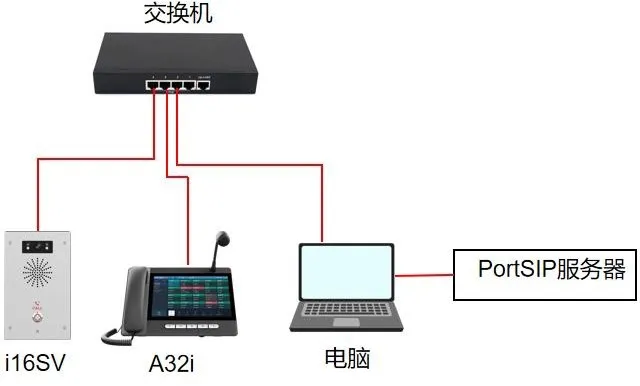
機器とPCのネットワーク接続図

  接続トポロジー

  i16SVとA32iをスイッチに接続し、設定用PCを同じスイッチに接続します。Becke UCサーバー環境も同PC上または同一のネットワークセグメント上で利用可能にしてください。これにより、サーバーが内線を管理し、定義されたリンググループに通話を配信できる小規模なローカル環境が構築されます。

  元のドキュメントでは、この構成が図1として機器とコンピューターの接続図で示されています。実用的には、この図は関連するすべての機器が同一のLAN環境を共有し、サーバーがWeb設定のためにアクセス可能であることを示しているだけです。

  Becke UCサーバーでのリンググループ設定

  開始前の確認事項

  リンググループ機能は、サーバーのIP PBX機能セットに属します。つまり、グループが機能するためには、参加する機器が事前にBecke UCサーバーに内線として登録されている必要があります。内線登録自体についてはここでは扱いませんが、最初に完了させてください。そうしないと、グループ作成時に目的の担当者を選択できません。

  端末がオンラインになり正常に登録されたら、サーバーのWebインターフェースからリンググループを追加できます。

  リンググループの作成方法

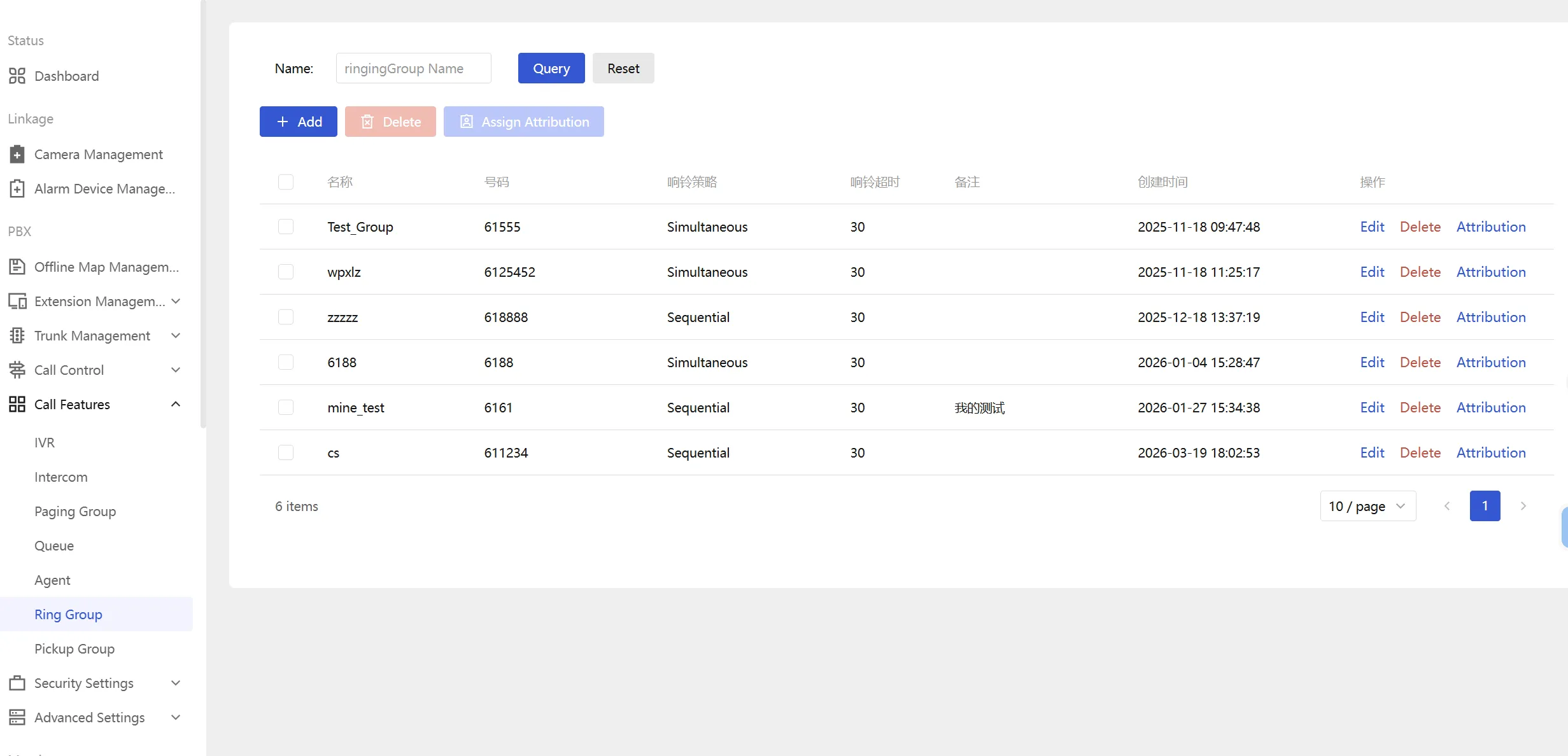
  Becke UCサーバーのWebインターフェースにログインし、通話管理セクション内のリンググループ設定ページに移動します。そこから追加ボタンをクリックし、新しいリンググループエントリを作成します。
リンググループ作成図

  追加ウィンドウが開いたら、主要なパラメータを編集できます。元のガイドの図2には、このリンググループ追加インターフェースが示されています。主な項目について、より実践的な形で以下に説明します。

  1. リンググループ番号:利用者がグループに接続するためにダイヤルする番号です。プロジェクトの番号計画に合わせてカスタマイズできます。本例では、グループ番号は8888に設定されています。

  2. グループ名:受付、警備デスク、保守チーム、サービスホットラインなど、グループを示す記述的な名前を入力します。

  3. 呼び出し戦略:複数の戦略が利用可能な場合がありますが、本例では同時呼び出しを使用します。これは、グループ番号がダイヤルされたときにすべてのグループ担当者が同時に呼び出されることを意味します。

  4. 呼び出し時間:通話がタイムアウトするか、サーバーに設定された追加の通話処理ロジックに従うまで、機器が呼び出し音を鳴らし続ける時間を定義します。

  5. グループメンバー:追加をクリックし、このリンググループに所属させる登録済みのBecke機器または内線を選択します。

  必要な情報を入力したら、設定を保存します。これでリンググループは実際の通話テストに利用できるようになります。

     ベストプラクティス:担当者の役割を明確に反映するグループ名を使用してください。システムに複数の部門、建物、対応チームが存在する場合、管理が容易になります。

  リンググループの実際の動作

  通話フロー例

  リンググループ作成後、利用者は割り当てられたグループ番号(8888など)をダイヤルできます。Becke UCサーバーは通話を受信し、そのグループに含まれるすべての担当者に呼び出し信号を送信します。本例のシナリオでは、i16SVとA32iの両方が同時に呼び出されます。

  いずれかの担当者が応答すると、サーバーは直ちにその機器に通話を接続し、他の担当者の呼び出しを停止します。これにより、複数の端末が対応可能な現場に最適なシンプルな共同応答モデルが実現されます。

  代表的な利用シーン

  リンググループは、通話の応答が単一の内線の可用性に依存しない環境で特に役立ちます。オフィスの受付、産業用制御室、工場の保守デスク、警備ポスト、サービスカウンター、社内ヘルプポイントなどで利用できます。特定の人物ではなく、在席する担当者であれば誰でも応答すればよいSIPインターカム機器でも、同様の方法が有効です。

  元ドキュメントの図3はこの適用効果を示しています。グループ番号がダイヤルされると、割り当てられたすべての担当者に通知が行き、最初に応答した機器が通話を受け持ち、その他の機器は呼び出し状態から解除されます。

  導入時の実用的な注意点

  設定のポイント

  実際のプロジェクトでリンググループを作成する際は、番号計画をシンプルで一貫性のあるものにすることを推奨します。グループ番号は覚えやすく、PBXのその他のダイヤルプランに論理的に適合する必要があります。また、グループのテストを行う前に、すべてのメンバーがSIP登録を完了し、音声パスが正常に動作していることを確認することをお勧めします。
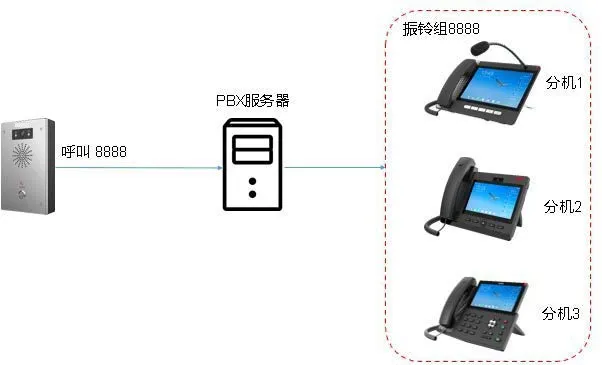
リンググループ適用例

  IPフォンとSIPインターカムの両方を含む構成の場合、管理者は事前に電源供給、ネットワーク到達性、サーバーの状態も確認してください。リンググループは基本的な機能に見えますが、安定した動作には正しい端末登録とクリーンなネットワーク接続が不可欠です。

  まとめ

  Becke UCサーバーのリンググループ機能は、着信を複数の機器に一度に配信するためのシンプルで効率的な方法を提供します。BeckeのIPフォンやインターカム端末を1つの番号にグループ化することで、通話をより速く応答でき、単一の端末への依存度を低減できます。共同サービス拠点や協調的な対応が必要なシナリオでは、SIPベースの通信システムにおける最も有用なコア機能の1つです。

  ここで示した例では、同時呼び出し、カスタムグループ番号8888、i16SVおよびA32iなどの登録済みBecke機器を中心に設定を行っています。正しく設定すれば、この機能は操作が簡単で、プロジェクトの規模拡大に合わせて容易に拡張できます。

カタログ
顧客サービス 電話
We use cookie to improve your online experience. By continuing to browse this website, you agree to our use of cookie.

Cookies

This Cookie Policy explains how we use cookies and similar technologies when you access or use our website and related services. Please read this Policy together with our Terms and Conditions and Privacy Policy so that you understand how we collect, use, and protect information.

By continuing to access or use our Services, you acknowledge that cookies and similar technologies may be used as described in this Policy, subject to applicable law and your available choices.

Updates to This Cookie Policy

We may revise this Cookie Policy from time to time to reflect changes in legal requirements, technology, or our business practices. When we make updates, the revised version will be posted on this page and will become effective from the date of publication unless otherwise required by law.

Where required, we will provide additional notice or request your consent before applying material changes that affect your rights or choices.

What Are Cookies?

Cookies are small text files placed on your device when you visit a website or interact with certain online content. They help websites recognize your browser or device, remember your preferences, support essential functionality, and improve the overall user experience.

In this Cookie Policy, the term “cookies” also includes similar technologies such as pixels, tags, web beacons, and other tracking tools that perform comparable functions.

Why We Use Cookies

We use cookies to help our website function properly, remember user preferences, enhance website performance, understand how visitors interact with our pages, and support security, analytics, and marketing activities where permitted by law.

We use cookies to keep our website functional, secure, efficient, and more relevant to your browsing experience.

Categories of Cookies We Use

Strictly Necessary Cookies

These cookies are essential for the operation of the website and cannot be disabled in our systems where they are required to provide the service you request. They are typically set in response to actions such as setting privacy preferences, signing in, or submitting forms.

Without these cookies, certain parts of the website may not function correctly.

Functional Cookies

Functional cookies enable enhanced features and personalization, such as remembering your preferences, language settings, or previously selected options. These cookies may be set by us or by third-party providers whose services are integrated into our website.

If you disable these cookies, some services or features may not work as intended.

Performance and Analytics Cookies

These cookies help us understand how visitors use our website by collecting information such as traffic sources, page visits, navigation behavior, and general interaction patterns. In many cases, this information is aggregated and does not directly identify individual users.

We use this information to improve website performance, usability, and content relevance.

Targeting and Advertising Cookies

These cookies may be placed by our advertising or marketing partners to help deliver more relevant ads and measure the effectiveness of campaigns. They may use information about your browsing activity across different websites and services to build a profile of your interests.

These cookies generally do not store directly identifying personal information, but they may identify your browser or device.

First-Party and Third-Party Cookies

Some cookies are set directly by our website and are referred to as first-party cookies. Other cookies are set by third-party services, such as analytics providers, embedded content providers, or advertising partners, and are referred to as third-party cookies.

Third-party providers may use their own cookies in accordance with their own privacy and cookie policies.

Information Collected Through Cookies

Depending on the type of cookie used, the information collected may include browser type, device type, IP address, referring website, pages viewed, time spent on pages, clickstream behavior, and general usage patterns.

This information helps us maintain the website, improve performance, enhance security, and provide a better user experience.

Your Cookie Choices

You can control or disable cookies through your browser settings and, where available, through our cookie consent or preference management tools. Depending on your location, you may also have the right to accept or reject certain categories of cookies, especially those used for analytics, personalization, or advertising purposes.

Please note that blocking or deleting certain cookies may affect the availability, functionality, or performance of some parts of the website.

Restricting cookies may limit certain features and reduce the quality of your experience on the website.

Cookies in Mobile Applications

Where our mobile applications use cookie-like technologies, they are generally limited to those required for core functionality, security, and service delivery. Disabling these essential technologies may affect the normal operation of the application.

We do not use essential mobile application cookies to store unnecessary personal information.

How to Manage Cookies

Most web browsers allow you to manage cookies through browser settings. You can usually choose to block, delete, or receive alerts before cookies are stored. Because browser controls vary, please refer to your browser provider’s support documentation for details on how to manage cookie settings.

Contact Us

If you have any questions about this Cookie Policy or our use of cookies and similar technologies, please contact us at support@becke.cc .