SIP電話のためのBroadsoft SCA(共有通話外観)サーバーおよび端末の設定ガイド

はじめに

概要

共有通話表示(SCA)機能は、複数アカウント間で通話ステータスをリアルタイム共有し、グループメンバーの通話応答・発信を容易にします。着信が発生した際、共有回線グループ内の登録済み全ての電話機が通話要求を受信し、同時に鳴動します。いずれかの電話機が応答すると、その他の端末は鳴動を停止し、これらの端末には不在着信として記録されません。

専用回線は共有回線の対となる機能で、通話中の当事者同士のみ回線の通話ステータスを参照できます。

対応機種

本書は以下の機種に適用されます:BX3S、BX4、BX5S、BX6、BX7、BX7C、GP210、GP210i、BX3U、BX4U、BX5U、BX6U。

対象読者

本書はSIP電話機でBroadsoft SCA機能を利用するユーザー向けです。

用語集

  1. 専用回線:通話中の当事者のみ回線の通話ステータスを参照可能な回線。

  2. 共有回線:指定された範囲内で通話ステータスを共有できる回線。

  3. 通話表示:SIP回線上の1つの通話セッションを1つの通話表示と定義します。

  4. 共有通話表示(SCA):共有回線上の通話ステータスのこと。

  5. 公開保留:公開保留状態では、グループ内の他の電話機が対応する共有回線キーを押すことで通話を再取得し、会話を再開できます。これにより、保留中の通話を別の電話機に引き継いで通信を継続することが可能です。

  6. 非公開保留:非公開保留状態では、他の電話機から通話を再取得することはできません。他の端末で対応回線キーを押すと、割り込み操作として認識されます。

  7. 通話中/ブリッジ通話中/ブリッジ保留中:これらの状態では、グループ内の他の電話機が共有回線キーを押してアクティブな通話に参加し、三者会議を作成できます。これを割り込み通話と呼びます。

共有通話表示(SCA)操作手順

サーバー側設定

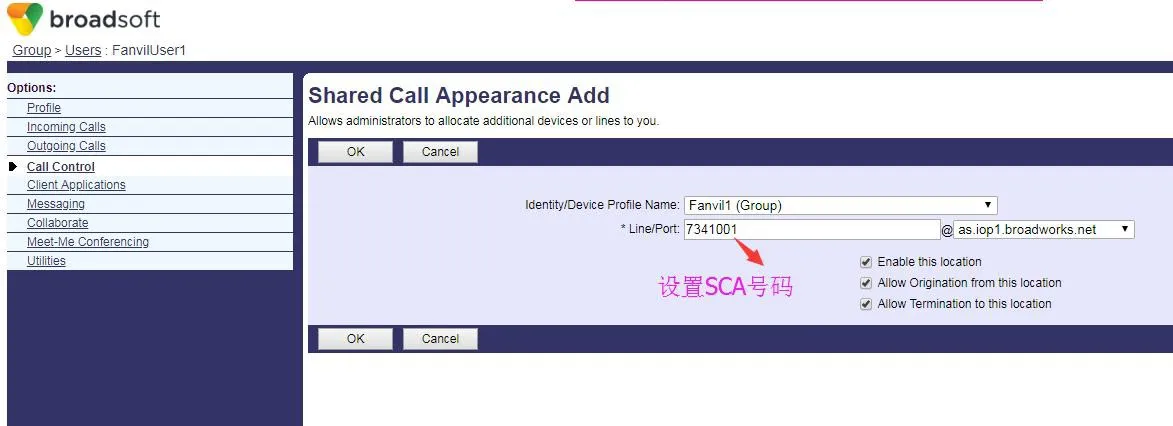
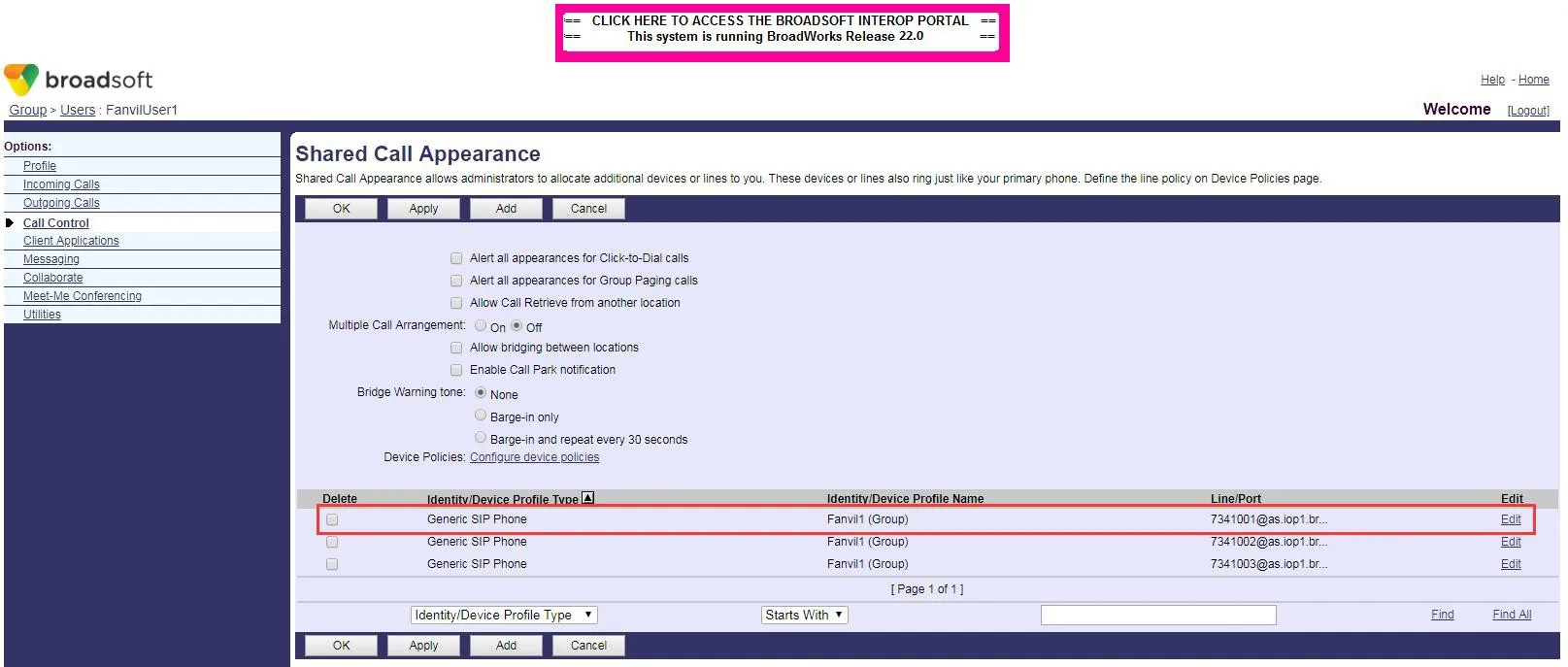
本機能を使用するには、共有グループを作成する必要があります。Broadsoftは使いやすい作成手順を提供しています。BroadWorks管理ポータルにログインし、グループユーザー通話制御共有通話表示 へ移動し、追加 をクリックして1つまたは複数の共有グループを作成してください(既存作成済みアカウントも利用可能)。下記スクリーンショットを参照してください:
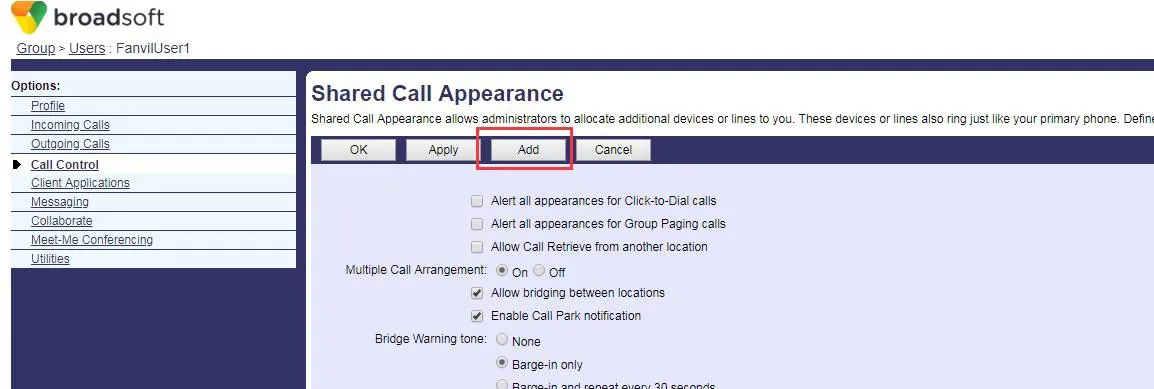
共有グループ作成画面SCA番号設定画面作成済みリスト表示画面

グループ作成後、新規作成したアカウントを複数の端末に登録できます。登録には親アカウントのユーザー名とパスワードを使用し、SIPユーザー名欄に新規作成したSCAアカウント名を入力してください。実運用では、グループ全メンバーが親アカウントの設定と属性を共有します。

電話端末設定

電話機をBroadSoftサーバーに登録し、作成した番号を複数端末に登録してください。
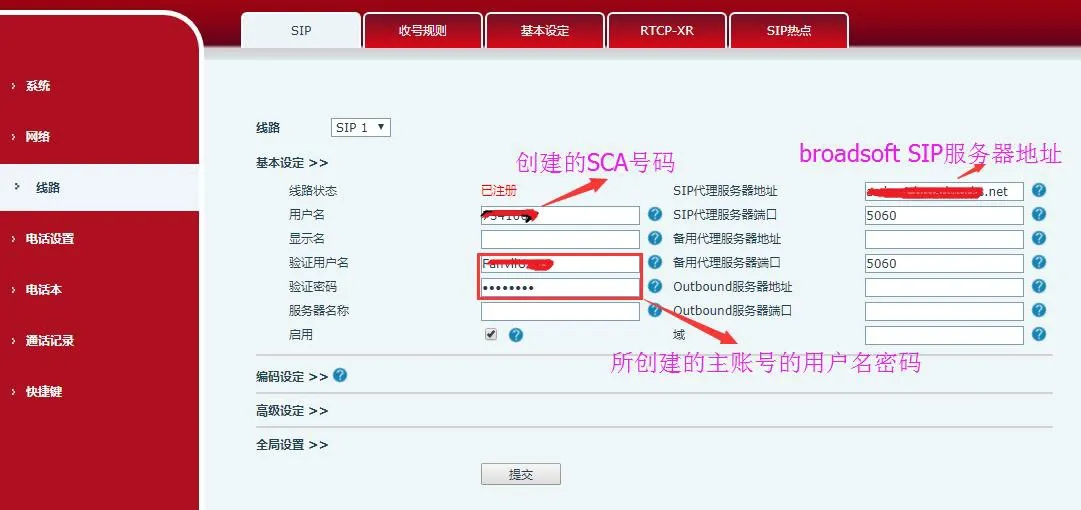
電話機登録用BroadSoftサーバーアカウント設定画面

電話機をBroadSoftサーバーに登録したら、サーバー種別を設定します。電話機のWeb管理画面にログインし、回線SIP詳細設定 へ進み、サーバー種別をBroadSoftに設定してください。下記スクリーンショットを参照:
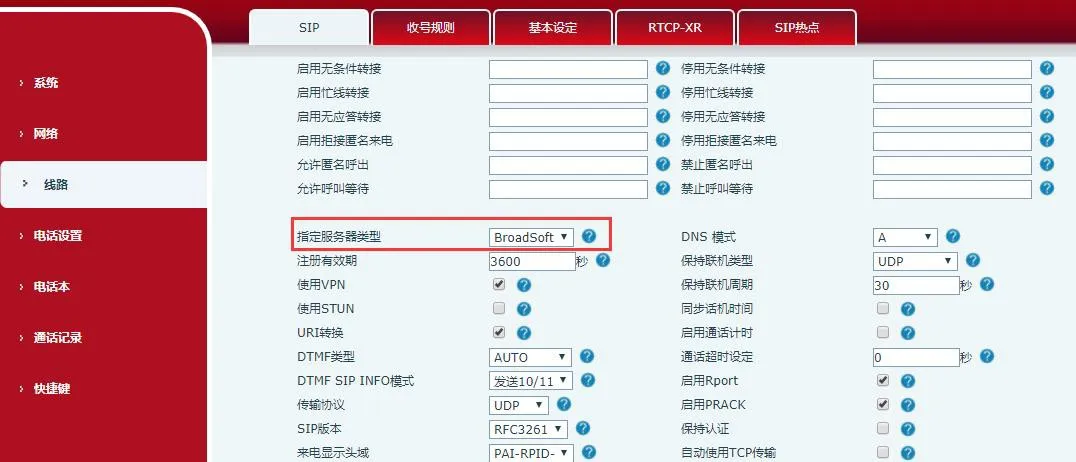
BroadSoftサーバー登録用詳細設定画面

電話機でSCA機能を有効にするには、電話機のWeb画面にログインし、回線SIP詳細設定 へ移動し、SCAを有効にしてください(SCAを無効にすると、登録回線は専用回線として動作します)。下記スクリーンショットを参照:
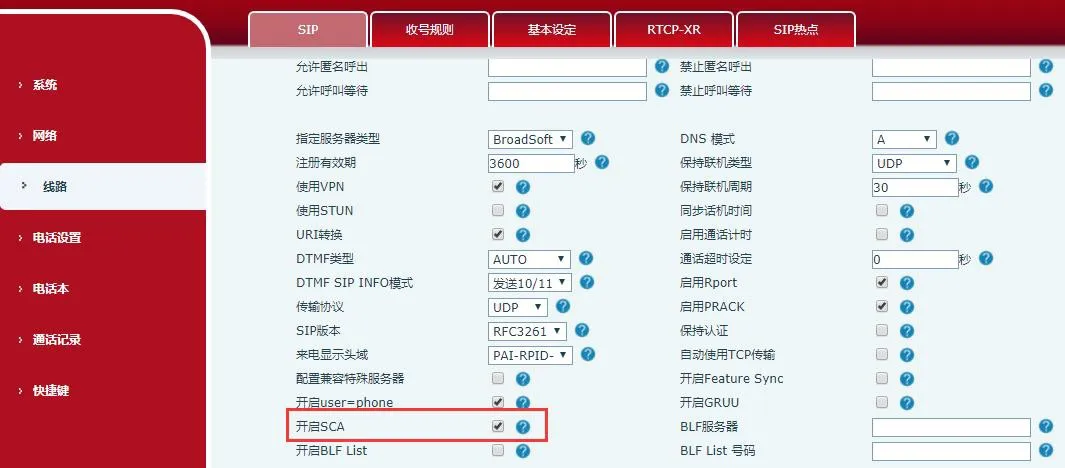
電話機SCA有効設定画面

アカウント設定と登録が正常に完了した後、機能キー画面でDSSキーをSCA有効回線に割り当て、通話ステータスをリアルタイム監視できます。各回線キーが1つの通話表示に対応します。通話ステータスの表示については回線キーLED表示欄を参照してください。

非公開保留操作を便利に行うため、機能キー画面でDSSキーを非公開保留キーとして設定してください。なお、公開保留機能は通話中のソフトキー保留から利用可能です。
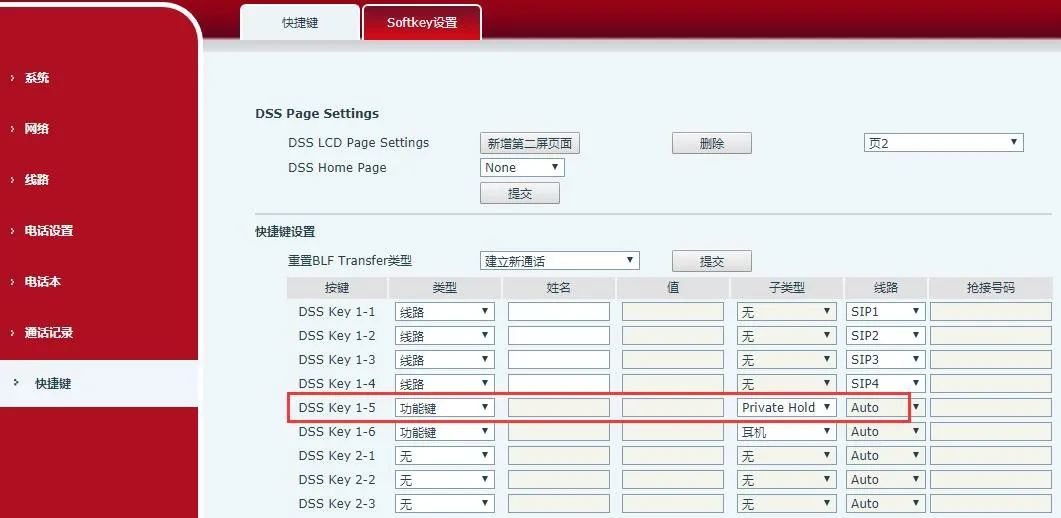
機能キー画面 - DSSキーを非公開保留キーに設定

注:BroadSoftサーバーに登録する全ての電話機は、SCA機能を正常に利用するため上記設定手順を完了する必要があります。

LEDインジケーター状態

グループの通話ステータスを簡単に監視するため、DSSキーをSCA有効回線に割り当ててください。回線LEDの表示は通話状態によって下記のように異なります。

状態 & 種別自端末他端末
待機中消灯消灯
回線捕捉緑色 常時点灯赤色 常時点灯
発信中緑色 高速点滅赤色 高速点滅
着信中緑色 高速点滅緑色 高速点滅
通話中緑色 常時点灯赤色 常時点灯
公開保留中緑色 低速点滅赤色 低速点滅
非公開保留中緑色 低速点滅赤色 常時点灯
割り込み通話中緑色 常時点灯赤色 常時点灯
ブリッジ保留中緑色 常時点灯赤色 常時点灯

共有通話表示(SCA)利用シナリオ

機能の理解を深めるため、実務での利用シナリオを以下に記載します。

以下のシナリオでは、管理者と事務アシスタントが上記手順で設定を完了し、同一のSCAアカウントを登録している状況を想定しています。

シナリオ1:SCAアカウントに着信があると、管理者とアシスタントの電話機が同時に鳴動します。管理者が不在の場合、自身の電話機の鳴動を拒否で停止できます。アシスタントの電話機は鳴動を継続し、アシスタントが応答・拒否するか、通話がタイムアウトするまで鳴動し続けます。

シナリオ2:アシスタントが着信に応答し、管理者に通話を引き継ぐ必要がある場合、公開保留キーを押して通話を保留にできます。管理者は対応するSCA回線キーを押すことで通話を再取得し、会話を再開できます。

シナリオ3:管理者が顧客と重要な通話中に一時的に離席する必要がある場合、非公開保留キーを押すことで、他ユーザーによる通話の再取得を防げます。

シナリオ4:管理者が顧客と通話中に、アシスタントにメモ取りのため通話に参加してもらう必要がある場合、アシスタントは対応するSCA回線キーを押して割り込み、通話に参加できます。

カタログ
顧客サービス 電話
We use cookie to improve your online experience. By continuing to browse this website, you agree to our use of cookie.

Cookies

This Cookie Policy explains how we use cookies and similar technologies when you access or use our website and related services. Please read this Policy together with our Terms and Conditions and Privacy Policy so that you understand how we collect, use, and protect information.

By continuing to access or use our Services, you acknowledge that cookies and similar technologies may be used as described in this Policy, subject to applicable law and your available choices.

Updates to This Cookie Policy

We may revise this Cookie Policy from time to time to reflect changes in legal requirements, technology, or our business practices. When we make updates, the revised version will be posted on this page and will become effective from the date of publication unless otherwise required by law.

Where required, we will provide additional notice or request your consent before applying material changes that affect your rights or choices.

What Are Cookies?

Cookies are small text files placed on your device when you visit a website or interact with certain online content. They help websites recognize your browser or device, remember your preferences, support essential functionality, and improve the overall user experience.

In this Cookie Policy, the term “cookies” also includes similar technologies such as pixels, tags, web beacons, and other tracking tools that perform comparable functions.

Why We Use Cookies

We use cookies to help our website function properly, remember user preferences, enhance website performance, understand how visitors interact with our pages, and support security, analytics, and marketing activities where permitted by law.

We use cookies to keep our website functional, secure, efficient, and more relevant to your browsing experience.

Categories of Cookies We Use

Strictly Necessary Cookies

These cookies are essential for the operation of the website and cannot be disabled in our systems where they are required to provide the service you request. They are typically set in response to actions such as setting privacy preferences, signing in, or submitting forms.

Without these cookies, certain parts of the website may not function correctly.

Functional Cookies

Functional cookies enable enhanced features and personalization, such as remembering your preferences, language settings, or previously selected options. These cookies may be set by us or by third-party providers whose services are integrated into our website.

If you disable these cookies, some services or features may not work as intended.

Performance and Analytics Cookies

These cookies help us understand how visitors use our website by collecting information such as traffic sources, page visits, navigation behavior, and general interaction patterns. In many cases, this information is aggregated and does not directly identify individual users.

We use this information to improve website performance, usability, and content relevance.

Targeting and Advertising Cookies

These cookies may be placed by our advertising or marketing partners to help deliver more relevant ads and measure the effectiveness of campaigns. They may use information about your browsing activity across different websites and services to build a profile of your interests.

These cookies generally do not store directly identifying personal information, but they may identify your browser or device.

First-Party and Third-Party Cookies

Some cookies are set directly by our website and are referred to as first-party cookies. Other cookies are set by third-party services, such as analytics providers, embedded content providers, or advertising partners, and are referred to as third-party cookies.

Third-party providers may use their own cookies in accordance with their own privacy and cookie policies.

Information Collected Through Cookies

Depending on the type of cookie used, the information collected may include browser type, device type, IP address, referring website, pages viewed, time spent on pages, clickstream behavior, and general usage patterns.

This information helps us maintain the website, improve performance, enhance security, and provide a better user experience.

Your Cookie Choices

You can control or disable cookies through your browser settings and, where available, through our cookie consent or preference management tools. Depending on your location, you may also have the right to accept or reject certain categories of cookies, especially those used for analytics, personalization, or advertising purposes.

Please note that blocking or deleting certain cookies may affect the availability, functionality, or performance of some parts of the website.

Restricting cookies may limit certain features and reduce the quality of your experience on the website.

Cookies in Mobile Applications

Where our mobile applications use cookie-like technologies, they are generally limited to those required for core functionality, security, and service delivery. Disabling these essential technologies may affect the normal operation of the application.

We do not use essential mobile application cookies to store unnecessary personal information.

How to Manage Cookies

Most web browsers allow you to manage cookies through browser settings. You can usually choose to block, delete, or receive alerts before cookies are stored. Because browser controls vary, please refer to your browser provider’s support documentation for details on how to manage cookie settings.

Contact Us

If you have any questions about this Cookie Policy or our use of cookies and similar technologies, please contact us at support@becke.cc .