BeckeインドアステーションでIPアドレスを確認し、静的IPを設定する方法

はじめに

概要

室内端末の導入・保守作業を行う際、現在のIPアドレスの確認やネットワークモードを固定IPへ変更する必要が頻繁に発生します。本ガイドでは、Becke製室内端末のIPアドレス確認方法、固定IPv4アドレスの設定手順を実務に即した形で解説します。以下の手順は純正インターフェースの論理に基づき、施工者・技術員・プロジェクト担当者向けに分かりやすく記載しています。

対象機種

本書は以下の室内端末モデルに対応:i51W、i52W、i53W、i56A

対象読者

本資料は、機器のIPアドレス確認、端末をDHCPから固定IP運用へ切り替える必要のあるユーザー・施工業者・サポート担当者を対象とします。

IPアドレスの確認方法

i51W / i52W のIP確認

方法1:本体画面から確認

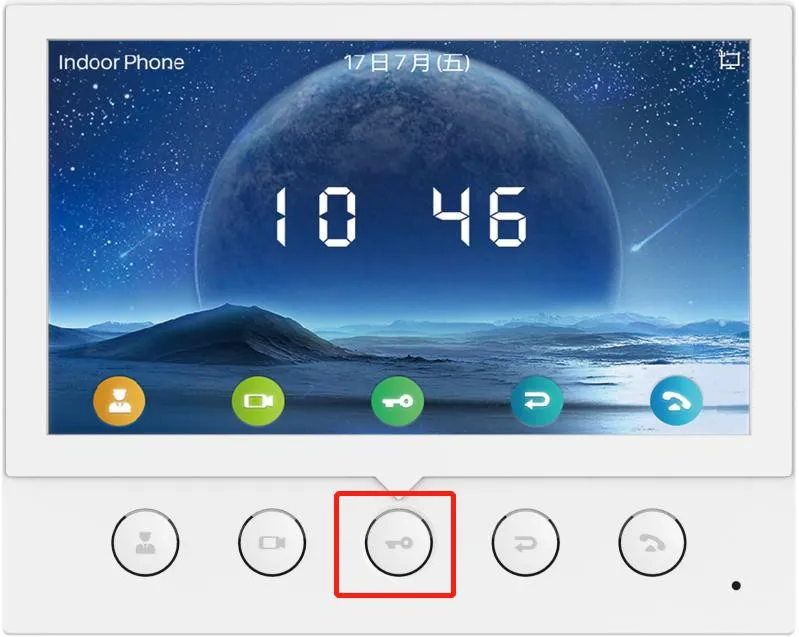
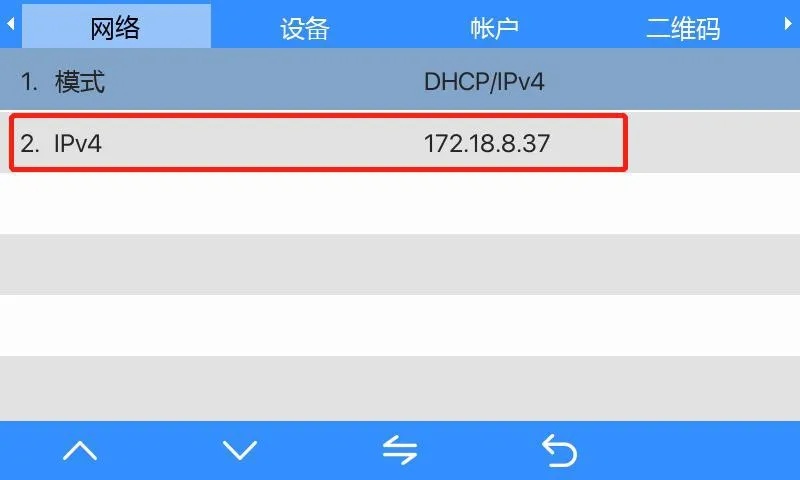
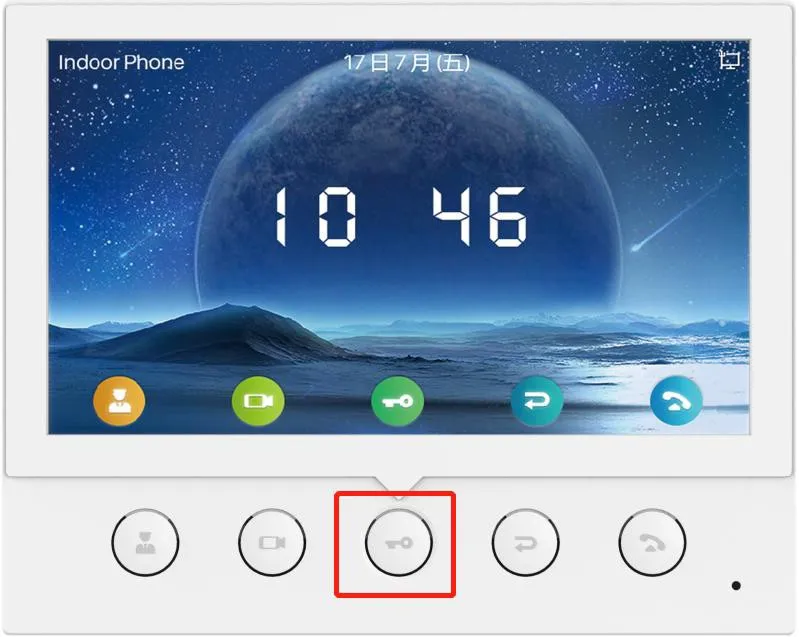
i51W・i52W本体の指定キーを約3秒長押しし、機器メニューを開きます。メニュー内でシステム情報 → ネットワーク → IPv4へ進むと、画面に現在のIPアドレスが表示されます。
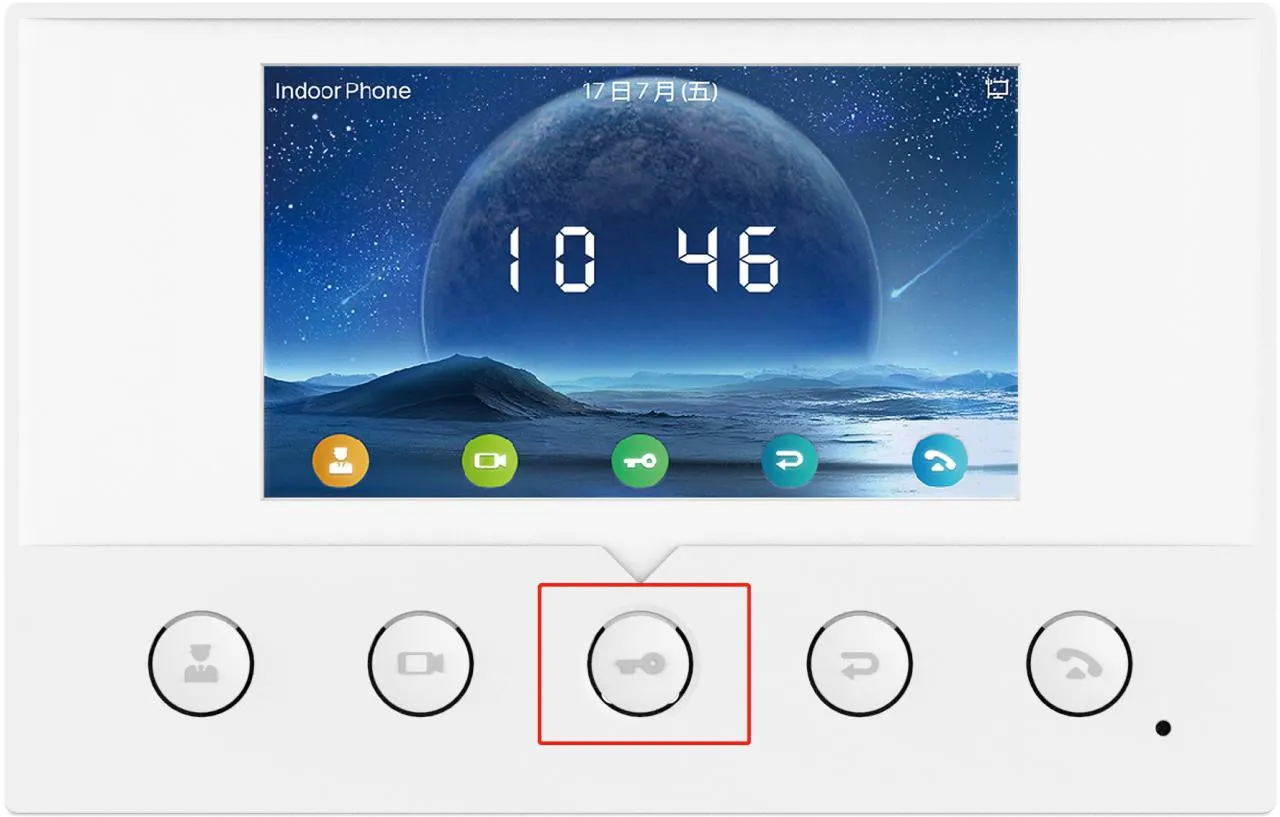
i51W キー操作図
図1. i51W キー操作説明図
i52W キー操作図
図2. i52W キー操作説明図
i51W・i52W IP表示画面
図3. i51W・i52W IPv4情報表示画面

方法2:IPスキャンツールを使用

  1. 機器とPCを同一のローカルネットワークに接続します。

  2. 公式ダウンロードページよりIPスキャンツールをダウンロード・インストールします:https://www.fanvil.com.cn/Support/download/cid/30.html

  3. PCのIPアドレスを、機器と同一サブネットに設定します。

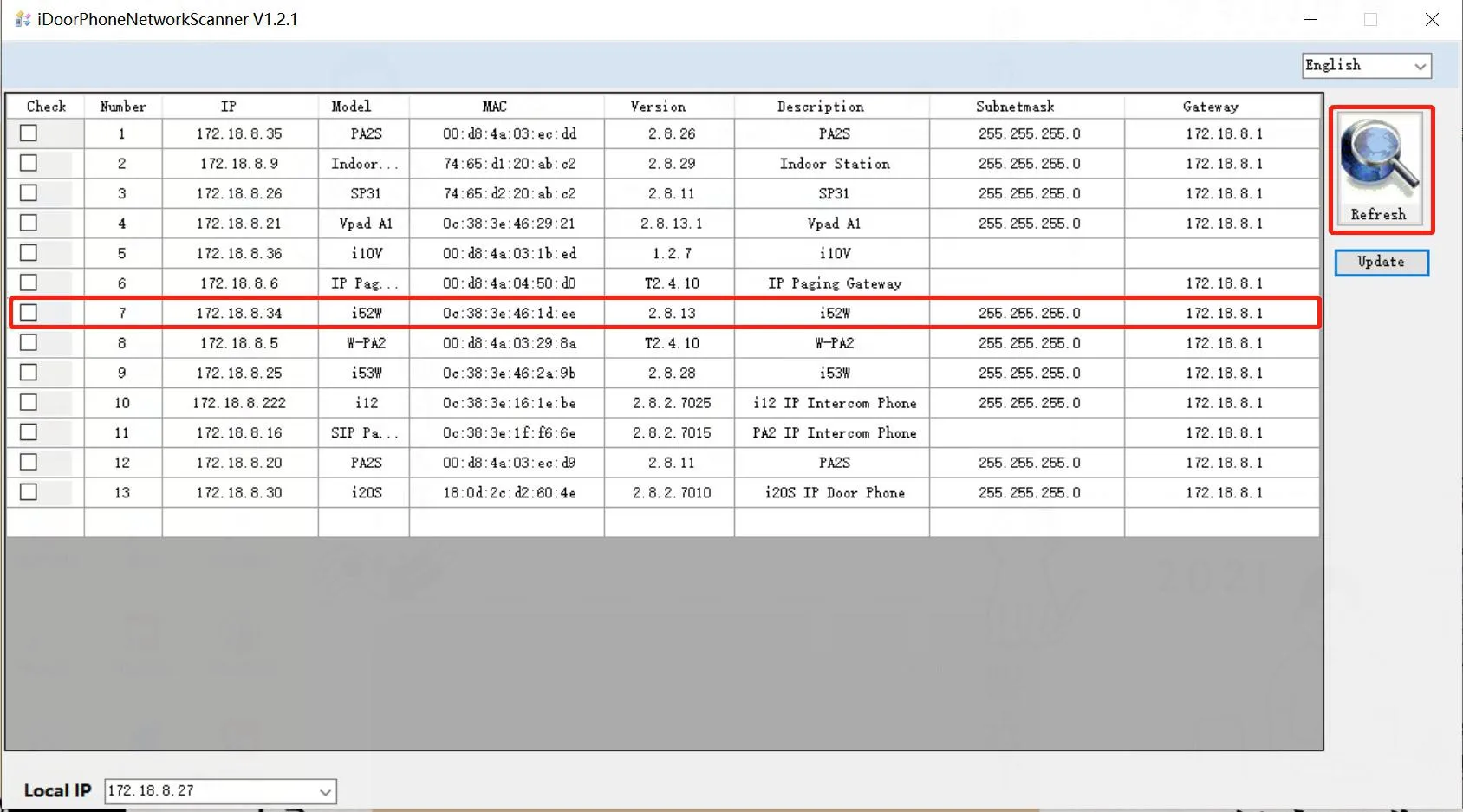
  4. スキャンツールの更新をクリックすると、LAN内の対応機器を検出し、機種名とIPアドレスが表示されます。
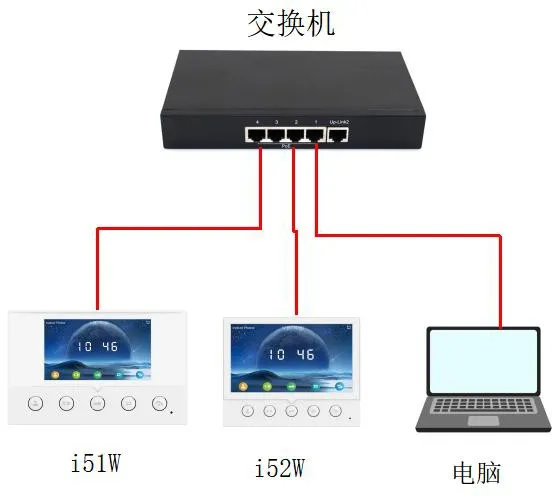
スキャンツール接続構成図
図4. IPスキャン用 機器-PC接続図
IPスキャンリスト画面
図5. 機器検出・IP表示 スキャン結果例

i53W のIP確認

方法1:本体画面から確認

メニューをタップし、ステータス → ネットワークへ進むと、画面にi53Wの現在IPアドレスが表示されます。
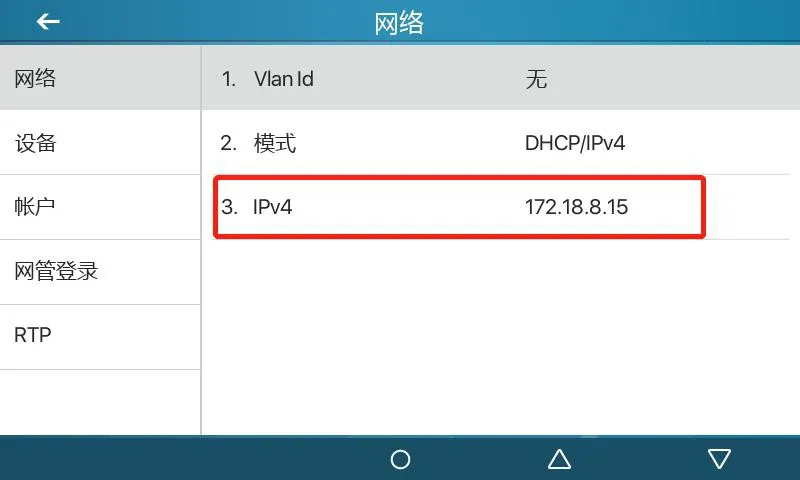
i53W IP表示画面
図6. i53W 画面上でのIPアドレス確認

方法2:IPスキャンツールを使用

  1. i53WとPCを同一ネットワークに接続します。

  2. 公式サイトよりIPスキャンツールをダウンロード・インストールします。

  3. PCが機器と同一サブネットに属していることを確認します。

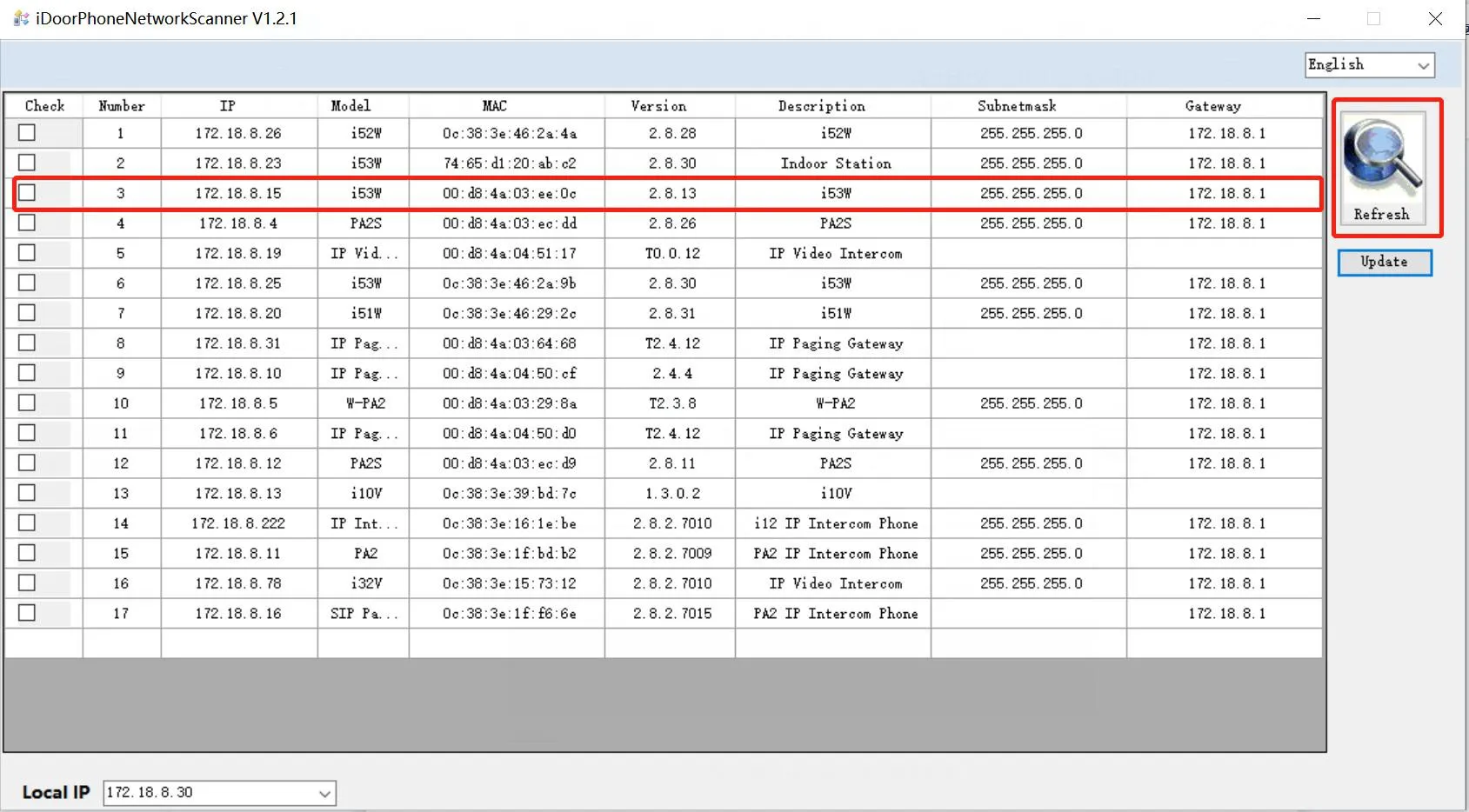
  4. 更新をクリックしてLANをスキャンし、検出された機器のIPアドレスを確認します。
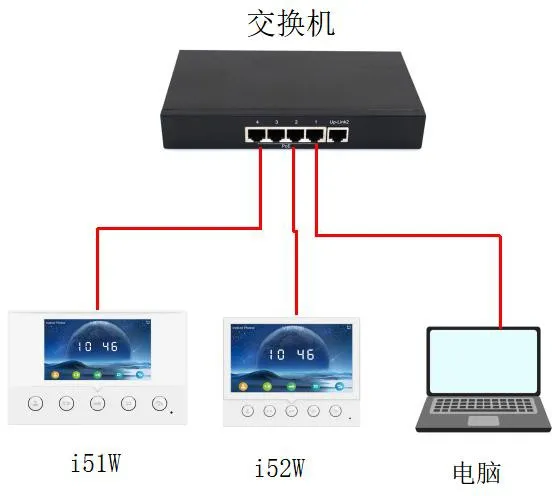
i53W スキャン接続図
図7. i53W IPスキャン用接続構成図
i53W スキャン結果画面
図8. i53W IPスキャン結果例

i56A のIP確認

方法1:クイックパネルから確認

i56A画面上部から下へスワイプし、クイック設定パネルを開くと、現在のIPアドレスを直接確認できます。
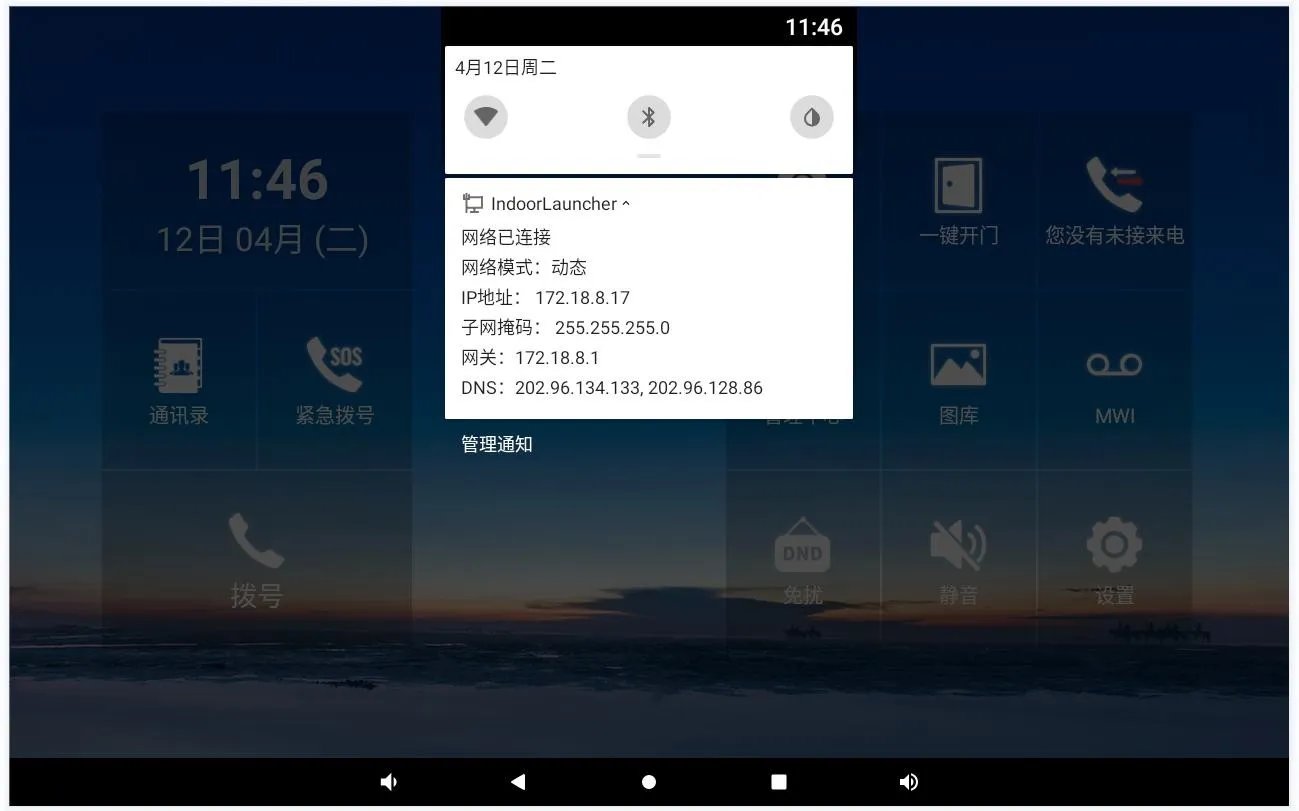
i56A クイックパネルIP表示
図9. i56A クイックパネルでのIP確認

方法2:機器ステータス画面から確認

画面内の設定 → 一般を開き、ネットワーク情報を参照してIPアドレスを確認します。
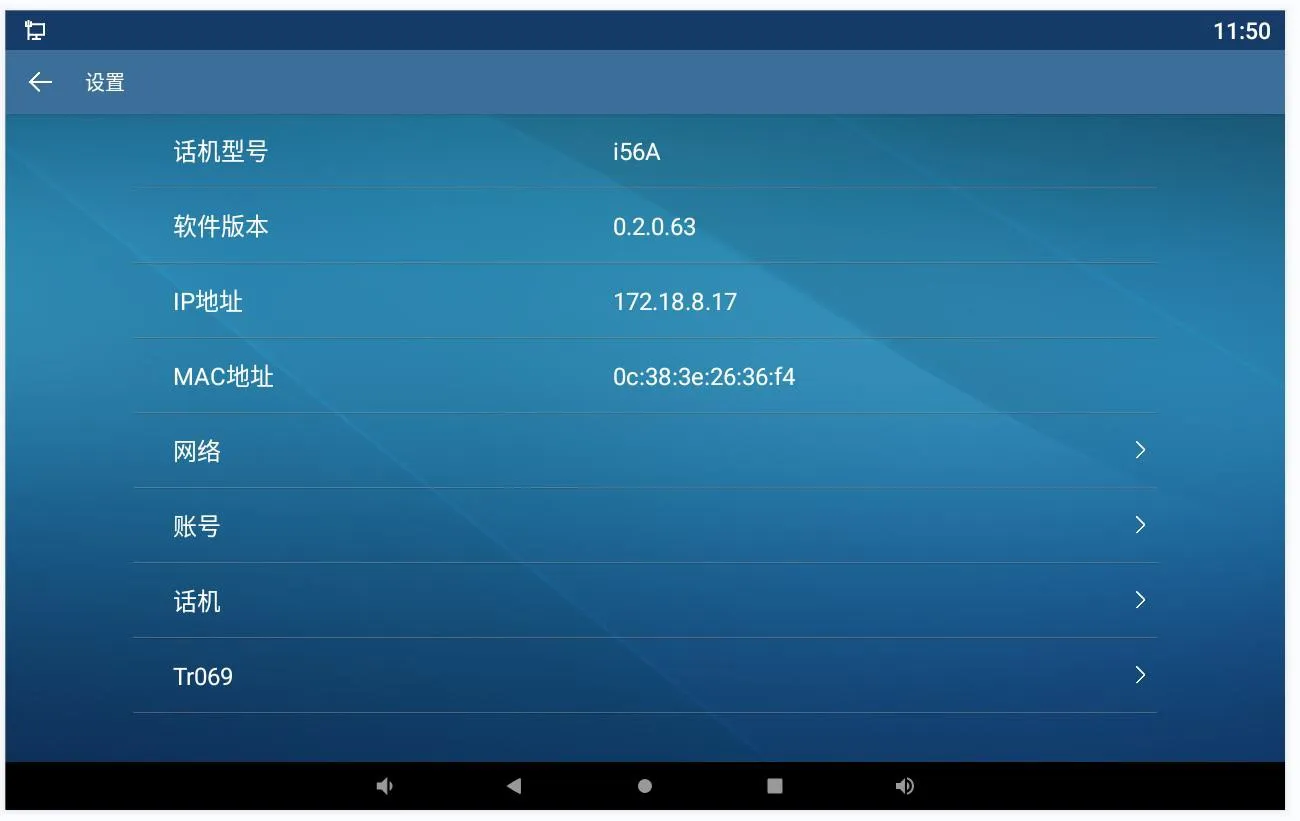
i56A ステータス画面ネットワーク情報
図10. i56A ステータス画面でのIP確認

固定IPアドレスの設定方法

i51W / i52W 固定IP設定

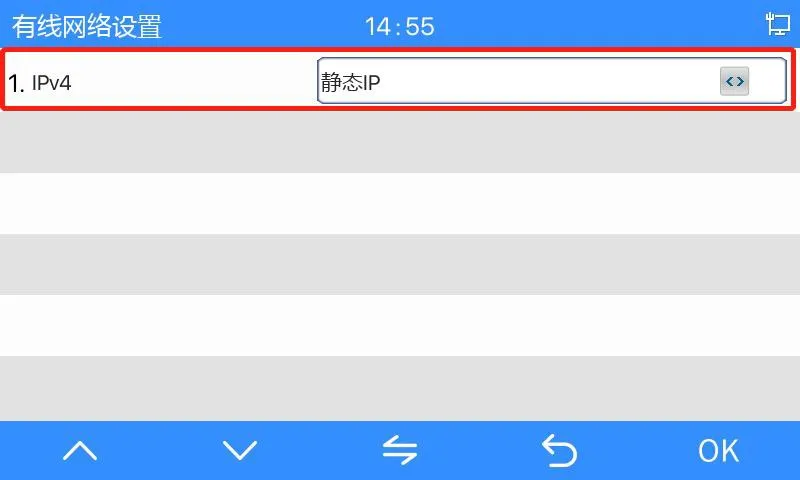
対象キーを約3秒長押ししてi51W・i52Wのメニュー画面を開き、ネットワーク設定 → 有線ネットワーク設定 → IPv4 → 固定IPへ進みます。
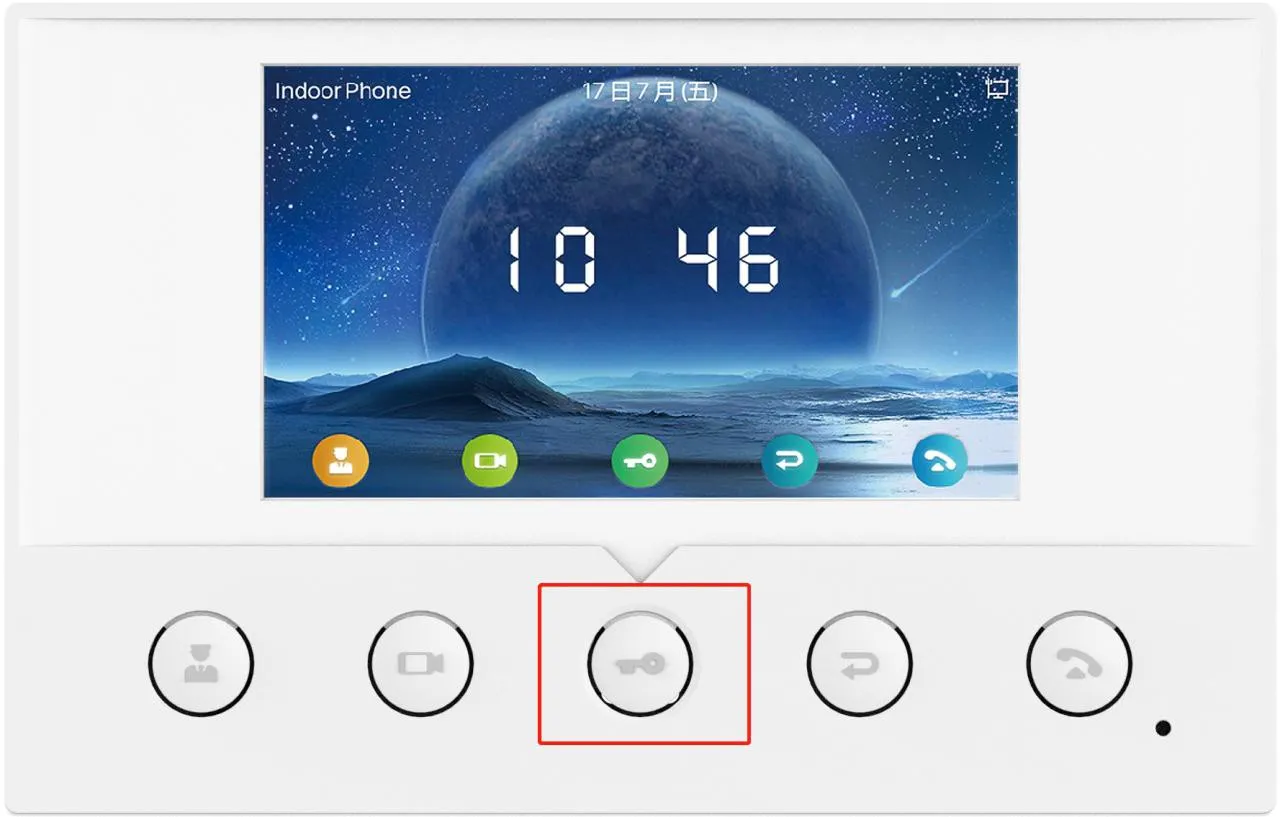
i51W メニュー进入操作
図11. i51W メニュー画面の開き方
i52W メニュー进入操作
図12. i52W メニュー画面の開き方
i51W・i52W 固定IP設定画面
図13. i51W・i52W 固定IPモード設定画面

重要注意:i51W・i52Wは本体メニューでネットワークを固定IPモードへ切り替え可能ですが、画面上でIPv4アドレスの詳細編集はできません。モード切り替え後の既定固定IPは192.168.1.178となります。アドレスを変更する場合はWeb管理画面から設定してください。

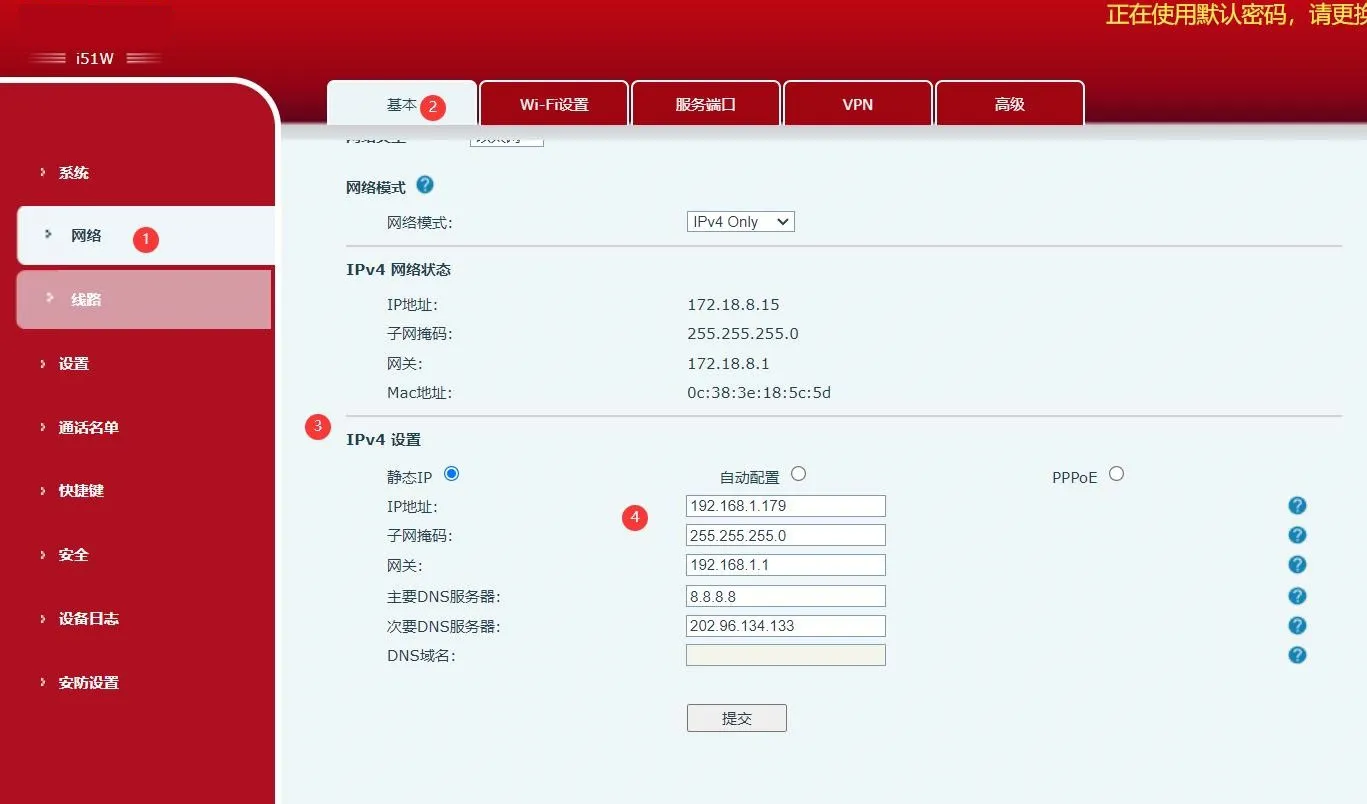
Web画面設定手順

  1. ブラウザに現在のDHCPアドレス、またはモード切り替え後の既定固定IPを入力します。

  2. 初期アカウント情報でWeb画面にログイン:ID:admin / パスワード:admin

  3. ネットワーク → 基本設定 → IPv4設定へ進みます。

  4. 必要な固定IP情報を編集し、設定を保存します。

Web画面 固定IP編集インターフェース
図14. Web管理画面での固定IP編集

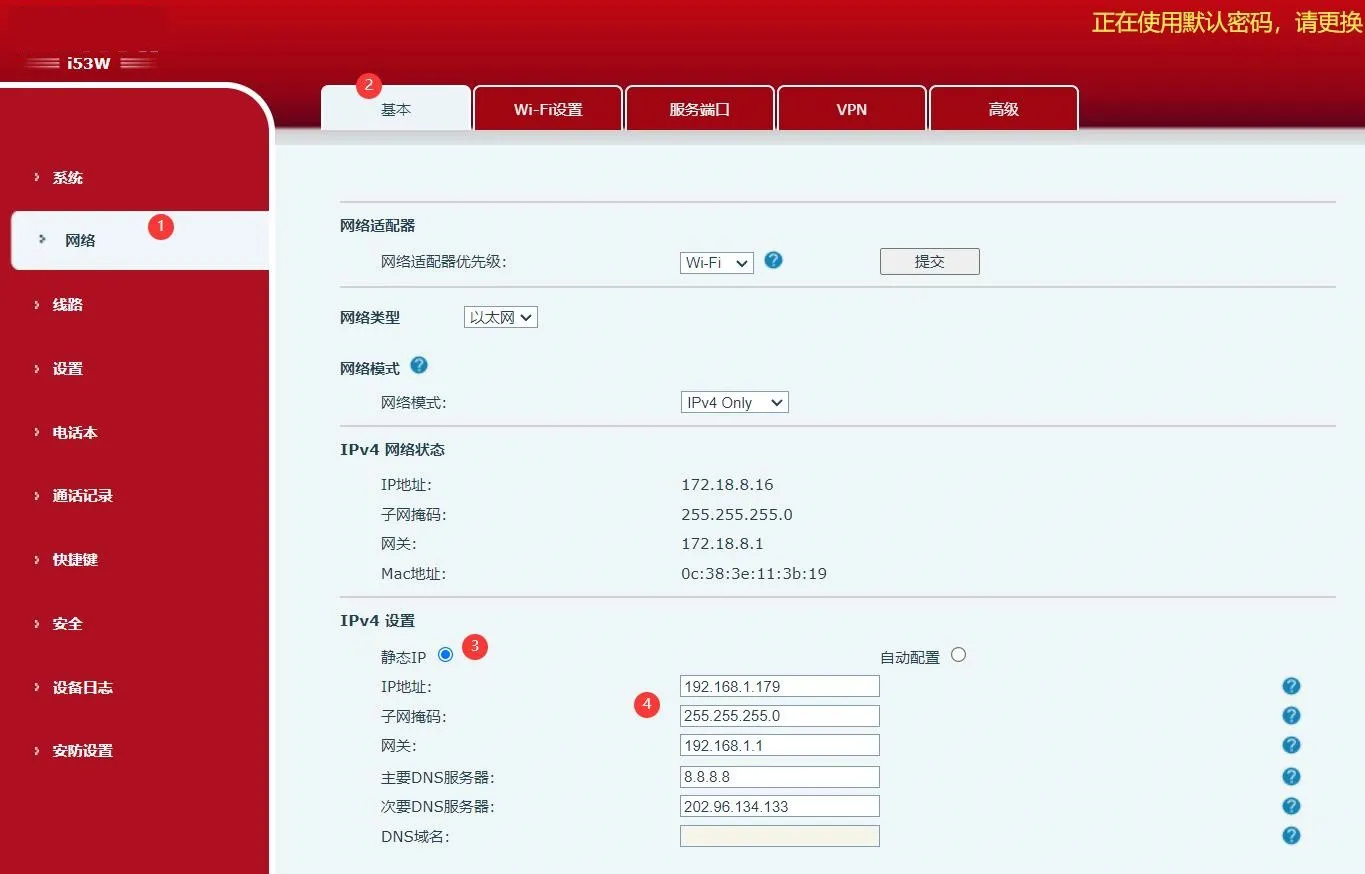
i53W 固定IP設定

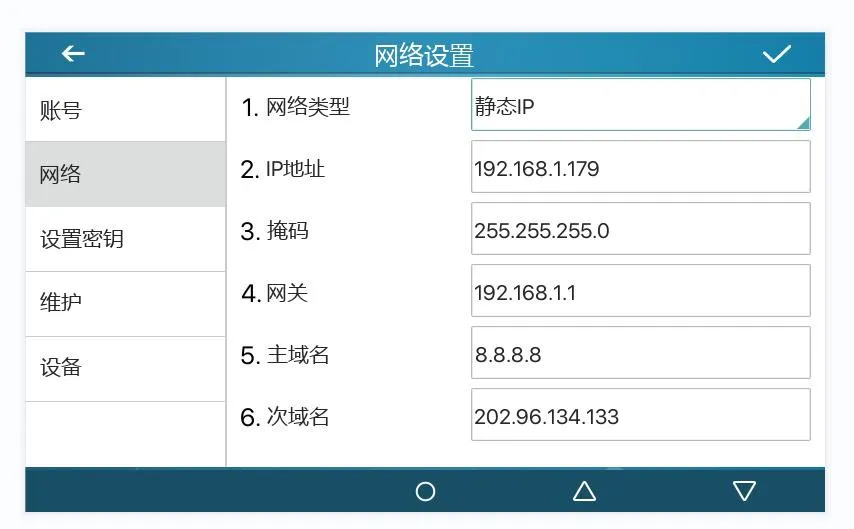
方法1:本体画面から設定

  1. メニュー → 詳細設定をタップし、初期パスワード123を入力します。

  2. ネットワーク → ネットワーク設定 → IPv4へ進みます。

  3. ネットワーク種別を固定IPに変更します。

  4. 任意のIPパラメータを編集し、設定を保存します。

i53W 本体固定IP設定画面
図15. i53W 本体画面での固定IP設定

方法2:Web画面から設定

  1. ブラウザに機器のIPアドレスを入力し、Web管理画面を開きます。

  2. 初期アカウントadmin / adminでログインします。

  3. ネットワーク → 基本設定 → IPv4設定へ進みます。

  4. ネットワークモードとIPv4情報を必要に応じて変更します。

i53W Web画面設定インターフェース
図16. i53W Web画面での固定IP設定

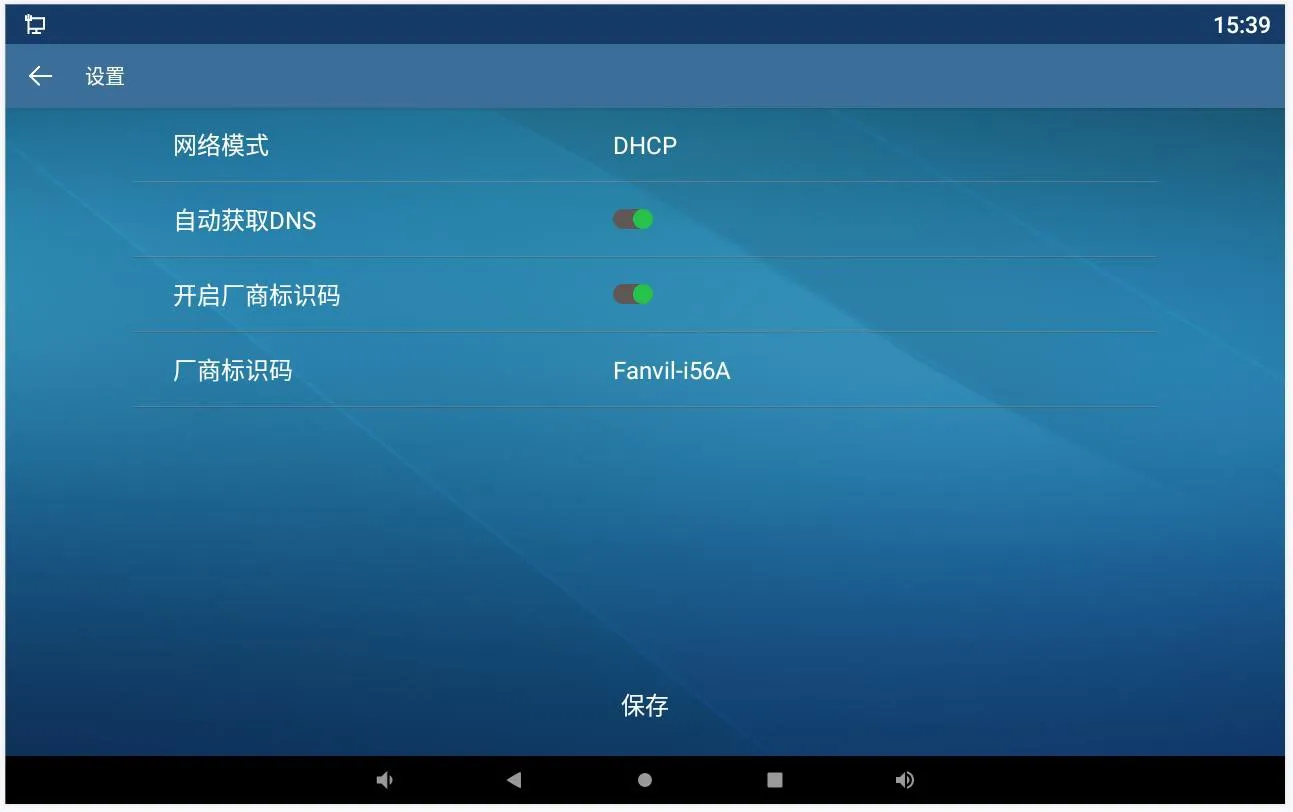
i56A 固定IP設定

方法1:本体画面から設定

  1. 待機画面より設定 → 詳細を開き、初期パスワードadminを入力します。

  2. ネットワーク → イーサネットへ進みます。

  3. ネットワークモードを固定に切り替えます。

  4. 任意の固定IP詳細情報を入力し、設定を保存します。

i56A 本体固定IP設定画面
図17. i56A ローカル画面での固定IP設定

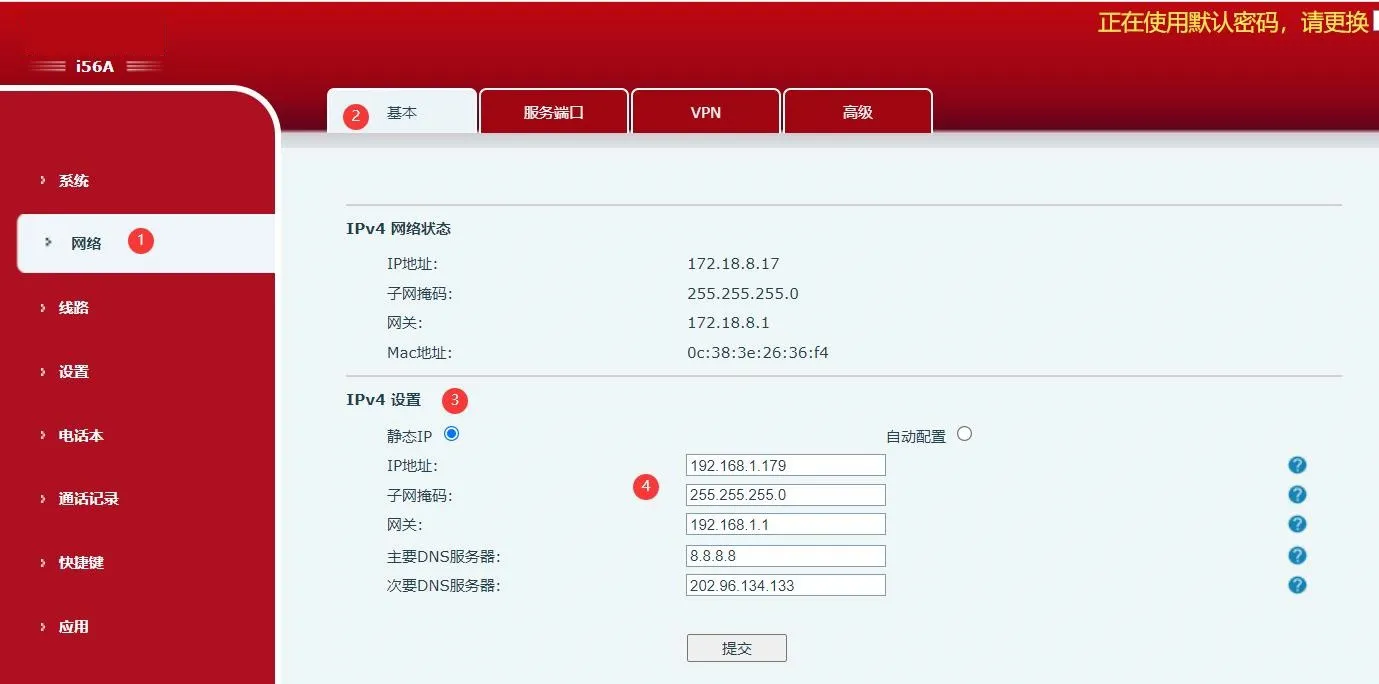
方法2:Web画面から設定

  1. ブラウザに現在のIPアドレスを入力し、Web管理画面にアクセスします。

  2. 正規のログイン情報で認証を行います。

  3. ネットワーク → 基本設定 → IPv4設定へ進みます。

  4. IPv4設定を更新し、変更を保存します。

i56A Web画面IP編集インターフェース
図18. i56A Web管理画面でのIP編集

導入時の注意事項

IPアドレスの確認・変更時は、機器とPCが同一の通信可能なサブネットに属していることを確認してください。機器をDHCPから固定IPへ切り替えた際は、ブラウザでログインする前に新しいアドレスを必ず確認してください。また導入時は、各端末の最終IPアドレス・サブネットマスク・ゲートウェイ・VLAN情報を記録し、今後の保守作業を効率化することを推奨します。

大規模導入の際は、統一されたIPアドレス設計を使用し、設定完了後に各端末の動作確認を実施することで、トラブルシューティング時間を削減し、施工効率を高められます。

よくある質問(FAQ)

機器本体で直接IPアドレスを確認できますか?

はい。本ガイド対象の全機種は、本体画面またはクイック設定パネルからローカルでIPアドレスを確認する機能を標準搭載しています。

i51W・i52Wで本体のみで固定IPアドレスを完全設定できますか?

本体メニューで固定IPモードへの切り替えは可能ですが、アドレス数値の詳細編集はWeb管理画面でのみ行えます。

IPスキャンツールで機器が検出されない原因は?

主な原因は、PCが異なるサブネットにある、機器の電源・配線異常、PCと端末間のネットワーク疎通不良などが挙げられます。

カタログ
顧客サービス 電話
We use cookie to improve your online experience. By continuing to browse this website, you agree to our use of cookie.

Cookies

This Cookie Policy explains how we use cookies and similar technologies when you access or use our website and related services. Please read this Policy together with our Terms and Conditions and Privacy Policy so that you understand how we collect, use, and protect information.

By continuing to access or use our Services, you acknowledge that cookies and similar technologies may be used as described in this Policy, subject to applicable law and your available choices.

Updates to This Cookie Policy

We may revise this Cookie Policy from time to time to reflect changes in legal requirements, technology, or our business practices. When we make updates, the revised version will be posted on this page and will become effective from the date of publication unless otherwise required by law.

Where required, we will provide additional notice or request your consent before applying material changes that affect your rights or choices.

What Are Cookies?

Cookies are small text files placed on your device when you visit a website or interact with certain online content. They help websites recognize your browser or device, remember your preferences, support essential functionality, and improve the overall user experience.

In this Cookie Policy, the term “cookies” also includes similar technologies such as pixels, tags, web beacons, and other tracking tools that perform comparable functions.

Why We Use Cookies

We use cookies to help our website function properly, remember user preferences, enhance website performance, understand how visitors interact with our pages, and support security, analytics, and marketing activities where permitted by law.

We use cookies to keep our website functional, secure, efficient, and more relevant to your browsing experience.

Categories of Cookies We Use

Strictly Necessary Cookies

These cookies are essential for the operation of the website and cannot be disabled in our systems where they are required to provide the service you request. They are typically set in response to actions such as setting privacy preferences, signing in, or submitting forms.

Without these cookies, certain parts of the website may not function correctly.

Functional Cookies

Functional cookies enable enhanced features and personalization, such as remembering your preferences, language settings, or previously selected options. These cookies may be set by us or by third-party providers whose services are integrated into our website.

If you disable these cookies, some services or features may not work as intended.

Performance and Analytics Cookies

These cookies help us understand how visitors use our website by collecting information such as traffic sources, page visits, navigation behavior, and general interaction patterns. In many cases, this information is aggregated and does not directly identify individual users.

We use this information to improve website performance, usability, and content relevance.

Targeting and Advertising Cookies

These cookies may be placed by our advertising or marketing partners to help deliver more relevant ads and measure the effectiveness of campaigns. They may use information about your browsing activity across different websites and services to build a profile of your interests.

These cookies generally do not store directly identifying personal information, but they may identify your browser or device.

First-Party and Third-Party Cookies

Some cookies are set directly by our website and are referred to as first-party cookies. Other cookies are set by third-party services, such as analytics providers, embedded content providers, or advertising partners, and are referred to as third-party cookies.

Third-party providers may use their own cookies in accordance with their own privacy and cookie policies.

Information Collected Through Cookies

Depending on the type of cookie used, the information collected may include browser type, device type, IP address, referring website, pages viewed, time spent on pages, clickstream behavior, and general usage patterns.

This information helps us maintain the website, improve performance, enhance security, and provide a better user experience.

Your Cookie Choices

You can control or disable cookies through your browser settings and, where available, through our cookie consent or preference management tools. Depending on your location, you may also have the right to accept or reject certain categories of cookies, especially those used for analytics, personalization, or advertising purposes.

Please note that blocking or deleting certain cookies may affect the availability, functionality, or performance of some parts of the website.

Restricting cookies may limit certain features and reduce the quality of your experience on the website.

Cookies in Mobile Applications

Where our mobile applications use cookie-like technologies, they are generally limited to those required for core functionality, security, and service delivery. Disabling these essential technologies may affect the normal operation of the application.

We do not use essential mobile application cookies to store unnecessary personal information.

How to Manage Cookies

Most web browsers allow you to manage cookies through browser settings. You can usually choose to block, delete, or receive alerts before cookies are stored. Because browser controls vary, please refer to your browser provider’s support documentation for details on how to manage cookie settings.

Contact Us

If you have any questions about this Cookie Policy or our use of cookies and similar technologies, please contact us at support@becke.cc .