VLANの紹介と産業用SIP電話の設定

VLAN概要

VLANとは

イーサネットはCSMA/CD(搬送波感知多重アクセス/衝突検出)に基づく共有メディアネットワーク技術です。多数のホストが存在すると、深刻な衝突、ブロードキャストストーム、パフォーマンス低下、ネットワーク障害が発生します。スイッチは衝突を抑えますが、ブロードキャストトラフィックを分離することはできません。

VLAN(仮想ローカルエリアネットワーク)技術は、物理LANを複数の論理ブロードキャストドメインに分割することでこの問題を解決します。同一VLAN内の機器は同一LAN上にあるかのように通信し、異なるVLAN同士は直接通信できず、ブロードキャストを制限します。
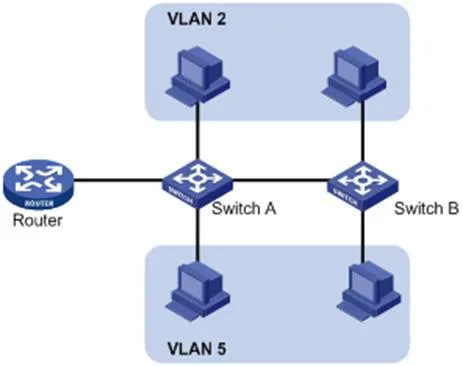
VLAN相互接続論理図

VLANは物理的な位置に制限されません。機器は同一スイッチ上、複数のスイッチをまたぐ、ルーターを跨ぐ構成でも同一VLANに所属可能です。

VLANの利点:

  1. ブロードキャストドメインを制限し、ルーティング負荷・遅延を削減、帯域幅を節約しパフォーマンスを向上させる。

  2. セキュリティ強化:VLAN間をレイヤー2で隔離。通信にはレイヤー3ルーティングが必要。

  3. 柔軟な仮想グループ:物理配線を変更せず、ユーザーを論理的にグループ化可能。

VLANの動作原理

VLANフレームを識別するため、データリンク層(レイヤー2)のイーサネットヘッダーにVLANタグが付加されます。

IEEEは1999年に802.1QプロトコルでVLANタグ付けを標準化しました。イーサネットパケットにVLAN情報をタグ付けする標準的な方式を定義しています。

802.1Qは送信元MACアドレスとEtherTypeフィールドの間に4バイトのタグを挿入します:

  • 2バイト:TPID(タグプロトコル識別子)

  • 2バイト:TCI(タグ制御情報)

TCIにはPCP(優先度コードポイント)、CFI(標準フォーマット識別子)、VID(VLAN ID)が含まれます。

標準イーサネットフレームフォーマット

図1-2 標準イーサネットフレームフォーマット

VLANタグ構造

図1-3 VLANタグフィールド

VLANタグの各フィールド:

  1. TPID:16ビット、802.1Qタグを識別;既定値 0x8100。

  2. Priority(優先度):3ビット、802.1pサービスクラス(CoS)。

  3. CFI:1ビット、MACアドレスフォーマット;0=標準、既定値 0。

  4. VLAN ID:12ビット、VLANを識別;有効範囲 1–4094(0と4095は予約済み)。

注釈:ダブルタグ(QinQ)フレームの場合、スイッチは外側タグのみ処理し、内側タグはペイロードとして扱われます。

VLANの応用

2.3.1 LLDP概要

LLDP(リンク層ディスカバリープロトコル)は、機器がローカルネットワーク上で隣接機器情報を通知・受信できるプロトコルです。情報はMIBに保存され、SNMP(RFC 2922)で参照可能です。

LLDPはTLV(タイプ/長さ/値)構造で機器情報を伝送します。複数のTLVでLLDPDU(LLDPデータユニット)を構成します。

タイプ長さ
7ビット9ビット0-511バイト

図1-4 TLV構造

LLDP-MED(メディアエンドポイントディスカバリー)はVoIP機器向け拡張仕様で、以下の機能を提供します:

  • 機能検出

  • 音声VLAN設定

  • PoE電源管理

  • 資産管理

  • 緊急通報向け位置情報識別

注釈:LLDPとLLDP-MEDは同一ポートで同時に動作できません。

IP電話におけるLLDP機能:

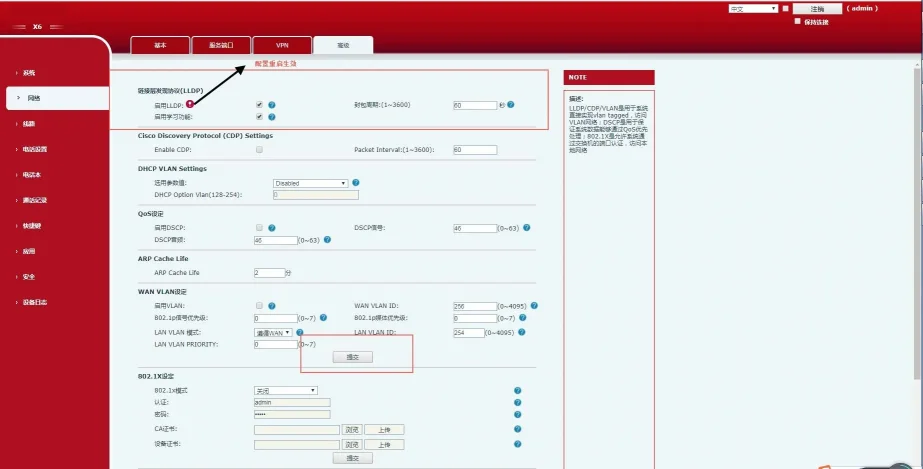
LLDPを有効にすると、電話機は定期的に自身の情報を通知し、スイッチの情報を監視します。アプリケーションタイプ=音声の場合、電話機はスイッチから音声VLAN IDを自動取得し、設定を更新後再起動してVLANを適用します。

LLDP設定手順(Webインターフェース):

  1. 管理者アカウントadmin/adminでWeb画面にログイン。

  2. ネットワーク → 詳細設定へ移動。

  3. LLDPを有効化。

  4. 送信間隔を設定(1–3600秒)。

  5. 適用をクリックし、電話機を再起動。

LLDP設定Webインターフェース

図1-5 LLDP設定インターフェース

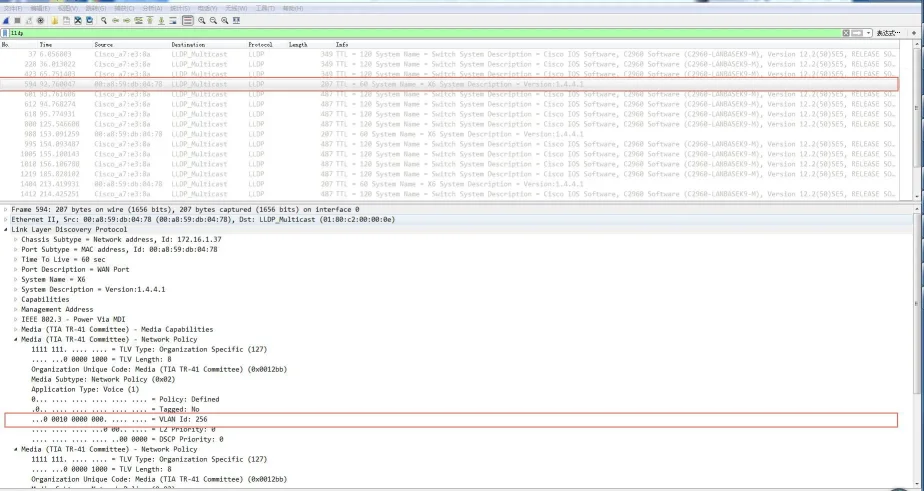
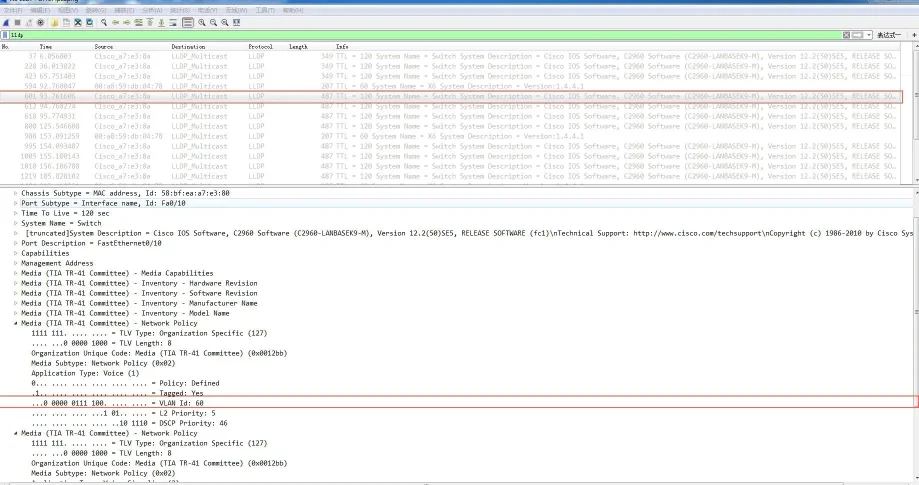
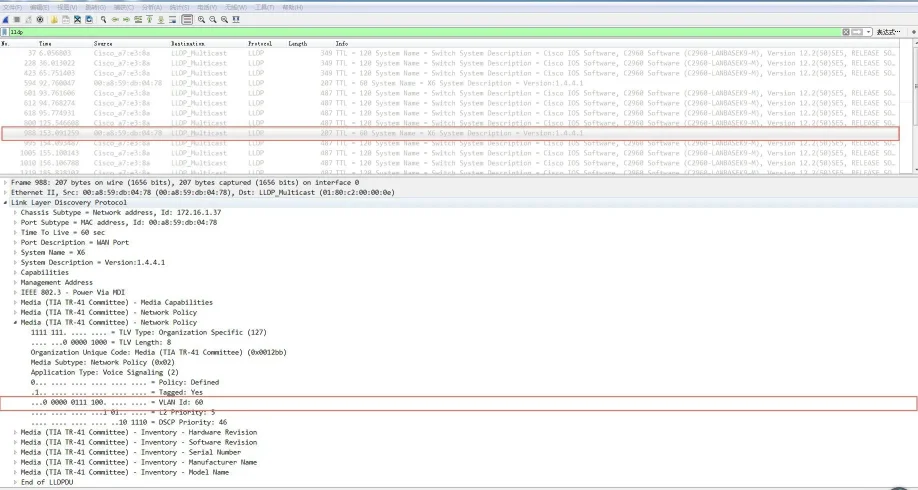
LLDP有効後、電話機は以下の動作を行います:

  • マルチキャストLLDPパケットを定期送信。

  • WAN/LANポートでLLDPパケットを受信。

  • MAC/PHY設定に対応。

  • ネットワークポリシーTLVからVLANを取得(手動設定を上書き)。

電話機送信LLDPパケット電話機受信LLDPパケットVLAN学習後送信LLDPパケット

2.3.2 CDP概要

CDP(シスコディスカバリープロトコル)は、シスコ独自のレイヤー2機器検出プロトコルです。

IP電話におけるCDP機能:
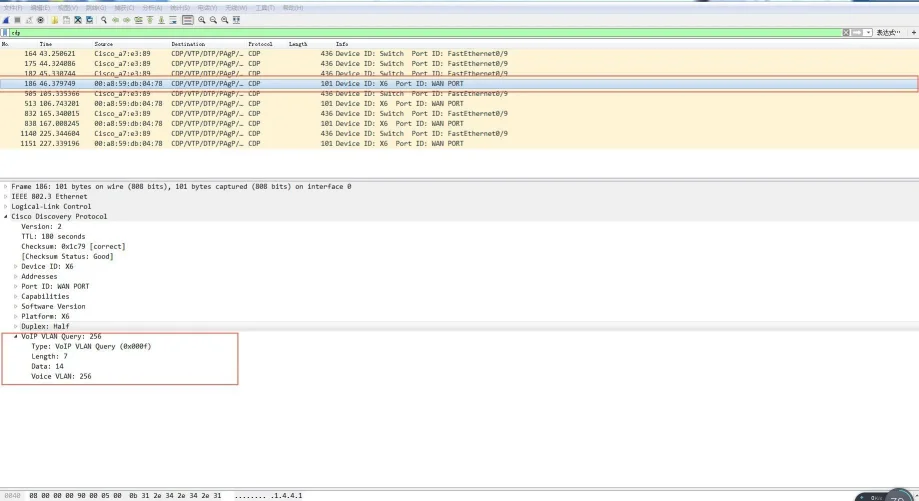
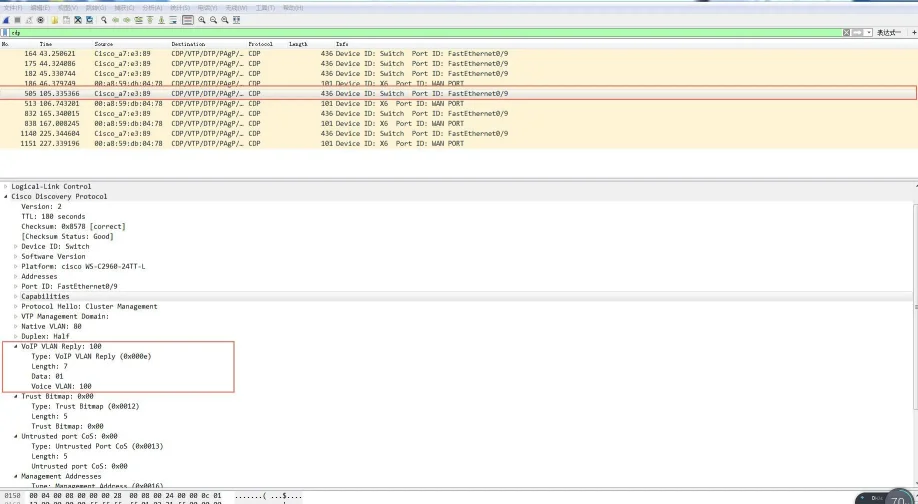
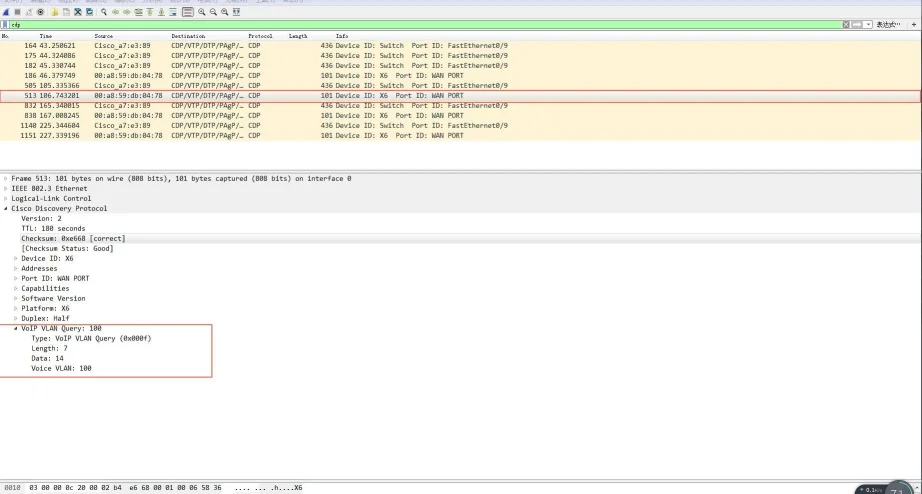
電話機は自身の情報を通知し、スイッチからのCDPパケットを監視します。音声VLAN IDを自動取得し、設定更新後再起動します。

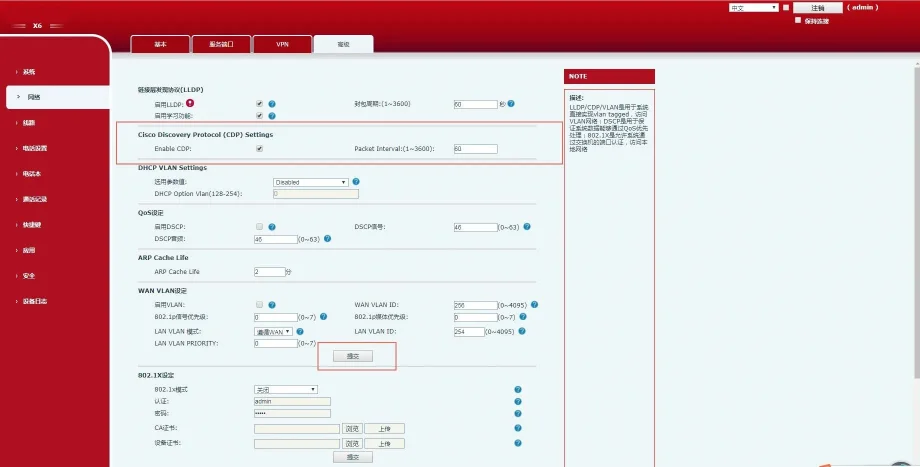
CDP設定手順(Webインターフェース):

  1. admin/adminでログイン。

  2. ネットワーク → 詳細設定へ移動。

  3. CDPを有効化。

  4. メッセージ送信間隔を設定(1–3600秒)。

  5. 適用をクリック。

CDP設定インターフェース

図1-6 CDP設定インターフェース

電話機送信CDPパケット電話機受信CDPパケットVLAN学習後送信CDPパケット

2.3.3 DHCP VLAN

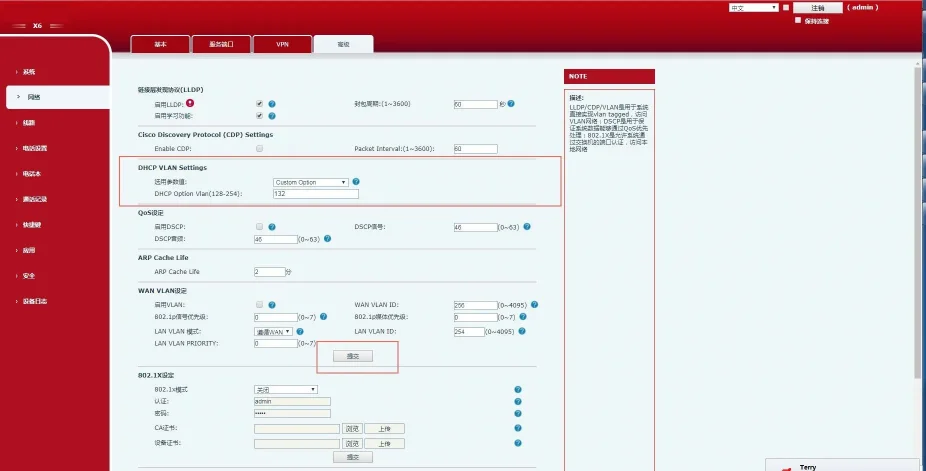
電話機はDHCPによるVLAN自動検出に対応します。既定ではオプション132を使用してVLAN IDを取得し、最大5つのカスタムDHCPオプションを設定可能です。

DHCP VLAN設定手順(Webインターフェース):

  1. admin/adminでログイン。

  2. ネットワーク → 詳細設定へ移動。

  3. DHCP VLANを有効化。

  4. DHCPオプション番号を入力(例:132)。

  5. 適用をクリック。

DHCP VLAN設定インターフェース

図1-7 DHCP VLAN設定インターフェース

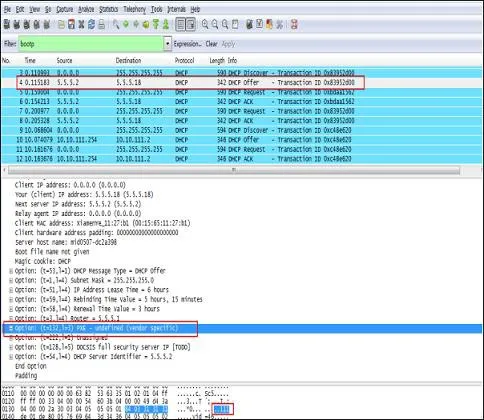
動作フロー:

  1. 電話機がDHCP Discoverをブロードキャスト送信。

  2. サーバーがオプション132(VLAN ID)を含めて応答。

  3. 電話機は現在のIPを解放し、取得したVLAN IDで全トラフィックにタグを付与し、再度DHCPを実行。
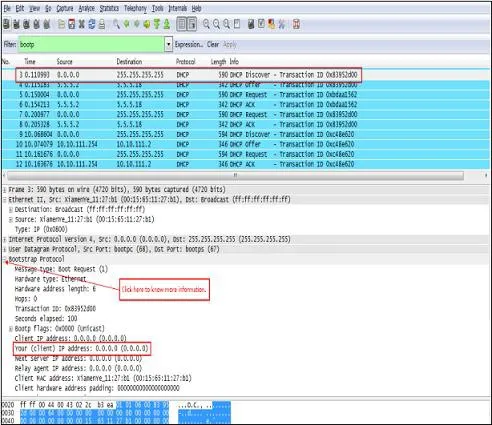
電話機送信DHCP Discover電話機受信DHCP Offer

2.3.4 VLAN手動設定

VLANは既定で無効になっています。WAN(インターネット)ポートとLAN(PC接続)ポートに個別にVLAN IDと802.1p優先度(0–7、7が最高優先度)を設定できます。

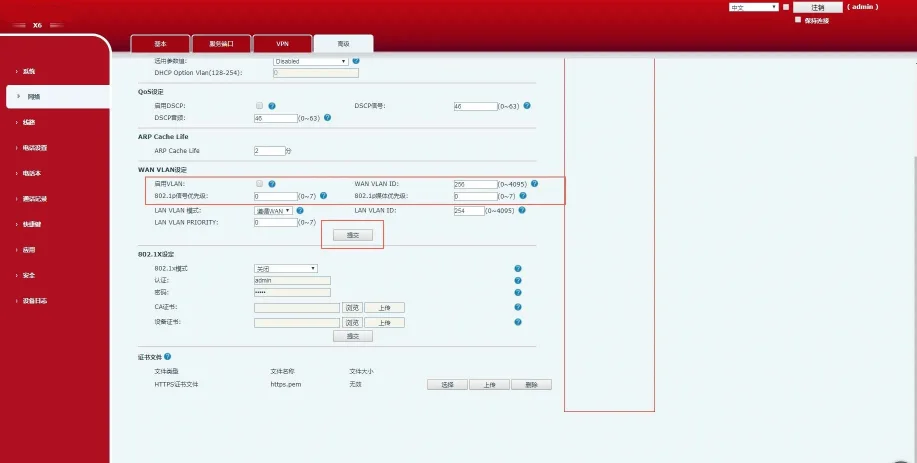
WAN VLAN設定(Webインターフェース):

  1. admin/adminでログイン。

  2. ネットワーク → 詳細設定へ移動。

  3. VLANを有効化。

  4. WAN VLAN IDを設定(1–4094)。

  5. 優先度を設定(0–7)。

  6. 適用をクリック。

WAN VLAN設定インターフェース

図1-8 WAN VLAN設定

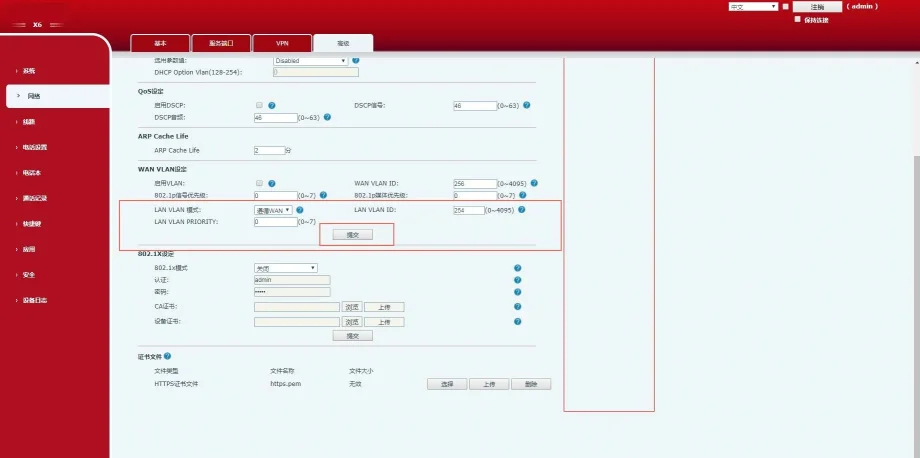
LAN VLAN設定(Webインターフェース):

  1. admin/adminでログイン。

  2. ネットワーク → 詳細設定へ移動。

  3. LAN VLANモードとIDを設定。

  4. 優先度を設定。

  5. 適用をクリック。

LAN VLAN設定インターフェース

図1-9 LAN VLAN設定

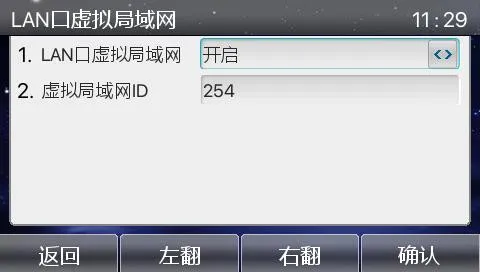
電話機LCD画面でのVLAN設定:

メニュー → 詳細設定(パスワード:123) → ネットワーク → QoS&Vlan → WAN VLAN / LAN VLAN
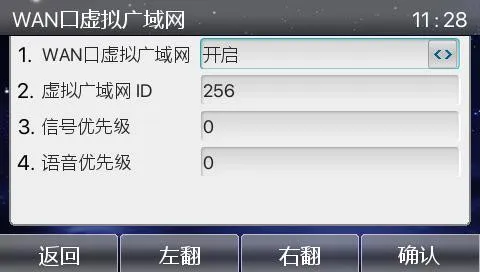
WAN VLAN LCD画面LAN VLAN LCD画面

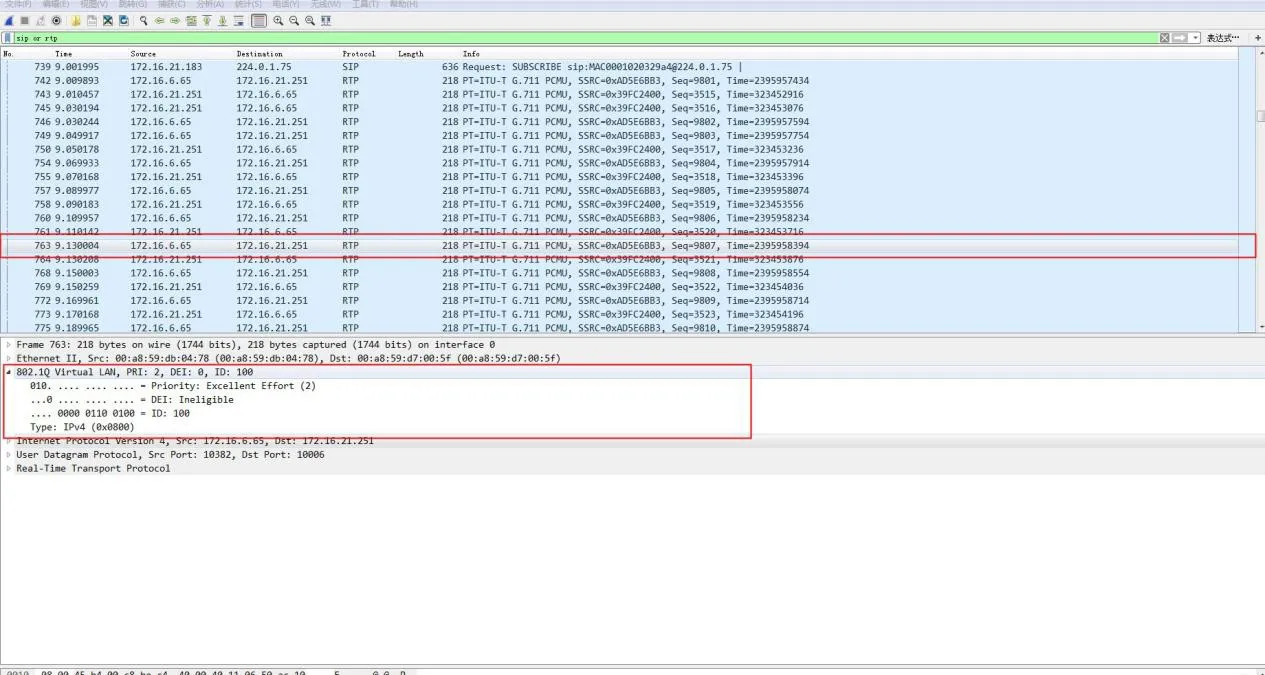
設定検証:
パケットキャプチャを行い、SIP・RTPフレーム内の802.1Qタグ、VLAN ID、802.1p優先度を確認してください。
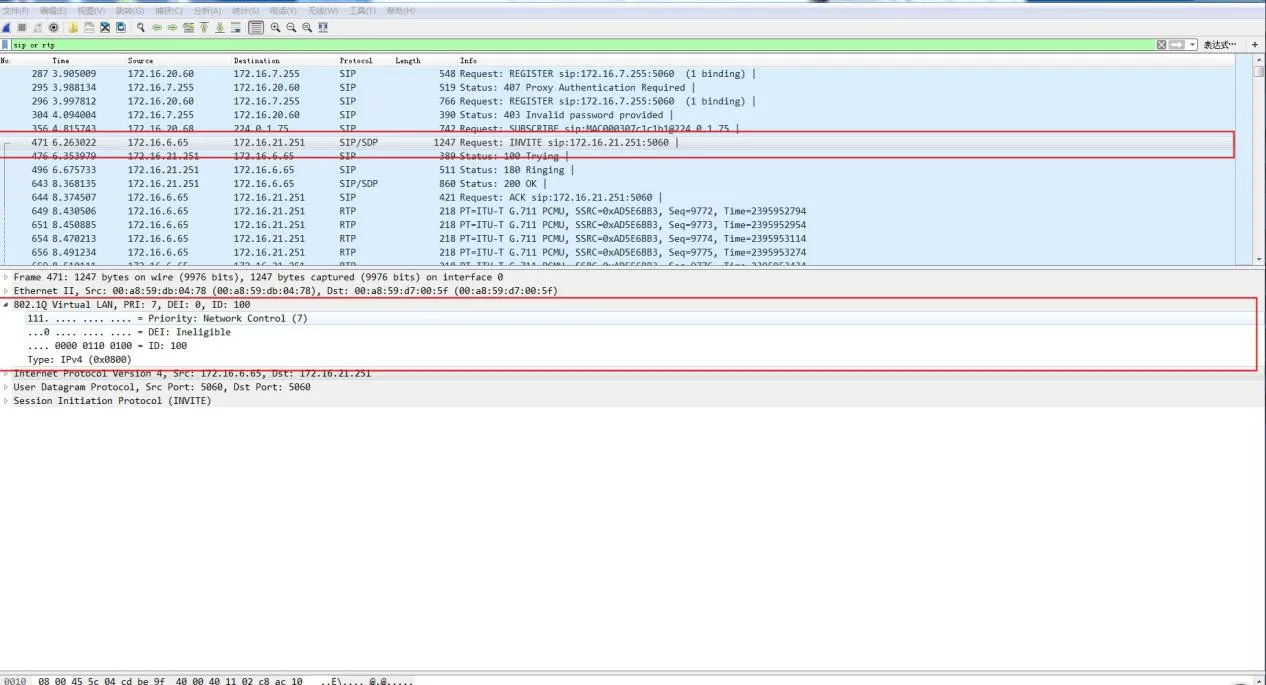
パケットキャプチャ画面パケットキャプチャ画面

スイッチVLAN設定

Trunk・Access・Hybrid・Tagged・Untaggedの解説

イーサネットスイッチのポートは3つのモードに対応します:

  • Access:1つのVLANに所属;端末(PC)接続用。

  • Trunk:複数VLANを伝送;スイッチ間接続用。

  • Hybrid:複数VLANを伝送;任意のUntagged出力を設定可能。

主要ルール:

  • Tagged(タグあり):フレーム送信時に802.1Q VLANタグを保持。

  • Untagged(タグなし):スイッチが送信前にVLANタグを削除。

  • PVID(ポートVLAN ID):タグなし着信フレームに割り当てる既定VLAN。

ポート種別受信時処理送信時処理
タグなしフレーム受信タグありフレーム受信
AccessPVIDタグを付与VLAN != PVID の場合は廃棄タグを削除して転送
Trunk許可されている場合PVIDタグを付与VLANが許可されている場合受信VLAN = PVID の場合のみタグを削除
Hybrid許可されている場合PVIDタグを付与VLANが許可されている場合受信ポート設定に基づきタグ付け/タグ削除

Cisco 2960スイッチ VLAN設定

イーサネットVLAN既定設定

パラメータ既定値範囲
VLAN ID11–4094
VLAN名VLANxxxx
MTU15001500–18190
ステータスアクティブアクティブ/停止

VLAN作成・編集

手順コマンド目的
1configure terminalグローバル設定モードに入る
2vlan VLANを作成または編集
3name VLAN名を設定
4end特権モードに戻る
5show vlan設定を確認
6copy running-config startup-config設定を保存

VLAN削除

手順コマンド目的
1configure terminalグローバル設定モードに入る
2no vlan VLANを削除
3end設定モードを終了
4show vlan brief削除結果を確認

ポートをVLANに割り当て(アクセスポート)

手順コマンド目的
1configure terminalグローバル設定
2interface 設定するポートを選択
3switchport mode accessアクセスポートに設定
4switchport access vlan VLANを割り当て
5end設定モードを終了

トランクポート設定

手順コマンド目的
1configure terminalグローバル設定
2interface 設定するポートを選択
3switchport mode trunkトランクポートに設定
4switchport trunk native vlan ネイティブVLANを設定
5end設定モードを終了

トランク許可VLAN設定

switchport trunk allowed vlan { add | all | except | remove }

ネイティブVLAN設定

switchport trunk native vlan

対応機器

Cisco 2960シリーズスイッチ

カタログ
顧客サービス 電話
We use cookie to improve your online experience. By continuing to browse this website, you agree to our use of cookie.

Cookies

This Cookie Policy explains how we use cookies and similar technologies when you access or use our website and related services. Please read this Policy together with our Terms and Conditions and Privacy Policy so that you understand how we collect, use, and protect information.

By continuing to access or use our Services, you acknowledge that cookies and similar technologies may be used as described in this Policy, subject to applicable law and your available choices.

Updates to This Cookie Policy

We may revise this Cookie Policy from time to time to reflect changes in legal requirements, technology, or our business practices. When we make updates, the revised version will be posted on this page and will become effective from the date of publication unless otherwise required by law.

Where required, we will provide additional notice or request your consent before applying material changes that affect your rights or choices.

What Are Cookies?

Cookies are small text files placed on your device when you visit a website or interact with certain online content. They help websites recognize your browser or device, remember your preferences, support essential functionality, and improve the overall user experience.

In this Cookie Policy, the term “cookies” also includes similar technologies such as pixels, tags, web beacons, and other tracking tools that perform comparable functions.

Why We Use Cookies

We use cookies to help our website function properly, remember user preferences, enhance website performance, understand how visitors interact with our pages, and support security, analytics, and marketing activities where permitted by law.

We use cookies to keep our website functional, secure, efficient, and more relevant to your browsing experience.

Categories of Cookies We Use

Strictly Necessary Cookies

These cookies are essential for the operation of the website and cannot be disabled in our systems where they are required to provide the service you request. They are typically set in response to actions such as setting privacy preferences, signing in, or submitting forms.

Without these cookies, certain parts of the website may not function correctly.

Functional Cookies

Functional cookies enable enhanced features and personalization, such as remembering your preferences, language settings, or previously selected options. These cookies may be set by us or by third-party providers whose services are integrated into our website.

If you disable these cookies, some services or features may not work as intended.

Performance and Analytics Cookies

These cookies help us understand how visitors use our website by collecting information such as traffic sources, page visits, navigation behavior, and general interaction patterns. In many cases, this information is aggregated and does not directly identify individual users.

We use this information to improve website performance, usability, and content relevance.

Targeting and Advertising Cookies

These cookies may be placed by our advertising or marketing partners to help deliver more relevant ads and measure the effectiveness of campaigns. They may use information about your browsing activity across different websites and services to build a profile of your interests.

These cookies generally do not store directly identifying personal information, but they may identify your browser or device.

First-Party and Third-Party Cookies

Some cookies are set directly by our website and are referred to as first-party cookies. Other cookies are set by third-party services, such as analytics providers, embedded content providers, or advertising partners, and are referred to as third-party cookies.

Third-party providers may use their own cookies in accordance with their own privacy and cookie policies.

Information Collected Through Cookies

Depending on the type of cookie used, the information collected may include browser type, device type, IP address, referring website, pages viewed, time spent on pages, clickstream behavior, and general usage patterns.

This information helps us maintain the website, improve performance, enhance security, and provide a better user experience.

Your Cookie Choices

You can control or disable cookies through your browser settings and, where available, through our cookie consent or preference management tools. Depending on your location, you may also have the right to accept or reject certain categories of cookies, especially those used for analytics, personalization, or advertising purposes.

Please note that blocking or deleting certain cookies may affect the availability, functionality, or performance of some parts of the website.

Restricting cookies may limit certain features and reduce the quality of your experience on the website.

Cookies in Mobile Applications

Where our mobile applications use cookie-like technologies, they are generally limited to those required for core functionality, security, and service delivery. Disabling these essential technologies may affect the normal operation of the application.

We do not use essential mobile application cookies to store unnecessary personal information.

How to Manage Cookies

Most web browsers allow you to manage cookies through browser settings. You can usually choose to block, delete, or receive alerts before cookies are stored. Because browser controls vary, please refer to your browser provider’s support documentation for details on how to manage cookie settings.

Contact Us

If you have any questions about this Cookie Policy or our use of cookies and similar technologies, please contact us at support@becke.cc .