
SIP登録失敗のトラブルシューティングガイド

はじめに

概要

SIPアカウント情報を設定して送信した後、電話機に登録失敗メッセージが表示されます。

対応モデル

対応製品:すべての電話モデル。
対応ファームウェア:対応モデルで利用可能なすべてのファームウェアバージョン。

対象ユーザー

このドキュメントは、SIPアカウントの登録障害をトラブルシューティングする必要があるユーザーを対象としています。

解決策

問題のタイプを選択

シナリオ1:アカウント設定の送信後、すぐに登録がタイムアウトする。
シナリオ2:電話機がしばらく正常に動作した後、登録がタイムアウトする。
シナリオ3:登録に失敗し、エラーコードが返される。
シナリオ4:しばらく正常に動作した後、電話機が突然オフラインになり、ネットワーク接続を失う。電話機を再起動すると、ネットワーク接続が復旧する。
シナリオ5:電話機は登録済みと表示されるが、PBXは内線がオフラインまたは未登録と報告する。

トラブルシューティングと解決策

アカウント設定の送信後、すぐに登録がタイムアウトする

1. 症状:
SIPアカウントパラメータを設定して送信すると、電話機に登録中...と表示されます。しばらくすると、ステータスが登録タイムアウトに変わります。

2. 考えられる原因:
電話機は登録リクエストを送信するが、サーバーから応答を受信しないため、登録がタイムアウトします。
① 電話機とサーバー間にネットワークの問題があるか、SIPパラメータが誤っている可能性があります(サーバーアドレスやポートが間違っているなど)。
② アカウントがシステムによって一時的にブラックリストに登録されている可能性があります。一部のIMS環境では、同じアカウントを使用した繰り返しの登録試行が疑わしい動作と見なされ、アカウントが一定期間(例:10分間)ブロックされる場合があります。
③ 電話機がプライベートLANにあり、パブリックサーバーに登録する場合、サーバーの応答が内部電話機に正しく到達しない可能性があります。

3. 解決策:
① 電話機とサーバー間のネットワークパスが適切に機能し、両側に到達可能であることを確認します(例:Pingを使用)。また、すべてのSIPアカウントパラメータ(特にサーバーアドレスとポート)が正しいことを確認します。
② 登録を再送信する前にしばらく待つか、サーバー上に新しいアカウントを作成します。異なる電話機で同じアカウントを繰り返し使用しないでください。
③ 内部電話機がパブリックSIPサーバーに登録する場合、電話機でrport特殊サーバー互換性を有効にしてから、再度登録します。

電話機がしばらく正常に動作した後、登録がタイムアウトする

1. 症状:
電話機は正常に登録され正常に動作しますが、しばらくすると(通常約1日後)、ステータスが登録タイムアウトに変わります。電話機は発着信できなくなります。電話機を再起動するか、ローカルSIPポートを変更すると、再び正常に登録できます。

2. 考えられる原因:
この状況は、特定のルーターを使用する環境でよく見られます。ルーターが再起動されるか、新しいパブリックIPアドレスを受け取ると、電話機からのパケットはルーターの古いパブリックIPを使用して変換される場合があります。その結果、サーバーの応答が電話機に返されず、登録がタイムアウトします。
電話機を再起動するか、ローカル登録ポートを変更すると、ルーターは送信元アドレスを正しく書き換え、登録は再び成功します。

3. 解決策:
新しいファームウェアバージョンは、動的なローカルSIPポートメカニズムをサポートしています。登録に失敗またはタイムアウトした場合、電話機は異なるローカルポートを使用して自動的に再試行できます。公式ウェブサイトから最新のファームウェアをダウンロードするか、テクニカルサポートに連絡してバージョンの互換性を確認してください。

登録に失敗し、エラーコードが返される

1. 症状:
SIPアカウント情報を設定して送信した後、電話機に登録失敗メッセージが表示されます。
① エラーコード403
② エラーコード404
③ エラーコード423
④ エラーコード5xx

2. 考えられる原因:
① これは通常、ユーザー名またはパスワードが間違っているか、アカウントがサーバーで無効になっていることを意味します。
② これはアカウントが存在しないことを意味します。
③ これは登録間隔が短すぎることを意味します。
④ これはサーバー側の障害を示しています。

3. 解決策:
① ユーザー名とパスワードを再確認し、システム管理者と一緒にアカウントの状態を確認します。
② 管理者に連絡して、アカウントが存在するかどうかを確認します。
③ 電話機の登録有効期限間隔を長くします。
④ 管理者に連絡して、SIPサーバーの状態を確認します。

しばらく正常に動作した後、電話機が突然オフラインになり、ネットワーク接続を失う

1. 症状:
電話機がしばらく動作した後、突然登録を失い、ネットワーク接続を失います。電話機を再起動すると、ネットワーク接続が復元されます。

2. 考えられる原因:
一部のCiscoスイッチおよび特定のレイヤー2スイッチは、電話システムが使用するタイマーとは異なるARPエージングタイマーを使用します。スイッチのARPエントリが予想より早く期限切れになると、電話機のネットワーク接続が中断される可能性があります。

3. 解決策:
電話機を最新のファームウェアバージョンにアップグレードします。新しいファームウェアは、ARPエージングタイマーの手動設定をサポートしています。電話機のWebインターフェースで、ネットワーク - 詳細設定 - ARPエージング時間に移動し、必要に応じて値を1からN分に設定します。

電話機は登録済みと表示されるが、PBXはオフラインまたは未登録と表示する

1. 症状:
電話機のディスプレイには内線が登録済みと表示されますが、PBXはそれをオフラインまたは未登録と報告します。

2. 考えられる原因:
一部のネットワーク環境では、IPルーティングまたはNATはアクティブなままですが、PBXまたは電話機でNATキープアライブが有効になっていません。SIP登録が完了した後、継続的なUDPキープアライブトラフィックがないため、NATデバイスはデフォルトのUDPタイムアウト(多くの場合60秒)後にマッピングを削除します。

3. 解決策:
電話機のWEBインターフェース - 回線 - 詳細設定にログインし、SIPサーバーの要件に従ってキープアライブタイプと間隔を調整します。SIP OPTIONまたはUDPを試すこともできます。キープアライブ間隔は60秒未満に設定する必要があります。

以下の例では、X4U電話機を設定の参照として使用しています。

rport特殊サーバー互換性を有効にする方法

電話機のWeb管理ページに移動し、回線 - 詳細設定をクリックし、Rportを有効にする特殊サーバー互換性を設定するをチェックし、ページ下部の送信をクリックします。以下に示します。
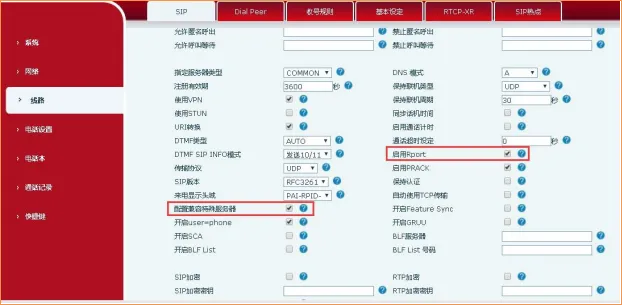
電話機でrportと特殊サーバー互換性を有効にする方法

ローカルポート更新を有効にする方法

電話機のWeb管理ページに移動し、回線 - 詳細設定をクリックし、ポート更新を有効にするをチェックし、ページ下部の送信をクリックします。以下に示します。
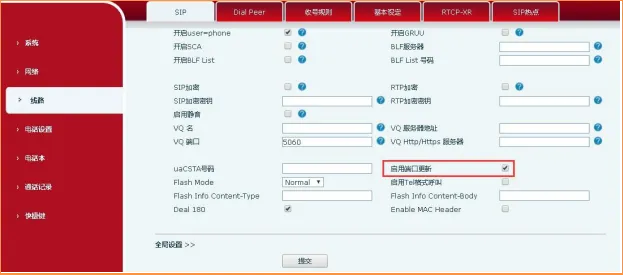
電話機でローカルポート更新を有効にする方法

登録有効期限を変更する方法

電話機のWeb管理ページに移動し、回線 - 詳細設定 - 登録有効期限をクリックし、登録間隔を変更し、ページ下部の送信をクリックします。以下に示します。
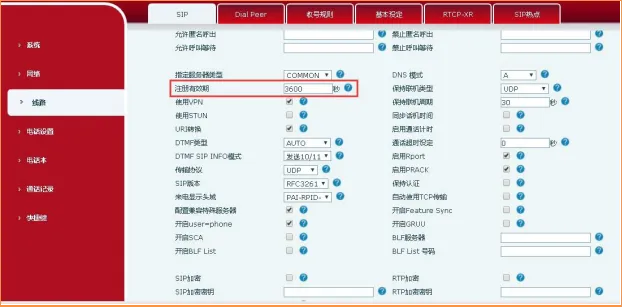
電話機で登録有効期限を変更する方法

ARPエージング時間を変更する方法

電話機のWeb管理ページに移動し、ネットワーク - 詳細設定 - ARPエージング時間をクリックし、必要に応じて値を1からNに設定します(できればスイッチのエージングタイマーに合わせる)、ページ下部の送信をクリックします。以下に示します。
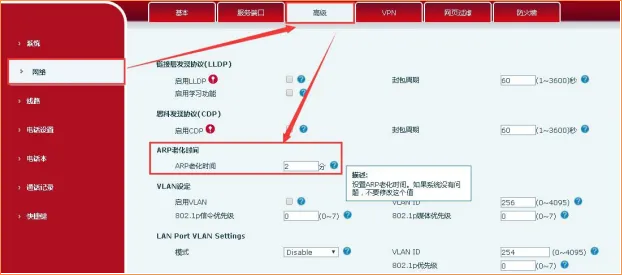
電話機でARPエージング時間を変更する方法

キープアライブタイプを変更する方法

電話機のWeb管理ページに移動し、回線 - 詳細設定 - キープアライブタイプをクリックします。SIPサーバーがサポートするモードを選択するか、SIP OPTIONまたはUDPを試し、ページ下部の送信をクリックします。以下に示します。
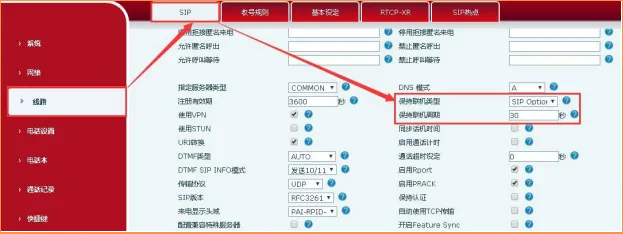

電話機でキープアライブタイプを変更する方法

カタログ
顧客サービス 電話
We use cookie to improve your online experience. By continuing to browse this website, you agree to our use of cookie.

Cookies

This Cookie Policy explains how we use cookies and similar technologies when you access or use our website and related services. Please read this Policy together with our Terms and Conditions and Privacy Policy so that you understand how we collect, use, and protect information.

By continuing to access or use our Services, you acknowledge that cookies and similar technologies may be used as described in this Policy, subject to applicable law and your available choices.

Updates to This Cookie Policy

We may revise this Cookie Policy from time to time to reflect changes in legal requirements, technology, or our business practices. When we make updates, the revised version will be posted on this page and will become effective from the date of publication unless otherwise required by law.

Where required, we will provide additional notice or request your consent before applying material changes that affect your rights or choices.

What Are Cookies?

Cookies are small text files placed on your device when you visit a website or interact with certain online content. They help websites recognize your browser or device, remember your preferences, support essential functionality, and improve the overall user experience.

In this Cookie Policy, the term “cookies” also includes similar technologies such as pixels, tags, web beacons, and other tracking tools that perform comparable functions.

Why We Use Cookies

We use cookies to help our website function properly, remember user preferences, enhance website performance, understand how visitors interact with our pages, and support security, analytics, and marketing activities where permitted by law.

We use cookies to keep our website functional, secure, efficient, and more relevant to your browsing experience.

Categories of Cookies We Use

Strictly Necessary Cookies

These cookies are essential for the operation of the website and cannot be disabled in our systems where they are required to provide the service you request. They are typically set in response to actions such as setting privacy preferences, signing in, or submitting forms.

Without these cookies, certain parts of the website may not function correctly.

Functional Cookies

Functional cookies enable enhanced features and personalization, such as remembering your preferences, language settings, or previously selected options. These cookies may be set by us or by third-party providers whose services are integrated into our website.

If you disable these cookies, some services or features may not work as intended.

Performance and Analytics Cookies

These cookies help us understand how visitors use our website by collecting information such as traffic sources, page visits, navigation behavior, and general interaction patterns. In many cases, this information is aggregated and does not directly identify individual users.

We use this information to improve website performance, usability, and content relevance.

Targeting and Advertising Cookies

These cookies may be placed by our advertising or marketing partners to help deliver more relevant ads and measure the effectiveness of campaigns. They may use information about your browsing activity across different websites and services to build a profile of your interests.

These cookies generally do not store directly identifying personal information, but they may identify your browser or device.

First-Party and Third-Party Cookies

Some cookies are set directly by our website and are referred to as first-party cookies. Other cookies are set by third-party services, such as analytics providers, embedded content providers, or advertising partners, and are referred to as third-party cookies.

Third-party providers may use their own cookies in accordance with their own privacy and cookie policies.

Information Collected Through Cookies

Depending on the type of cookie used, the information collected may include browser type, device type, IP address, referring website, pages viewed, time spent on pages, clickstream behavior, and general usage patterns.

This information helps us maintain the website, improve performance, enhance security, and provide a better user experience.

Your Cookie Choices

You can control or disable cookies through your browser settings and, where available, through our cookie consent or preference management tools. Depending on your location, you may also have the right to accept or reject certain categories of cookies, especially those used for analytics, personalization, or advertising purposes.

Please note that blocking or deleting certain cookies may affect the availability, functionality, or performance of some parts of the website.

Restricting cookies may limit certain features and reduce the quality of your experience on the website.

Cookies in Mobile Applications

Where our mobile applications use cookie-like technologies, they are generally limited to those required for core functionality, security, and service delivery. Disabling these essential technologies may affect the normal operation of the application.

We do not use essential mobile application cookies to store unnecessary personal information.

How to Manage Cookies

Most web browsers allow you to manage cookies through browser settings. You can usually choose to block, delete, or receive alerts before cookies are stored. Because browser controls vary, please refer to your browser provider’s support documentation for details on how to manage cookie settings.

Contact Us

If you have any questions about this Cookie Policy or our use of cookies and similar technologies, please contact us at support@becke.cc .