SIP電話の録音設定とユーザーガイド

はじめに

概要

電話機はアクティブな通話中の録音をサポートしています。2つの録音方法が利用可能です:

  1. RTPストリームをフォーマットされたファイルとしてローカルストレージ(USB)に保存する。

  2. RTPストリームを録音サーバーに送信して保存および管理する。

対応モデル

このドキュメントは、BX3S、BX4、BX5S、BX6、BX7、BX7C、GP210、GP210i、およびBXUシリーズのIP電話に適用されます。

対象読者

このドキュメントは、電話機の通話録音機能の実装と改善を理解する必要がある社内の研究開発およびテストエンジニアを対象としています。

録音フレームワークの紹介

通話録音アーキテクチャ

ローカルの受信専用ストリームが作成され、通話ストリームとミキシングされます。電話機はローカルポートにバインドしてミックスされたRTPデータを受信し、それをローカルファイルに書き込むか、リモートサーバーに送信します。
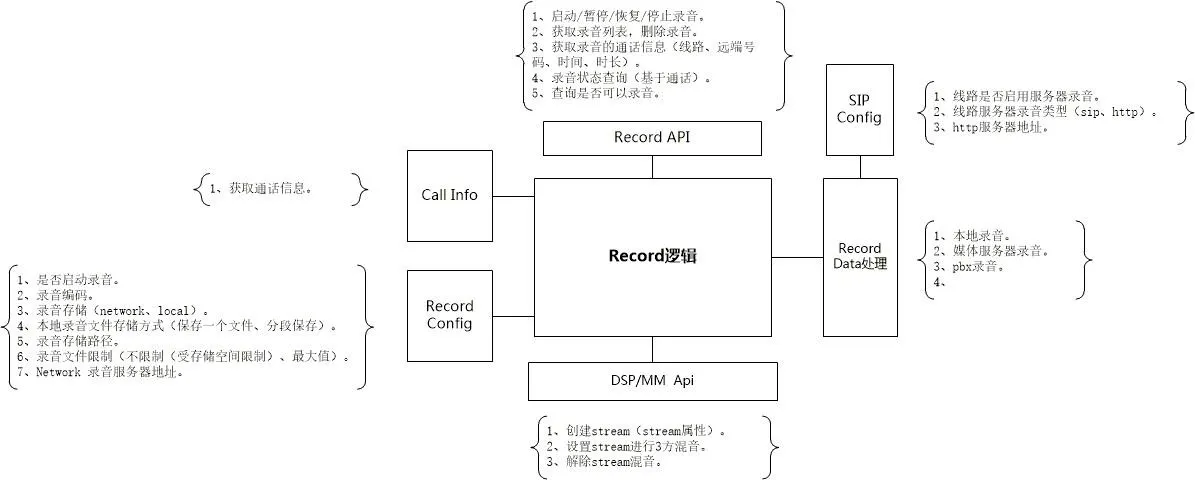
通話録音アーキテクチャ図

通話録音機能モジュール

ローカル録音

ローカル録音にはUSBフラッシュドライブが必要です。電話機はUSBストレージ容量をチェックし、Record_[SystemTime]という名前のファイルを作成し、RTPデータを保存します。

ファイルサイズの制限に達し、まだ空き容量がある場合は、新しいファイルが自動的に作成されます。録音中の一時停止/再開がサポートされています。

ローカル録音ファイル形式(.wav)

char codec[64]int32_t rtpLenint32_t incrementuint32_t dataSizertp datartp data...
  • codec: 録音オーディオコーデック

  • rtpLen: RTPデータの長さ

  • increment: タイムスタンプ増分

  • dataSize: RTPデータの総長さ

サーバー録音

サーバー録音では、serverAddrserverPortを設定する必要があります。通信には制御コマンド(TCP)とRTPメディア(UDP)が含まれます。

制御コマンド(TCP)

電話機が録音セッションを開始します。サーバーはRTPストリーミング用の専用UDPポートを割り当てます。

録音開始コマンド形式
リクエスト: cmd=RecordStartRequest&id=xxx&device=xxx&remote_number=xxx&remote_name=xxx&local_number=xxx&local_name=xxx&dir=in|out&codec=xxx
レスポンス: cmd=RecordStartResponse&id=xxx&result=success|failed&reason=xxx&server=xxx&port=xxx

  1. id: 一意のセッションID(ランダム、録音中は固定)

  2. device: 電話機のMACアドレス

  3. dir: 通話方向(着信/発信)

  4. codec: RTPコーデック(PCMA|PCMU)

  5. server/port: RTPストリーミング用のUDPアドレス

注記: サーバーが"failed"と応答した場合、電話機は録音失敗のプロンプトを表示します。

録音停止コマンド形式
リクエスト: cmd=RecordStopRequest&id=xxx&remote_number=xxx&remote_name=xxx&local_number=xxx&local_name=xxx&reason=xxx
レスポンス: cmd=RecordStopResponse&id=xxx&result=success

ソケットエラーが発生した場合、両方の側がセッションを終了し、状態をクリアします。

RTPデータ(UDP)

電話機は、停止コマンドを受信するか接続が切断されるまで、UDP経由でRTPパケットをサーバーに送信します。

サービス停止と再生

電話機はファイルヘッダー(コーデック、タイムスタンプ、長さ)を解析して再生時間を計算し、再生を制御します。

通話録音操作ガイド

ローカル録音(USB)

ローカル録音にはUSBドライブが必要です。BX5S/BX6でサポートされています。BX3S/BX4ではサポートされていません

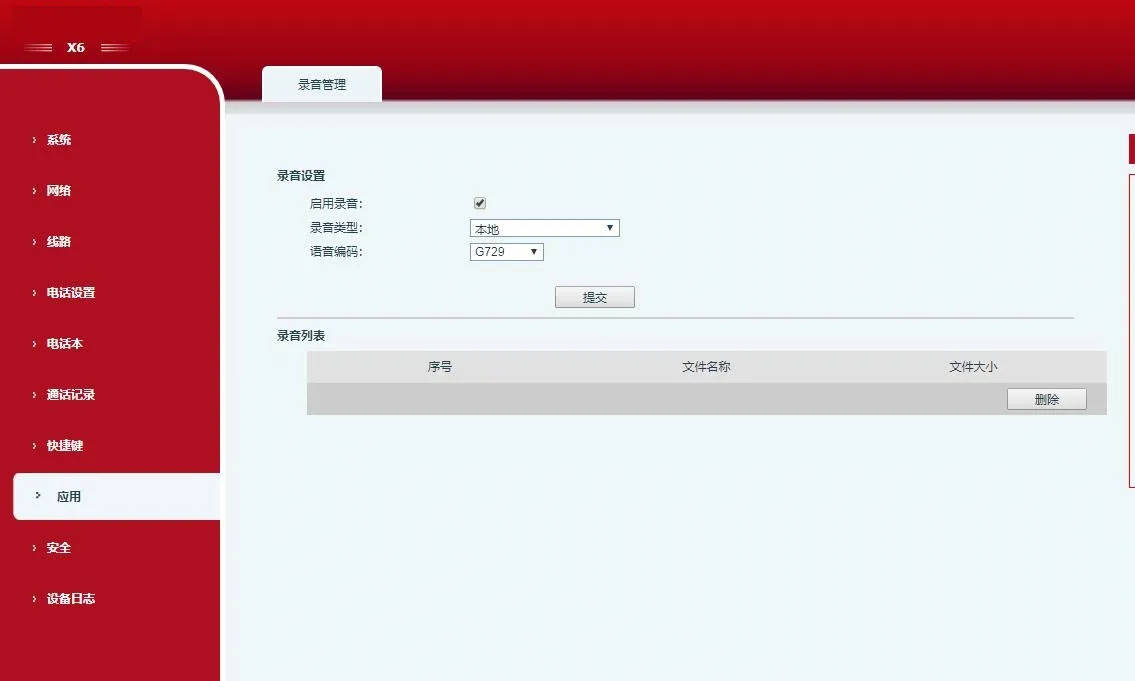
  1. アプリ > 録音管理から録音を有効にし、モードをローカルに設定します。

ローカル録音モードを有効にする

  1. DSSキー/ファンクションキーを録音として設定します。

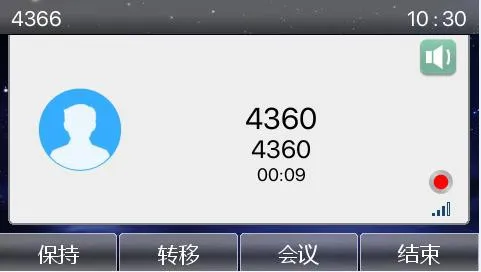
  2. USBドライブを挿入し、通話を行い、録音キーを押して開始します。

録音中インターフェース

  1. もう一度押すと録音が停止します。

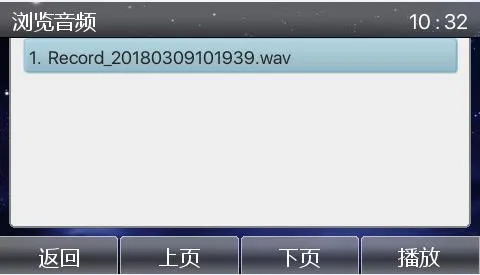
  2. アプリ > USBから録音を表示/再生します。

録音ファイルを表示

サーバー録音

ローカル録音サーバー

RecordServerソフトウェアをインストールします(PCMA/PCMU/G722をサポート)。

サーバーパス: \\172.16.1.8\firmware\Applications\RecordServer
RecordServer.exeを実行してサービスを開始します。

  1. 電話機のWebインターフェースで、録音を有効にし、タイプをネットワークに設定し、サーバーのIP/ポートを入力し、コーデックを選択します。
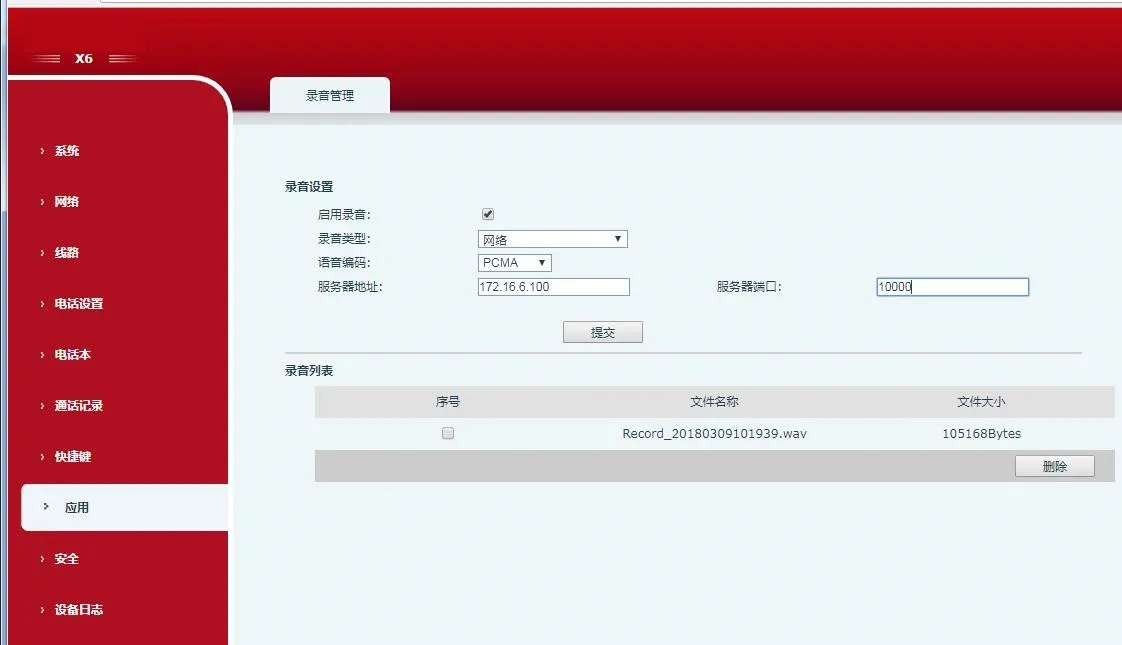
Web UIでネットワーク録音を有効にする

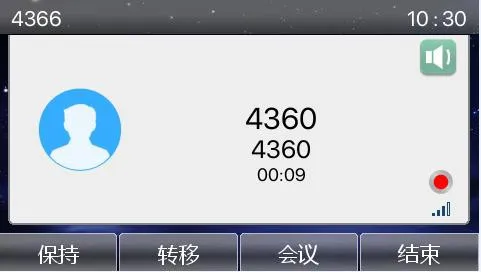
  1. 通話を行い、録音DSSキーを押します。

録音中

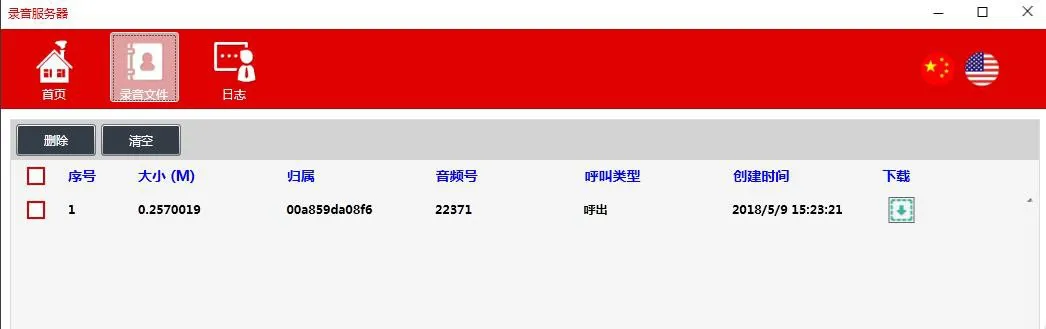
  1. 録音を停止し、サーバーからファイルをダウンロードします。

録音ファイルをダウンロード

SIP INFO録音

電話機をSIP INFO互換サーバー(例:3CX)に登録します。

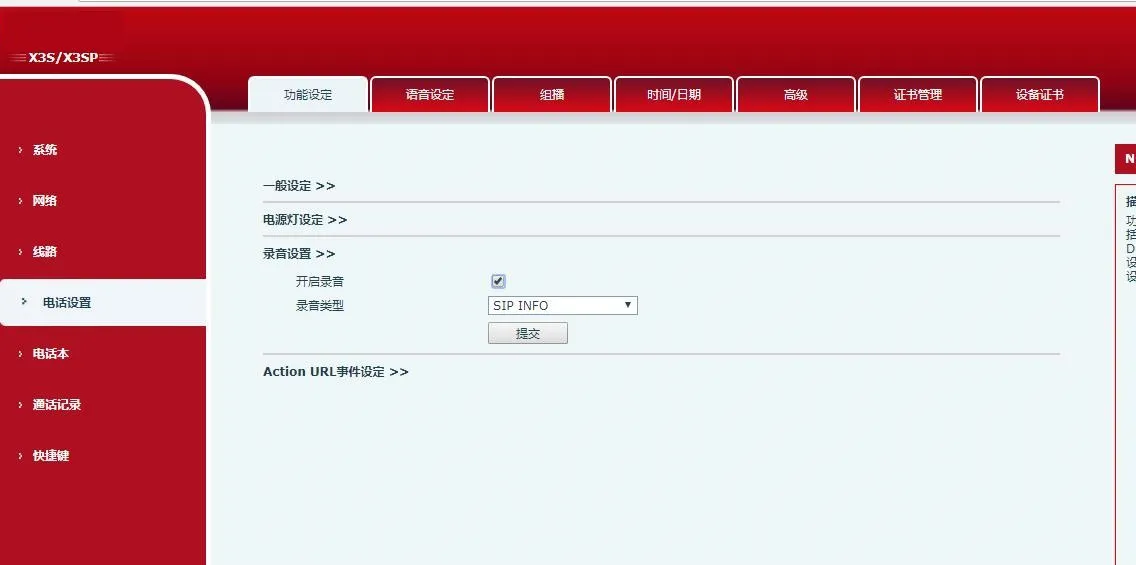
  1. Web UIで録音を有効にし、タイプをSIP INFOに設定します。

SIP INFO録音を有効にするインターフェース

  1. 録音DSSキーを設定し、通話中に録音を開始/停止します。

  2. SIPサーバー(3CX)の管理ポータルで録音を表示します。

カタログ
顧客サービス 電話
We use cookie to improve your online experience. By continuing to browse this website, you agree to our use of cookie.

Cookies

This Cookie Policy explains how we use cookies and similar technologies when you access or use our website and related services. Please read this Policy together with our Terms and Conditions and Privacy Policy so that you understand how we collect, use, and protect information.

By continuing to access or use our Services, you acknowledge that cookies and similar technologies may be used as described in this Policy, subject to applicable law and your available choices.

Updates to This Cookie Policy

We may revise this Cookie Policy from time to time to reflect changes in legal requirements, technology, or our business practices. When we make updates, the revised version will be posted on this page and will become effective from the date of publication unless otherwise required by law.

Where required, we will provide additional notice or request your consent before applying material changes that affect your rights or choices.

What Are Cookies?

Cookies are small text files placed on your device when you visit a website or interact with certain online content. They help websites recognize your browser or device, remember your preferences, support essential functionality, and improve the overall user experience.

In this Cookie Policy, the term “cookies” also includes similar technologies such as pixels, tags, web beacons, and other tracking tools that perform comparable functions.

Why We Use Cookies

We use cookies to help our website function properly, remember user preferences, enhance website performance, understand how visitors interact with our pages, and support security, analytics, and marketing activities where permitted by law.

We use cookies to keep our website functional, secure, efficient, and more relevant to your browsing experience.

Categories of Cookies We Use

Strictly Necessary Cookies

These cookies are essential for the operation of the website and cannot be disabled in our systems where they are required to provide the service you request. They are typically set in response to actions such as setting privacy preferences, signing in, or submitting forms.

Without these cookies, certain parts of the website may not function correctly.

Functional Cookies

Functional cookies enable enhanced features and personalization, such as remembering your preferences, language settings, or previously selected options. These cookies may be set by us or by third-party providers whose services are integrated into our website.

If you disable these cookies, some services or features may not work as intended.

Performance and Analytics Cookies

These cookies help us understand how visitors use our website by collecting information such as traffic sources, page visits, navigation behavior, and general interaction patterns. In many cases, this information is aggregated and does not directly identify individual users.

We use this information to improve website performance, usability, and content relevance.

Targeting and Advertising Cookies

These cookies may be placed by our advertising or marketing partners to help deliver more relevant ads and measure the effectiveness of campaigns. They may use information about your browsing activity across different websites and services to build a profile of your interests.

These cookies generally do not store directly identifying personal information, but they may identify your browser or device.

First-Party and Third-Party Cookies

Some cookies are set directly by our website and are referred to as first-party cookies. Other cookies are set by third-party services, such as analytics providers, embedded content providers, or advertising partners, and are referred to as third-party cookies.

Third-party providers may use their own cookies in accordance with their own privacy and cookie policies.

Information Collected Through Cookies

Depending on the type of cookie used, the information collected may include browser type, device type, IP address, referring website, pages viewed, time spent on pages, clickstream behavior, and general usage patterns.

This information helps us maintain the website, improve performance, enhance security, and provide a better user experience.

Your Cookie Choices

You can control or disable cookies through your browser settings and, where available, through our cookie consent or preference management tools. Depending on your location, you may also have the right to accept or reject certain categories of cookies, especially those used for analytics, personalization, or advertising purposes.

Please note that blocking or deleting certain cookies may affect the availability, functionality, or performance of some parts of the website.

Restricting cookies may limit certain features and reduce the quality of your experience on the website.

Cookies in Mobile Applications

Where our mobile applications use cookie-like technologies, they are generally limited to those required for core functionality, security, and service delivery. Disabling these essential technologies may affect the normal operation of the application.

We do not use essential mobile application cookies to store unnecessary personal information.

How to Manage Cookies

Most web browsers allow you to manage cookies through browser settings. You can usually choose to block, delete, or receive alerts before cookies are stored. Because browser controls vary, please refer to your browser provider’s support documentation for details on how to manage cookie settings.

Contact Us

If you have any questions about this Cookie Policy or our use of cookies and similar technologies, please contact us at support@becke.cc .