セキュリティ設定ガイド

はじめに

概要

このガイドでは、当社のアクセス制御およびインターホン製品のセキュリティ機能を設定する方法を説明します。

対応モデル

アクセス制御、インターホン、その他の業界固有の端末。

前提条件

① アクセス制御デバイス1台(このガイドではBi64を例として使用)、PoEスイッチまたはDC電源で給電。
② 同じスイッチに接続された設定用PC1台、室内ユニットへのネットワーク接続が確認されていること。

手順

インターフェースの説明

デバイスの背面カバーを取り外し、電源入力、電気錠制御、および関連接続に使用される端子台にアクセスします。以下に示します。
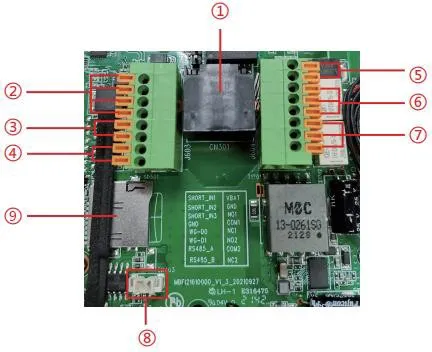
 デバイスインターフェース接続
番号 説明
イーサネットポート:標準RJ45、10/100 Mbpsアダプティブ、Cat5またはCat5eケーブル推奨。
スイッチ、赤外線センサー、ドアセンサー、振動センサーなどの入力デバイス用のドライコンタクト入力検出ポート×3。
Wiegandインターフェース。Wiegand Inは外部カードリーダー用、Wiegand Outはアクセス制御コントローラーおよび関連デバイスに接続可能。
RS485インターフェース。
電源入力:12V/1A、上部端子がプラス、下部端子がマイナス。
⑥、⑦ 電気錠、警報デバイス、その他の制御機器用のドライコンタクト出力制御ポート×2。
補聴補助機器用のLine Outインターフェース。
TFカードスロット、最大128GB対応、スナップショットや音声ファイルの保存に使用。

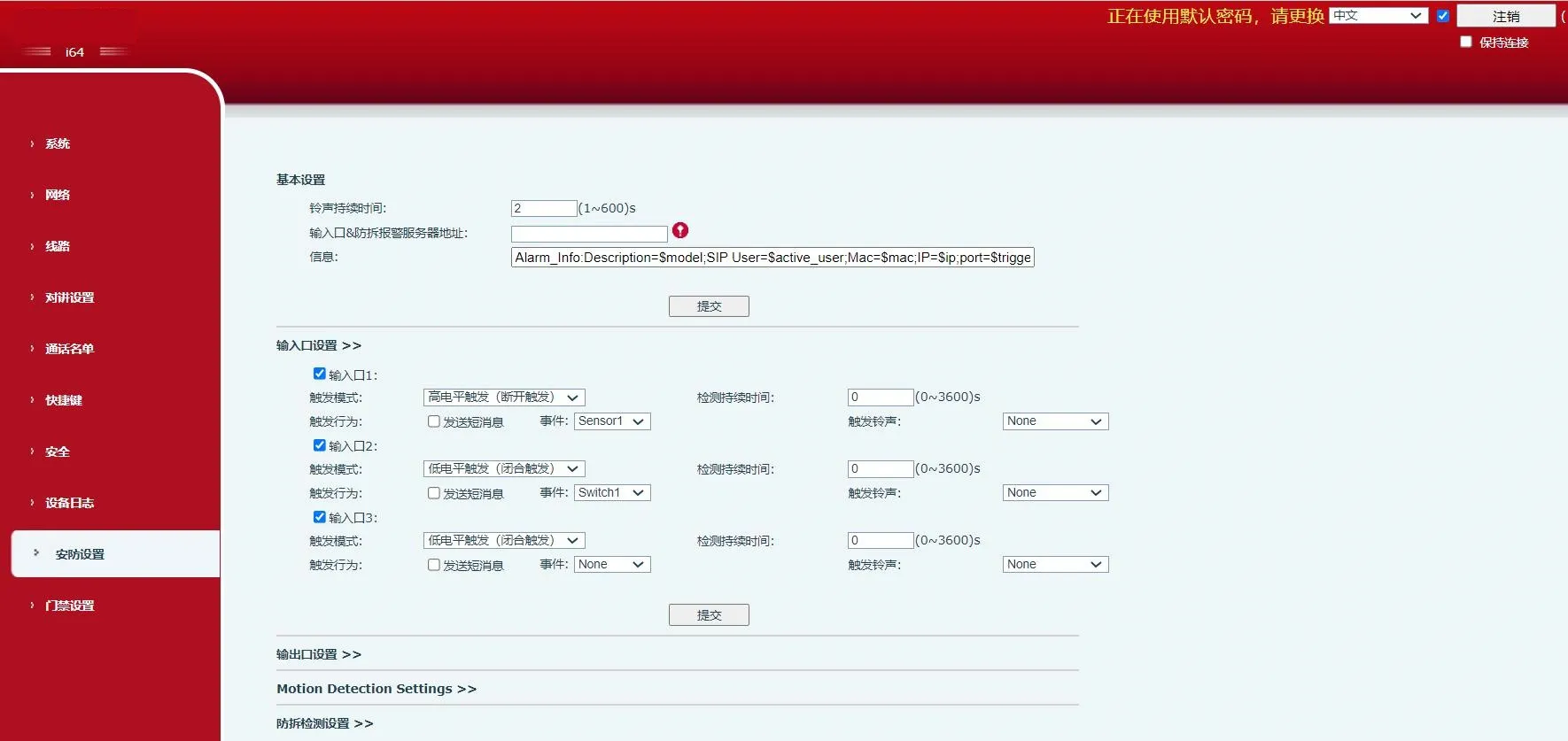
Webセキュリティ設定インターフェース

デバイスセキュリティ設定インターフェース

ドライコンタクト入出力設定

1. ドライコンタクト入力ポート:

入力ポートは、ドア接点、赤外線検知器、振動センサー、緊急ボタンなどに接続し、事前設定されたアクションをトリガーできます。

1) メッセージによるサーバーへのイベント報告。
ユーザーは任意の互換電話からSMS形式のメッセージをデバイスに送信できます。
メッセージ形式:ALERT=[メッセージ]
例:デフォルト設定では、ALERT=OUT1_SOSを送信できます。

2) ドライコンタクト入力アクション。
入力ポートに接続された外部デバイスは、以下のいずれかのモードでイベントをトリガーできます:
ハイレベルトリガー(オープンサーキットトリガー)
ローレベルトリガー(クローズドサーキットトリガー)

2. ドライコンタクト出力ポート:

出力ポートは、電気錠、警告灯、カメラ警報入力などに接続し、事前設定されたアクションをトリガーできます。

1) サーバーから出力制御メッセージを受信し、出力ポートをトリガー。
WebページでリモートSMSトリガーを有効にします。デバイスがALERT=[メッセージ]形式のメッセージを受信すると、出力アクションがトリガーされます。

2) 出力ポートを入力ポートにリンク。
Webページで入力トリガーを有効にすると、選択したロジック入力が対応する出力をアクティブにできます。

3) リモートDTMFコマンドを受信し、検証後に出力をトリガー。
WebページでリモートDTMFトリガーを有効にします。表示されている例では、デフォルトのトリガーコードは1234です。デバイスと電話の通話中に1234を入力すると、出力ポートの状態が変化します。DTMFコードの後に#を押すと、出力が即座にトリガーされます。

4) 出力を通話ステータスイベントにリンク。
通話ステータスを選択すると、そのステータスが開始されたときにデバイスがアラームを開始し、ステータスが終了すると自動的にアラームを停止します。

セキュリティパラメータ

セキュリティ設定
パラメータ説明
基本設定
リング継続時間 アラーム着信音の継続時間。
サーバーアドレス リモート応答サーバーアドレスを設定します(リモート応答サーバーおよびアラームトリガーサーバーを含む)。入力ポートがトリガーされると、デバイスは以下のような形式でサーバーにメッセージを送信します:
Alarm_Info:Description=i16SV;SIP User=;Mac=0c:38:3e:39:6a:b6;IP=172.16.7.189;port=Input
メッセージ サーバーへのアップロード時に追加されるカスタム情報。
入力ポート設定  
入力ポート 入力ポートを有効または無効にします。
トリガーモード ローレベルトリガー(クローズドトリガー)を選択すると、デバイスは入力ポートで閉じたローレベル状態を検出します。
ハイレベルトリガー(オープントリガー)を選択すると、デバイスは入力ポートで開いたハイレベル状態を検出します。
検出継続時間 トリガー条件が有効と見なされる前に維持する必要がある時間を設定します。
トリガーアクション:
メッセージ送信
入力ポートからサーバーへのメッセージレポートを有効または無効にします。
イベント 入力トリガーに関連付けられたイベントを定義します(ドア接点、スイッチ、DSSキーなど)。
トリガー着信音 着信音の選択をサポートします。
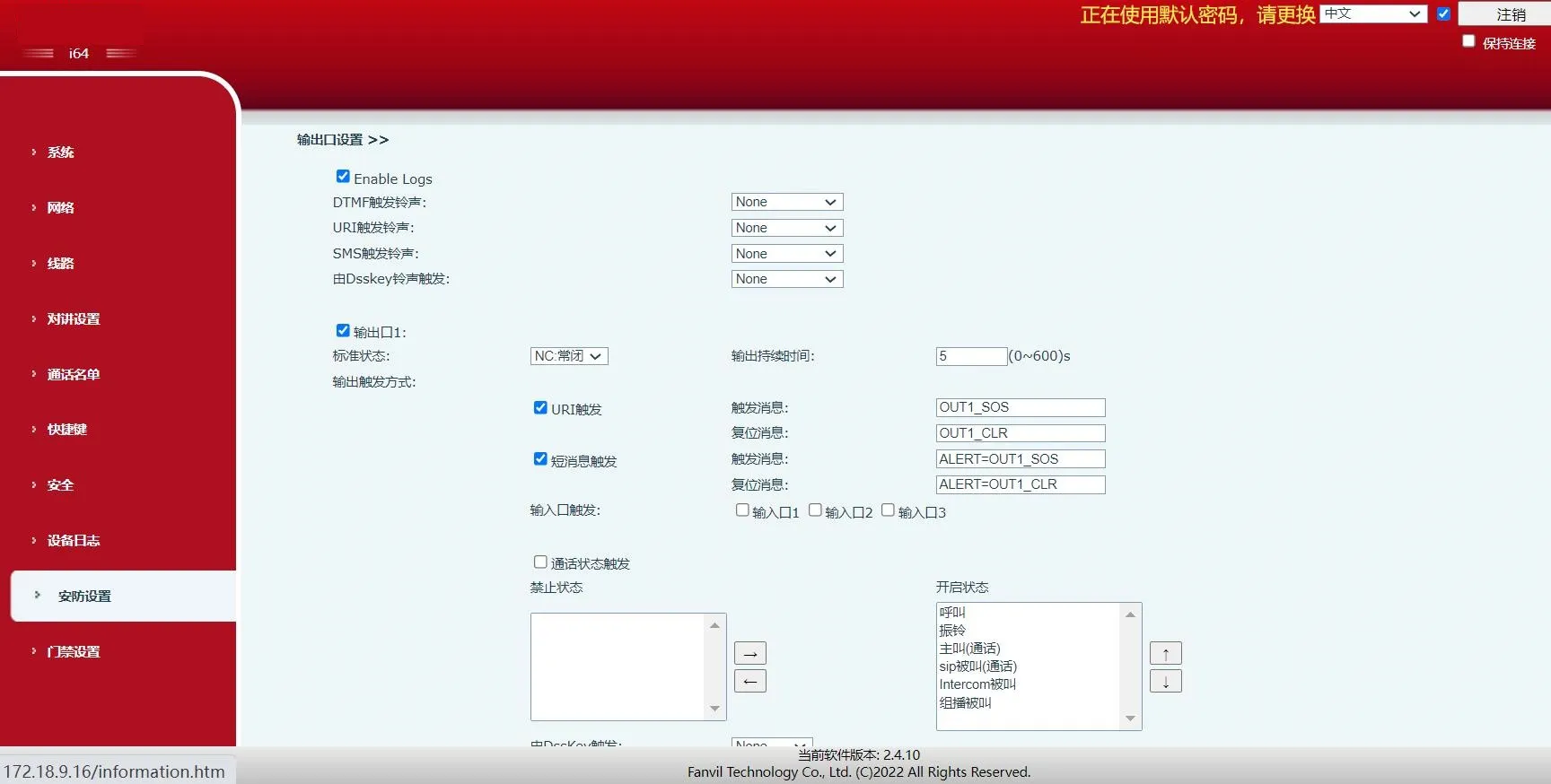
出力ポート設定
ログを有効にする ログ記録を有効または無効にします。
DTMFトリガー着信音 着信音の選択をサポートします。
URIトリガー着信音 着信音の選択をサポートします。
SMSトリガー着信音 着信音の選択をサポートします。
DSSキートリガー着信音 着信音の選択をサポートします。
出力ポート 出力ポートを有効または無効にします。
デフォルト状態 ローレベル(NO:開)を選択すると、トリガー条件が満たされたときにNOポートが開きます。
ハイレベル(NC:閉)を選択すると、トリガー条件が満たされたときにNCポートが閉じます。
出力継続時間 出力状態変化の継続時間。デフォルト値は5秒です。
入力ポートトリガー 選択した入力ポートがトリガー条件を満たすと、出力ポートは出力継続時間で定義された期間アクティブになります。
DTMFトリガー リモートデバイスからDTMFコードを受信し、コードが正しければ対応する出力ポートをトリガーします。


DTMFトリガーコード 通話中、端末はリモートデバイスからDTMFコードを受信します。コードが正しければ、対応する出力ポートがトリガーされます。デフォルト値は1234です。
DTMFリセットコード 通話中、端末はリモートデバイスからDTMFコードを受信します。コードが正しければ、対応する出力ポートがリセットされます。デフォルト値は4321です。
リセットモード 継続時間による 出力状態変化は出力継続時間によって制御されます。
通話ステータスによる 出力は通話ステータスによって制御され、通話ステータスが終了するとデフォルト状態に戻ります。
URIトリガー URIベースのトリガーを有効または無効にします。
リモートデバイスまたはサーバーから有効なコマンドが送信されると、対応する出力ポートがトリガーまたはリセットされます。
トリガーメッセージ 出力ポートがトリガーされた後に送信されるメッセージ。
リセットメッセージ 出力ポートがリセットされた後に送信されるメッセージ。
SMSトリガー SMSベースのトリガーを有効または無効にします。
リモートデバイスまたはサーバーがALERT=[コマンド]を送信し、コマンドが正しければ、対応する出力ポートがトリガーまたはリセットされます。
トリガーメッセージ 出力ポートがトリガーされた後に送信されるメッセージ。
リセットメッセージ 出力ポートがリセットされた後に送信されるメッセージ。
入力ポートトリガー 現在の出力ポートをトリガーするために使用できる入力ポートを選択します。
通話ステータストリガー 通話ステータスに基づく連続出力動作を定義します。トリガー条件の例:
1. 通話中
2. 呼び出し中
3. 発信中
DSSキートリガー DSSキーを使用して出力をトリガーします。
切断時トリガー 通話切断後に出力をトリガーします。
切断遅延 切断トリガーがアクティブになるまでの遅延。デフォルト値は5秒です。
動体検知設定
動体検知アラーム 動体検知を有効または無効にします。
トリガー継続時間 トリガー遅延時間を設定します。デフォルトは3秒、範囲は0〜3600秒です。
トリガー着信音 着信音の選択をサポートします。
トリガーアクション:
メッセージ送信
動体検知アラームがトリガーされたときにサーバーへメッセージを送信する機能を有効または無効にします。


ファンクションキーdsskey1またはdsskey2として設定すると、DSSキーを押すと通話がトリガーされます。デフォルト値はnoneです。
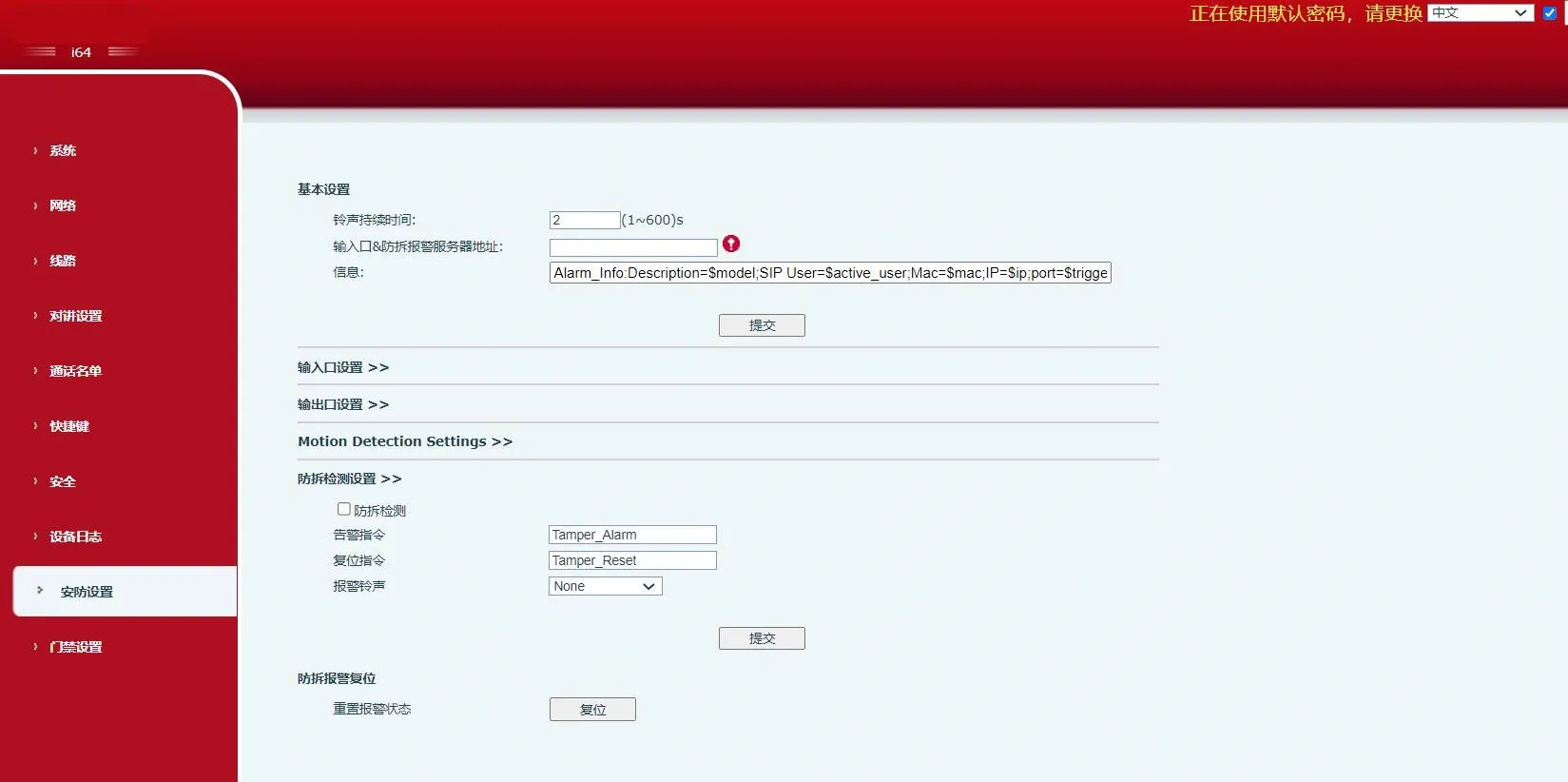
タンパー検知設定
タンパー検知 タンパー検知を有効または無効にします。端末が強制的に取り外されると、タンパーアラームがトリガーされ、設定されたアラーム着信音が鳴り続けます。
アラームコマンド アラームがトリガーされると、端末は設定されたアラームコマンドをサーバーに送信します。
リセットコマンド アラーム着信音を停止するには、リモートデバイスから端末にメッセージを送信できます。メッセージ内容がリセットコマンドに設定された値と一致する場合、端末はアラーム着信音の再生を停止します。

アラーム着信音 アラームに使用する着信音を定義します。
タンパーアラームリセット
アラーム状態をリセット アラーム再生を停止し、アクティブなアラーム状態をクリアします。


カタログ
顧客サービス 電話
We use cookie to improve your online experience. By continuing to browse this website, you agree to our use of cookie.

Cookies

This Cookie Policy explains how we use cookies and similar technologies when you access or use our website and related services. Please read this Policy together with our Terms and Conditions and Privacy Policy so that you understand how we collect, use, and protect information.

By continuing to access or use our Services, you acknowledge that cookies and similar technologies may be used as described in this Policy, subject to applicable law and your available choices.

Updates to This Cookie Policy

We may revise this Cookie Policy from time to time to reflect changes in legal requirements, technology, or our business practices. When we make updates, the revised version will be posted on this page and will become effective from the date of publication unless otherwise required by law.

Where required, we will provide additional notice or request your consent before applying material changes that affect your rights or choices.

What Are Cookies?

Cookies are small text files placed on your device when you visit a website or interact with certain online content. They help websites recognize your browser or device, remember your preferences, support essential functionality, and improve the overall user experience.

In this Cookie Policy, the term “cookies” also includes similar technologies such as pixels, tags, web beacons, and other tracking tools that perform comparable functions.

Why We Use Cookies

We use cookies to help our website function properly, remember user preferences, enhance website performance, understand how visitors interact with our pages, and support security, analytics, and marketing activities where permitted by law.

We use cookies to keep our website functional, secure, efficient, and more relevant to your browsing experience.

Categories of Cookies We Use

Strictly Necessary Cookies

These cookies are essential for the operation of the website and cannot be disabled in our systems where they are required to provide the service you request. They are typically set in response to actions such as setting privacy preferences, signing in, or submitting forms.

Without these cookies, certain parts of the website may not function correctly.

Functional Cookies

Functional cookies enable enhanced features and personalization, such as remembering your preferences, language settings, or previously selected options. These cookies may be set by us or by third-party providers whose services are integrated into our website.

If you disable these cookies, some services or features may not work as intended.

Performance and Analytics Cookies

These cookies help us understand how visitors use our website by collecting information such as traffic sources, page visits, navigation behavior, and general interaction patterns. In many cases, this information is aggregated and does not directly identify individual users.

We use this information to improve website performance, usability, and content relevance.

Targeting and Advertising Cookies

These cookies may be placed by our advertising or marketing partners to help deliver more relevant ads and measure the effectiveness of campaigns. They may use information about your browsing activity across different websites and services to build a profile of your interests.

These cookies generally do not store directly identifying personal information, but they may identify your browser or device.

First-Party and Third-Party Cookies

Some cookies are set directly by our website and are referred to as first-party cookies. Other cookies are set by third-party services, such as analytics providers, embedded content providers, or advertising partners, and are referred to as third-party cookies.

Third-party providers may use their own cookies in accordance with their own privacy and cookie policies.

Information Collected Through Cookies

Depending on the type of cookie used, the information collected may include browser type, device type, IP address, referring website, pages viewed, time spent on pages, clickstream behavior, and general usage patterns.

This information helps us maintain the website, improve performance, enhance security, and provide a better user experience.

Your Cookie Choices

You can control or disable cookies through your browser settings and, where available, through our cookie consent or preference management tools. Depending on your location, you may also have the right to accept or reject certain categories of cookies, especially those used for analytics, personalization, or advertising purposes.

Please note that blocking or deleting certain cookies may affect the availability, functionality, or performance of some parts of the website.

Restricting cookies may limit certain features and reduce the quality of your experience on the website.

Cookies in Mobile Applications

Where our mobile applications use cookie-like technologies, they are generally limited to those required for core functionality, security, and service delivery. Disabling these essential technologies may affect the normal operation of the application.

We do not use essential mobile application cookies to store unnecessary personal information.

How to Manage Cookies

Most web browsers allow you to manage cookies through browser settings. You can usually choose to block, delete, or receive alerts before cookies are stored. Because browser controls vary, please refer to your browser provider’s support documentation for details on how to manage cookie settings.

Contact Us

If you have any questions about this Cookie Policy or our use of cookies and similar technologies, please contact us at support@becke.cc .