
Phonebook Serverユーザーガイド

はじめに

概要

PhonebookServerは、当社が設計・開発したWindowsデスクトップアプリケーションで、VoIPデバイスに電話帳を管理・配信するためのものです。簡単な設定で簡単に使用できます。また、FDMS管理プラットフォーム内のモジュールとしても機能します。

対象読者

このドキュメントは、当社のVoIPデバイスに電話帳を配信する必要がある担当者を対象としています。

PhonebookServerのインストール

PhonebookServerの圧縮パッケージをローカルコンピューターに解凍し、PhonebookServerフォルダーを開いて、PhonebookServer.exeを直接実行してアプリケーションを起動します。図1を参照してください。
PhonebookServerを解凍して開く
                                                                                                                                図1

PhonebookServerの使用

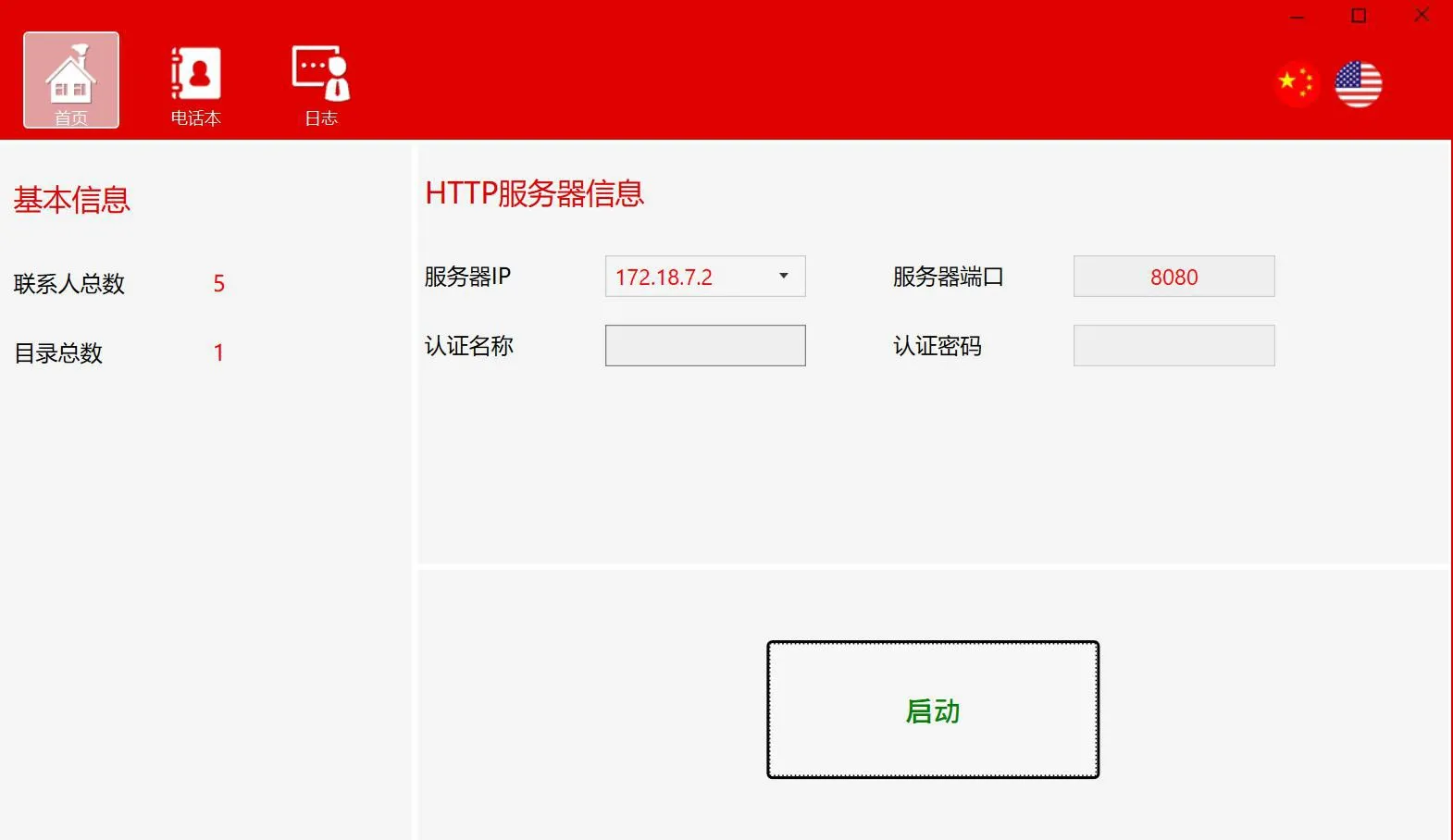
使用する前に、PhonebookServerソフトウェアを開き、HTTPサーバーの設定を構成して、サーバーを起動します。

ホームページ

基本情報:連絡先の総数とディレクトリの総数
HTTPサーバー情報:サーバーのIPアドレスとポート、認証ユーザー名とパスワード
開始ボタン:サーバーの開始/停止に使用します
HTTPサーバー情報の設定
1. サーバーのIPアドレスを設定します
サーバーIPフィールドにはPCのネットワークアダプターのリストが表示され、ドロップダウンリストから必要なIPアドレスを選択できます。
注:サーバー起動IPアドレスとして127.0.0.1を使用しないでください。
2. サーバーポートを設定します
デフォルトのポート8080を使用するか、まだ使用されていない他の利用可能なポートを設定できます。
3. 認証ユーザー名とパスワードを設定します
サーバーの起動
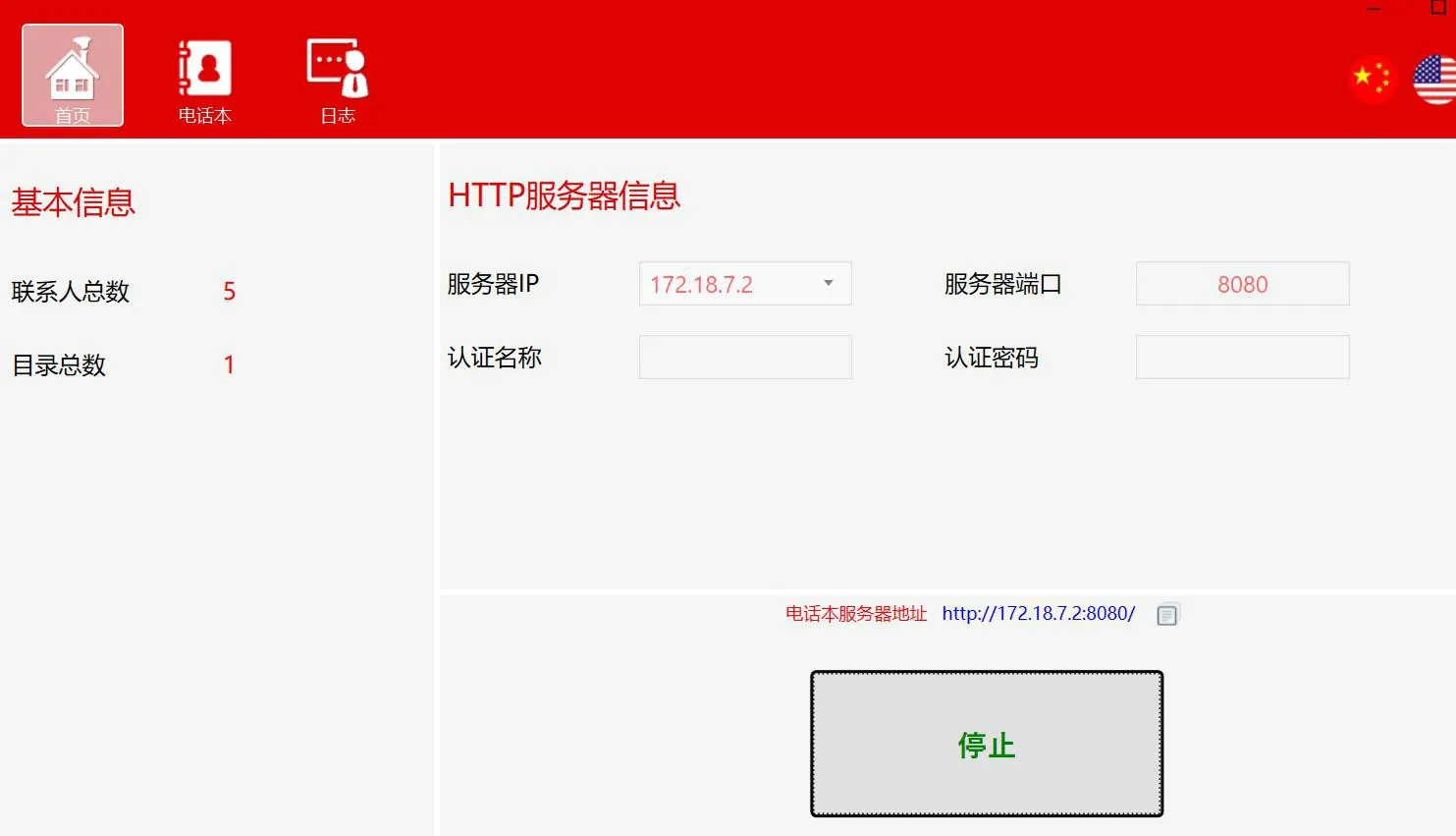
ホームページの開始ボタンをクリックします。サーバーが起動すると、電話帳サーバーのアドレスが表示され、ワンクリックでコピーできます。
サーバーの起動

電話帳

このセクションは主にディレクトリと連絡先の管理に使用されます。
ディレクトリ操作
ディレクトリの追加:

1. 追加ボタンをクリックします
2. ディレクトリパネルの空の領域を右クリックして「追加」を選択します
サブディレクトリの追加(複数レベル対応):
1. サブディレクトリを追加するディレクトリを選択し、追加ボタンをクリックします
2. サブディレクトリを追加するディレクトリを選択し、それを右クリックして「追加」を選択します
ディレクトリの削除:
1. 削除するディレクトリまたはサブディレクトリを選択し、削除ボタンをクリックします
2. 削除するディレクトリまたはサブディレクトリを選択し、それを右クリックして「削除」を選択します
ディレクトリ名の編集
1. 編集するディレクトリまたはサブディレクトリを選択し、編集ボタンをクリックします
2. 編集するディレクトリまたはサブディレクトリを選択し、それを右クリックして「編集」を選択します
ディレクトリのエクスポート:
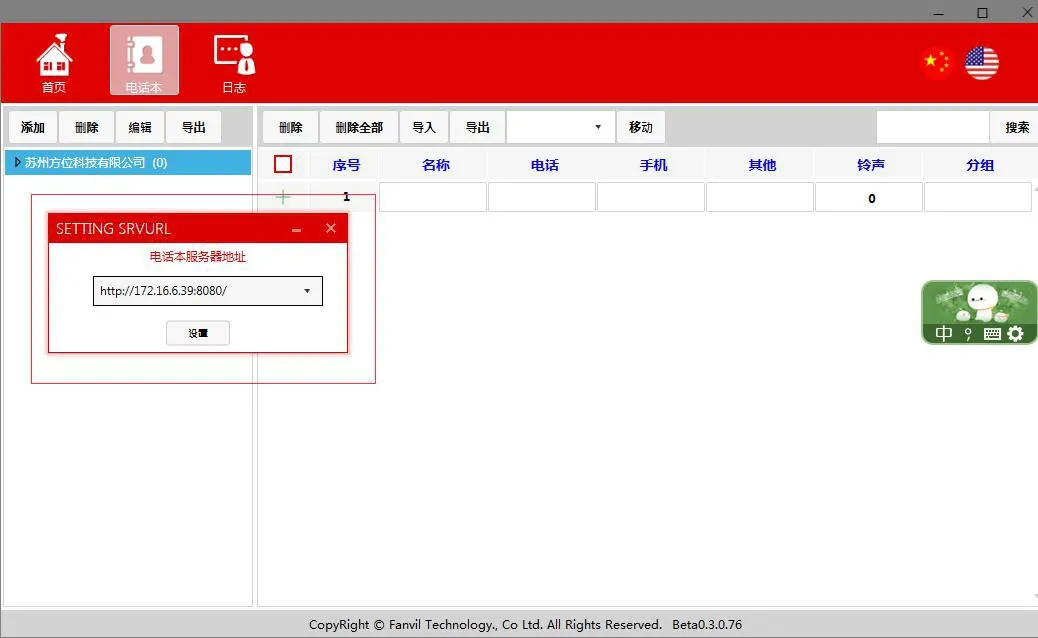
エクスポートするディレクトリを選択し、「エクスポート」ボタンをクリックするか右クリックして「エクスポート」を選択し、電話帳サーバーのアドレスを設定し(または以前に設定した電話帳サーバーアドレスを選択し)、エクスポートパスを選択してファイルを保存します。
電話帳ディレクトリのエクスポート
 連絡先
連絡先の追加:
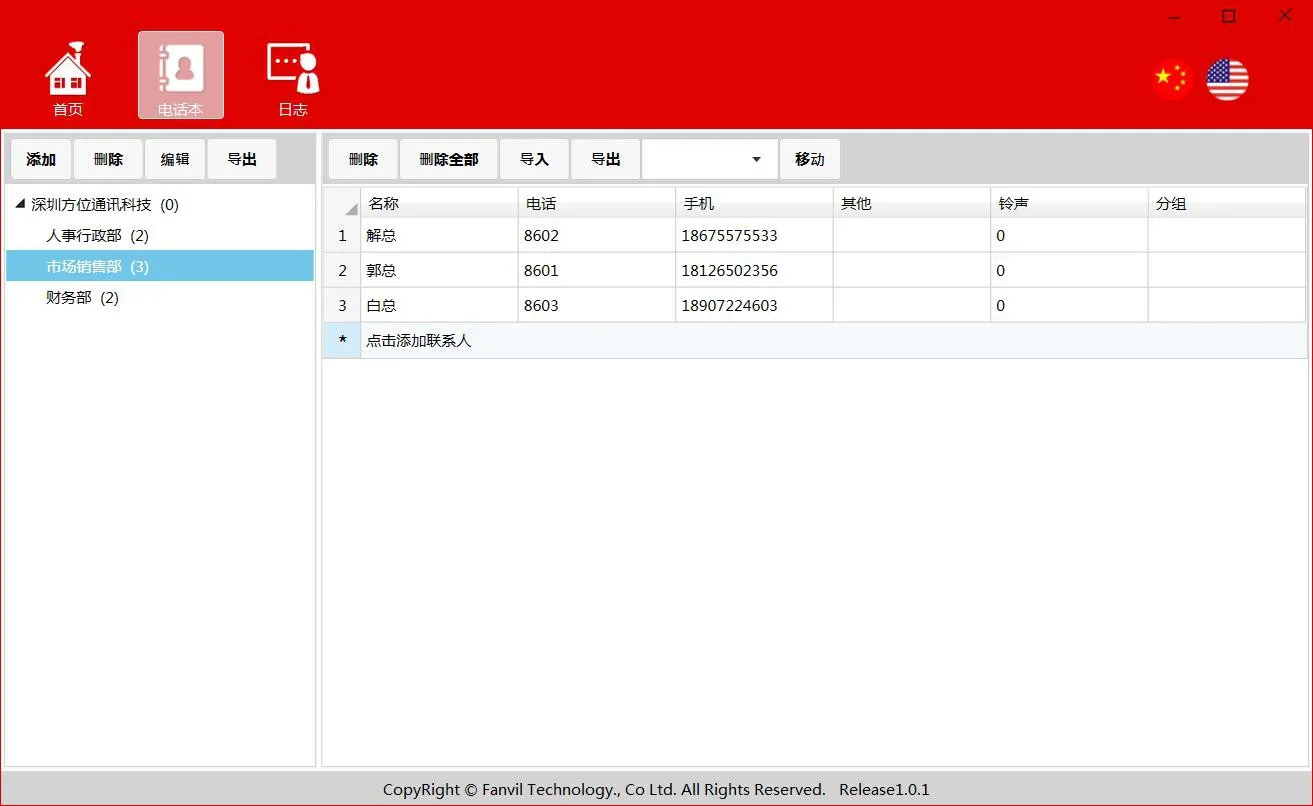
連絡先を追加するディレクトリを選択し、連絡先情報を編集して(名前と電話番号は必須)、編集後、新しい連絡先編集フィールドの空白領域をクリックして保存します。
連絡先の追加
連絡先の削除:
削除する連絡先を選択し、削除ボタンをクリックします
すべての連絡先を削除:
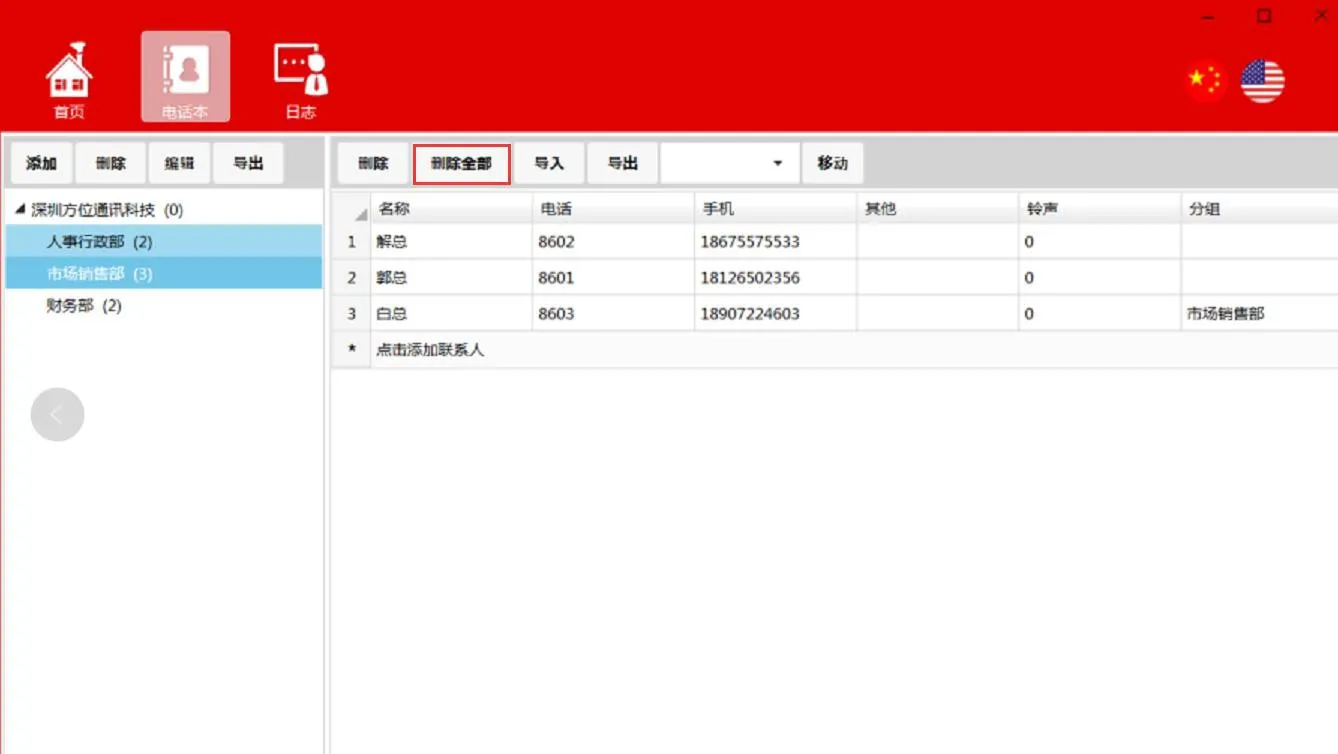
すべての連絡先を削除
連絡先のインポート:
ディレクトリを選択->インポート->インポートするファイルを選択します。インポートが正常に完了すると、インポートされた連絡先が現在のディレクトリの下に表示されます。
連絡先のエクスポート:
ディレクトリを選択->エクスポート->エクスポート先のパスを選択します
連絡先の移動:
移動する連絡先を選択->ディレクトリを選択->移動
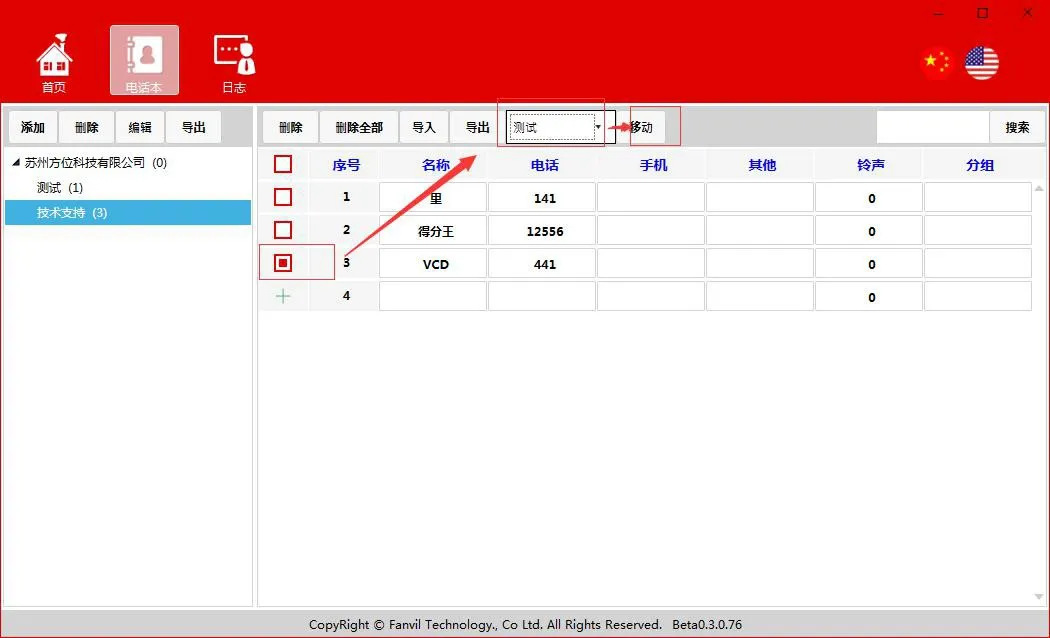
連絡先の移動
連絡先の検索:
連絡先名、電話番号、その他のフィールドによる一致をサポートします
ログ
ログセクションは、主にディレクトリ、連絡先、およびサーバーの開始/停止アクションに関連する操作を記録します。

電話から電話帳にアクセスする

電話のWebインターフェースを開き、“電話帳”-“クラウド電話帳”-“クラウド電話帳管理”に移動します。URLを電話帳サーバーのアドレスに設定し、ユーザー名とパスワードをPhonebookServerで設定された認証情報に設定します。設定を保存すると、電話は電話帳サーバーに正常にアクセスします。
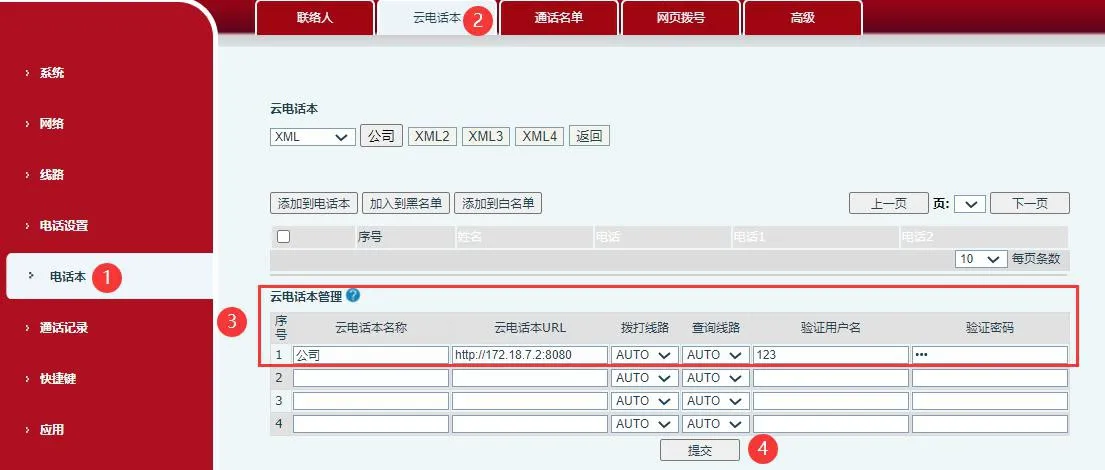

電話のクラウド電話帳管理設定

カタログ
顧客サービス 電話
We use cookie to improve your online experience. By continuing to browse this website, you agree to our use of cookie.

Cookies

This Cookie Policy explains how we use cookies and similar technologies when you access or use our website and related services. Please read this Policy together with our Terms and Conditions and Privacy Policy so that you understand how we collect, use, and protect information.

By continuing to access or use our Services, you acknowledge that cookies and similar technologies may be used as described in this Policy, subject to applicable law and your available choices.

Updates to This Cookie Policy

We may revise this Cookie Policy from time to time to reflect changes in legal requirements, technology, or our business practices. When we make updates, the revised version will be posted on this page and will become effective from the date of publication unless otherwise required by law.

Where required, we will provide additional notice or request your consent before applying material changes that affect your rights or choices.

What Are Cookies?

Cookies are small text files placed on your device when you visit a website or interact with certain online content. They help websites recognize your browser or device, remember your preferences, support essential functionality, and improve the overall user experience.

In this Cookie Policy, the term “cookies” also includes similar technologies such as pixels, tags, web beacons, and other tracking tools that perform comparable functions.

Why We Use Cookies

We use cookies to help our website function properly, remember user preferences, enhance website performance, understand how visitors interact with our pages, and support security, analytics, and marketing activities where permitted by law.

We use cookies to keep our website functional, secure, efficient, and more relevant to your browsing experience.

Categories of Cookies We Use

Strictly Necessary Cookies

These cookies are essential for the operation of the website and cannot be disabled in our systems where they are required to provide the service you request. They are typically set in response to actions such as setting privacy preferences, signing in, or submitting forms.

Without these cookies, certain parts of the website may not function correctly.

Functional Cookies

Functional cookies enable enhanced features and personalization, such as remembering your preferences, language settings, or previously selected options. These cookies may be set by us or by third-party providers whose services are integrated into our website.

If you disable these cookies, some services or features may not work as intended.

Performance and Analytics Cookies

These cookies help us understand how visitors use our website by collecting information such as traffic sources, page visits, navigation behavior, and general interaction patterns. In many cases, this information is aggregated and does not directly identify individual users.

We use this information to improve website performance, usability, and content relevance.

Targeting and Advertising Cookies

These cookies may be placed by our advertising or marketing partners to help deliver more relevant ads and measure the effectiveness of campaigns. They may use information about your browsing activity across different websites and services to build a profile of your interests.

These cookies generally do not store directly identifying personal information, but they may identify your browser or device.

First-Party and Third-Party Cookies

Some cookies are set directly by our website and are referred to as first-party cookies. Other cookies are set by third-party services, such as analytics providers, embedded content providers, or advertising partners, and are referred to as third-party cookies.

Third-party providers may use their own cookies in accordance with their own privacy and cookie policies.

Information Collected Through Cookies

Depending on the type of cookie used, the information collected may include browser type, device type, IP address, referring website, pages viewed, time spent on pages, clickstream behavior, and general usage patterns.

This information helps us maintain the website, improve performance, enhance security, and provide a better user experience.

Your Cookie Choices

You can control or disable cookies through your browser settings and, where available, through our cookie consent or preference management tools. Depending on your location, you may also have the right to accept or reject certain categories of cookies, especially those used for analytics, personalization, or advertising purposes.

Please note that blocking or deleting certain cookies may affect the availability, functionality, or performance of some parts of the website.

Restricting cookies may limit certain features and reduce the quality of your experience on the website.

Cookies in Mobile Applications

Where our mobile applications use cookie-like technologies, they are generally limited to those required for core functionality, security, and service delivery. Disabling these essential technologies may affect the normal operation of the application.

We do not use essential mobile application cookies to store unnecessary personal information.

How to Manage Cookies

Most web browsers allow you to manage cookies through browser settings. You can usually choose to block, delete, or receive alerts before cookies are stored. Because browser controls vary, please refer to your browser provider’s support documentation for details on how to manage cookie settings.

Contact Us

If you have any questions about this Cookie Policy or our use of cookies and similar technologies, please contact us at support@becke.cc .