IP電話管理システムのFDPSユーザーガイド

FDPS 概要

概要説明

FDPSは分散配置管理システムであり、デバイスの一括プロビジョニングに対応しています。デバイスは起動または再起動後、自動的にFDPSサーバーへAutoProvision設定リクエストを送信します。サーバーはユーザー定義パラメータを含むカスタマイズされた設定ファイルを応答します。

アカウントレベル

FDPSシステムは管理者、代理者、顧客の3階層アカウント管理方式を採用しています。(本書では代理者アカウントと顧客アカウントのシステム利用方法を中心に説明します。)

アカウント種別機能
管理者 Ø 個人アカウント管理
Ø システム統計参照(アカウント、グループ、デバイス)
Ø 代理者アカウント管理
Ø システム内全デバイス参照
Ø アカウントログ管理
代理者 Ø 個人アカウント管理
Ø サブアカウント管理
Ø サブアカウントMACアドレス管理
Ø デバイス管理
Ø グループ管理
Ø アカウントログ管理
顧客 Ø 個人アカウント管理
Ø デバイス管理
Ø グループ管理
Ø アカウントログ管理

システム利用方法

システムログイン

ログイン画面にユーザー名とパスワードを入力し、ログインボタンをクリックするとFDPS管理プラットフォームにアクセスできます(図1-1)。(全アカウントはシングルログインのみ対応、後からログインすると前のセッションは強制ログアウトされます。)

ログイン画面のUser Manualボタンから、日本語・英語版のユーザーマニュアルをダウンロードできます。
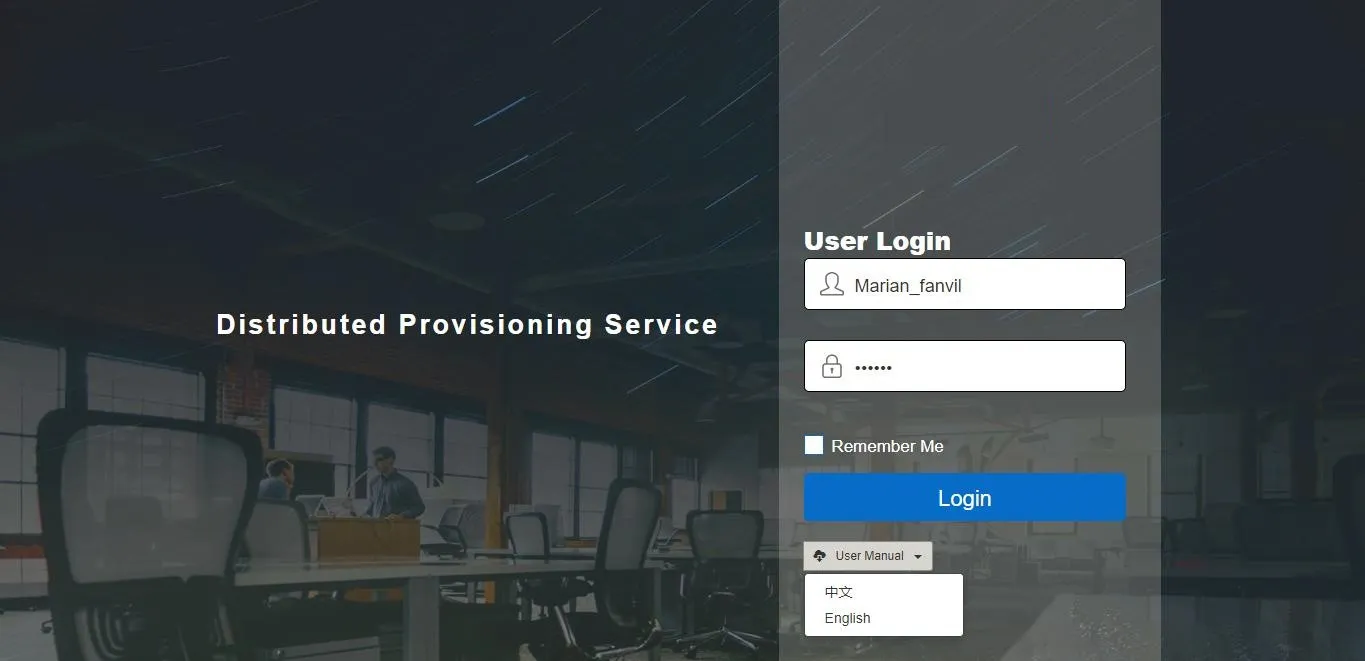
システムログイン画面

図 1-1

代理者アカウント

各代理者(副管理者)アカウントはシステム管理者が作成し、ユーザー名と初期パスワードを割り当てます。代理者は発行された初期認証情報でログイン可能です。

アカウント情報管理

ログイン後、代理者はホーム画面に遷移します(図2-1)。INFO画面にはアカウント統計(アカウント数、デバイス数、グループ数)、個人情報、パスワード変更画面が表示されます。
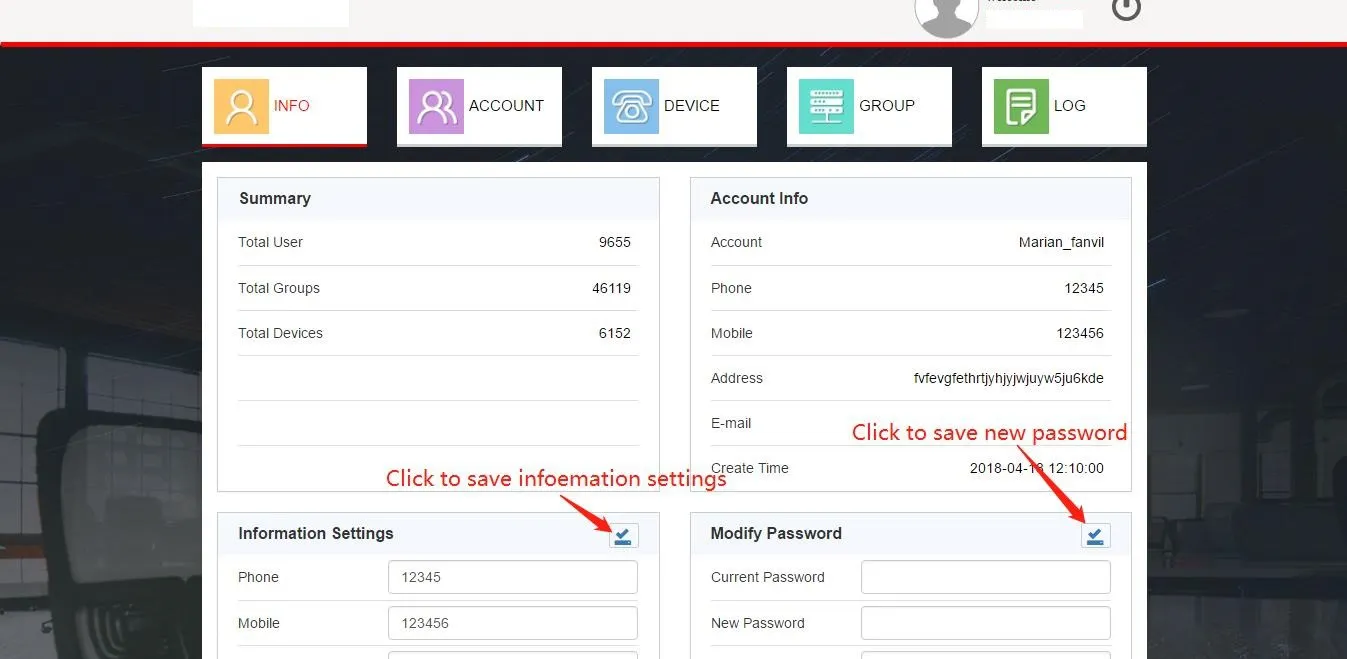
アカウント情報・パスワード変更画面

図 2-1

パスワード、連絡先、住所、メールアドレスなどの個人情報をこの画面で直接編集できます。保存後、更新された情報がアカウント情報欄に反映されます。

アカウント管理

ACCOUNTタブをクリックすると顧客アカウント管理モジュールに入ります(図2-2)。この画面で顧客アカウントの追加、削除、検索、パスワードリセットが行えます。

1. 顧客アカウント追加
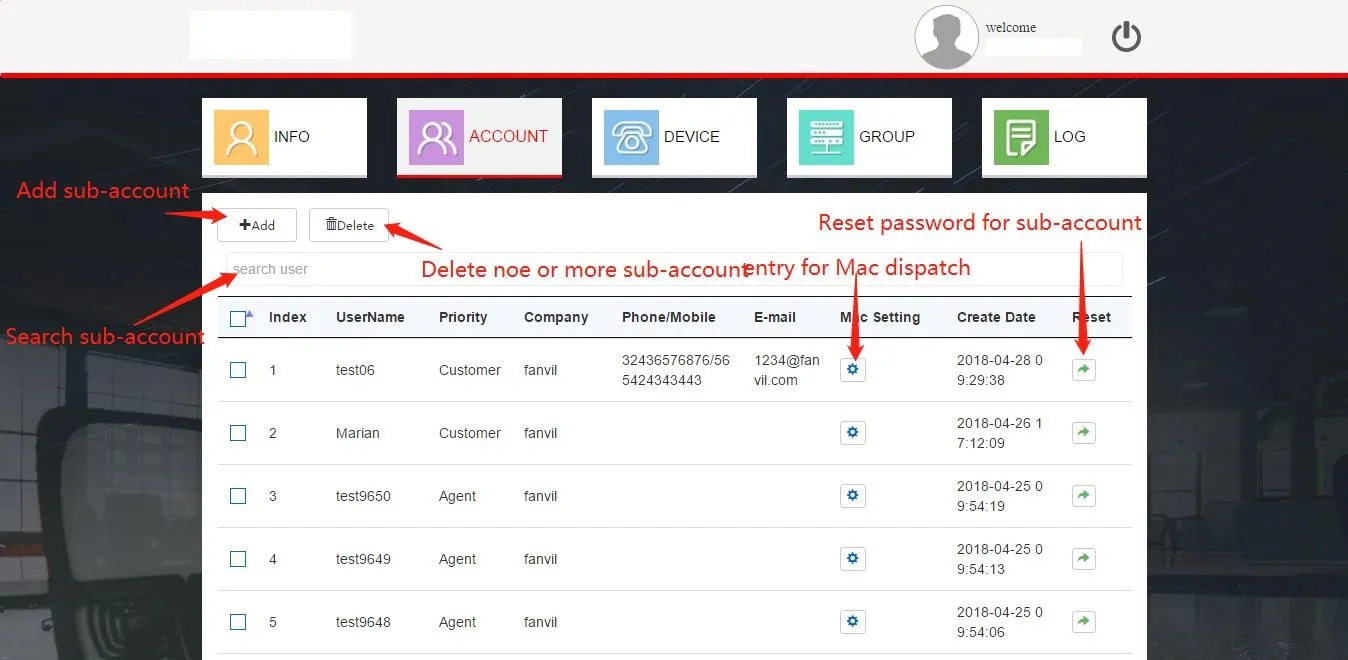
顧客アカウント追加画面

図 2-2

Addボタンをクリックしてユーザー追加ダイアログを開き(図2-3)、必須項目を入力しDoneをクリックすると顧客アカウントが作成されます。
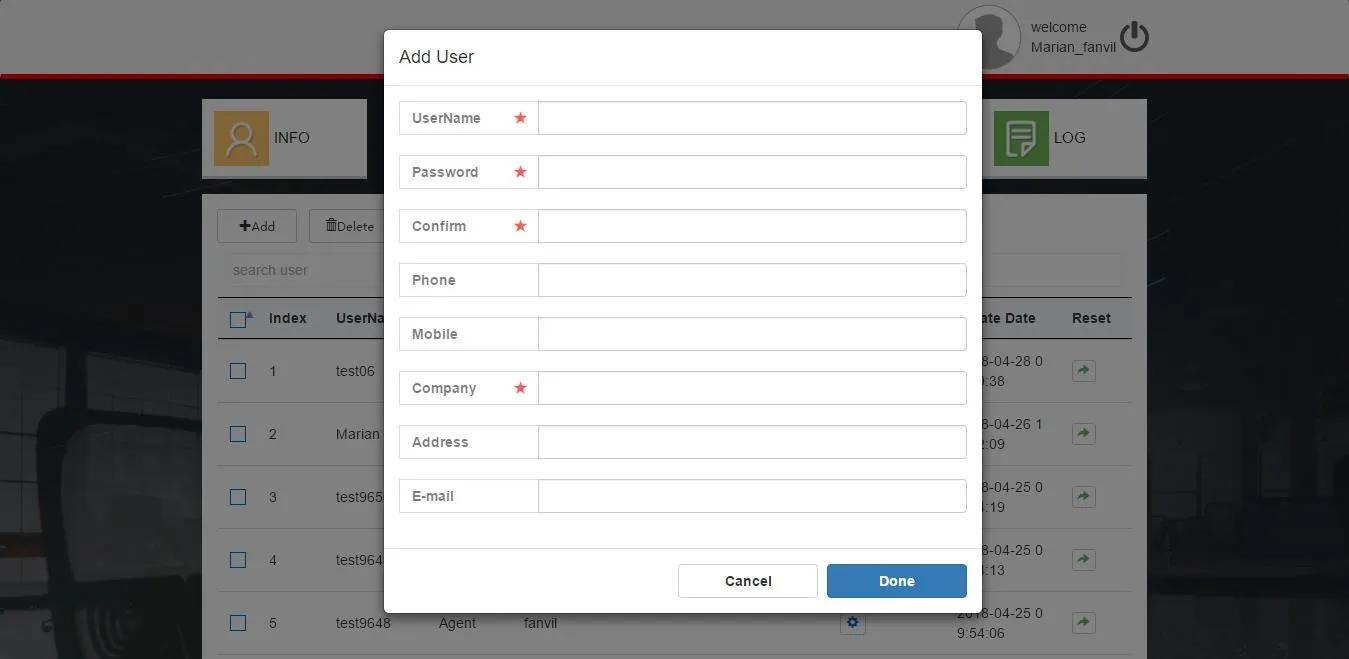
ユーザー追加ダイアログ

図 2-3

2. 顧客アカウント削除

対象アカウントを選択しDeleteボタンをクリックします(図2-2)。ポップアップの確認画面でOKAYをクリックすると削除が完了します。

3. 顧客アカウントパスワードリセット

対象アカウントのResetボタンをクリックし(図2-2)、ポップアップ画面で新しいパスワードを入力してリセット完了です。
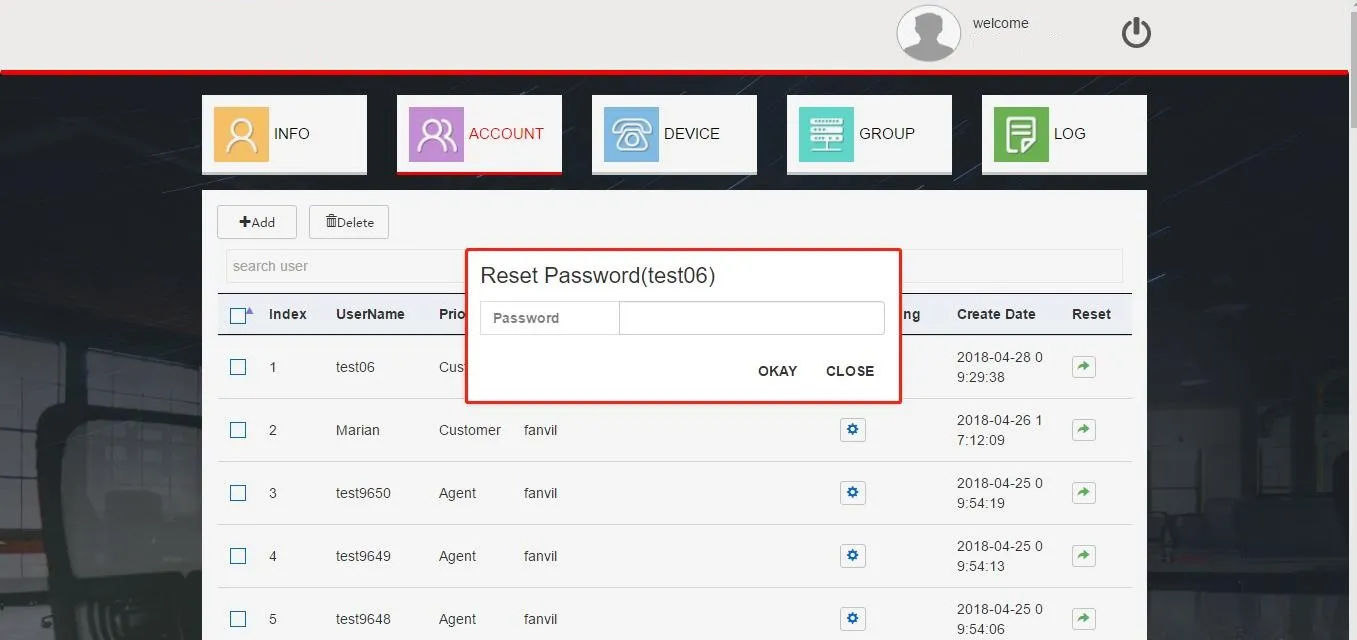
パスワードリセット画面

図 2-4

4. アカウント検索

search user欄にキーワードを入力すると、アカウントを素早く検索できます(図2-2)。

5. サブアカウントMACアドレス管理

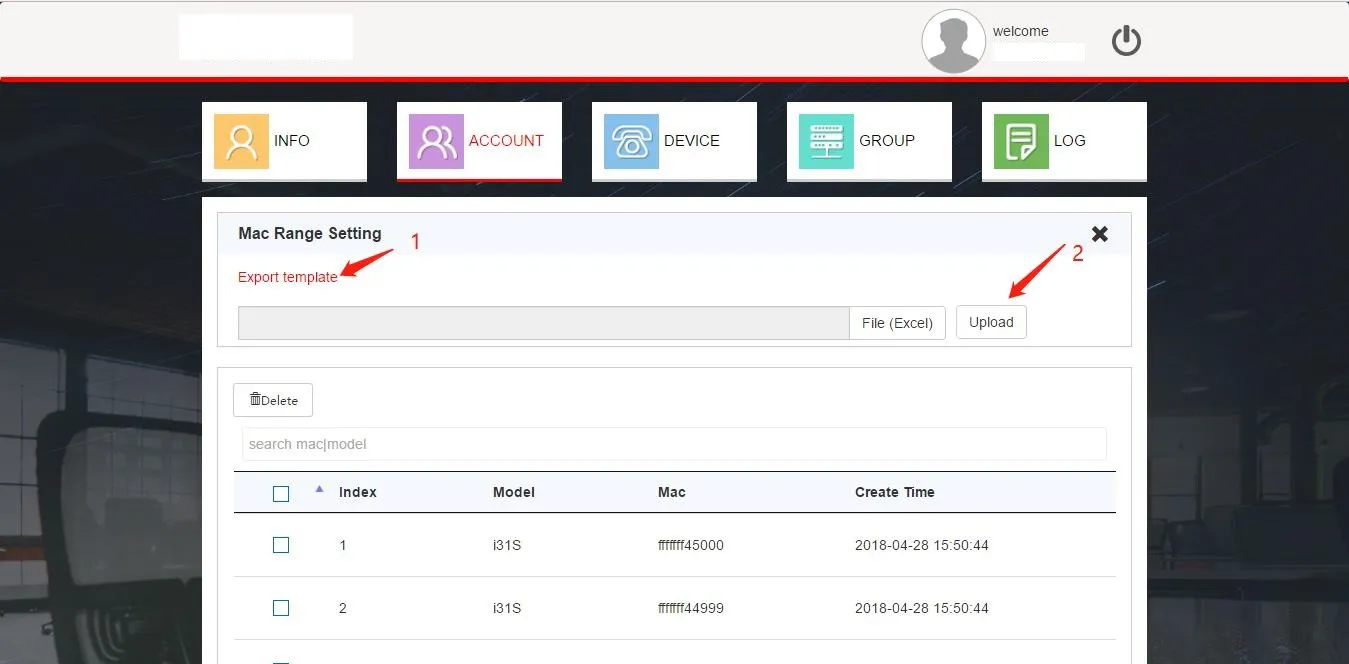
代理者は顧客にMACアドレスを割り当てる必要があります。未割り当てのMACアドレスは無効で、顧客が登録することはできません。図2-5のボタンをクリックし、MACアドレス割り当て画面に進みます(図2-6)。
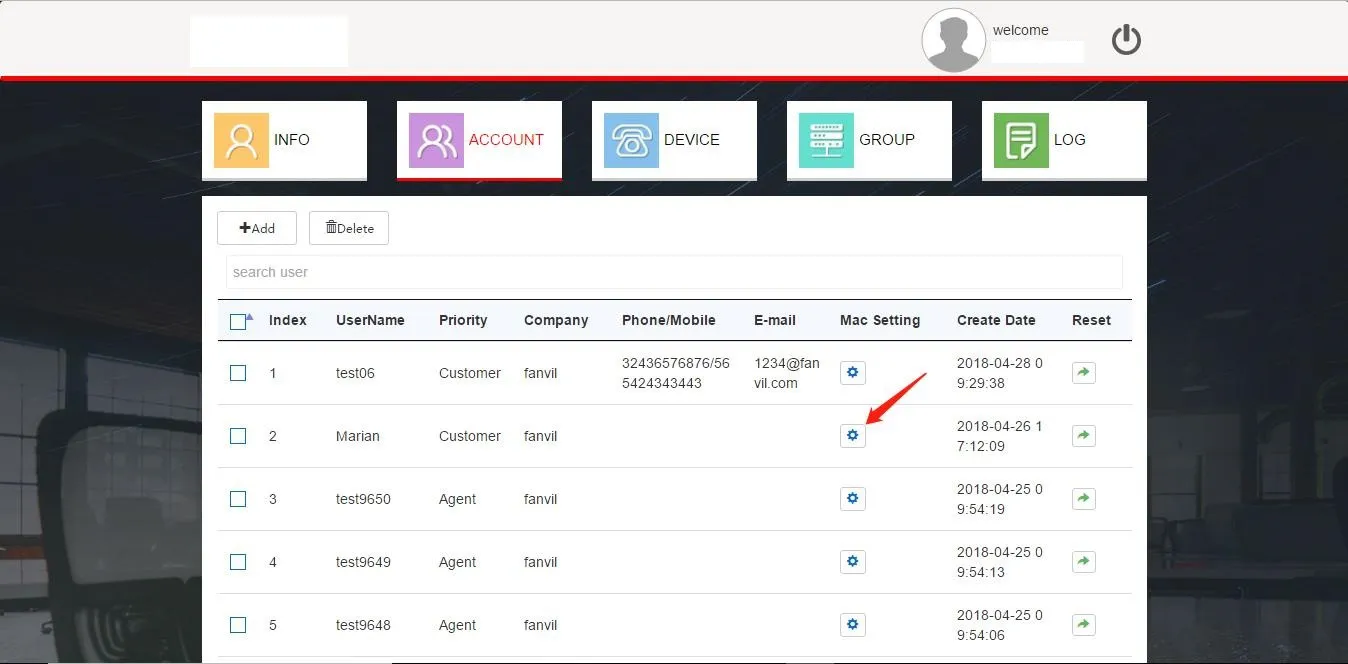
MACアドレス割り当て入口画面

図 2-5

MACアドレス割り当て画面

図 2-6

1) MACアドレス割り当て
システムはExcelインポートによるMAC割り当てのみ対応します。番号1のリンクをクリックしてテンプレートファイルをダウンロードし、MACアドレスを記入後File (Excel)(番号2)をクリックしてファイルをアップロードします。割り当て済みMACはリストに表示され、顧客が対応するデバイスを管理できるようになります。
注意:1回のインポート最大登録数は30,000件(5分以内)。運用効率のため、1バッチ10,000件ずつインポートすることを推奨(約5秒)。

2) MACアドレス回収
代理者はサブアカウントのMACリストから不要なMACを削除して回収できます。回収されたMACは顧客のデバイスリストから削除され、当該サブアカウントで管理できなくなります。

デバイス管理

代理者はデバイスの登録・管理が可能です。DEVICEタブをクリックするとデバイスリストが表示されます(図2-7)。
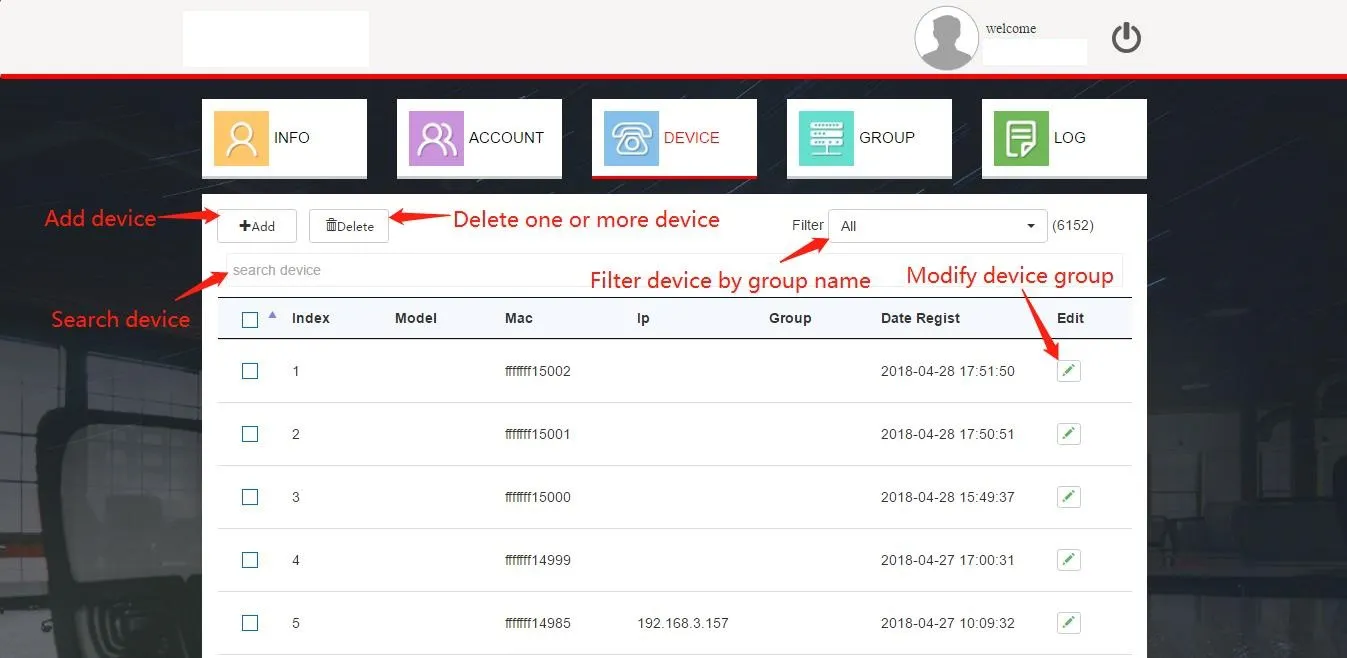
デバイスリスト画面

図 2-7

1. デバイス追加
Excel一括インポートでデバイスを追加します。Addボタンをクリックし(図2-7)、インポート画面に進みます(図2-8)。既定のグループを選択してインポートするデバイスを紐付け、ファイルをアップロードします。インポート成功後、リストが自動更新されます。
注意事項:
1. MACアドレスインポートと同じテンプレートを使用してください。
2. 1回最大30,000件、推奨バッチサイズは10,000件。
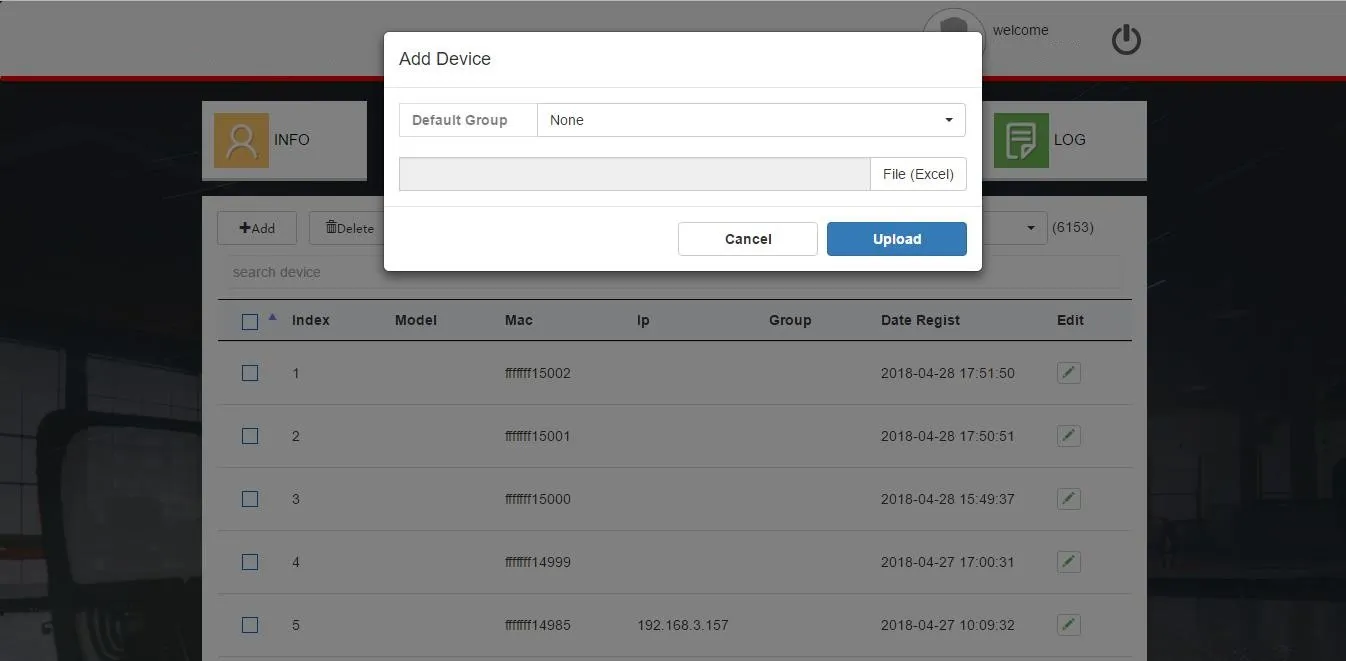
Excelインポート画面

図 2-8

2. デバイス削除
対象デバイスを選択しDeleteボタンをクリックすると削除されます(図2-7)。

3. デバイス検索
検索欄にMACアドレスを入力するとデバイスを検索できます(図2-7)。Filterドロップダウンでグループ別にデバイスを表示可能です。

4. デバイスグループ編集
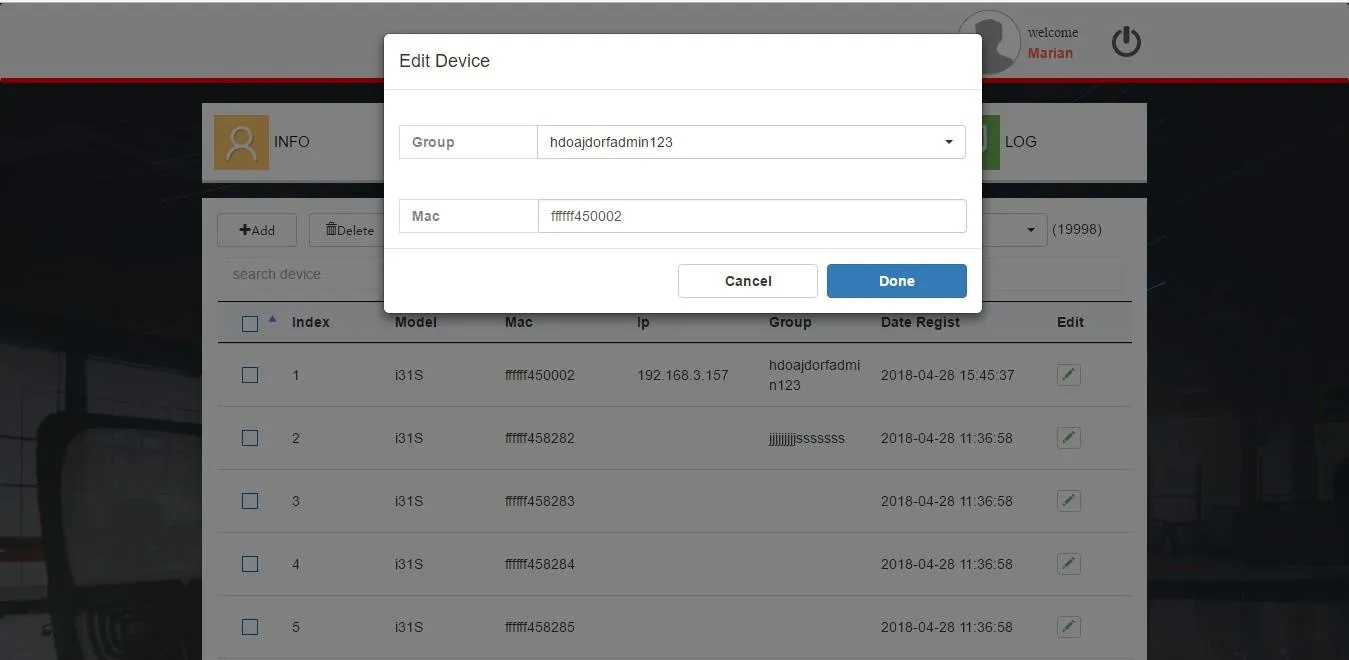
リスト内のEditボタンをクリックし(図2-7)、グループ選択ダイアログを開きます(図2-9)。新しいグループを選択しDoneをクリック。更新後、デバイスはFDPSから新しいグループ設定を取得します。
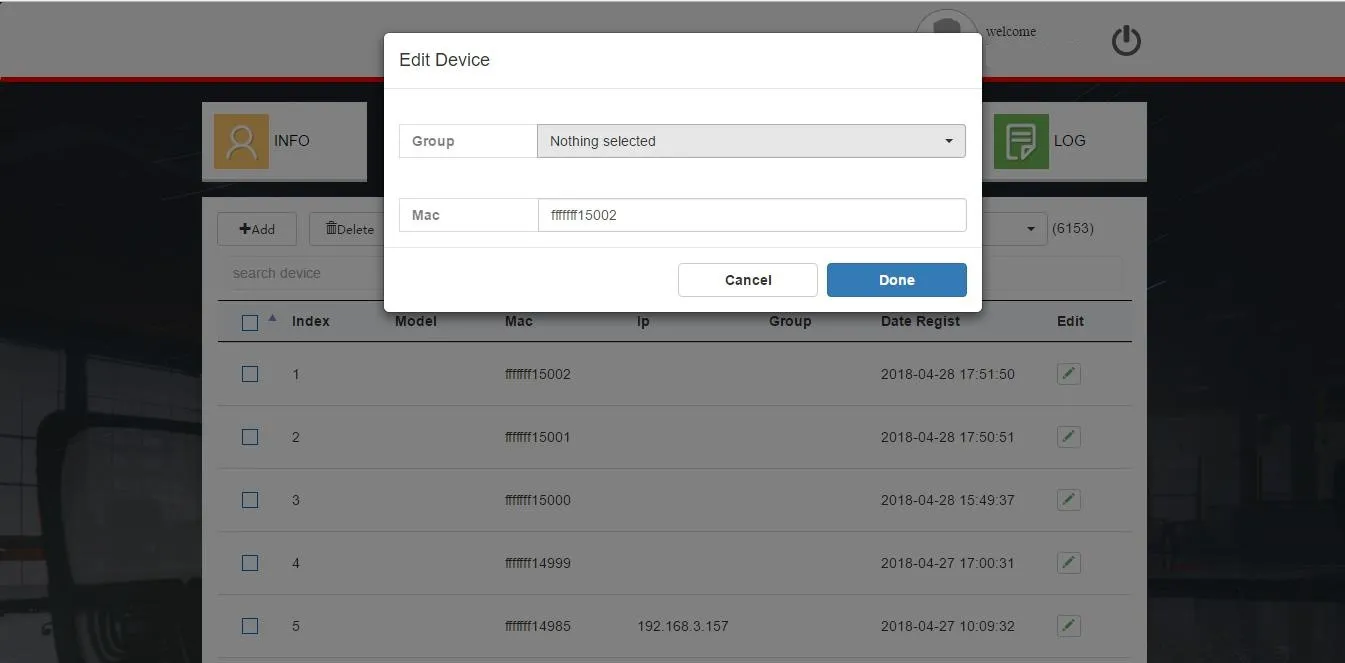
デバイスグループ編集画面

図 2-9

5. デバイス一括グループ追加
DEVICE画面下部のショートカットを使用し(図2-10)、現在のページ最大50台のデバイスを一括でグループに割り当てできます。デバイスを選択しグループを指定後、Link, add to groupをクリックします。
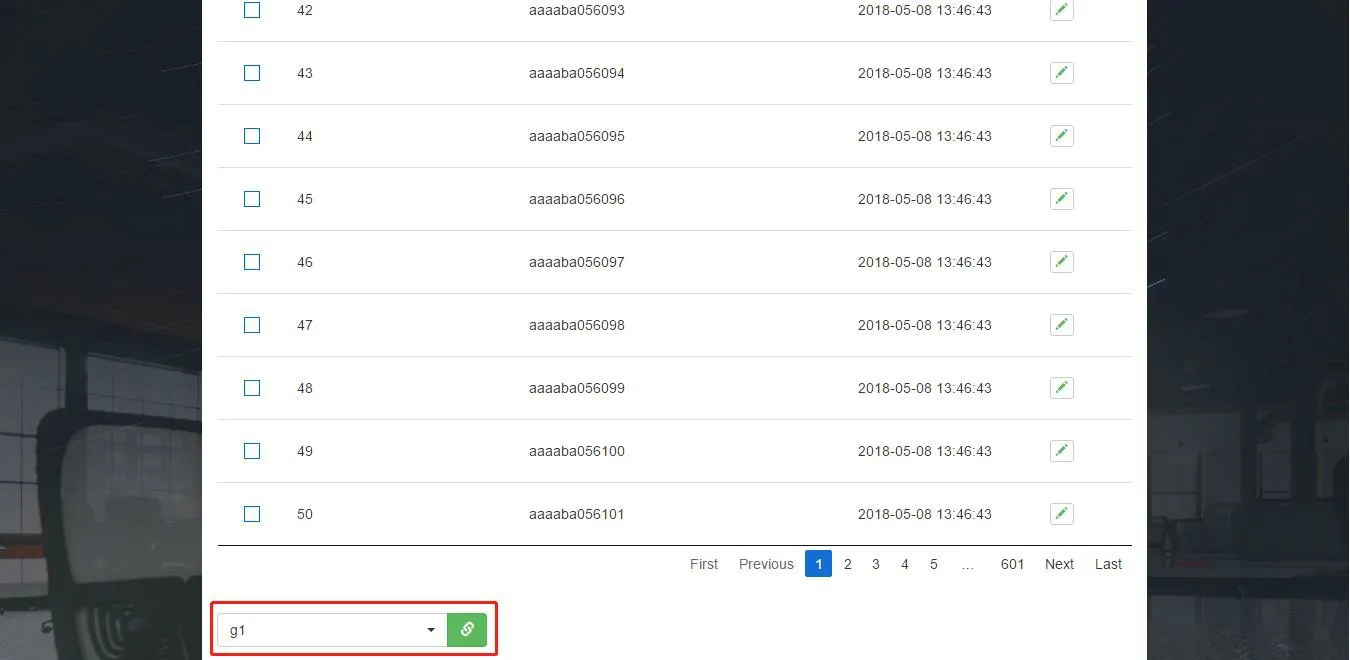
デバイス一括グループ追加画面

図 2-10

グループ管理

グループとは、デバイスのWEB画面設定に対応した自動プロビジョニング設定テンプレートで、一括設定に使用します。グループを紐付けたデバイスは、FDPSからグループ設定を取得し適用します(図2-11)。
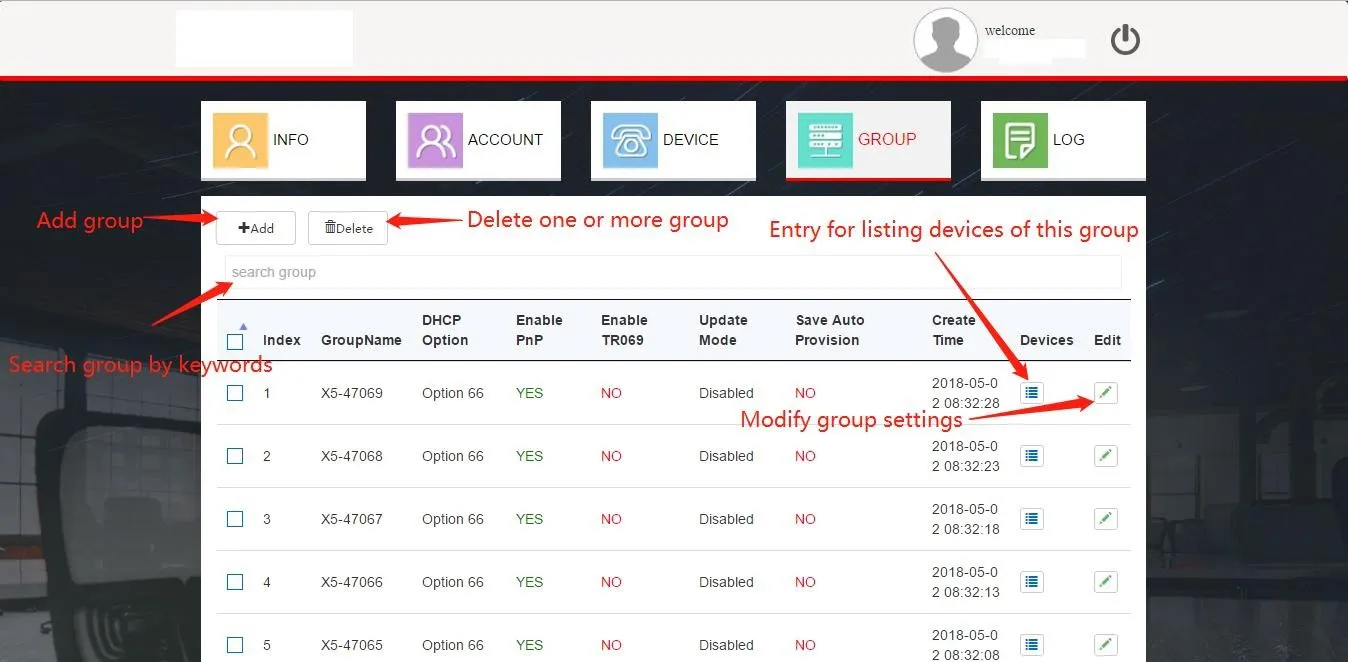
グループ管理画面

図 2-11

1. グループ追加
Addをクリックし(図2-11)、作成画面を開きます(図2-12)。グループ名と各種パラメータを設定しDoneで作成完了です。
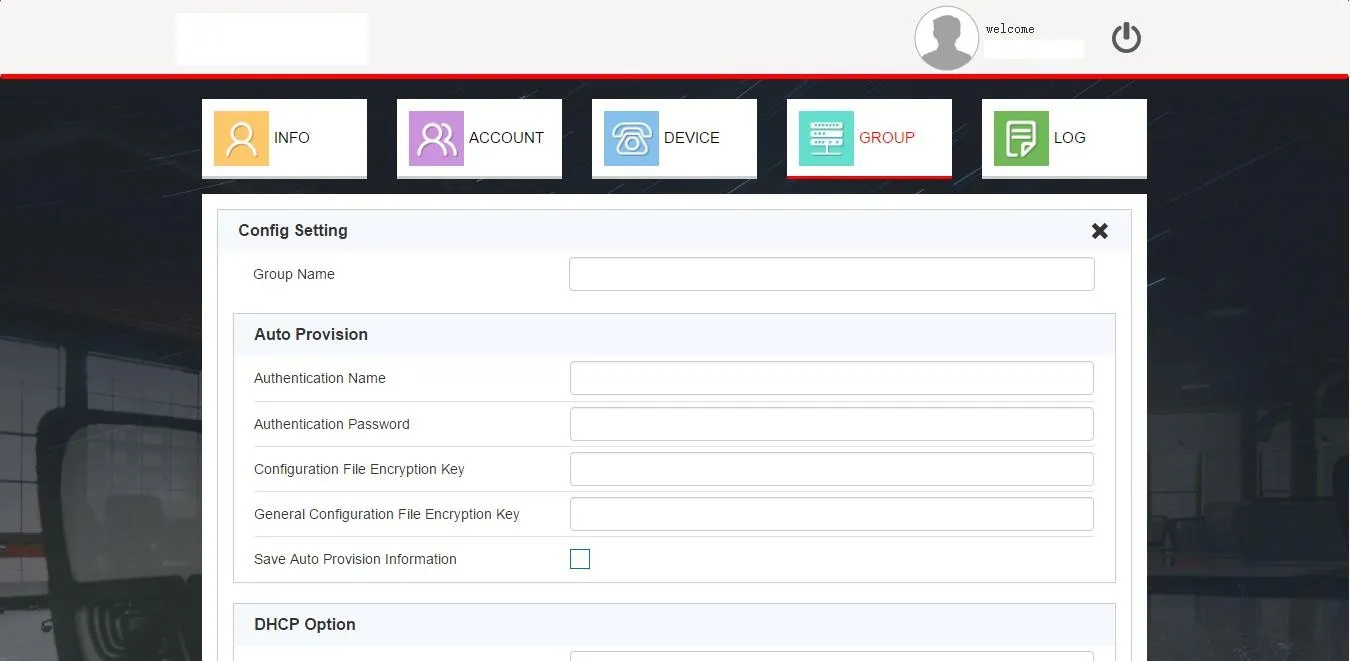
グループ追加画面

図 2-12

2. グループ編集
Editボタンをクリックし(図2-11)、設定を変更し(図2-13)Doneで保存します。
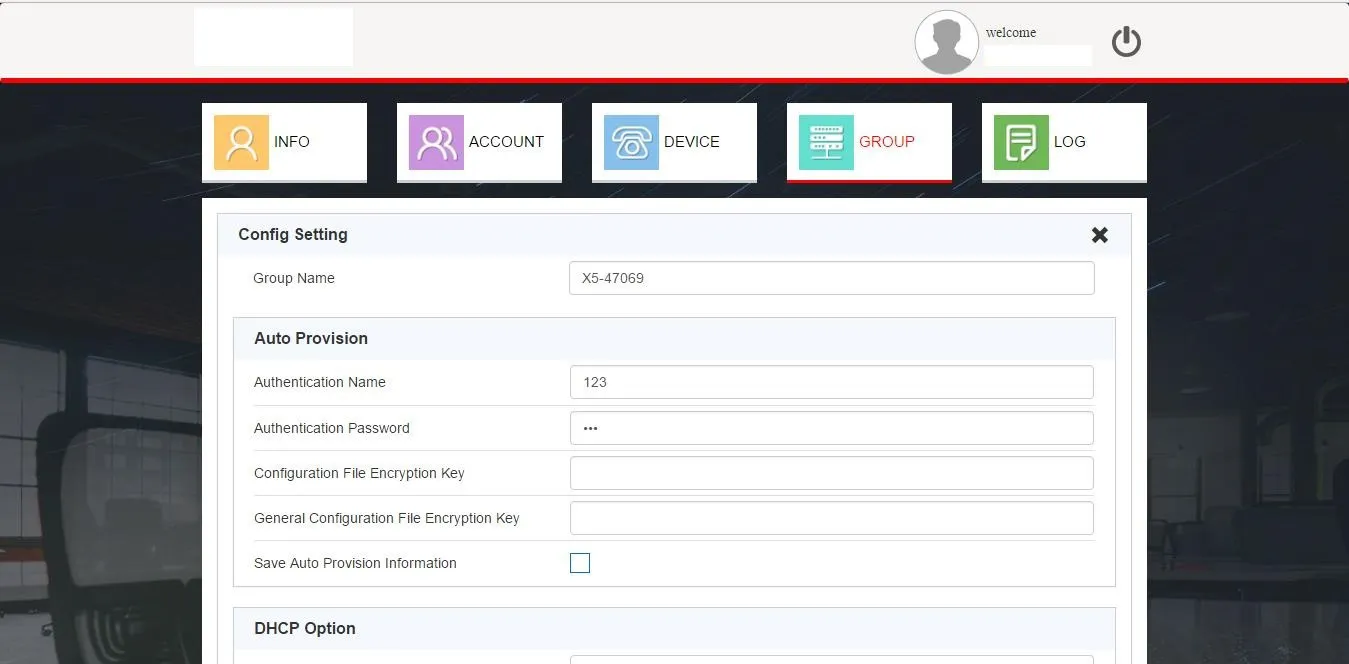
グループ設定編集画面

図 2-13

3. グループ削除
対象グループを選択しDeleteをクリックすると削除されます。

4. グループ検索
search group欄にキーワードを入力すると、グループ名または作成日時で絞り込み検索できます(図2-11)。

5. グループ内デバイス参照
任意のグループのDevicesボタンをクリックすると、絞り込み後のデバイスリストに遷移します(図2-11)。

ログ管理

システムはアカウントの全操作ログを記録します(図2-14)。最新10,000件のログダウンロード、検索、個別削除、一括クリアに対応しています。
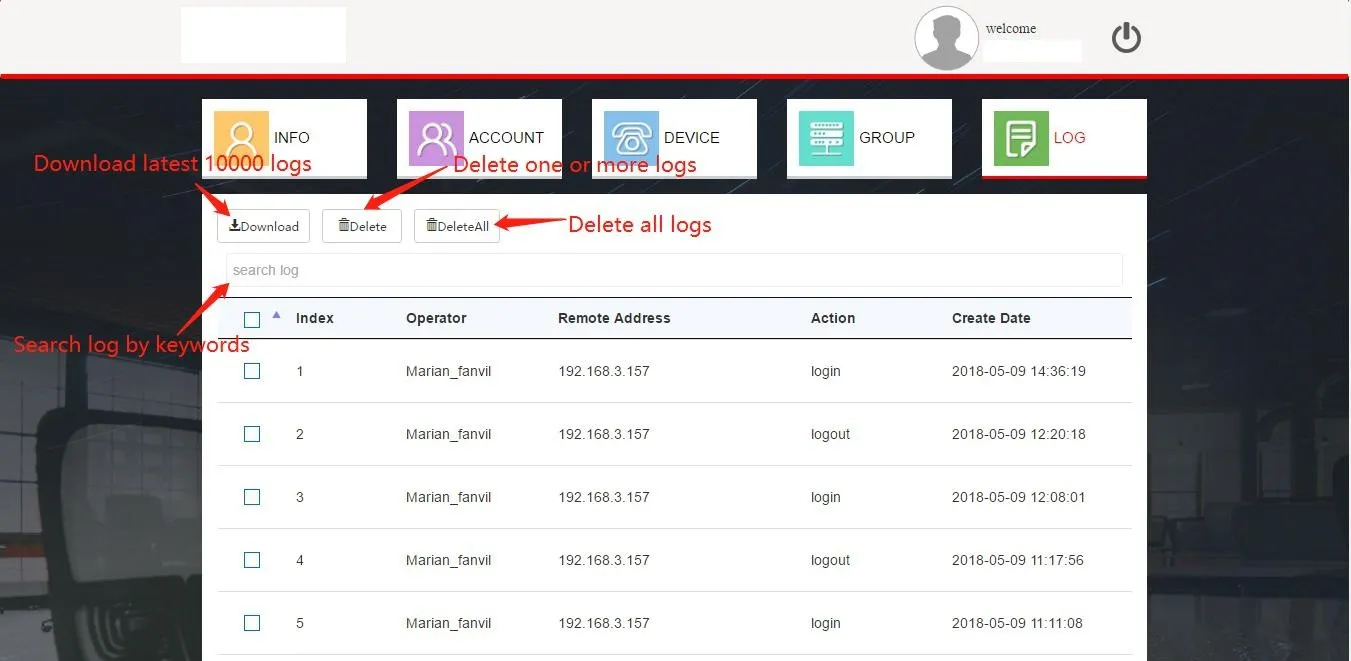
ログ管理画面

図 2-14

顧客アカウント

顧客アカウントは代理者が作成するサブアカウントです。代理者アカウントを削除すると、配下の全顧客アカウントも同時に削除されます。顧客は自身でサブアカウントを作成できず、上位代理者から割り当てられたMACアドレスのみ管理可能です。

アカウント情報管理

顧客のホーム画面(図2-15)には統計情報、個人情報、パスワード設定が表示され、代理者のINFO画面と同じ仕様です。
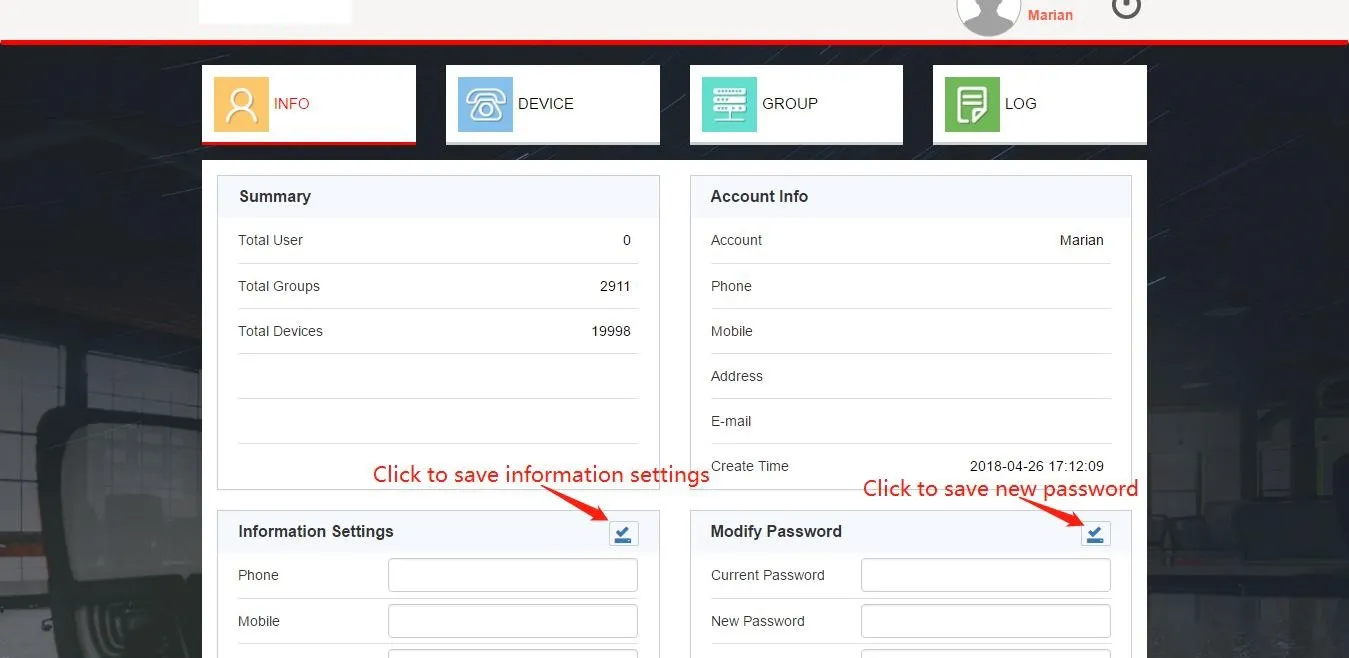
顧客アカウント情報画面

図 2-15

この画面でパスワード、連絡先、住所、メールアドレスを更新できます。

デバイス管理

DEVICEをクリックすると、代理者から割り当てられた有効MACデバイスを管理できます(図2-16)。登録済みデバイスのみFDPSから設定を取得できます。
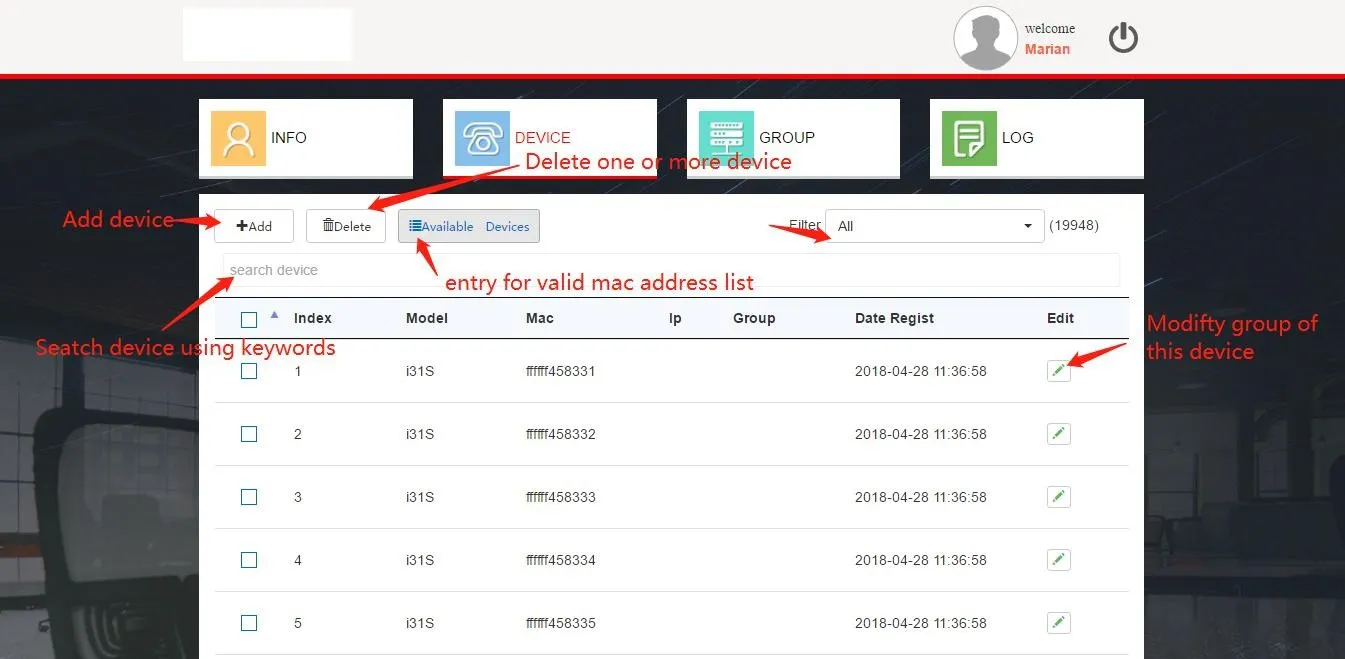
顧客デバイスリスト画面

図 2-16

1. 有効デバイス参照
Available Devicesをクリックすると割り当て済みMACアドレスが表示されます(図2-17)。MACを選択しRegisterをクリックすると、管理対象デバイスリストに追加されます。
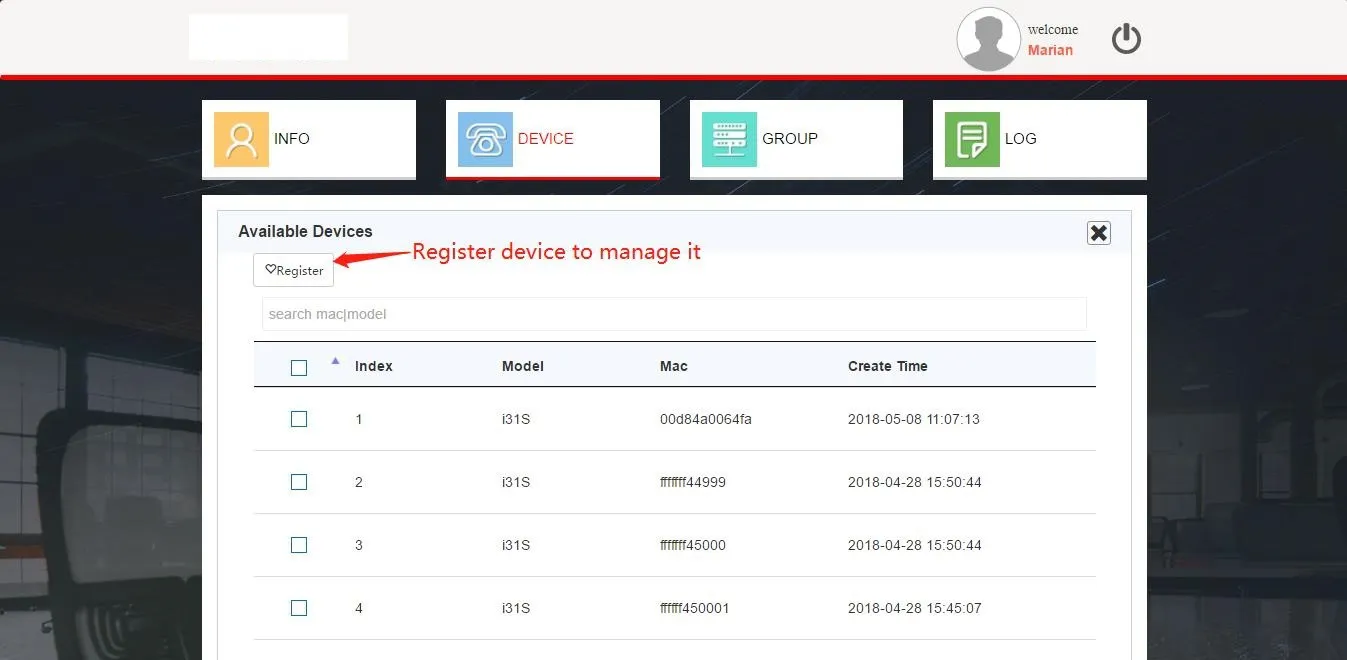
有効デバイス画面

図 2-17

2. デバイス追加
Excel一括インポートに対応(図2-18)。既定グループを選択して紐付け、標準テンプレートを使用してください(1回最大30,000件)。
顧客デバイスインポート画面

図 2-18

3. デバイス一括グループ追加
画面下部のショートカットを使用し(図2-19)、最大50台のデバイスを任意のグループに一括割り当てできます。
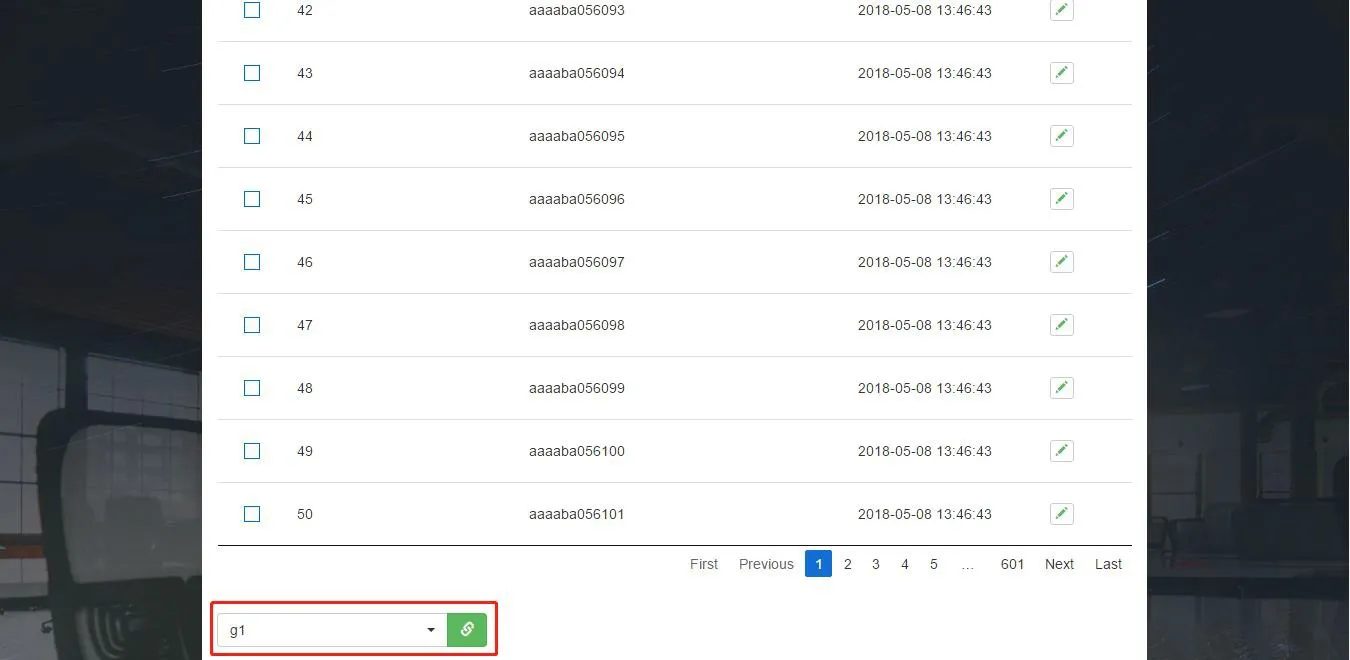
顧客デバイス一括グループ割り当て画面

図 2-19

グループ管理

グループはデバイス一括設定用の自動プロビジョニングテンプレートとして機能します(図2-21)。デバイスは紐付けられたグループの設定をFDPSから取得し適用します。
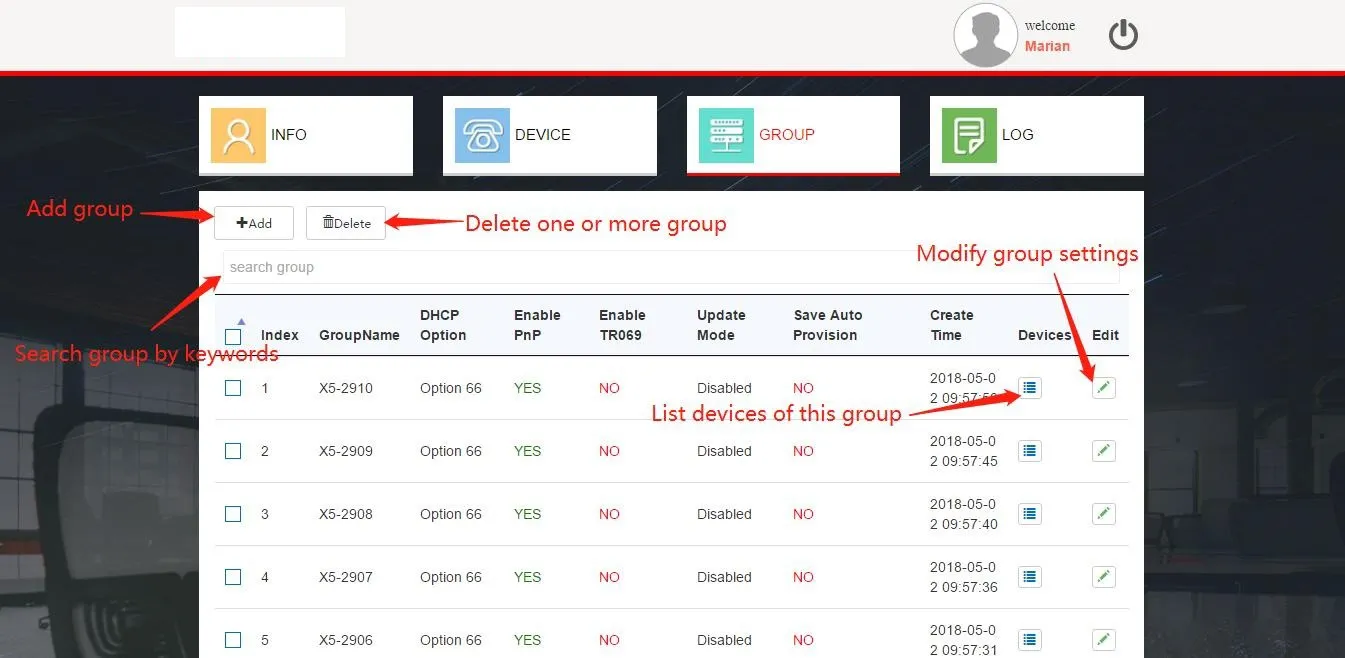
顧客グループ管理画面

図 2-21

1. グループ追加
Addをクリックし(図2-21)、パラメータを設定後(図2-22)Doneで保存します。
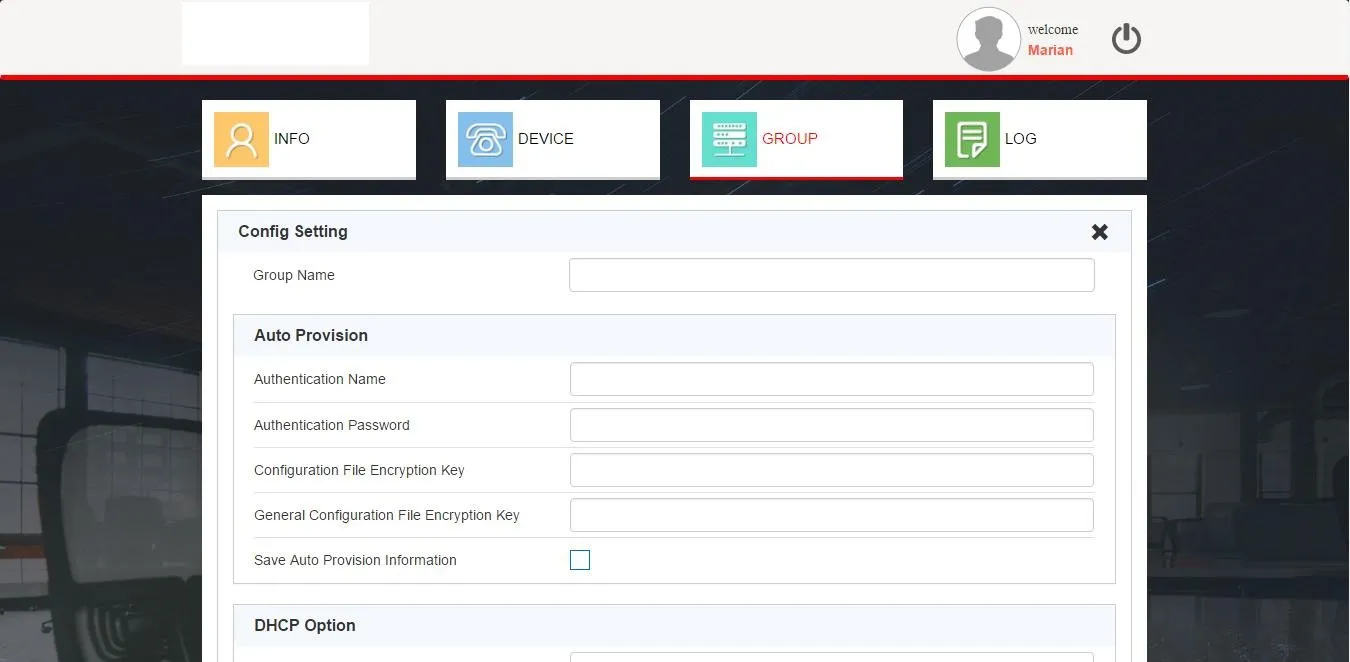
顧客グループ追加画面

図 2-22

2. グループ編集
Editをクリックし(図2-21)、設定を更新し(図2-23)保存します。
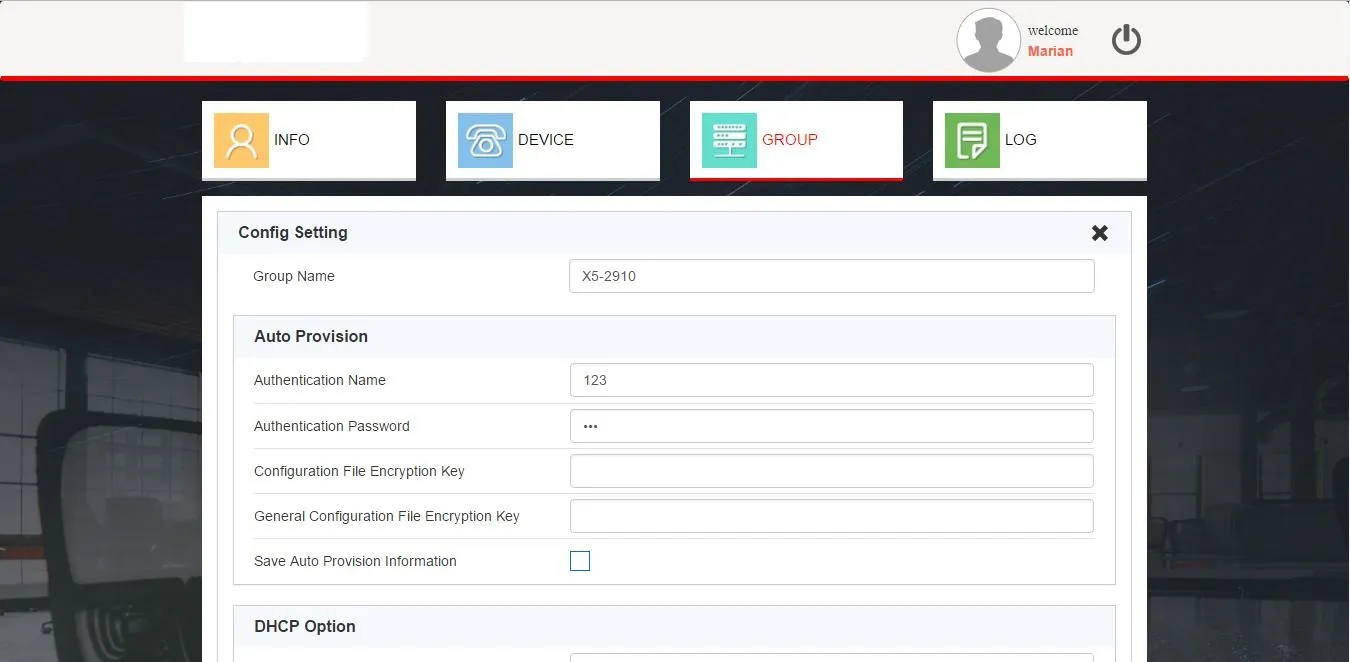
顧客グループ編集画面

図 2-23

3. グループ削除・検索・グループ内デバイス参照
機能は代理者のグループ管理と完全に同一です。

ログ管理

顧客アカウントもログの全機能を利用可能:操作履歴参照、最新10,000件ログダウンロード、検索、個別削除、ログ一括クリアが行えます。
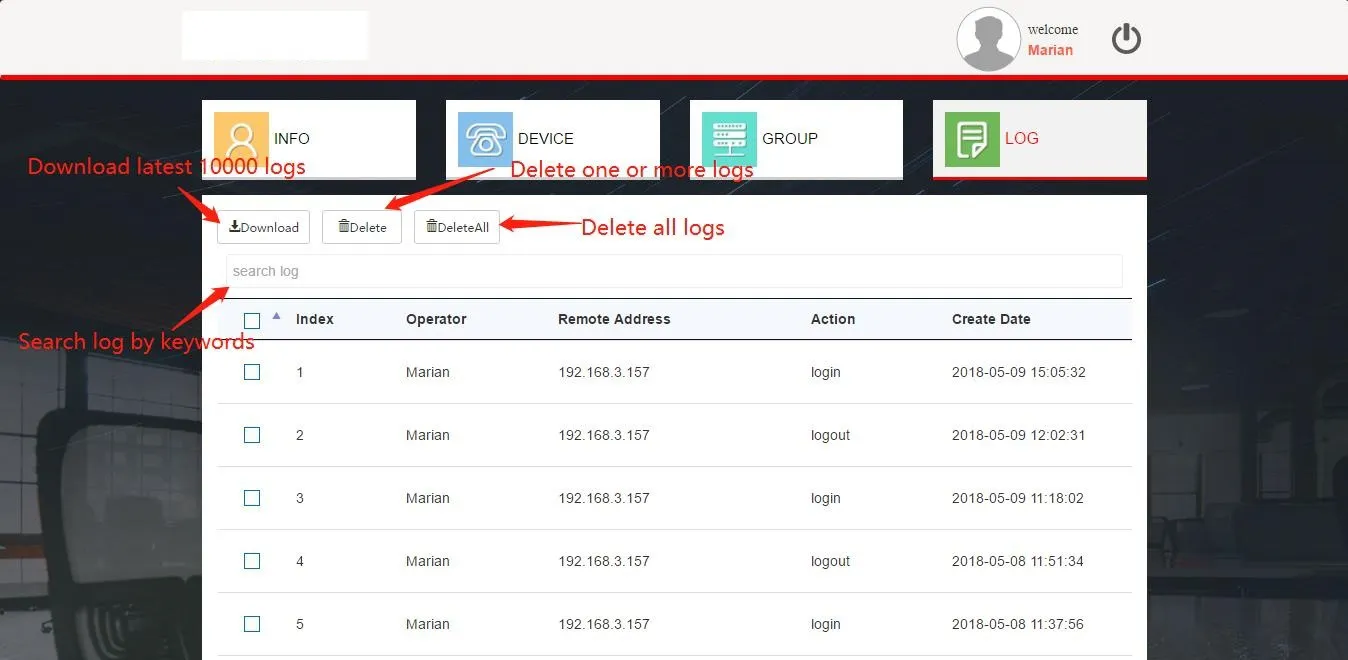
顧客ログ管理画面

パケットキャプチャ:デバイスとFDPS(RPS)サーバー通信

get_ap_url メソッド

再起動後、デバイスはFDPSへHTTPリクエストを送信し、設定URLパスを取得します。登録済みデバイスに対しては、サーバーから割り当てグループのファームウェア更新URLが応答され、デバイスはこのURLを用いて自動プロビジョニングを実行します。
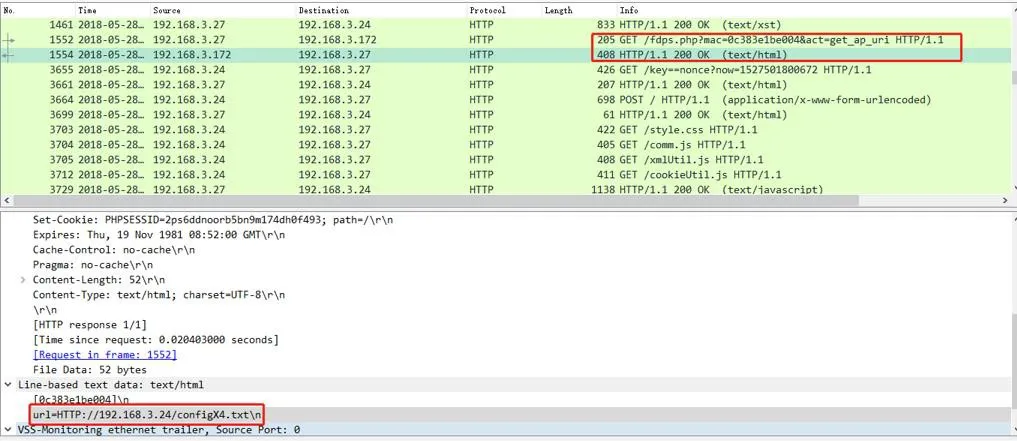
パケットキャプチャ:get_ap_url

get_ap_config メソッド

再起動後、デバイスはHTTPリクエストで設定ファイルを取得します。サーバーはグループ設定データを応答し、デバイスはAuto Provisionに設定を適用して配置を完了します。

パケットキャプチャ:get_ap_config

カタログ
顧客サービス 電話
We use cookie to improve your online experience. By continuing to browse this website, you agree to our use of cookie.

Cookies

This Cookie Policy explains how we use cookies and similar technologies when you access or use our website and related services. Please read this Policy together with our Terms and Conditions and Privacy Policy so that you understand how we collect, use, and protect information.

By continuing to access or use our Services, you acknowledge that cookies and similar technologies may be used as described in this Policy, subject to applicable law and your available choices.

Updates to This Cookie Policy

We may revise this Cookie Policy from time to time to reflect changes in legal requirements, technology, or our business practices. When we make updates, the revised version will be posted on this page and will become effective from the date of publication unless otherwise required by law.

Where required, we will provide additional notice or request your consent before applying material changes that affect your rights or choices.

What Are Cookies?

Cookies are small text files placed on your device when you visit a website or interact with certain online content. They help websites recognize your browser or device, remember your preferences, support essential functionality, and improve the overall user experience.

In this Cookie Policy, the term “cookies” also includes similar technologies such as pixels, tags, web beacons, and other tracking tools that perform comparable functions.

Why We Use Cookies

We use cookies to help our website function properly, remember user preferences, enhance website performance, understand how visitors interact with our pages, and support security, analytics, and marketing activities where permitted by law.

We use cookies to keep our website functional, secure, efficient, and more relevant to your browsing experience.

Categories of Cookies We Use

Strictly Necessary Cookies

These cookies are essential for the operation of the website and cannot be disabled in our systems where they are required to provide the service you request. They are typically set in response to actions such as setting privacy preferences, signing in, or submitting forms.

Without these cookies, certain parts of the website may not function correctly.

Functional Cookies

Functional cookies enable enhanced features and personalization, such as remembering your preferences, language settings, or previously selected options. These cookies may be set by us or by third-party providers whose services are integrated into our website.

If you disable these cookies, some services or features may not work as intended.

Performance and Analytics Cookies

These cookies help us understand how visitors use our website by collecting information such as traffic sources, page visits, navigation behavior, and general interaction patterns. In many cases, this information is aggregated and does not directly identify individual users.

We use this information to improve website performance, usability, and content relevance.

Targeting and Advertising Cookies

These cookies may be placed by our advertising or marketing partners to help deliver more relevant ads and measure the effectiveness of campaigns. They may use information about your browsing activity across different websites and services to build a profile of your interests.

These cookies generally do not store directly identifying personal information, but they may identify your browser or device.

First-Party and Third-Party Cookies

Some cookies are set directly by our website and are referred to as first-party cookies. Other cookies are set by third-party services, such as analytics providers, embedded content providers, or advertising partners, and are referred to as third-party cookies.

Third-party providers may use their own cookies in accordance with their own privacy and cookie policies.

Information Collected Through Cookies

Depending on the type of cookie used, the information collected may include browser type, device type, IP address, referring website, pages viewed, time spent on pages, clickstream behavior, and general usage patterns.

This information helps us maintain the website, improve performance, enhance security, and provide a better user experience.

Your Cookie Choices

You can control or disable cookies through your browser settings and, where available, through our cookie consent or preference management tools. Depending on your location, you may also have the right to accept or reject certain categories of cookies, especially those used for analytics, personalization, or advertising purposes.

Please note that blocking or deleting certain cookies may affect the availability, functionality, or performance of some parts of the website.

Restricting cookies may limit certain features and reduce the quality of your experience on the website.

Cookies in Mobile Applications

Where our mobile applications use cookie-like technologies, they are generally limited to those required for core functionality, security, and service delivery. Disabling these essential technologies may affect the normal operation of the application.

We do not use essential mobile application cookies to store unnecessary personal information.

How to Manage Cookies

Most web browsers allow you to manage cookies through browser settings. You can usually choose to block, delete, or receive alerts before cookies are stored. Because browser controls vary, please refer to your browser provider’s support documentation for details on how to manage cookie settings.

Contact Us

If you have any questions about this Cookie Policy or our use of cookies and similar technologies, please contact us at support@becke.cc .