DHCP Option 66による産業用電話機の自動展開

紹介

概要

本書では、DHCP Option66(自動展開方式の一つ)を使用してSIP産業用電話機を一括アップグレードする方法を説明します。電話機を再起動すると、起動時にIP取得要求を送信します。ルーターまたはDHCP ServerはIPを配布すると同時に、事前設定したアップグレード情報を電話機へ送信し、電話機が対応ファイルを見つけて設定を更新できるようにします。

対応機種

本書は当社すべてのSIP産業用電話機モデルに適用されます。

対象読者

本書はSIP産業用電話機の問題を解決する日常保守担当者向けです。

操作方法

ネットワーク接続方式:

PCにソフトウェアをインストールしてDHCP Serverを構築します(ダウンロード:http://www.dhcpserver.de/cms/)。新しいDHCP ServerでSIP産業用電話機にIPアドレスを提供し、電話機へ送信するアップグレード情報を設定します。また、PC上にFTPまたはTFTPサーバーを設定して、ファームウェアや設定ファイルなど必要なファイルを保存します。
最終的なネットワークトポロジーは以下のとおりです:
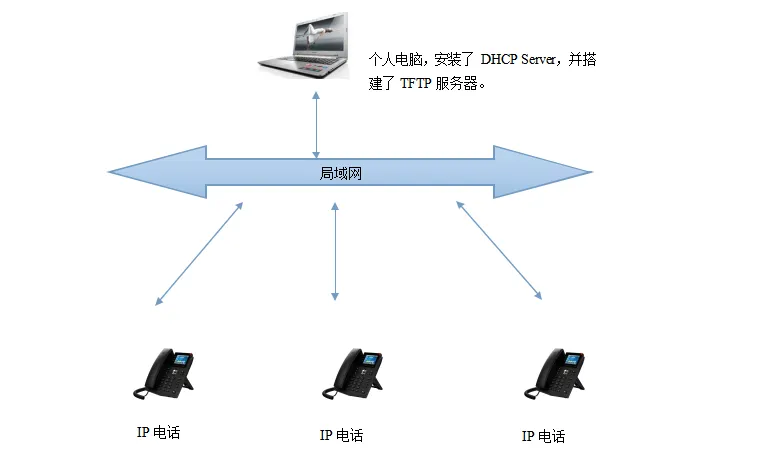
ネットワーク接続トポロジー図
1. DHCP Serverの設定
DHCP Serverを http://www.dhcpserver.de/cms/ からダウンロードし、中国語を含まないフォルダに展開します。PCの有線ネットワークカードに 192.168.1.2 などの固定IPを設定します。
 dhcpwiz.exeをダブルクリックし、DHCP Serverを実行します。設定ウィンドウが表示されたら、Nextをクリックします:
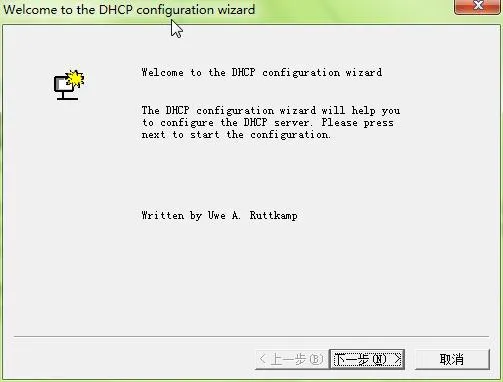
DHCP Serverを開く
固定IPを設定した有線ネットワークカードを選択し、このカードでSIP産業用電話機へIPを配布します:
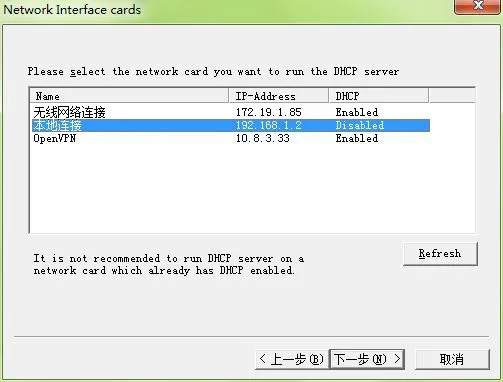
電話機へIPを配布
内蔵TFTPサーバーを有効にします。選択したTFTPルートディレクトリはアップグレードファイルの保存場所です。SIP産業用電話機はこのディレクトリでファームウェアや設定ファイルを探します。中国語を含むパスは避け、このディレクトリを覚えておきます:
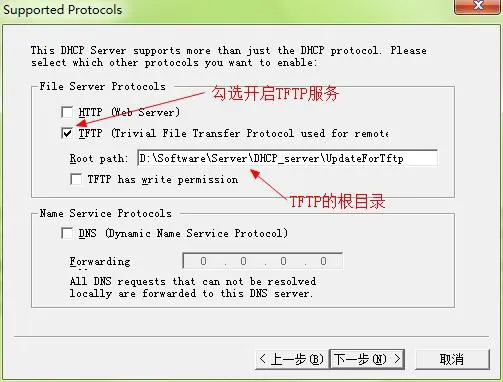
ファイル保存パス
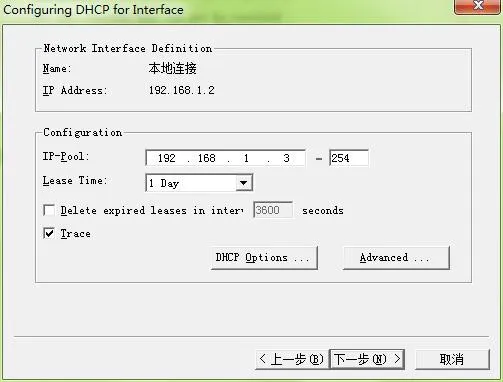
Nextをクリックし、配布するIPアドレス範囲を設定します:
IPアドレス範囲画面
DHCP Option 66を設定します。この項目は、SIP産業用電話機にアップグレードファイルのダウンロード先を知らせるためのものです:
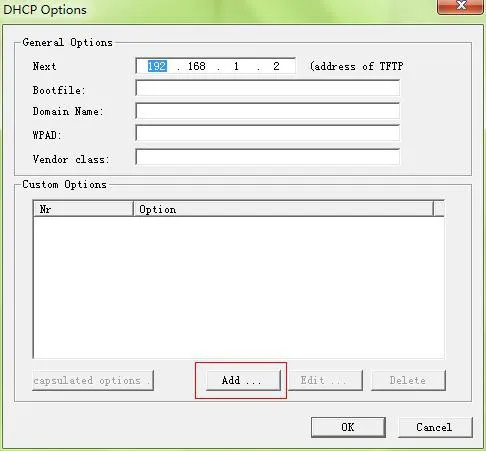
DHCP Option66設定
Addをクリックして DHCP option を追加します。追加内容は以下のとおりです:
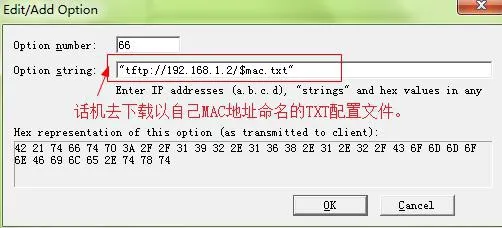
新しいDHCP option追加
パス(“tftp://192.168.1.2/CommonFile.txt”)を追加するとき、ダブルクォーテーションを忘れないでください。このパスはIP配布時に電話機へ送信されます。電話機は192.168.1.2からCommonFile.txtをダウンロードします。この指示ファイルは電話機に実行内容を伝えます。OKを2回クリック して確認します。
再度Nextをクリックし、前の設定内容の概要を確認します:
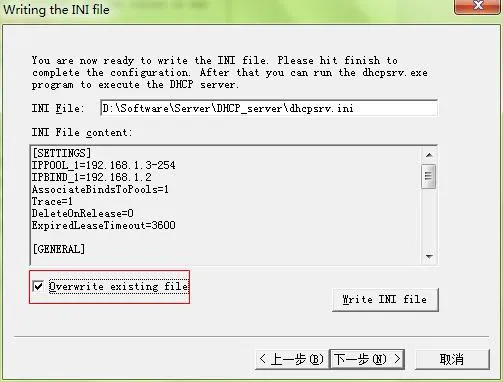
前期設定のまとめ画面
Overwrite existing fileにチェックし、 Write INI fileをクリックしてからNextをクリックします:
Overwrite existing fileにチェック
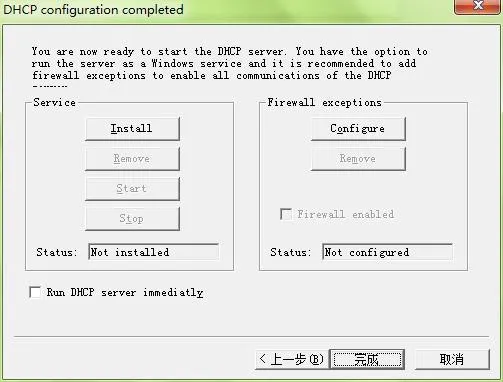
Installをクリックして設定を有効にします:
設定を有効化
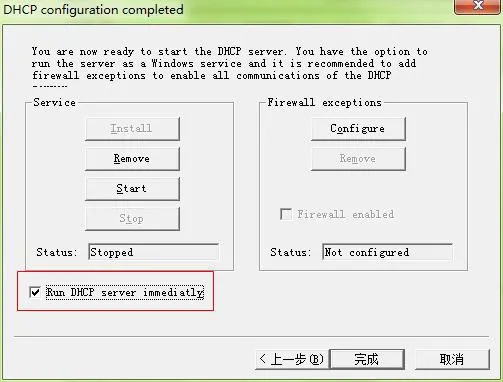
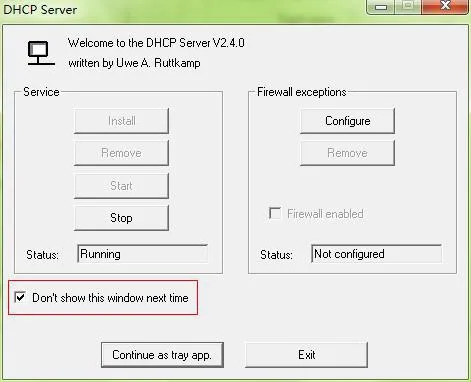
必要な項目にチェックし、Startをクリック してDHCP Serverを開始します。状態がrunningに変わります:
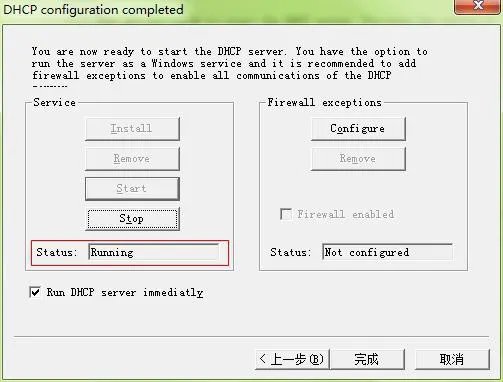
設定済みDHCP Server開始
Finishをクリックします:
完了クリック
をクリックし、ポップアップで はいをクリックします。PC右下のタスクバーにこのアイコンが表示されます:。これはDHCP ServerがPCにインストールされたことを示します。

設定ファイルの変更

SIP産業用電話機がこの設定ファイルをアップグレードすると、電話機が再起動し、再起動後に更新された設定が有効になります。
この設定ファイルは必要に応じて変更します。まず電話機から設定ファイルをエクスポートし、変更が必要なパラメータのみを残します。パラメータ名や空白を変更しないでください。変更すると設定ファイルが電話機に適用できない場合があります。この例では、登録ポート、サーバーアドレス、表示名、登録アカウント、電話番号、パスワードを変更するためのパラメータを残します:
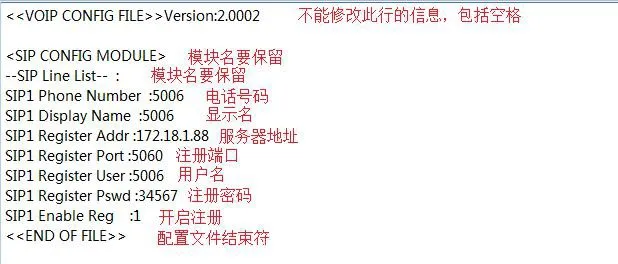
設定ファイル詳細パラメータ図
設定ファイルを開きます。内容は少ないですが、アドレスが正しいことを確認してください:
ファームウェアアドレスにはTFTPサーバーのホストアドレス、つまりPCアドレスとファームウェアファイル名が含まれます。ファイル名がfirmware.zの場合、電話機はfirmware.zを探します。ファームウェアをTFTPルートディレクトリに置くと、電話機がダウンロードしてアップグレードします。
注意:指示設定ファイルを変更するときは、他の内容を変更しないでください。空白の削除や追加も禁止です。そうしないとアップグレードに失敗します。

アップグレード操作

以上の設定が完了したら、SIP産業用電話機を一括アップグレードできます。
1. SIP産業用電話機の設定ファイル(例:00A859D0DACE.txt)をTFTPルートディレクトリに置きます。1台の電話機に1つの設定ファイルが対応します。複数台ある場合は、それぞれの電話機に設定ファイルを作成します。
2. SIP産業用電話機を再起動します。現場条件により手動再起動または一括再給電が可能です。PC上で電話機がIPを取得する提示を確認できます。約30秒後、電話機画面にアップグレードソフトウェアのダウンロード提示が表示されます。電話機が自動で1回再起動するとアップグレード完了です。その後、PC上のDHCP Serverを終了し、元のルーター接続に戻します。

カタログ
顧客サービス 電話
We use cookie to improve your online experience. By continuing to browse this website, you agree to our use of cookie.

Cookies

This Cookie Policy explains how we use cookies and similar technologies when you access or use our website and related services. Please read this Policy together with our Terms and Conditions and Privacy Policy so that you understand how we collect, use, and protect information.

By continuing to access or use our Services, you acknowledge that cookies and similar technologies may be used as described in this Policy, subject to applicable law and your available choices.

Updates to This Cookie Policy

We may revise this Cookie Policy from time to time to reflect changes in legal requirements, technology, or our business practices. When we make updates, the revised version will be posted on this page and will become effective from the date of publication unless otherwise required by law.

Where required, we will provide additional notice or request your consent before applying material changes that affect your rights or choices.

What Are Cookies?

Cookies are small text files placed on your device when you visit a website or interact with certain online content. They help websites recognize your browser or device, remember your preferences, support essential functionality, and improve the overall user experience.

In this Cookie Policy, the term “cookies” also includes similar technologies such as pixels, tags, web beacons, and other tracking tools that perform comparable functions.

Why We Use Cookies

We use cookies to help our website function properly, remember user preferences, enhance website performance, understand how visitors interact with our pages, and support security, analytics, and marketing activities where permitted by law.

We use cookies to keep our website functional, secure, efficient, and more relevant to your browsing experience.

Categories of Cookies We Use

Strictly Necessary Cookies

These cookies are essential for the operation of the website and cannot be disabled in our systems where they are required to provide the service you request. They are typically set in response to actions such as setting privacy preferences, signing in, or submitting forms.

Without these cookies, certain parts of the website may not function correctly.

Functional Cookies

Functional cookies enable enhanced features and personalization, such as remembering your preferences, language settings, or previously selected options. These cookies may be set by us or by third-party providers whose services are integrated into our website.

If you disable these cookies, some services or features may not work as intended.

Performance and Analytics Cookies

These cookies help us understand how visitors use our website by collecting information such as traffic sources, page visits, navigation behavior, and general interaction patterns. In many cases, this information is aggregated and does not directly identify individual users.

We use this information to improve website performance, usability, and content relevance.

Targeting and Advertising Cookies

These cookies may be placed by our advertising or marketing partners to help deliver more relevant ads and measure the effectiveness of campaigns. They may use information about your browsing activity across different websites and services to build a profile of your interests.

These cookies generally do not store directly identifying personal information, but they may identify your browser or device.

First-Party and Third-Party Cookies

Some cookies are set directly by our website and are referred to as first-party cookies. Other cookies are set by third-party services, such as analytics providers, embedded content providers, or advertising partners, and are referred to as third-party cookies.

Third-party providers may use their own cookies in accordance with their own privacy and cookie policies.

Information Collected Through Cookies

Depending on the type of cookie used, the information collected may include browser type, device type, IP address, referring website, pages viewed, time spent on pages, clickstream behavior, and general usage patterns.

This information helps us maintain the website, improve performance, enhance security, and provide a better user experience.

Your Cookie Choices

You can control or disable cookies through your browser settings and, where available, through our cookie consent or preference management tools. Depending on your location, you may also have the right to accept or reject certain categories of cookies, especially those used for analytics, personalization, or advertising purposes.

Please note that blocking or deleting certain cookies may affect the availability, functionality, or performance of some parts of the website.

Restricting cookies may limit certain features and reduce the quality of your experience on the website.

Cookies in Mobile Applications

Where our mobile applications use cookie-like technologies, they are generally limited to those required for core functionality, security, and service delivery. Disabling these essential technologies may affect the normal operation of the application.

We do not use essential mobile application cookies to store unnecessary personal information.

How to Manage Cookies

Most web browsers allow you to manage cookies through browser settings. You can usually choose to block, delete, or receive alerts before cookies are stored. Because browser controls vary, please refer to your browser provider’s support documentation for details on how to manage cookie settings.

Contact Us

If you have any questions about this Cookie Policy or our use of cookies and similar technologies, please contact us at support@becke.cc .