
カラースクリーンSIP電話画像アップグレードガイドは、カスタム壁紙、ロゴ、DSSキーアイコンの仕様、Photo shopの作成、7-Zipパッケージ、Web UI、およびすべてのモデルの自動プロビジョニングアップグレード手順をカバーしています。
カラースクリーンIP電話は、アイドル画面の壁紙とタイトルロゴのカスタムアップグレードをサポートしています。H5シリーズ電話は、ショートカットキーアイコンのカスタムアップグレードを追加でサポートしています。Web UIアップグレードとAuto Provisionアップグレードの2つの方法が利用可能です。サポートされている画像フォーマット: .bmp および .tar.gz。
1. カラースクリーン電話機モデル別の壁紙仕様:
表1 - カラースクリーンシリーズ壁紙仕様
| モデル | 解像度 W*H | 色深度 | フォーマット | ファイルサイズ | ファイル名 |
| BX3S/BX4 | 320*240 | 16bit RGB565 | bmp | ~150KB | 無制限 |
| BX3SG | 320*240 | 16bit RGB565 | bmp | ~150KB | 無制限 |
| BX3U | 320*240 | 16bit RGB565 | bmp | ~150KB | 無制限 |
| BX4U | 320*240 | 16bit RGB565 | bmp | ~150KB | 無制限 |
| BH5 | 480*320 | 16bit RGB565 | bmp | ~300KB | 無制限 |
| BX5S | 480*320 | 16bit /24bit RGB565 | bmp | ~300KB | 無制限 |
| BX5U | 480*320 | 16bit RGB565 | bmp | ~300KB | 無制限 |
| BX6-Main | 480*272 | 24bit RGB888 | bmp | ~380KB | 無制限 |
| BX6-Sub | 240*320 | 16bit RGB565 | bmp | ~150KB | 無制限 |
| BX6U | 480 * 272 | 24bit RGB888 | bmp | ~380KB | 無制限 |
| BX7 | 800*480 | 24bit RGB888 | bmp | ~1.00MB | 無制限 |
| BX7C | 800*480 | 24bit RGB888 | bmp | ~1.00MB | 無制限 |
| GP210/GP210i-Main | 480*272 | 24bit RGB888 | bmp | ~380KB | 無制限 |
| GP210/GP210i-Sub | 320*480 | 16bit RGB565 | bmp | ~300KB | 無制限 |
2. カラースクリーン電話機モデル別のDSSキーアイコン仕様:
表2 - カラースクリーンモデルのDSSキーアイコン仕様
| モデル | 解像度 W*H | 色深度 | フォーマット | ファイルサイズ | ファイル名 |
| BX3S/BX4 | - | - | - | - | - |
| BH5 | 54*54 | 16bit RGB565 | bmp | ~5KB | 表3を参照 |
| BX4U-Side | 25*25 | 32bit | Png | ~3KB | 表4 ノーマルDSSキーを参照 |
| BX4U-Sub | 42*42 | 32bit | Png | ~3KB | 表4 ノーマルDSSキーを参照 |
| BX5U-Side | 25*25 | 32bit | Png | ~3KB | 表4 ノーマルDSSキーを参照 |
| BX5U-Sub | 42*42 | 32bit | Png | ~3KB | 表4 ノーマルDSSキーを参照 |
| BX6U-Side | 25*25 | 32bit | Png | ~3KB | 表4 ノーマルDSSキーを参照 |
| BX6U-Sub | 42*42 | 32bit | Png | ~3KB | 表4 ノーマルDSSキーを参照 |
| BX5S | - | - | - | - | - |
| BX6-Sub DSS | 42*42 | 32bit | Png | ~3KB | 表4 ノーマルDSSキーを参照 |
| BX7 | - | - | - | - | - |
| BX7C | 31*31 | 32bit | Png | ~4KB | 表4 サイドDSSキーを参照 |
| GP210/GP210i-Side | 25*25 | 32bit | Png | ~2KB | 表4 サイドDSSキーを参照 |
| GP210/GP210i-Sub DSS | 42*42 | 32bit | Png | ~3KB | 表4 ノーマルDSSキーを参照 |
3. BH5電話機のアイドル画面スピードダイヤルアイコンの命名:
表3 - H5電話機カスタムアイコン命名
| ファイルタイプ | ファイル名 | フォーマット | ファイルサイズ | 解像度 WxH |
| 受付 | ICON_RECEPTION | bmp | ~5KB | 54x54 |
| サービス | ICON_SERVICE | bmp | ~5KB | 54x54 |
| 清掃 | ICON_CLEANING | bmp | ~5KB | 54x54 |
| 起床 | ICON_WAKEUP | bmp | ~5KB | 54x54 |
| 緊急 | ICON_EMG | bmp | ~5KB | 54x54 |
| 管理者 | ICON_MANAGER | bmp | ~5KB | 54x54 |
注: ショートカットキー画像の背景色は黒にする必要があります。これにより背景が除去され、LCD画面に円形のアイコンが表示されます。
4. カラースクリーン電話機のアイドル画面DSSキーアイコンの命名:
表4 - DSSおよびサイドDSSキーアイコン
| DSSキータイプ | サイドDSSキーアイコン名 | ノーマルDSSキーアイコン名 |
| BLFリスト | side_custom_dss_blflist.png | custom_dss_blflist.png |
| DTMF | side_custom_dss_dtmf.png | custom_dss_dtmf.png |
| なし | side_custom_dss_edit.png | custom_dss_edit.png |
| キーイベント | side_custom_dss_keyevent.png | custom_dss_keyevent.png |
| 回線 | side_custom_dss_line.png | custom_dss_line.png |
| URL&Action URL | side_custom_dss_url.png | custom_dss_url.png |
| Mcast | side_custom_dss_mcast.png | custom_dss_mcast.png |
| メモリーキー/アテンド転送 | side_custom_dss_mem_axfer.png | custom_dss_mem_axfer.png |
| メモリーキー/ブラインド転送 | side_custom_dss_mem_bxfer.png | custom_dss_mem_bxfer.png |
| メモリーキー/コールパーク | side_custom_dss_mem_callpark.png | custom_dss_mem_callpark.png |
| メモリーキー/コール転送 | side_custom_dss_mem_cfw.png | custom_dss_mem_cfw.png |
| メモリーキー/カンファレンス | side_custom_dss_mem_conf.png | custom_dss_mem_conf.png |
| メモリーキー/DTMF | side_custom_dss_mem_dtmf.png | custom_dss_mem_dtmf.png |
| メモリーキー/インターカム | side_custom_dss_mem_intercome.png | custom_dss_mem_intercome.png |
| メモリーキー/MWI | side_custom_dss_mem_mwi.png | custom_dss_mem_mwi.png |
| メモリーキー/新規通話 | side_custom_dss_mem_newcall.png | custom_dss_mem_newcall.png |
| メモリーキー/プレゼント | side_custom_dss_mem_present.png | custom_dss_mem_present.png |
| メモリーキー/スピードダイヤル | side_custom_dss_mem_spdial.png | custom_dss_mem_spdial.png |
カラースクリーン電話機のタイトルロゴ仕様:
注: BX5SおよびBX6シリーズは、一時的にカスタムタイトルロゴのアップグレードをサポートしていません。
| モデル | 解像度 WxH | 色深度 | フォーマット | ファイルサイズ | ファイル名 |
| BX3S/BX4/BH5/D5 | W ≤ 画面幅; H < タイトルバー高さ | 16bit RGB565 | bmp | ~10KB | TITLE_LOGO |
タイトルバーの高さ (titlebarH):
A: H5 = 40px
B: BX3S/BX4/D5 = 35px
Adobe Photoshop
Photoshopを開く → 画像を開く → 画像 → 画像サイズ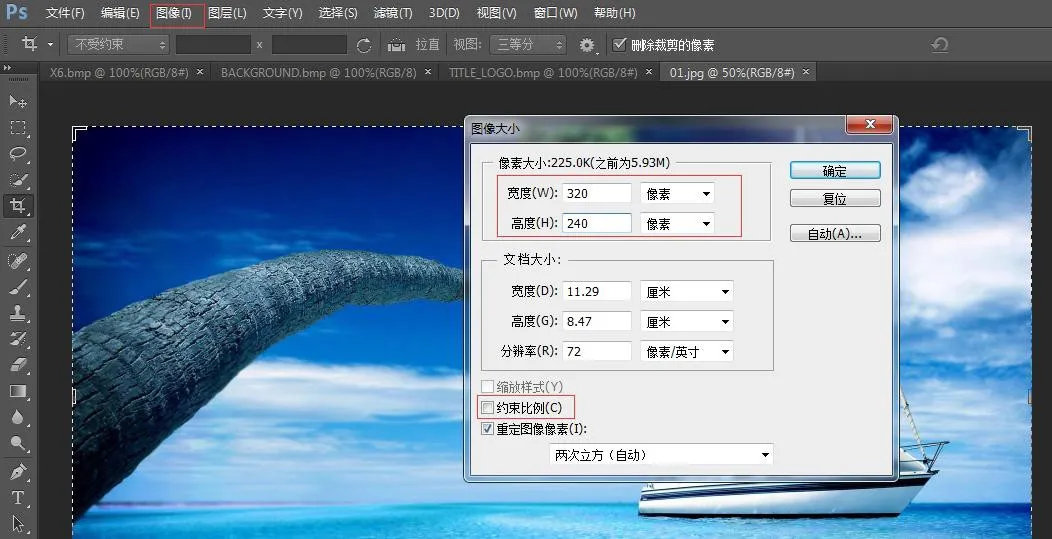 <
お使いの電話モデルに基づいて幅と高さを設定します。「縦横比を固定」のチェックを外す → OKをクリック
<
お使いの電話モデルに基づいて幅と高さを設定します。「縦横比を固定」のチェックを外す → OKをクリック
ファイル → 別名で保存 → BMP形式を選択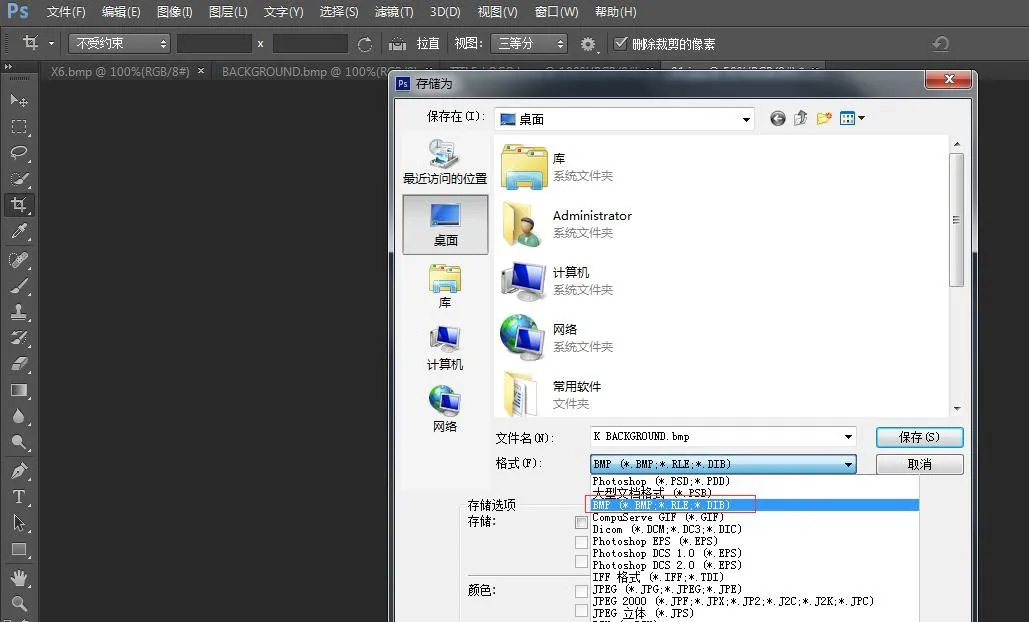
保存をクリックし、図のように正しい色深度を選択します: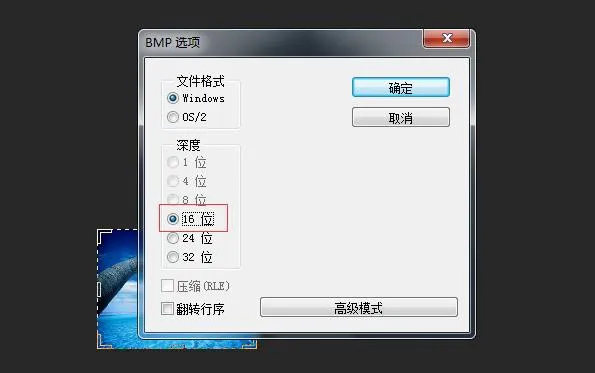 <
お使いの電話モデルに合った色深度を選択 → OK。画像の作成が完了します。
<
お使いの電話モデルに合った色深度を選択 → OK。画像の作成が完了します。
3. タイトルロゴ、スピードダイヤル、DSSキーアイコンも同じ作成方法を使用します。
4. etc.tar.gz パッケージの作成方法
7-Zipツールを使用します(例: ICON_SERVICE.bmp)
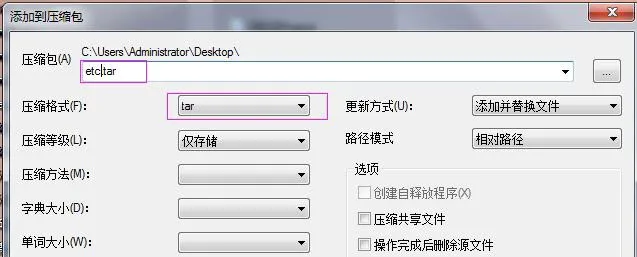
1) ファイルを右クリック → 7-Zip → アーカイブに追加 → アーカイブ形式: tar → OK → etc.tar を生成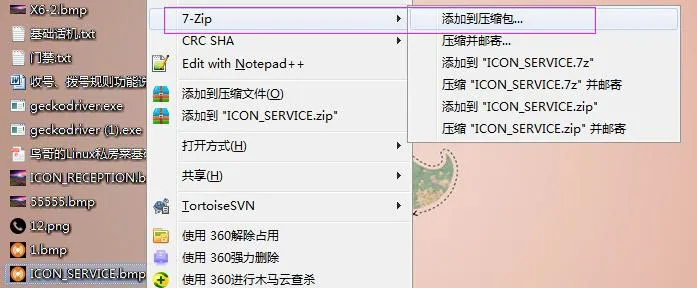
2) etc.tar を右クリック → 7-Zip → アーカイブに追加 → アーカイブ形式: gzip → OK → etc.tar.gz を生成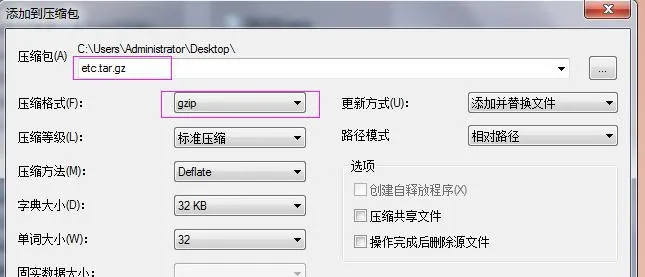
BX3S/BX4/BH5 壁紙アップグレード
H5は壁紙、タイトルロゴ、アイドル時スピードダイヤルアイコンのアップグレードをサポートしています。
電話のWeb UIにログイン → 電話設定 → 詳細設定 → 画面画像。ここで .bmp または etc.tar.gz ファイルをアップロードします。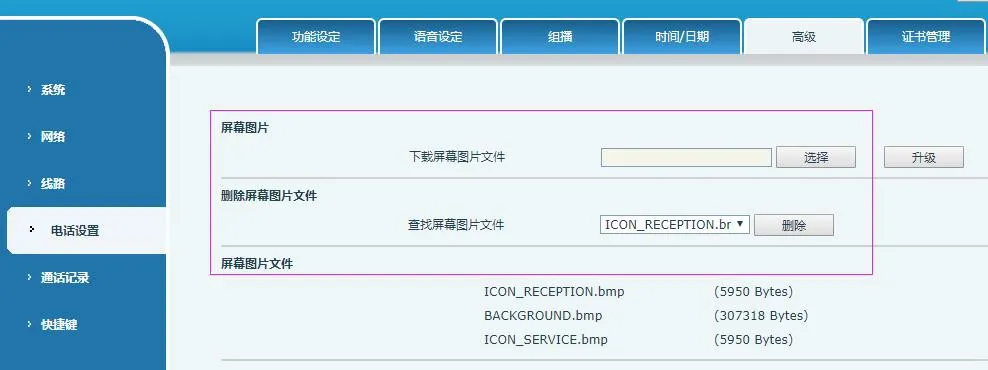 <
アップグレードが成功すると、このページで画像を表示および削除できます。
<
アップグレードが成功すると、このページで画像を表示および削除できます。
BX5S/BX6/BX7/BX7C/GP210/GP210i 壁紙アップグレード
電話のWeb UIにログイン → システム → アップグレード → 壁紙アップグレード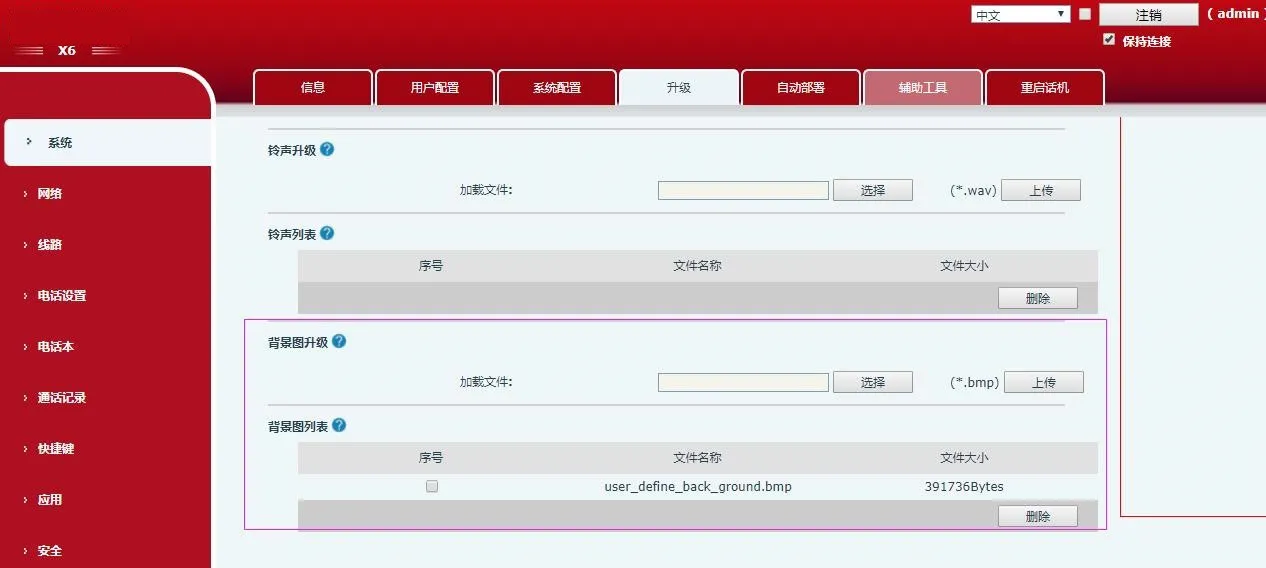 <
アップグレードが成功すると、このページで壁紙を表示および削除できます。
<
アップグレードが成功すると、このページで壁紙を表示および削除できます。
BX4U/BX5U/BX6U/BX5S/BX6/BX7/BX7C/GP210/GP210i DSSキーアイコンのアップグレード(2つの方法)
1) 直接アップグレード (.png)
Web UI: システム → アップグレード → DSSキーアイコンアップグレード。カスタムアイコンをアップロードします(表4の命名規則に従う必要があります)。アップグレードされたアイコンはDSSキーアイコンリストに表示されます。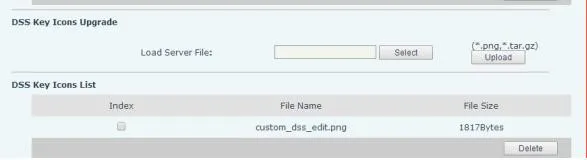
2) バッチアップグレード (.tar.gz)
アイコンを一括アップグレードする場合は、.tar.gzパッケージを使用します(カスタム名もサポートされます)。
① Linuxパッケージングコマンド: tar –zcvf etc.tar.gz xxx.png xxx1.png
② Windowsパッケージング (7-Zip):
- ファイルを選択 → 右クリック → 7-Zip → アーカイブに追加 → tar → OK (etc.tar を作成)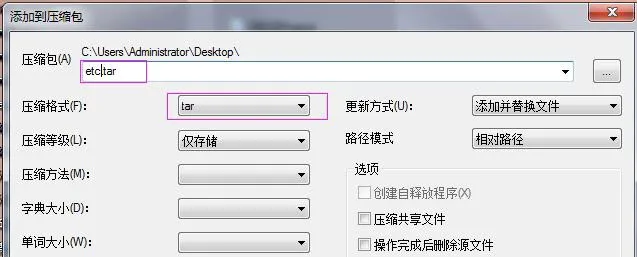 - etc.tar を右クリック → 7-Zip → アーカイブに追加 → gzip → OK (etc.tar.gz を作成)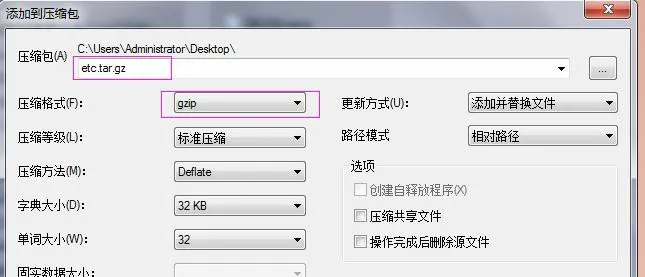
アップグレード後、Web UIでカスタムDSSキーアイコンを選択します。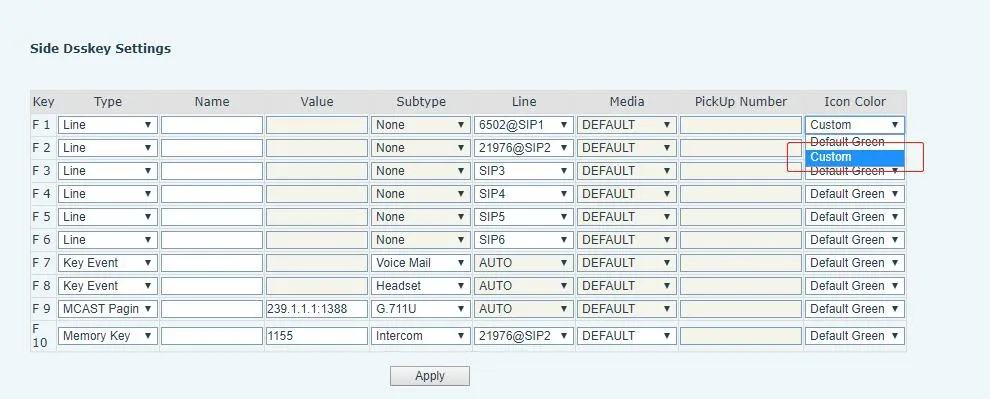
BX34シリーズのAuto Provision(壁紙、タイトルロゴ;H5はスピードダイヤルアイコンをサポート)
設定ファイルの
| Auto | Etc | Url | : ftp://1:1@172.16.6.62/BACKGROUND.bmp |
| Auto | Etc | Url | : ftp://1:1@172.16.6.62/TITLE_LOGO.bmp |
| Auto | Etc | Url | : ftp://1:1@172.16.6.62/etc.tar.gz |
設定例 (BACKGROUND.bmp):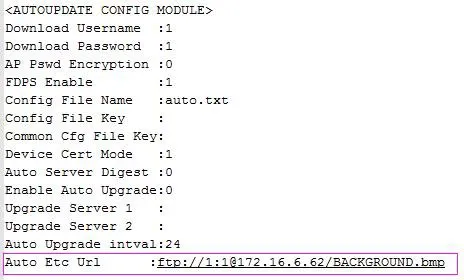
BX4U/BX5U/BX6U/BX5S/BX6/BX7/BX7C/GP210/GP210i は、壁紙とDSSキーアイコンに同じAuto Provision方法を使用します(タイトルロゴはサポートされていません)。ファイル名はカスタマイズ可能です。
例 (BX6):
Auto Etc Url : ftp://1:1@172.16.6.62/X6.bmp
Auto Etc Url : ftp://1:1@172.16.6.62/etc.tar.gz