
カラースクリーンSIP電話画像アップグレードガイドは、カスタム壁紙、ロゴ、DSSキーアイコンの仕様、Photo shopの作成、7-Zipパッケージ、Web UI、およびすべてのモデルの自動プロビジョニングアップグレード手順をカバーしています。
カラー液晶IP電話は、待ち受け壁紙とタイトルロゴのカスタムアップグレードに対応します。H5シリーズ電話機は、追加でショートカットキーアイコンのカスタム更新にも対応します。アップグレード方式はWeb UI更新と自動プロビジョニング更新の2種類があります。対応画像形式:.bmp および .tar.gz。
1. 各カラー液晶電話機種別 壁紙仕様:
表1 カラー液晶シリーズ 壁紙仕様
| 機種 | 解像度 幅*高さ | 色深度 | 形式 | ファイルサイズ | ファイル名 |
| BX3S/BX4 | 320*240 | 16bit RGB565 | bmp | 約150KB | 制限なし |
| BX3SG | 320*240 | 16bit RGB565 | bmp | 約150KB | 制限なし |
| BX3U | 320*240 | 16bit RGB565 | bmp | 約150KB | 制限なし |
| BX4U | 320*240 | 16bit RGB565 | bmp | 約150KB | 制限なし |
| BH5 | 480*320 | 16bit RGB565 | bmp | 約300KB | 制限なし |
| BX5S | 480*320 | 16bit /24bit RGB565 | bmp | 約300KB | 制限なし |
| BX5U | 480*320 | 16bit RGB565 | bmp | 約300KB | 制限なし |
| BX6-本体 | 480*272 | 24bit RGB888 | bmp | 約380KB | 制限なし |
| BX6-サブ | 240*320 | 16bit RGB565 | bmp | 約150KB | 制限なし |
| BX6U | 480 * 272 | 24bit RGB888 | bmp | 約380KB | 制限なし |
| BX7 | 800*480 | 24bit RGB888 | bmp | 約1.00MB | 制限なし |
| BX7C | 800*480 | 24bit RGB888 | bmp | 約1.00MB | 制限なし |
| GP210/GP210i-本体 | 480*272 | 24bit RGB888 | bmp | 約380KB | 制限なし |
| GP210/GP210i-サブ | 320*480 | 16bit RGB565 | bmp | 約300KB | 制限なし |
2. 各カラー液晶電話機種別 DSSキーアイコン仕様:
表2 カラー液晶機種 DSSキーアイコン仕様
| 機種 | 解像度 幅*高さ | 色深度 | 形式 | ファイルサイズ | ファイル名 |
| BX3S/BX4 | - | - | - | - | - |
| BH5 | 54*54 | 16bit RGB565 | bmp | 約5KB | 表3参照 |
| BX4U-サイド | 25*25 | 32bit | Png | 約3KB | 表4 標準DSSキー参照 |
| BX4U-サブ | 42*42 | 32bit | Png | 約3KB | 表4 標準DSSキー参照 |
| BX5U-サイド | 25*25 | 32bit | Png | 約3KB | 表4 標準DSSキー参照 |
| BX5U-サブ | 42*42 | 32bit | Png | 約3KB | 表4 標準DSSキー参照 |
| BX6U-サイド | 25*25 | 32bit | Png | 約3KB | 表4 標準DSSキー参照 |
| BX6U-サブ | 42*42 | 32bit | Png | 約3KB | 表4 標準DSSキー参照 |
| BX5S | - | - | - | - | - |
| BX6-サブDSS | 42*42 | 32bit | Png | 約3KB | 表4 標準DSSキー参照 |
| BX7 | - | - | - | - | - |
| BX7C | 31*31 | 32bit | Png | 約4KB | 表4 サイドDSSキー参照 |
| GP210/GP210i-サイド | 25*25 | 32bit | Png | 約2KB | 表4 サイドDSSキー参照 |
| GP210/GP210i-サブDSS | 42*42 | 32bit | Png | 約3KB | 表4 標準DSSキー参照 |
3. BH5電話機 待ち受け短縮ダイヤルアイコン 命名規則:
表3 H5機種 カスタムアイコン命名
| ファイル種別 | ファイル名 | 形式 | ファイルサイズ | 解像度 幅x高さ |
| 受付 | ICON_RECEPTION | bmp | 約5KB | 54x54 |
| サービス | ICON_SERVICE | bmp | 約5KB | 54x54 |
| 清掃 | ICON_CLEANING | bmp | 約5KB | 54x54 |
| 起床 | ICON_WAKEUP | bmp | 約5KB | 54x54 |
| 緊急 | ICON_EMG | bmp | 約5KB | 54x54 |
| 管理者 | ICON_MANAGER | bmp | 約5KB | 54x54 |
注釈:ショートカットキー画像の背景色は黒色にする必要があります。これにより背景が透過され、液晶画面上で円形アイコンとして表示されます。
4. カラー液晶電話機 待ち受けDSSキーアイコン 命名規則:
表4 DSS・サイドDSSキーアイコン
| DSSキー種別 | サイドDSSキー アイコン名 | 標準DSSキー アイコン名 |
| BLFリスト | side_custom_dss_blflist.png | custom_dss_blflist.png |
| DTMF | side_custom_dss_dtmf.png | custom_dss_dtmf.png |
| 未設定 | side_custom_dss_edit.png | custom_dss_edit.png |
| キーイベント | side_custom_dss_keyevent.png | custom_dss_keyevent.png |
| 回線 | side_custom_dss_line.png | custom_dss_line.png |
| URL・動作URL | side_custom_dss_url.png | custom_dss_url.png |
| マルチキャスト | side_custom_dss_mcast.png | custom_dss_mcast.png |
| メモリキー/応答転送 | side_custom_dss_mem_axfer.png | custom_dss_mem_axfer.png |
| メモリキー/ブラインド転送 | side_custom_dss_mem_bxfer.png | custom_dss_mem_bxfer.png |
| メモリキー/通話パーク | side_custom_dss_mem_callpark.png | custom_dss_mem_callpark.png |
| メモリキー/着信転送 | side_custom_dss_mem_cfw.png | custom_dss_mem_cfw.png |
| メモリキー/会議 | side_custom_dss_mem_conf.png | custom_dss_mem_conf.png |
| メモリキー/DTMF | side_custom_dss_mem_dtmf.png | custom_dss_mem_dtmf.png |
| メモリキー/インターホン | side_custom_dss_mem_intercome.png | custom_dss_mem_intercome.png |
| メモリキー/メッセージ通知 | side_custom_dss_mem_mwi.png | custom_dss_mem_mwi.png |
| メモリキー/新規通話 | side_custom_dss_mem_newcall.png | custom_dss_mem_newcall.png |
| メモリキー/プレゼンス | side_custom_dss_mem_present.png | custom_dss_mem_present.png |
| メモリキー/短縮ダイヤル | side_custom_dss_mem_spdial.png | custom_dss_mem_spdial.png |
カラー液晶電話機 タイトルロゴ仕様:
注釈:X5S・X6シリーズは、現在タイトルロゴのカスタムアップグレードに非対応です。
| 機種 | 解像度 幅x高さ | 色深度 | 形式 | ファイルサイズ | ファイル名 |
| X3S/X4/H5/D5 | 幅 ≦ 画面幅; 高さ < タイトルバー高さ | 16bit RGB565 | bmp | 約10KB | TITLE_LOGO |
タイトルバー高さ(titlebarH):
A: H5 = 40px
B: BX3S/BX4/D5 = 35px
Adobe Photoshop
2.1 Photoshopを起動 → 画像を開く → 画像 → 画像サイズ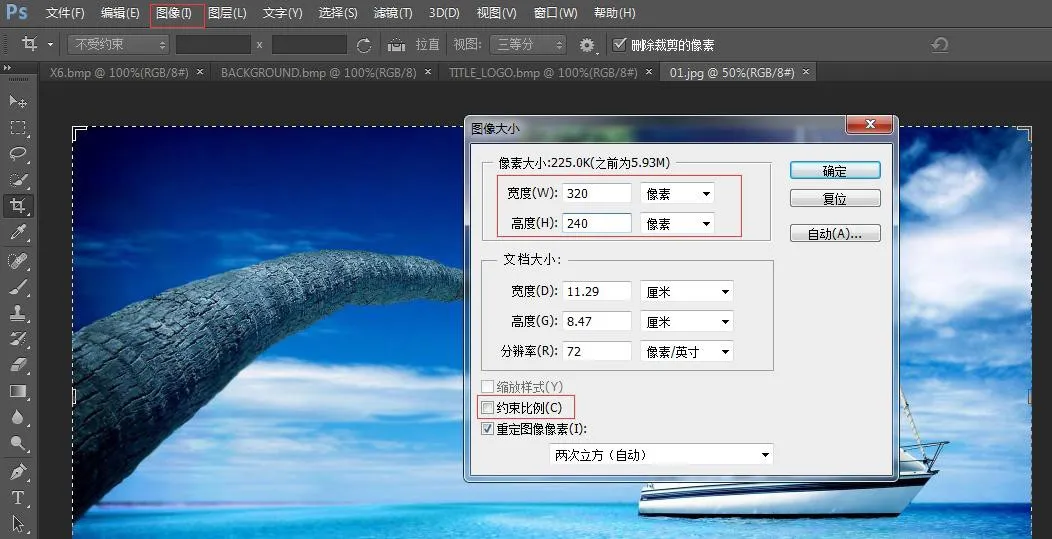 <
機種に合わせて幅・高さを設定し、「縦横比を固定」のチェックを外してOKをクリックします。
<
機種に合わせて幅・高さを設定し、「縦横比を固定」のチェックを外してOKをクリックします。
2.2 ファイル → 名前を付けて保存 → BMP形式を選択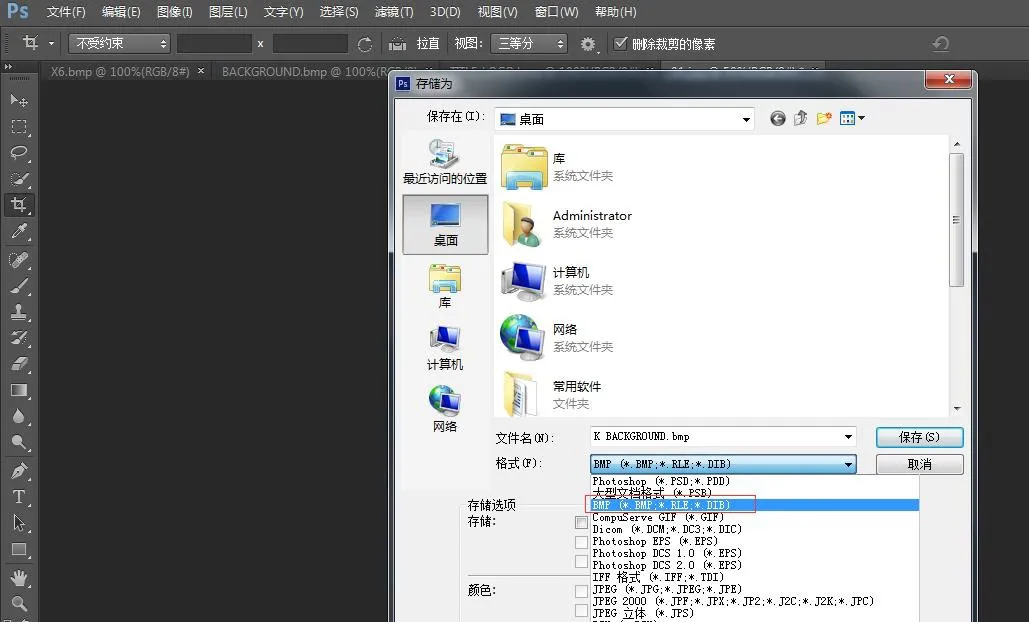
2.3 保存をクリックし、機種に対応した色深度を選択します: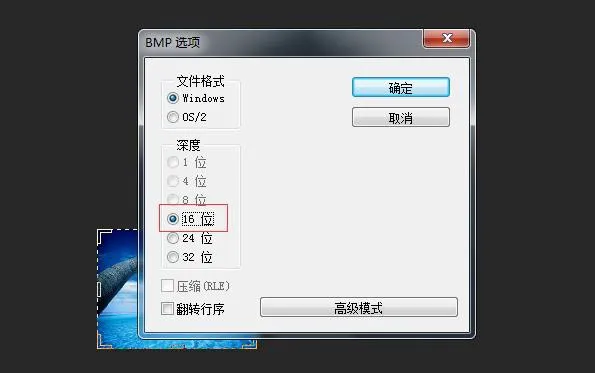 <
対応する色深度を選択してOK、画像作成完了となります。
<
対応する色深度を選択してOK、画像作成完了となります。
3. タイトルロゴ、短縮ダイヤルアイコン、DSSキーアイコンは同一の作成手順で作成します。
4. etc.tar.gzパッケージの作成方法
7-Zipツールを使用(例:ICON_SERVICE.bmp)
1) ファイルを右クリック → 7-Zip → アーカイブに追加 → アーカイブ形式: tar → OK → etc.tarを作成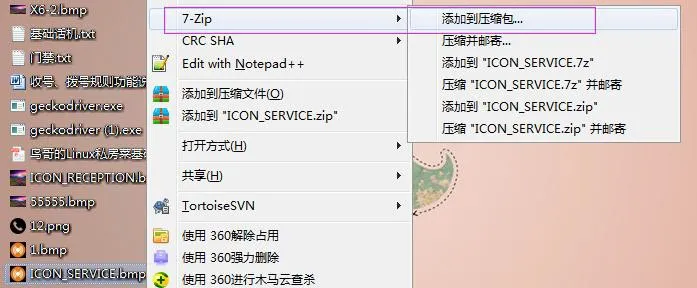
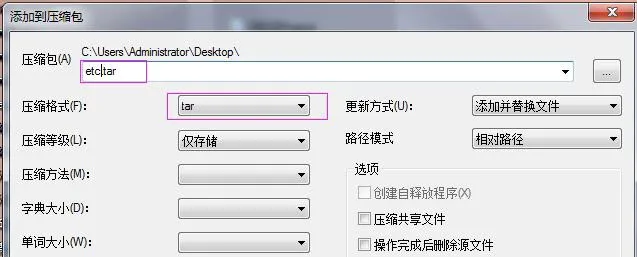
2) etc.tarを右クリック → 7-Zip → アーカイブに追加 → アーカイブ形式: gzip → OK → etc.tar.gzを作成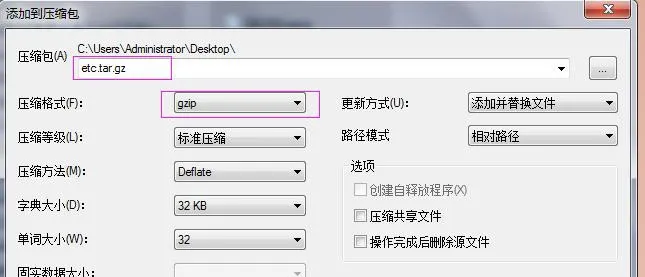
BX3S/BX4/BH5 壁紙更新
H5シリーズは壁紙、タイトルロゴ、待ち受け短縮ダイヤルアイコンのカスタム更新に対応します。電話機のWeb UIにログインし、電話設定 → 詳細設定 → 画面画像より.bmpまたはetc.tar.gzファイルをアップロードします。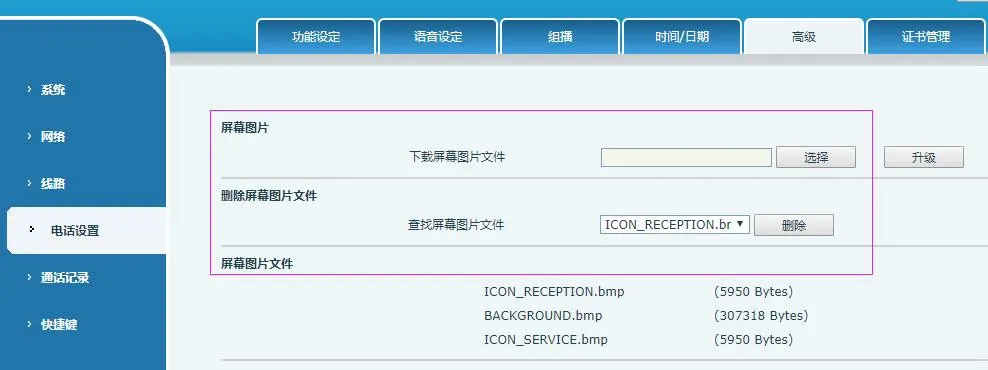 <
更新完了後、当画面にて画像の閲覧・削除が可能です。
<
更新完了後、当画面にて画像の閲覧・削除が可能です。
BX5S/BX6/BX7/BX7C/GP210/GP210i 壁紙更新
電話機Web UIにログイン → システム → アップグレード → 壁紙更新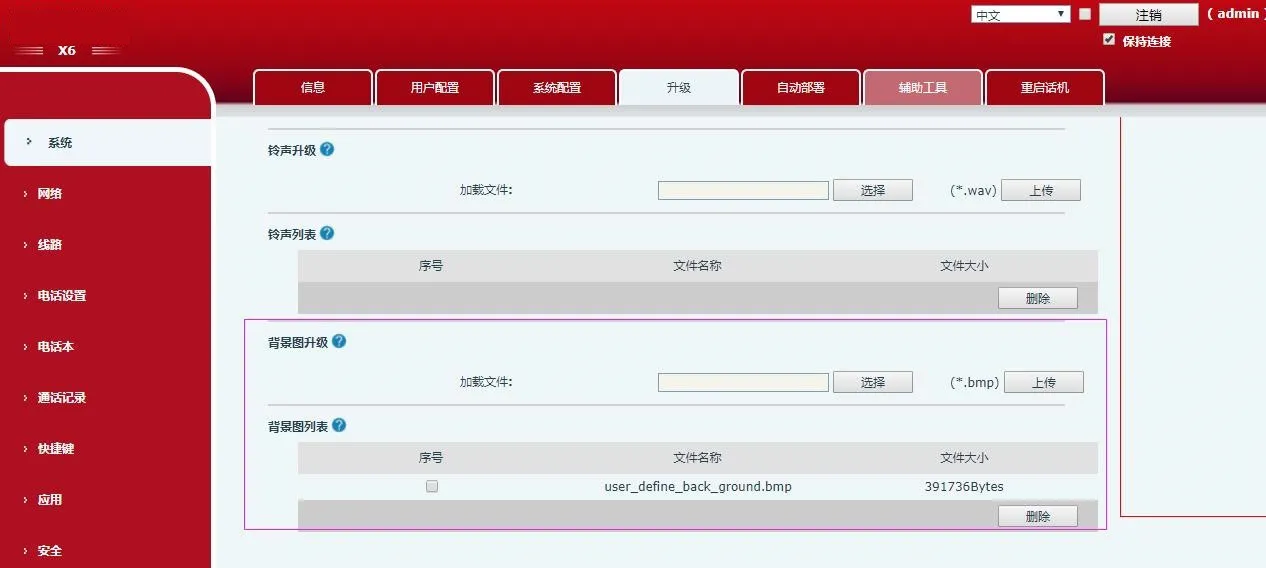 <
更新成功後、当画面で壁紙の確認・削除を行えます。
<
更新成功後、当画面で壁紙の確認・削除を行えます。
BX4U/BX5U/BX6U/BX5S/BX6/BX7/BX7C/GP210/GP210i DSSキーアイコン更新(2種類)
1) 単独更新(.png)
Web UI:システム → アップグレード → DSSキーアイコン更新。表4の命名規則に従ったカスタムアイコンをアップロードすると、DSSキーアイコン一覧に表示されます。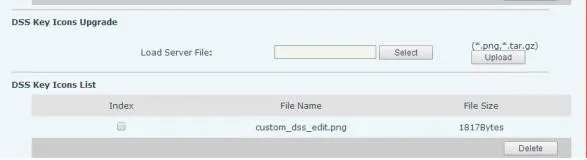
2) 一括更新(.tar.gz)
複数アイコンをまとめて更新する場合は.tar.gzパッケージを使用し、パッケージ名は任意に設定可能です。
① Linux圧縮コマンド:tar –zcvf etc.tar.gz xxx.png xxx1.png
② Windows圧縮(7-Zip使用):
- 対象ファイルを選択し右クリック → 7-Zip → アーカイブに追加 → tar → OK(etc.tar作成)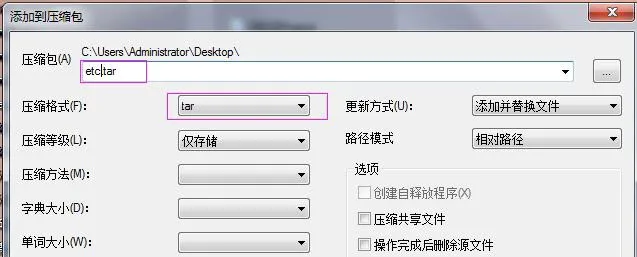 - etc.tarを右クリック → 7-Zip → アーカイブに追加 → gzip → OK(etc.tar.gz作成)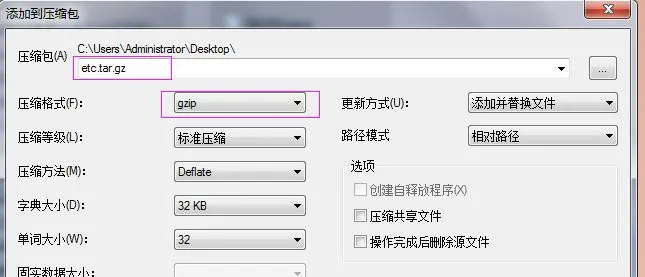
アップグレード後、Web UIにてカスタムDSSキーアイコンを選択して適用します。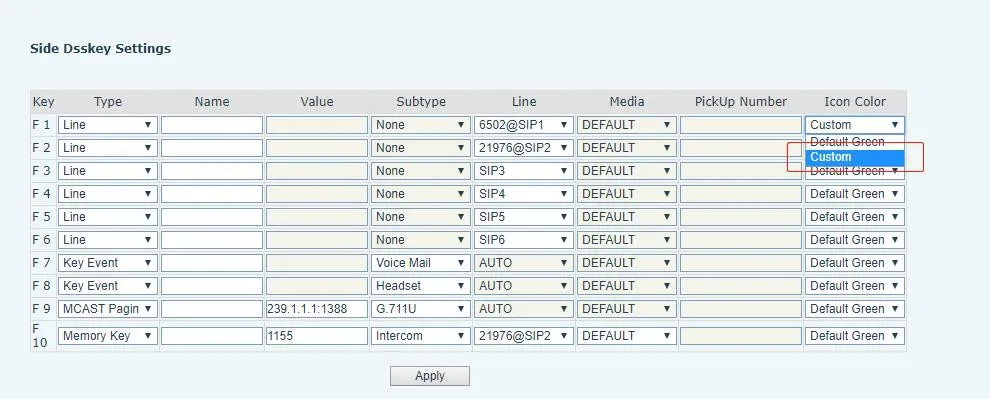
BX34シリーズ 自動プロビジョニング(壁紙・タイトルロゴ; H5は短縮ダイヤルアイコン対応)
設定ファイルの
| Auto | Etc | Url | : ftp://1:1@172.16.6.62/BACKGROUND.bmp |
| Auto | Etc | Url | : ftp://1:1@172.16.6.62/TITLE_LOGO.bmp |
| Auto | Etc | Url | : ftp://1:1@172.16.6.62/etc.tar.gz |
設定例(BACKGROUND.bmp):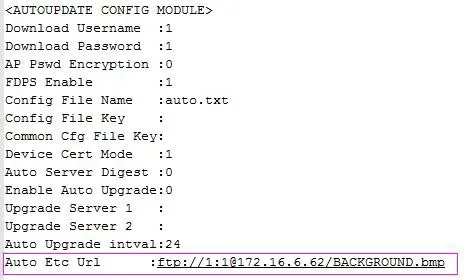
BX4U/BX5U/BX6U/BX5S/BX6/BX7/BX7C/GP210/GP210iは壁紙・DSSキーアイコンに同一の自動プロビジョニング方式を使用します(タイトルロゴ非対応)。ファイル名は任意に変更可能です。例(BX6):
Auto Etc Url : ftp://1:1@172.16.6.62/X6.bmp
Auto Etc Url : ftp://1:1@172.16.62/etc.tar.gz