
一方向のオーディオまたは両方の方向にオーディオがない場合のトラブルシューティング方法は?

はじめに

概要

2つの端末デバイスが音声通話中の場合、一方向のみ音声が聞こえる、または双方向とも音声が聞こえない問題が発生する可能性があります。一方向のみ音声が聞こえるとは、両方の通話者が正常に応答できるが、片方だけが相手の声を聞くことができる状態を指します。双方向とも音声が聞こえないとは、両方の通話者が応答できるが、どちらの側も相手側からの音声を一切聞くことができない状態を指します。

対応モデル

このガイドは、産業用デバイスと IP 電話モデルの両方を含む、当社のすべての製品に適用されます。

前提条件

トラブルシューティング用の PC を 1 台準備し、それに Wireshark をインストールします。PC をデバイスと同じ LAN に接続します。PC がデバイスおよび SIP サーバーと通信できることを確認します。また、デバイスが正しく給電され、ネットワークに適切に接続され、完全に起動し、ローカルネットワーク環境にアクセスできることを確認します。
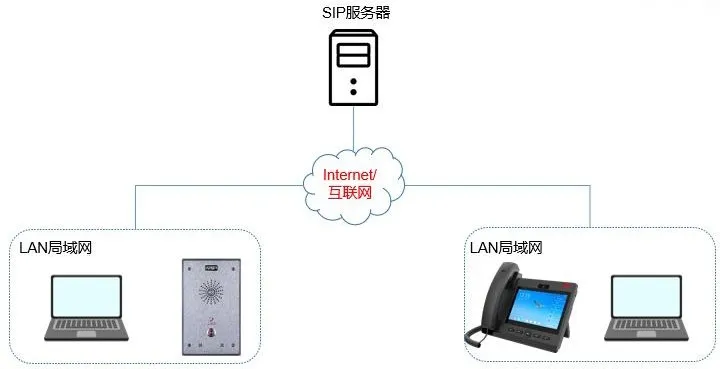
デバイスと PC の接続図

デバイスと PC の接続図

トラブルシューティング方法

音声の問題を分析する場合、最初のステップは正確な症状を特定することです。ほとんどの実際の導入環境では、産業用インターホンまたはドアステーションは通常 IP 電話を呼び出します。そのため、以下のセクションでは、通話の両端をインターホン電話として説明します。

インターホンが電話の声を聞き取れない

インターホンが電話からの音声を聞き取れない問題が発生した場合は、次の手順に従います。

電話が使用しているオーディオパス(受話器、スピーカーフォン、ヘッドセット)を確認します。受話器のみをテストした場合は、スピーカーホンに切り替え、それでも音声が聞こえないか確認します。一般的な原因の 1 つは、受話器コードが誤ってヘッドセットポートに接続されていることです。その場合、システムは依然として受話器のオーディオパスを使用している可能性がありますが、ケーブルが物理的にヘッドセットジャックに接続されているため、マイクの音声が正しくキャプチャされません。

インターホンで設定されているショートカットキーがスピードダイヤルに設定されているか確認します。

インターホンが電話を呼び出す場合、インターホンのショートカットキーはスピードダイヤルとして設定する必要があります:

インターホンのショートカットキーをスピードダイヤルとして設定

一部のユーザーは誤ってインターホンとして設定する場合があります。

電話が受話器を使用しているかスピーカーフォンを使用しているかに関わらず、インターホンが電話の声を聞き取れない場合は、セクション 2.3 で説明されているパケットキャプチャ手順に従います。インターホン、電話、サーバーで同時にトラフィックをキャプチャし、パケットキャプチャをテクニカルサポートに送信して分析を受けます。

電話がインターホンの声を聞き取れない

問題が受話器のみに影響しているのか、それとも受話器とスピーカーフォンの両方でインターホンの音声が聞こえないのかを確認します。受話器のみで音声が聞こえない場合は、受話器ケーブルが誤ってヘッドセットポートに差し込まれていないか確認します。

電話がショートカットキーを使用してインターホンを呼び出している場合、通話タイプがスピードダイヤルまたはインターホンに設定されているか確認します。インターホンに設定されている場合は、スピードダイヤルに変更してみてください。ショートカットキーをインターホンとして設定したままにする必要がある場合は、インターホンの設定でインターホンミュートを有効にするオプションを無効にします。
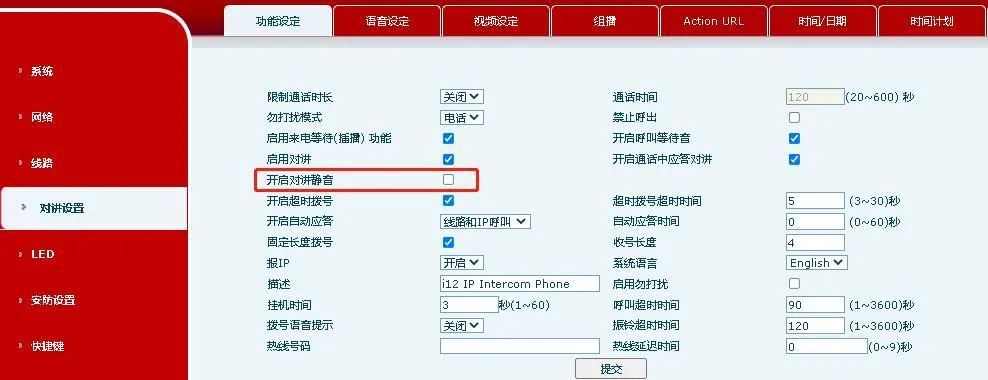
インターホンミュート関連の設定

セクション 2.3 で説明されているパケットキャプチャ手順に従います。インターホン、電話、サーバーで同時にトラフィックをキャプチャし、パケットキャプチャをテクニカルサポートに送信して分析を受けます。

両方の通話者が相手の声を聞き取れない

通話中にどちらの通話者も音声を聞き取れない場合、考えられる原因には、2 つのエンドポイント間のオーディオコーデックの不一致、またはネットワークの問題によって引き起こされる RTP 伝送障害が含まれます。この場合、テクニカルサポートによる詳細な分析のためにネットワークパケットキャプチャが必要です。

パケットキャプチャ手順は次のとおりです:

デバイス A の Web インターフェースにログインします。システムツールウェブキャプチャ に移動し、開始 をクリックしてデバイス A でのパケットキャプチャを開始します。
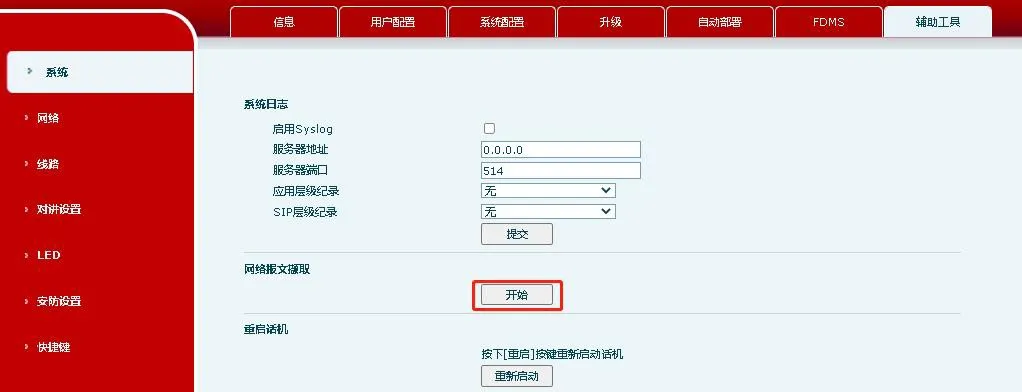
デバイスのパケットキャプチャインターフェース
注:デバイスの Web インターフェースからパケットをキャプチャする場合は、Chrome をお勧めします。他のブラウザでは互換性の問題が発生する可能性があります。

デバイス B でステップ 1 を繰り返し、デバイス B でもパケットキャプチャを開始します。

サーバー側でのパケットキャプチャを開始します。この部分については、サーバーベンダーまたは管理者に相談してください。

通話を発信し、応答します。通話が接続された後、デバイス A とデバイス B の両方から話し、通話を終了します。

デバイス A、デバイス B、およびサーバーでのパケットキャプチャを停止します。そして、3 つのパケットキャプチャファイルをすべてテクニカルサポートに送信して分析を受けます。

カタログ
顧客サービス 電話
We use cookie to improve your online experience. By continuing to browse this website, you agree to our use of cookie.

Cookies

This Cookie Policy explains how we use cookies and similar technologies when you access or use our website and related services. Please read this Policy together with our Terms and Conditions and Privacy Policy so that you understand how we collect, use, and protect information.

By continuing to access or use our Services, you acknowledge that cookies and similar technologies may be used as described in this Policy, subject to applicable law and your available choices.

Updates to This Cookie Policy

We may revise this Cookie Policy from time to time to reflect changes in legal requirements, technology, or our business practices. When we make updates, the revised version will be posted on this page and will become effective from the date of publication unless otherwise required by law.

Where required, we will provide additional notice or request your consent before applying material changes that affect your rights or choices.

What Are Cookies?

Cookies are small text files placed on your device when you visit a website or interact with certain online content. They help websites recognize your browser or device, remember your preferences, support essential functionality, and improve the overall user experience.

In this Cookie Policy, the term “cookies” also includes similar technologies such as pixels, tags, web beacons, and other tracking tools that perform comparable functions.

Why We Use Cookies

We use cookies to help our website function properly, remember user preferences, enhance website performance, understand how visitors interact with our pages, and support security, analytics, and marketing activities where permitted by law.

We use cookies to keep our website functional, secure, efficient, and more relevant to your browsing experience.

Categories of Cookies We Use

Strictly Necessary Cookies

These cookies are essential for the operation of the website and cannot be disabled in our systems where they are required to provide the service you request. They are typically set in response to actions such as setting privacy preferences, signing in, or submitting forms.

Without these cookies, certain parts of the website may not function correctly.

Functional Cookies

Functional cookies enable enhanced features and personalization, such as remembering your preferences, language settings, or previously selected options. These cookies may be set by us or by third-party providers whose services are integrated into our website.

If you disable these cookies, some services or features may not work as intended.

Performance and Analytics Cookies

These cookies help us understand how visitors use our website by collecting information such as traffic sources, page visits, navigation behavior, and general interaction patterns. In many cases, this information is aggregated and does not directly identify individual users.

We use this information to improve website performance, usability, and content relevance.

Targeting and Advertising Cookies

These cookies may be placed by our advertising or marketing partners to help deliver more relevant ads and measure the effectiveness of campaigns. They may use information about your browsing activity across different websites and services to build a profile of your interests.

These cookies generally do not store directly identifying personal information, but they may identify your browser or device.

First-Party and Third-Party Cookies

Some cookies are set directly by our website and are referred to as first-party cookies. Other cookies are set by third-party services, such as analytics providers, embedded content providers, or advertising partners, and are referred to as third-party cookies.

Third-party providers may use their own cookies in accordance with their own privacy and cookie policies.

Information Collected Through Cookies

Depending on the type of cookie used, the information collected may include browser type, device type, IP address, referring website, pages viewed, time spent on pages, clickstream behavior, and general usage patterns.

This information helps us maintain the website, improve performance, enhance security, and provide a better user experience.

Your Cookie Choices

You can control or disable cookies through your browser settings and, where available, through our cookie consent or preference management tools. Depending on your location, you may also have the right to accept or reject certain categories of cookies, especially those used for analytics, personalization, or advertising purposes.

Please note that blocking or deleting certain cookies may affect the availability, functionality, or performance of some parts of the website.

Restricting cookies may limit certain features and reduce the quality of your experience on the website.

Cookies in Mobile Applications

Where our mobile applications use cookie-like technologies, they are generally limited to those required for core functionality, security, and service delivery. Disabling these essential technologies may affect the normal operation of the application.

We do not use essential mobile application cookies to store unnecessary personal information.

How to Manage Cookies

Most web browsers allow you to manage cookies through browser settings. You can usually choose to block, delete, or receive alerts before cookies are stored. Because browser controls vary, please refer to your browser provider’s support documentation for details on how to manage cookie settings.

Contact Us

If you have any questions about this Cookie Policy or our use of cookies and similar technologies, please contact us at support@becke.cc .