SIPインターコムとIP電話BHP-SOS 10&BHP-SOS 16シリーズ間のPeertoPeer通話の設定方法は?

はじめに

概要

ピアツーピア通話(IP通話、IPダイレクト通話とも呼ばれる)とは、第三者機器やサーバーを介さず、2台の端末機器間で直接通話する方式です。低コストで設定が簡単な音声・映像通信の最もシンプルな実現方法ですが、ローカルエリアネットワーク(LAN)内でのみ動作し、異なるネットワークを越えて利用することはできません。

対応機種

IP電話:BF600S、BX7A。
産業用機器:BHP-SOS16V、BHP-SOS10V、BHP-SOS10D。

事前準備ツール

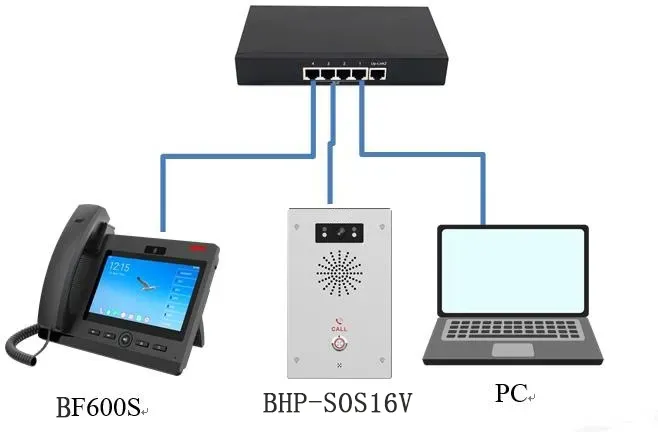
① BX7A/BF600S IP電話1台、BHP-SOS16V/BHP-SOS10V/BHP-SOS10Dインターカム1台、PoEスイッチ1台(またはDC電源)。すべての機器をスイッチに接続してください。
② デバッグ用コンピューター1台を同じスイッチに接続し、コンピューターと機器間のネットワーク接続を確保してください。

機器とコンピューターの接続図

BHP-SOS16V/BHP-SOS10V/BHP-SOS10DインターカムとBX7A/BF600S IP電話をスイッチに接続し、コンピューターも同じスイッチに接続して、ネットワーク通信が正常に行えるようにしてください。接続図は以下の通りです。
1.webp

ピアツーピア設定方法

シーンに応じて、IP電話とインターカムのピアツーピア通話には異なる方法を使用できます。本節では、ピアツーピア通話のクイック設定について詳しく説明します。

静的IPアドレスの設定

ピアツーピア通話を行うには、端末機器に静的IPアドレスを設定する必要があります。ネットワーク上の各端末には、同一サブネット内の異なるIPアドレス(同じネットワークアドレス、異なるホストアドレス)を割り当てる必要があります。詳細な設定手順は以下の通りです。

2.1.1 IPアドレスの照会

① インターカム機器(BHP-SOS16V/BHP-SOS10V/BHP-SOS10D):DHCPは標準で有効になっています。

  • ネットワークがDHCPに対応している場合:待機モードでDSSキーを約5秒長押しします。確認音が鳴った後、再度DSSキーを押すと、機器が現在のIPアドレスを音声で通知します。

  • ネットワークがDHCPに対応していない場合:待機モードでDSSキーを約5秒長押しします。確認音が鳴った後、3回連続で素早く押してネットワークモードを切り替えてください。切り替えが成功すると、機器がIPアドレスを音声で通知します。

② IP電話機器:

  • ネットワークがDHCPに対応している場合:待機モードでBX7A/BF600S画面の設定ボタンをタップし、ステータス --- 一般 --- IPアドレスに移動して現在のIPを確認してください。

  • ネットワークがDHCPに対応していない場合:画面の設定ボタンをタップし、イーサネット --- ネットワークモード --- 静的IPを選択して静的IPを設定してください。

2.1.2 静的IPアドレスの設定

① ブラウザに取得した機器のIPを入力し、IP電話とインターカムのWeb UIにログインしてください。デフォルトのユーザー名とパスワードは両方ともadminです。ログインインターフェースは図2の通りです。
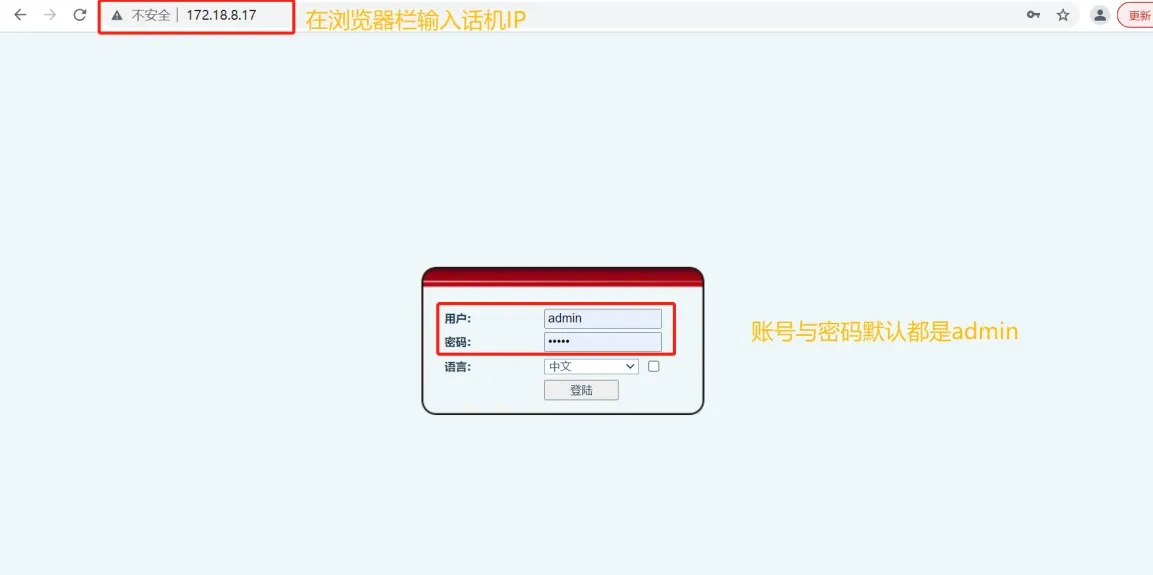
IP Phone Login Interface

図2 IP電話ログインインターフェース

② 機器のWeb UIに入り、ネットワーク --- 基本 --- IPv4設定に移動し、静的IPを選択し、図3に示すように静的IPパラメータを設定してください。
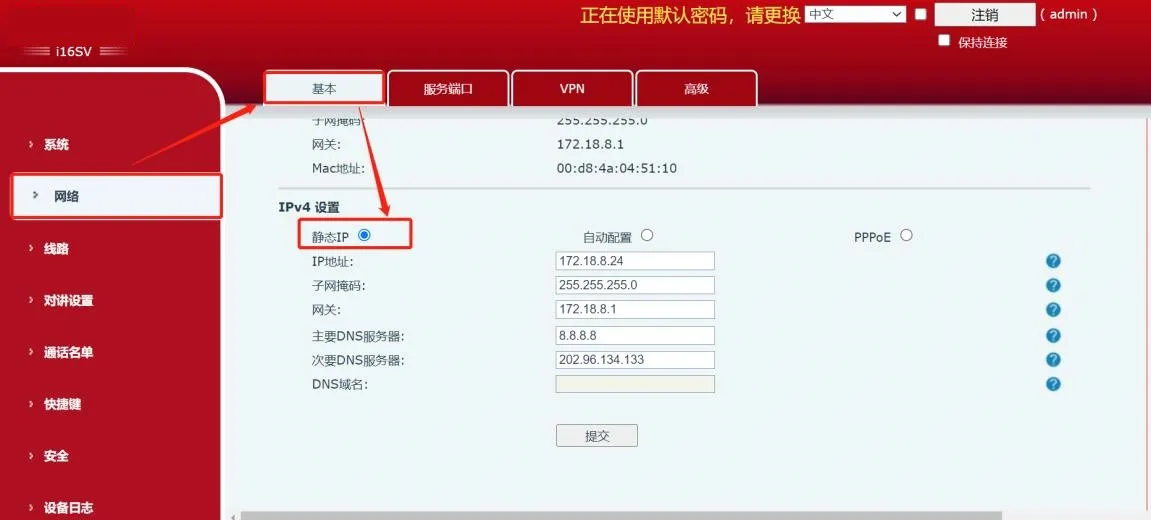
Static IP Address Configuration

図3 静的IPアドレス設定

IP電話からインターカムへの発信

ピアツーピアモードでは、IP電話からインターカムに発信できます。クイック設定の詳細は以下の通りです。 ① ブラウザにIP電話のIPを入力し、Web UIにログインしてください(デフォルト:admin/admin)。
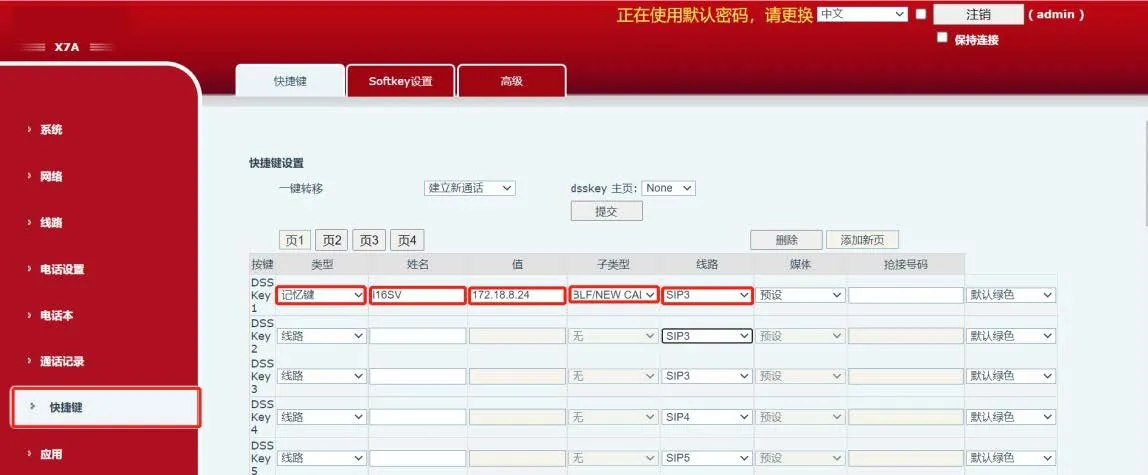
ショートカットボタンをクリックしてクイック設定ページに入ります。ショートカット1を例に、図4に示すように設定してください。

  • タイプ:メモリキー

  • 名前:任意の名前(画面に表示)

  • 値:インターカムのIPアドレスを入力(例:172.18.8.24)

  • サブタイプ:BLF/新規通話

  • 回線:SIP1

IP Phone Shortcut Configuration

図4 IP電話ショートカット設定

2.2.2 注意事項

① IP電話からインターカムに発信できない場合は、インターカムの設定を変更してください:
インターカムのWeb UIにログインし、インターカム設定 -- 機能設定 -- 基本設定に移動し、IP通話を許可にチェックを入れてください。図5を参照してください。
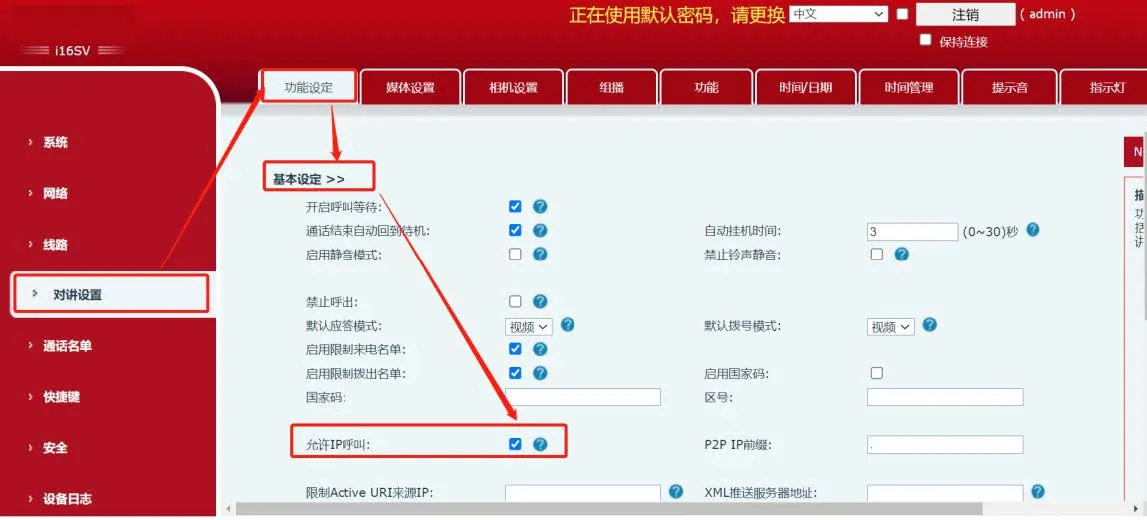
Intercom Allow IP Call Configuration

図5 インターカムIP通話許可設定

インターカムからIP電話への発信

ピアツーピアモードでは、インターカムからIP電話に発信できます。クイック設定の詳細は以下の通りです。

2.3.1 クイック設定

① ブラウザにインターカムのIPを入力し、Web UIにログインしてください(デフォルト:admin/admin)。
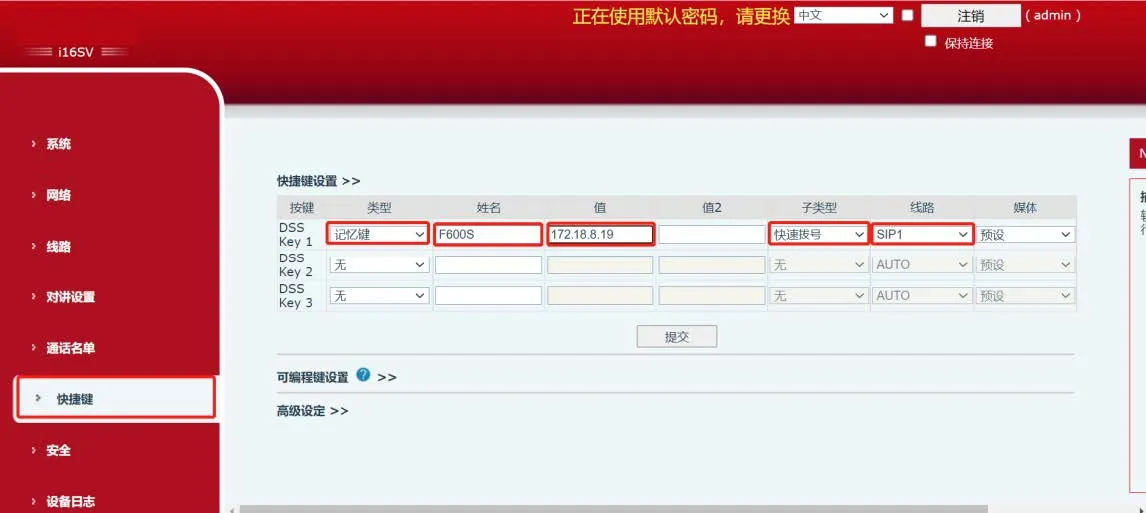
ショートカットボタンをクリックして設定ページに入ります。ショートカット1を例に、図6に示すように設定してください。

  • タイプ:メモリキー

  • 名前:任意の名前

  • 値:IP電話のIPアドレスを入力(例:172.18.8.19)

  • サブタイプ:BLF/新規通話

  • 回線:SIP1

Intercom Shortcut Configuration

図6 インターカムショートカット設定

2.3.2 注意事項

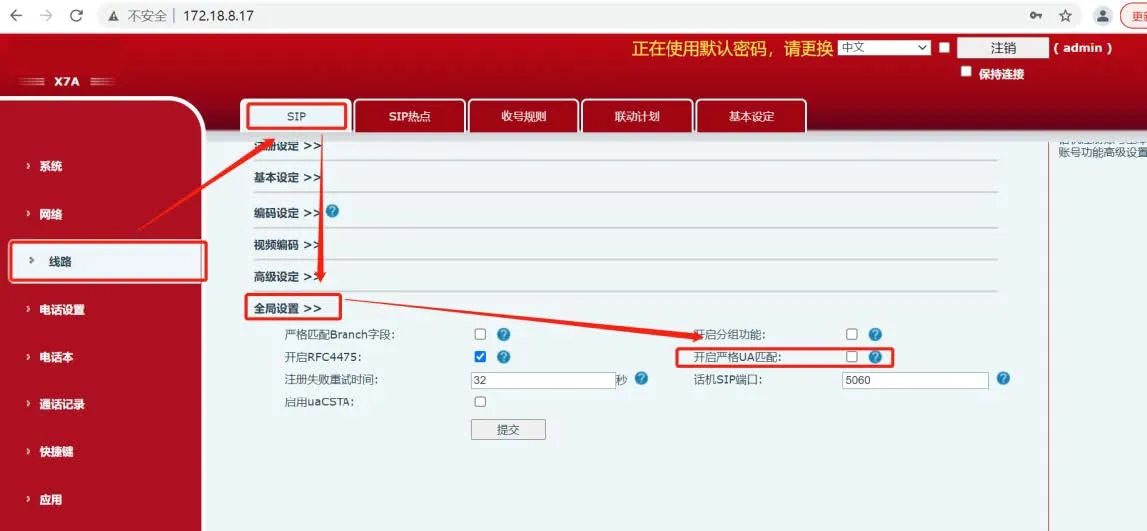
インターカムからIP電話に発信した際に話中音が聞こえる場合は、以下の手順で操作してください。 ① IP電話のWeb UIにログインし、アカウント -- SIP -- グローバル設定に移動し、厳密なUA照合を有効にするチェックを外してください。図7を参照してください。
IP Phone Disable Strict UA Match

図7 IP電話 厳密なUA照合の無効化

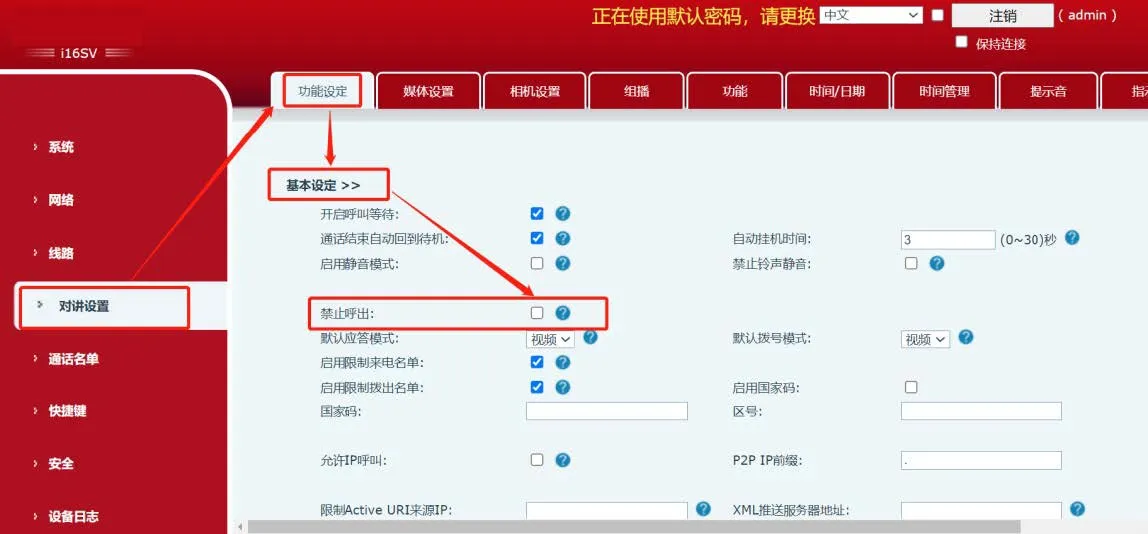
② インターカムのWeb UIにログインし、インターカム設定 -- 機能設定 -- 基本設定に移動し、外線発信を禁止チェックを外してください。図8を参照してください。
Intercom Disable Outgoing Call Restriction

図8 インターカム 外線発信制限の無効化

③ 上記の設定を完了すると、インターカムからIP電話に正常に発信できるようになります。

カタログ
顧客サービス 電話
We use cookie to improve your online experience. By continuing to browse this website, you agree to our use of cookie.

Cookies

This Cookie Policy explains how we use cookies and similar technologies when you access or use our website and related services. Please read this Policy together with our Terms and Conditions and Privacy Policy so that you understand how we collect, use, and protect information.

By continuing to access or use our Services, you acknowledge that cookies and similar technologies may be used as described in this Policy, subject to applicable law and your available choices.

Updates to This Cookie Policy

We may revise this Cookie Policy from time to time to reflect changes in legal requirements, technology, or our business practices. When we make updates, the revised version will be posted on this page and will become effective from the date of publication unless otherwise required by law.

Where required, we will provide additional notice or request your consent before applying material changes that affect your rights or choices.

What Are Cookies?

Cookies are small text files placed on your device when you visit a website or interact with certain online content. They help websites recognize your browser or device, remember your preferences, support essential functionality, and improve the overall user experience.

In this Cookie Policy, the term “cookies” also includes similar technologies such as pixels, tags, web beacons, and other tracking tools that perform comparable functions.

Why We Use Cookies

We use cookies to help our website function properly, remember user preferences, enhance website performance, understand how visitors interact with our pages, and support security, analytics, and marketing activities where permitted by law.

We use cookies to keep our website functional, secure, efficient, and more relevant to your browsing experience.

Categories of Cookies We Use

Strictly Necessary Cookies

These cookies are essential for the operation of the website and cannot be disabled in our systems where they are required to provide the service you request. They are typically set in response to actions such as setting privacy preferences, signing in, or submitting forms.

Without these cookies, certain parts of the website may not function correctly.

Functional Cookies

Functional cookies enable enhanced features and personalization, such as remembering your preferences, language settings, or previously selected options. These cookies may be set by us or by third-party providers whose services are integrated into our website.

If you disable these cookies, some services or features may not work as intended.

Performance and Analytics Cookies

These cookies help us understand how visitors use our website by collecting information such as traffic sources, page visits, navigation behavior, and general interaction patterns. In many cases, this information is aggregated and does not directly identify individual users.

We use this information to improve website performance, usability, and content relevance.

Targeting and Advertising Cookies

These cookies may be placed by our advertising or marketing partners to help deliver more relevant ads and measure the effectiveness of campaigns. They may use information about your browsing activity across different websites and services to build a profile of your interests.

These cookies generally do not store directly identifying personal information, but they may identify your browser or device.

First-Party and Third-Party Cookies

Some cookies are set directly by our website and are referred to as first-party cookies. Other cookies are set by third-party services, such as analytics providers, embedded content providers, or advertising partners, and are referred to as third-party cookies.

Third-party providers may use their own cookies in accordance with their own privacy and cookie policies.

Information Collected Through Cookies

Depending on the type of cookie used, the information collected may include browser type, device type, IP address, referring website, pages viewed, time spent on pages, clickstream behavior, and general usage patterns.

This information helps us maintain the website, improve performance, enhance security, and provide a better user experience.

Your Cookie Choices

You can control or disable cookies through your browser settings and, where available, through our cookie consent or preference management tools. Depending on your location, you may also have the right to accept or reject certain categories of cookies, especially those used for analytics, personalization, or advertising purposes.

Please note that blocking or deleting certain cookies may affect the availability, functionality, or performance of some parts of the website.

Restricting cookies may limit certain features and reduce the quality of your experience on the website.

Cookies in Mobile Applications

Where our mobile applications use cookie-like technologies, they are generally limited to those required for core functionality, security, and service delivery. Disabling these essential technologies may affect the normal operation of the application.

We do not use essential mobile application cookies to store unnecessary personal information.

How to Manage Cookies

Most web browsers allow you to manage cookies through browser settings. You can usually choose to block, delete, or receive alerts before cookies are stored. Because browser controls vary, please refer to your browser provider’s support documentation for details on how to manage cookie settings.

Contact Us

If you have any questions about this Cookie Policy or our use of cookies and similar technologies, please contact us at support@becke.cc .