
HTTP APIを使用してデバイスパラメータを設定する方法は?

    はじめに

    概要

    このガイドでは、HTTP API を介したデバイスパラメータの設定方法(SIPサーバー設定、SIPアカウント登録情報、DSSキーパラメータ、その他のデバイスオプションを含む)について説明します。デバイスはHTTPサーバーとして動作し、クライアントは特定のHTTPリクエストを送信して設定変更を適用します(下図参照)。
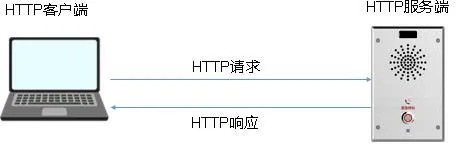
HTTP API 接続アーキテクチャ

    この例では、Postman を使用してデバイスに送信される HTTP リクエストをシミュレートします。

    対応モデル

    当社製品ラインの現在利用可能なすべての電話モデル。

    前提条件

    ① 最新のファームウェアバージョンにアップグレードされ、PoEスイッチに接続された BHP-SOS11V インターホンデバイス 1 台。
② Postman がインストールされた設定用 PC 1 台。同じスイッチに接続され、正常なネットワーク通信が確認されていること。
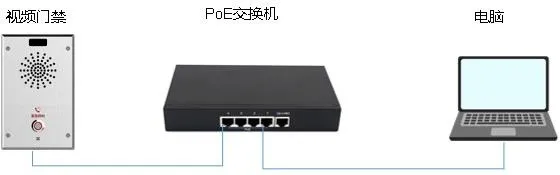
    電話と PC の接続図

電話と PC の接続図

    Postman を使用した HTTP リクエストのシミュレーション

    Postman のダウンロードとインストール

    Postman は以下からダウンロードします:
https://www.postman.com/downloads/
その後、インストール手順に従ってセットアップを完了します。

    Postman の設定

    FileNew をクリックし、HTTP Request を選択します。

Postman の設定

    新しいリクエストウィンドウで、POST メソッドを選択し、次の形式でデバイスの HTTP URL を入力します:

http://ip/xmlservice

    URL は大文字と小文字を区別することに注意してください。ip を実際のデバイス IP アドレスに置き換えます(下図参照)。
HTTP POST URL の設定

    次に、必要な HTTP リクエストパラメータを設定します:

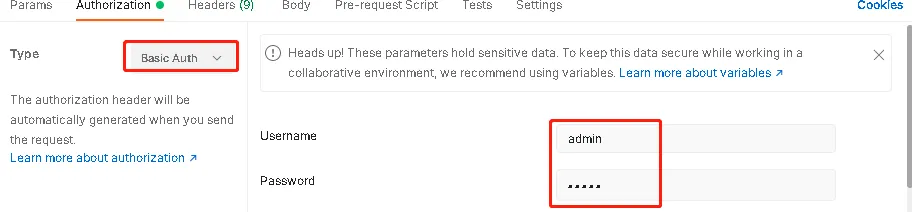
    認証方法:Basic Auth
ヘッダー:Content-Type: xml/text
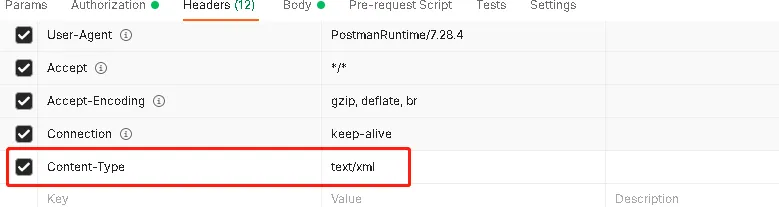
HTTP 認証とヘッダーの設定

    HTTP リクエストボディの設定

    Body をクリックし、raw を選択して、メッセージボディに XML コンテンツを入力します。サンプル形式を以下に示します。

XML ボディコンテンツの入力

    構造は次のとおりです:


これは XML 宣言ヘッダーであり、すべてのリクエストで必要です。


これは XML コマンド構造を定義します。cmd 属性は、現在のパラメータを取得する get または新しいパラメータを書き込む set のいずれかです。

sip.
これは実際の設定項目を指定します。この例では、リクエストはデバイスから SIP ライン関連のパラメータを取得します。

    実際の使用では、次のセクションを、実際に照会または設定するパラメータに応じて調整する必要があります:


sip.

    サポートされるパラメータリストを取得する方法

    モデルによってサポートされる HTTP API パラメータは異なる場合があります。以下のいずれかの方法を使用して、特定のデバイスでサポートされるパラメータリストを取得できます。

方法 1: デバイスの WEB インターフェースで、SystemSystem Configuration に移動し、nc タイプの設定ファイルをエクスポートします。
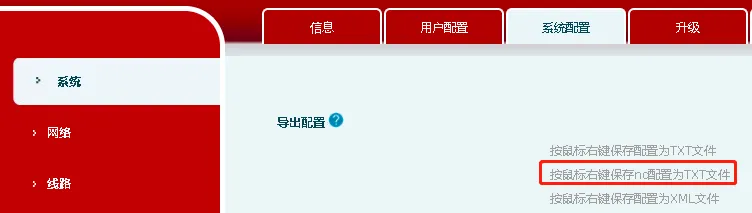
システム設定ページからの nc 設定ファイルのエクスポート

    右クリックしてファイルを保存するか、左クリックして設定を直接表示できます。一般的なパラメータは次のセクションにリストされています。

方法 2: 一部のモデルでは、Web インターフェースに nc 設定ファイルのリンクが直接提供されていません。その場合は、ブラウザのアドレスバーに対応する URL を入力して、nc 設定ファイルを手動で取得できます。
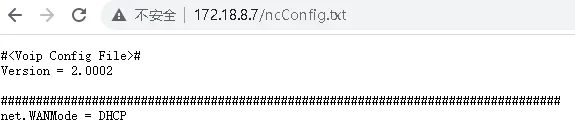
ブラウザからの nc 設定ファイルの取得

    注意:この方法は応答に時間がかかる場合があります。

    一般的なパラメータ

    このセクションでは、参考として一般的なパラメータをいくつかリストします。将来のアップデートでより多くのパラメータが追加される可能性があります。

    SIP ラインパラメータ

    SIP ラインパラメータの例(i30 アクセス制御デバイスより):

sip.line.1.PhoneNumber = 112
sip.line.1.DisplayName = 112
sip.line.1.SipName =
sip.line.1.RegAddr = 172.18.1.45
sip.line.1.RegPort = 2066
sip.line.1.RegUser = 112
sip.line.1.RegPswd = abc123
sip.line.1.RegTTL = 3600
sip.line.1.RegEnabled = 0

sip.line.1. は、これらのパラメータが SIP ライン 1 に属することを示します。

PhoneNumber は Web インターフェースの電話番号フィールドに対応します。
DisplayName は表示名に対応します。
RegAddr は SIP プロキシサーバーアドレスです。
RegPort は SIP プロキシサーバーポートです。
RegUser は認証ユーザー名で、通常は電話番号と同じです。
RegPswd はパスワードです。
RegTTL は登録有効期限で、デフォルト値は 3600 秒です。
RegEnabled はラインが有効かどうかを定義します:0 は無効、1 は有効を意味します。

    DSS キーパラメータ

    i30 の DSS キーパラメータの例:

dss.page.1.key.1.Type=1
dss.page.1.key.1.Value=125@1/f
dss.page.1.key.1.Title=

    まず Web インターフェースで DSS キーを設定し、次に get コマンド付きの HTTP API を使用して対応するパラメータ値を読み戻し、正確なマッピングを確認することをお勧めします。

Type=1 は、i30 や i12 などのデバイスの DSS キータイプが Hotkey であることを示します。他のモデルの場合は、上記の推奨方法を使用して実際のタイプ値を確認してください。

Value=125@1/f の意味:
125 = 宛先番号
@1 = ライン 1
/f = サブタイプ:スピードダイヤル

    ネットワークパラメータ

    i30 や i12 などのデバイスのネットワークパラメータの例:

net.WANMode=DHCP
net.static.IP=172.18.8.7
net.static.SubnetMask=255.255.255.0
net.static.Gateway=172.18.8.1
net.static.PrimaryDNS=202.96.134.133
net.static.SecondaryDNS=202.96.128.86
net.static.DomainName=
net.dhcp.Enabled=1

WANMode はネットワークモードを示し、DHCP または static のいずれかです。このパラメータは set コマンドで直接書き込むことはできません。dhcp.Enabled の値に応じて自動的に変化します。

static.IP は静的 IP アドレスです。デバイスが静的モードの場合にのみ有効です。DHCP モードでは、get コマンドを使用して現在の IP アドレスを取得できます。
static.SubnetMask はサブネットマスクです。
static.Gateway はデフォルトゲートウェイです。
static.PrimaryDNS はプライマリ DNS サーバーです。
static.SecondaryDNS はセカンダリ DNS サーバーです。
dhcp.Enabled は DHCP が有効かどうかを定義します:1 は DHCP モードがアクティブであることを意味し、0 は静的 IP モードが使用されていることを意味します。

    音量パラメータ

    BHP-SOS11V の音量パラメータの例:

phone.volume.HandFreeVol=9
phone.volume.HandFreeRingVol=3
phone.volume.HandFreeToneVol=3

phone.volume.HandFreeVol はハンズフリー音量です。範囲は 1-9 で、9 が最大音量です。
phone.volume.HandFreeRingVol は着信音の音量です。範囲は 1-9 で、9 が最大音量です。
phone.volume.HandFreeToneVol はアラートや通知音などのプロンプトトーンの音量です。範囲は 1-9 で、9 が最大音量です。

    システム情報パラメータ

    システム情報パラメータは読み取り専用です。つまり、get コマンドでのみ照会できます。

    例:

info.

    このパラメータはすべてのシステム情報を返します。特定の項目のみが必要な場合は、パラメータパスを次のノードレベルまで拡張します。

    例えば、デバイスの MAC アドレスを取得する場合:

info.dev.mac

カタログ
顧客サービス 電話
We use cookie to improve your online experience. By continuing to browse this website, you agree to our use of cookie.

Cookies

This Cookie Policy explains how we use cookies and similar technologies when you access or use our website and related services. Please read this Policy together with our Terms and Conditions and Privacy Policy so that you understand how we collect, use, and protect information.

By continuing to access or use our Services, you acknowledge that cookies and similar technologies may be used as described in this Policy, subject to applicable law and your available choices.

Updates to This Cookie Policy

We may revise this Cookie Policy from time to time to reflect changes in legal requirements, technology, or our business practices. When we make updates, the revised version will be posted on this page and will become effective from the date of publication unless otherwise required by law.

Where required, we will provide additional notice or request your consent before applying material changes that affect your rights or choices.

What Are Cookies?

Cookies are small text files placed on your device when you visit a website or interact with certain online content. They help websites recognize your browser or device, remember your preferences, support essential functionality, and improve the overall user experience.

In this Cookie Policy, the term “cookies” also includes similar technologies such as pixels, tags, web beacons, and other tracking tools that perform comparable functions.

Why We Use Cookies

We use cookies to help our website function properly, remember user preferences, enhance website performance, understand how visitors interact with our pages, and support security, analytics, and marketing activities where permitted by law.

We use cookies to keep our website functional, secure, efficient, and more relevant to your browsing experience.

Categories of Cookies We Use

Strictly Necessary Cookies

These cookies are essential for the operation of the website and cannot be disabled in our systems where they are required to provide the service you request. They are typically set in response to actions such as setting privacy preferences, signing in, or submitting forms.

Without these cookies, certain parts of the website may not function correctly.

Functional Cookies

Functional cookies enable enhanced features and personalization, such as remembering your preferences, language settings, or previously selected options. These cookies may be set by us or by third-party providers whose services are integrated into our website.

If you disable these cookies, some services or features may not work as intended.

Performance and Analytics Cookies

These cookies help us understand how visitors use our website by collecting information such as traffic sources, page visits, navigation behavior, and general interaction patterns. In many cases, this information is aggregated and does not directly identify individual users.

We use this information to improve website performance, usability, and content relevance.

Targeting and Advertising Cookies

These cookies may be placed by our advertising or marketing partners to help deliver more relevant ads and measure the effectiveness of campaigns. They may use information about your browsing activity across different websites and services to build a profile of your interests.

These cookies generally do not store directly identifying personal information, but they may identify your browser or device.

First-Party and Third-Party Cookies

Some cookies are set directly by our website and are referred to as first-party cookies. Other cookies are set by third-party services, such as analytics providers, embedded content providers, or advertising partners, and are referred to as third-party cookies.

Third-party providers may use their own cookies in accordance with their own privacy and cookie policies.

Information Collected Through Cookies

Depending on the type of cookie used, the information collected may include browser type, device type, IP address, referring website, pages viewed, time spent on pages, clickstream behavior, and general usage patterns.

This information helps us maintain the website, improve performance, enhance security, and provide a better user experience.

Your Cookie Choices

You can control or disable cookies through your browser settings and, where available, through our cookie consent or preference management tools. Depending on your location, you may also have the right to accept or reject certain categories of cookies, especially those used for analytics, personalization, or advertising purposes.

Please note that blocking or deleting certain cookies may affect the availability, functionality, or performance of some parts of the website.

Restricting cookies may limit certain features and reduce the quality of your experience on the website.

Cookies in Mobile Applications

Where our mobile applications use cookie-like technologies, they are generally limited to those required for core functionality, security, and service delivery. Disabling these essential technologies may affect the normal operation of the application.

We do not use essential mobile application cookies to store unnecessary personal information.

How to Manage Cookies

Most web browsers allow you to manage cookies through browser settings. You can usually choose to block, delete, or receive alerts before cookies are stored. Because browser controls vary, please refer to your browser provider’s support documentation for details on how to manage cookie settings.

Contact Us

If you have any questions about this Cookie Policy or our use of cookies and similar technologies, please contact us at support@becke.cc .
