Android IP電話からデバッグ情報を収集する方法は?

はじめに

概要

Android IP電話機の内部試験または顧客導入時に不具合が発生した場合、技術者はトラブルシューティングと分析のためにデバッグ情報を提出する必要があります。本ガイドでは、必要な診断ファイルの収集方法について説明します。

対応機種

GP32i、BX7A、BF600S、BJ7A、Bi56A

前提条件

1. Android IP電話機1台、USBメモリ1個、PoEスイッチまたはDC電源を用意します。電話機をスイッチに接続してください。

2. デバッグ用PC1台を用意し、同じスイッチに接続します。PCと電話機がネットワーク上で通信できることを確認してください。

機器とPCの接続図

Android IP電話機(ここではA32iを例に)をスイッチに接続し、PCも同じスイッチに接続します。PCと機器のネットワークが疎通できることを確認してください。接続例は図1の通りです。
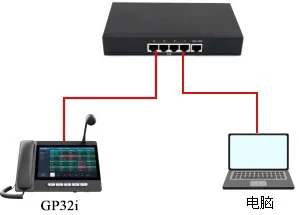
機器とPCの接続図

                 図1. 機器とPCの接続図

トラブルシューティング方法

不具合の内容に応じて、分析に必要な診断情報の種類が異なります。以下のセクションでは、状況別に提出すべきファイルについて説明します。

一般的なケース

ほとんどの場合、以下の3つのファイルを収集して開発チームに提出する必要があります:

1. デバッグシステムログファイル
電話機のWebインターフェースにログインし、システム > サポートページに移動し、システムログを見つけてください。

以下の設定を行ってください:

1) システムログを有効にする
2) サーバーアドレスをローカルPCのIPアドレスに設定する
3) サーバーポート514に設定する
4) システムログレベルデバッグに設定する
5) ログのエクスポートを有効にする
6) 不具合を再現した後、ログのエクスポートをクリックしてシステムログファイルをダウンロードする
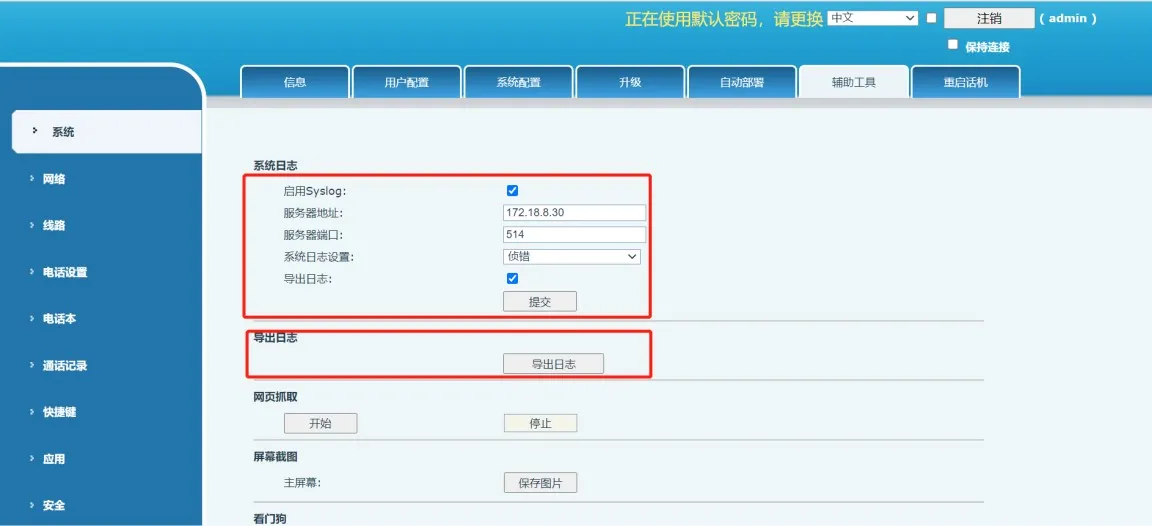
デバッグシステムログのエクスポート

                                                                                                                                   図2. デバッグシステムログのエクスポート

2. デバッグパッケージ
デバッグパッケージには、電話機のキャッシュログ、実行情報、ファームウェアの詳細、その他の内部診断データが含まれており、Webインターフェースからエクスポートできます。

システム > サポートツールに移動し、ワンクリックでデバッグ情報をエクスポートオプションを見つけてエクスポートをクリックしてください。この処理は約1分かかります。
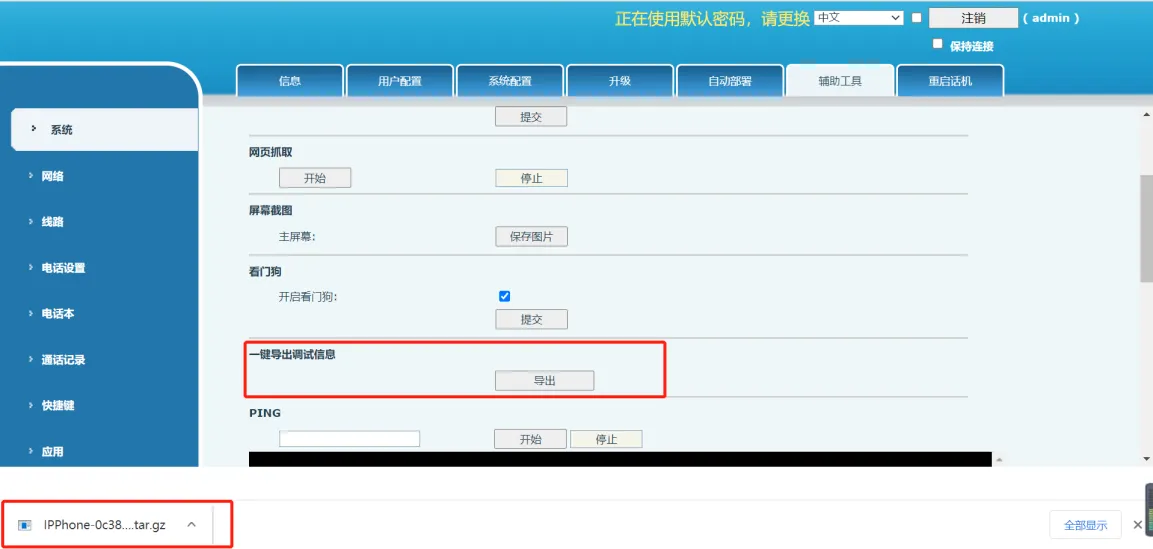
デバッグパッケージのエクスポート

                                                                                                                                        図3. デバッグパッケージのエクスポート

3. ネットワークキャプチャファイル
キャプチャファイルは送受信されたネットワークパケットを記録し、Wiresharkなどのツールで分析できます。

ネットワークトラフィックをキャプチャする手順:

1) 開始をクリックし、Webページのキャプチャプロセスが開始するのを待つ
2) 不具合を再現する
3) 不具合を再現した後、停止をクリックする
4) ブラウザのダウンロードページを開き、キャプチャファイルを探す
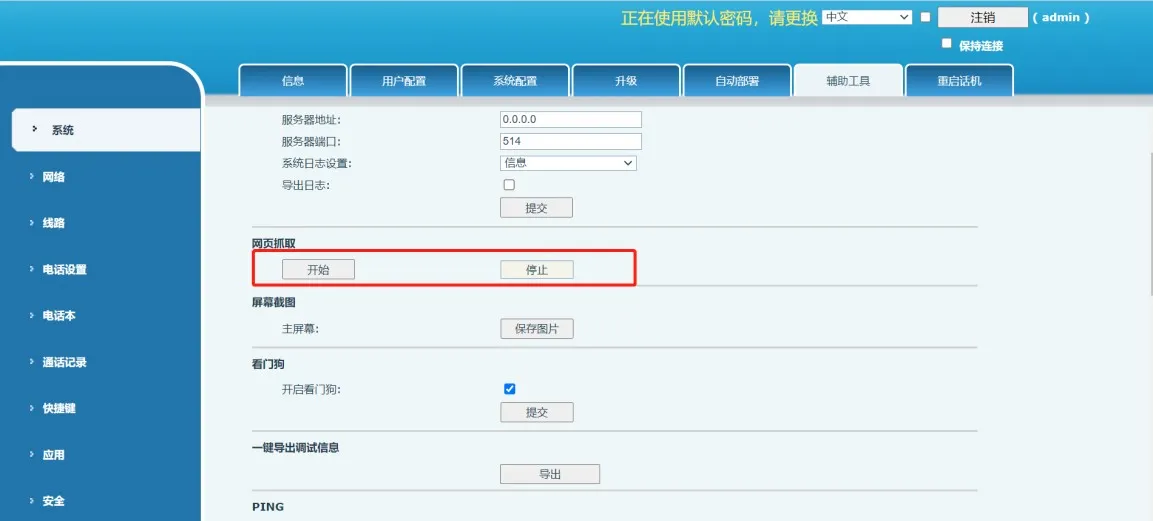
ネットワークパケットのキャプチャ

                                                                                                                                          図4. ネットワークパケットのキャプチャ

特別なケース

上記3つのファイルを提出した後、状況によっては追加情報が必要になる場合があります。

開発チームから要求された場合

開発チームがデバッグシステムログ、デバッグパッケージ、キャプチャファイルを分析した後、詳細な分析のためにAndroidリアルタイムログを要求する場合があります。以下のセクションでは、ADBを使用したAndroidリアルタイムログの収集方法について説明します。

Androidリアルタイムログ
電話機の動作中、Androidプラットフォームは実行ログを継続的に出力します。これらのログはエンジニアが問題を特定・分析するのに役立ちます。

1. PCにADBツールをインストールする

お使いのOSに対応したADBツールは以下のURLからダウンロードできます:

https://developer.android.google.cn/studio/releases/platform-tools

インストール後、ADBのインストールパスをシステム環境変数に追加してください。Windowsの場合、このPC > プロパティ > システムの詳細設定 > 詳細設定 > 環境変数に移動し、ADBディレクトリの絶対パスをPath変数に追加します。
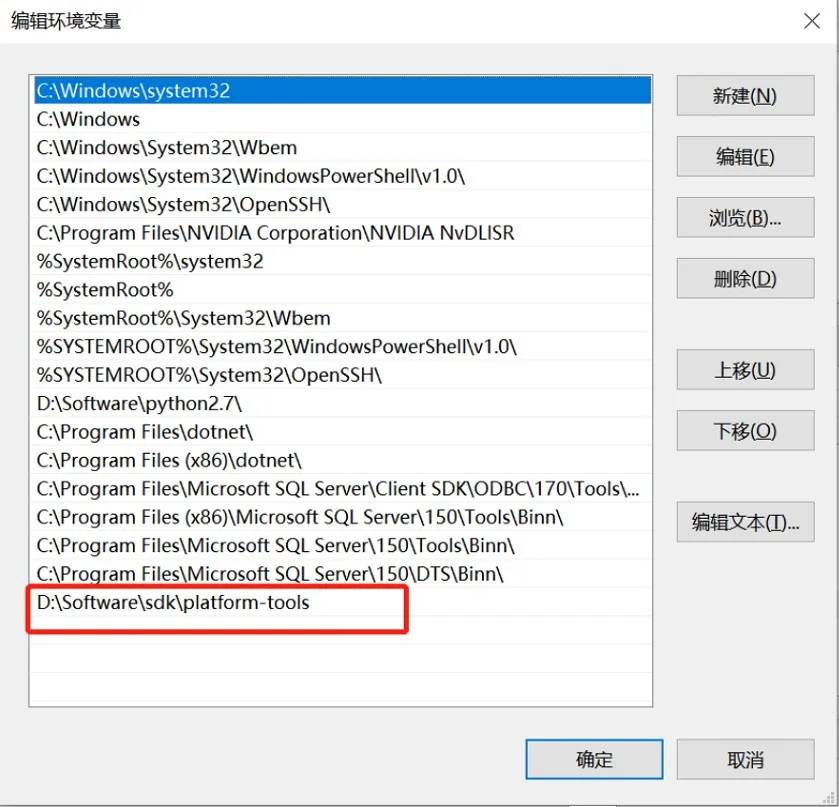
ADBパスの追加

                                                                                                        図5. ADBパスの追加

PCでコマンドプロンプトを開き、adbコマンドを入力してください。コマンドが正常に実行されれば、ADBが正しくインストールされています。
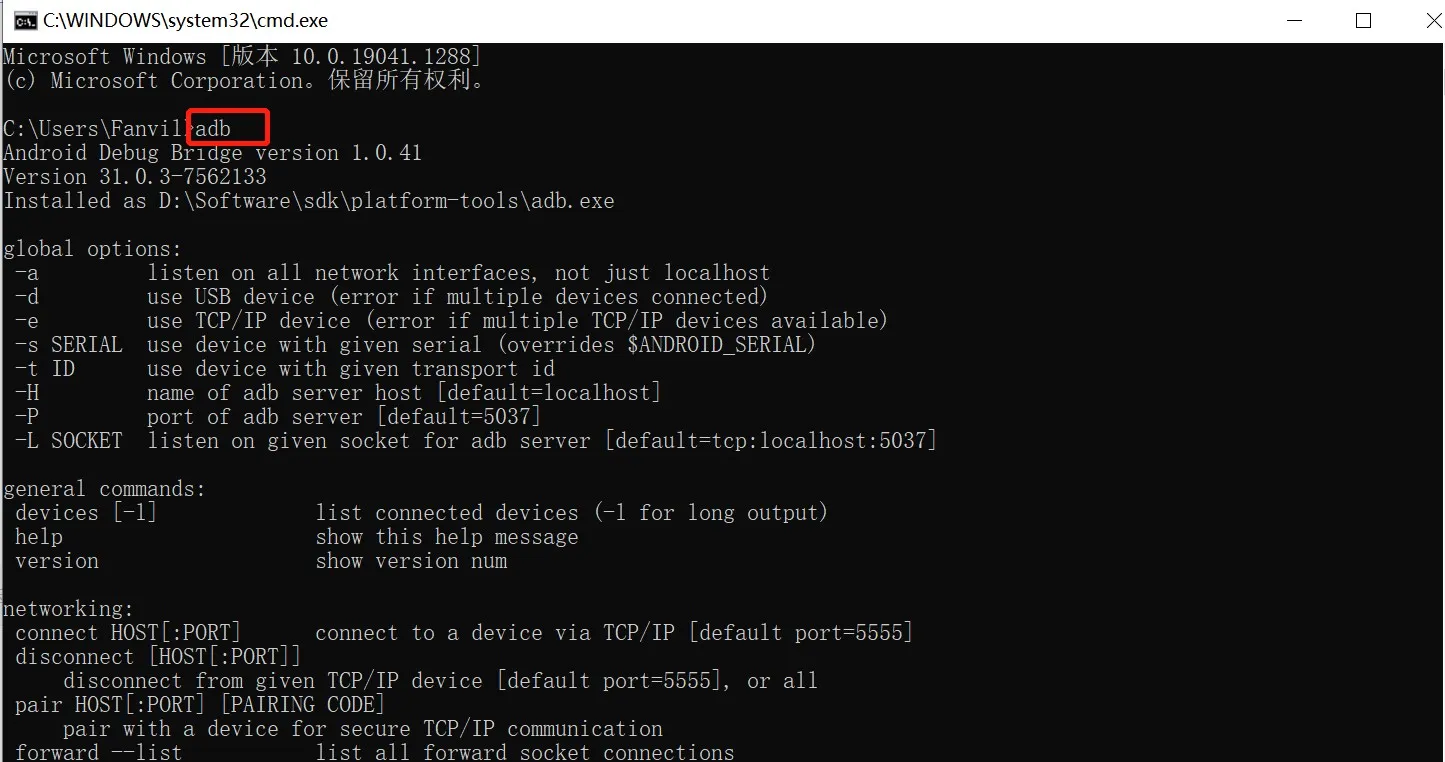
ADBインストール成功

                                                                                                          図6. ADBインストール成功

2. 電話機でUSBデバッグを有効にする

2020年12月1日以降にリリースされたAndroidファームウェアでは、ADBデバッグはデフォルトで無効になっており、手動で有効にする必要があります。

電話機にUSBメモリを挿入し、設定 > デバイス情報に移動し、ファームウェアバージョン番号を5回タップして開発者モードを有効にしてください。
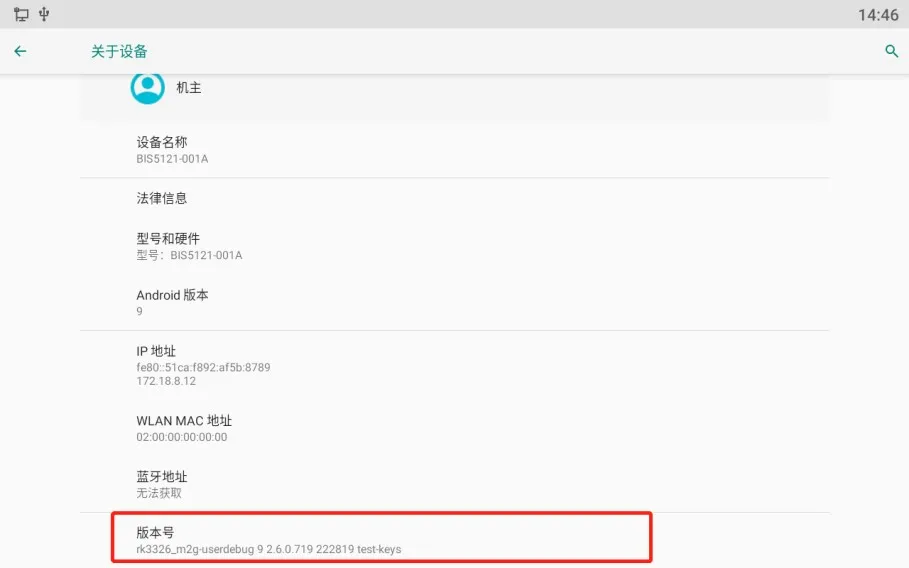
開発者モードの有効化

                                                                                                                     図7. 開発者モードの有効化

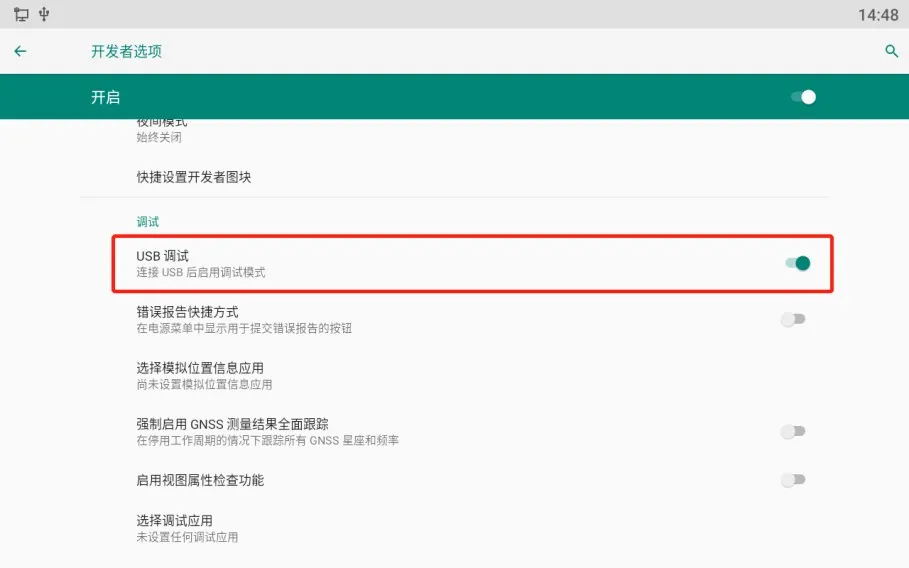
その後、設定 > システム > 開発者向けオプションに移動し、USBデバッグをオンにしてください。
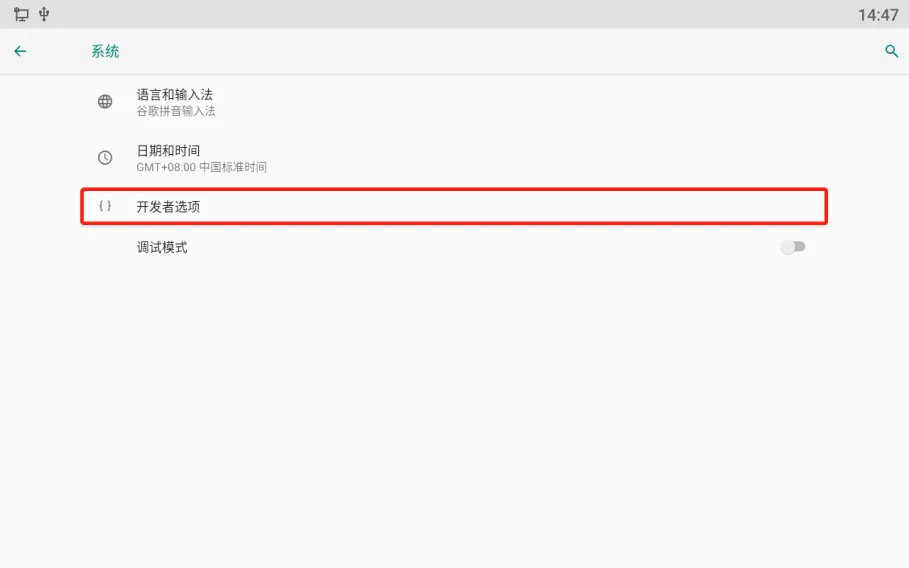
開発者向けオプションページUSBデバッグの有効化

                                                                                                                図8. USBデバッグの有効化

3. デバッグログレベルを変更する

電話機のデフォルトのログレベルは通常通知に設定されており、必要最小限の情報のみ記録されます。より詳細なログを取得するには、ログレベルをトレースに変更してください。

電話機の設定 > システムメンテナンス > ツールに移動し、ログレベルをトレースに設定してください。
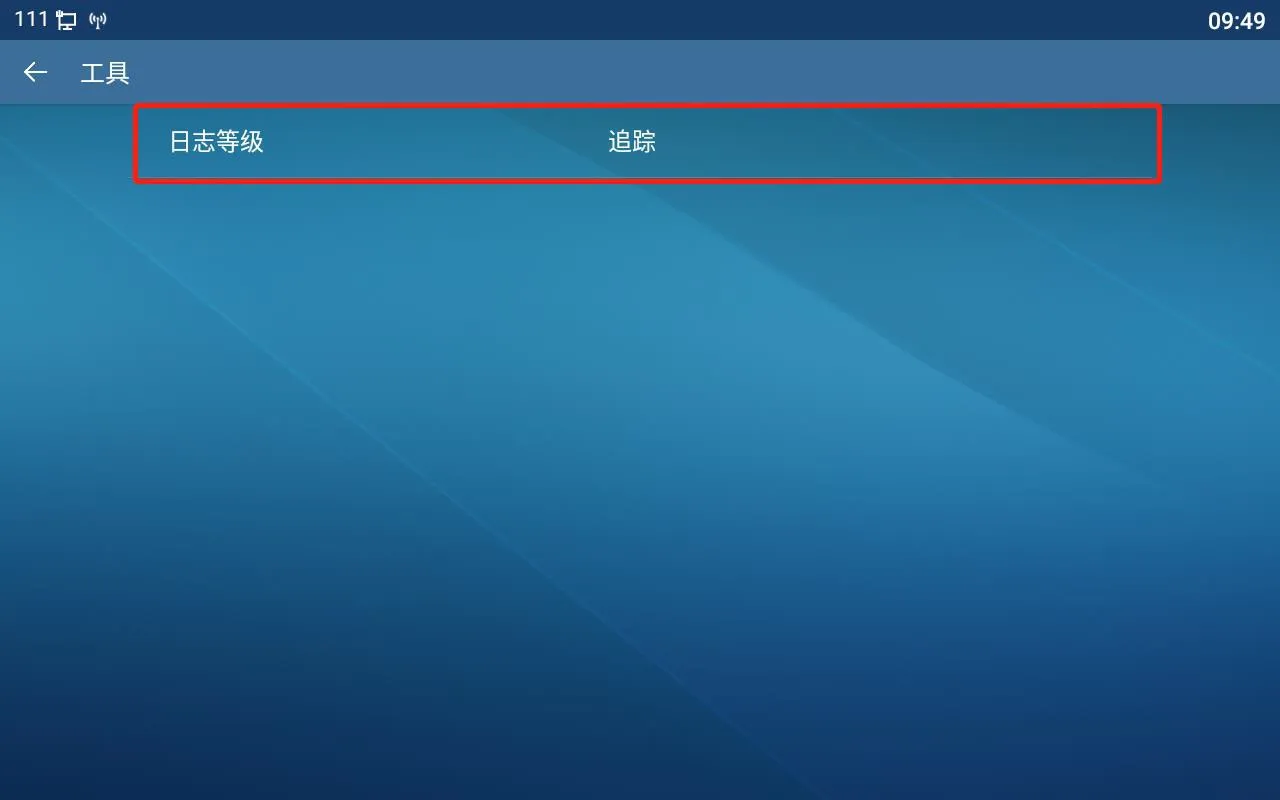
ログレベルの変更

                                                                                                                  図9. ログレベルの変更

4. リアルタイムログをキャプチャする

以下のADBコマンドを使用します:

adb connect 172.18.8.28
172.18.8.28を電話機の実際のIPアドレスに置き換えてください。このコマンドはネットワーク経由で電話機に接続します。

adb devices
このコマンドは接続されているデバイスを一覧表示し、電話機が正常に接続されているか確認できます。

adb logcat -G 16M
このコマンドはログバッファサイズを拡張し、より多くのログ内容を保存できるようにします。

adb logcat > logcat-202111051708.log
このコマンドはリアルタイムログの出力をPC上のファイルに保存します。推奨される命名形式:年+月+日+時+分+秒+.log
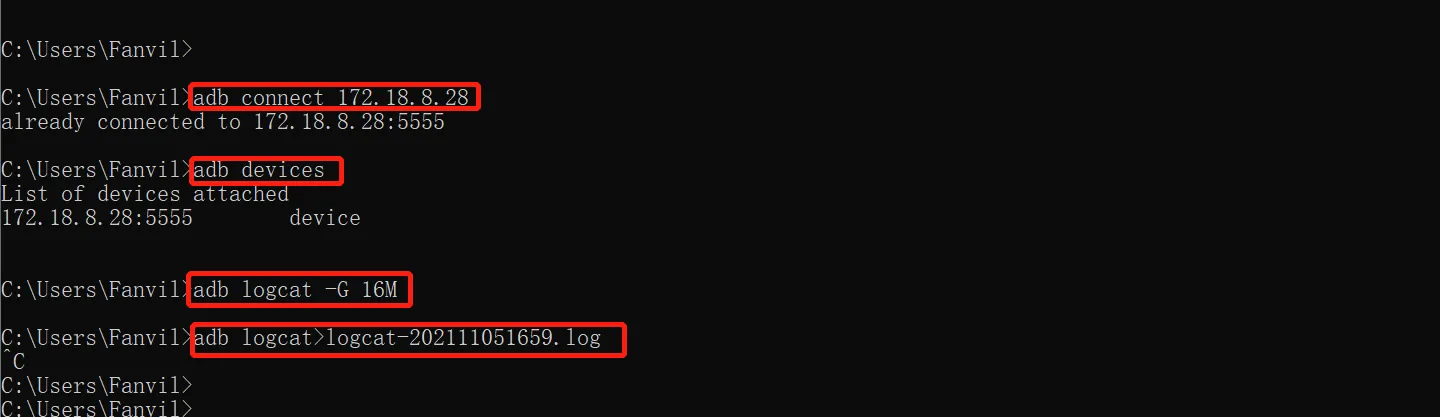
リアルタイムログのキャプチャ

                                                                                                              図10. リアルタイムログのキャプチャ

ログ取得が完了したら、以下のコマンドを実行します:

adb disconnect 172.18.8.28

これによりPCと電話機の接続が切断されます。その後、PC上の対応するディレクトリで生成されたリアルタイムログファイルを見つけることができます。
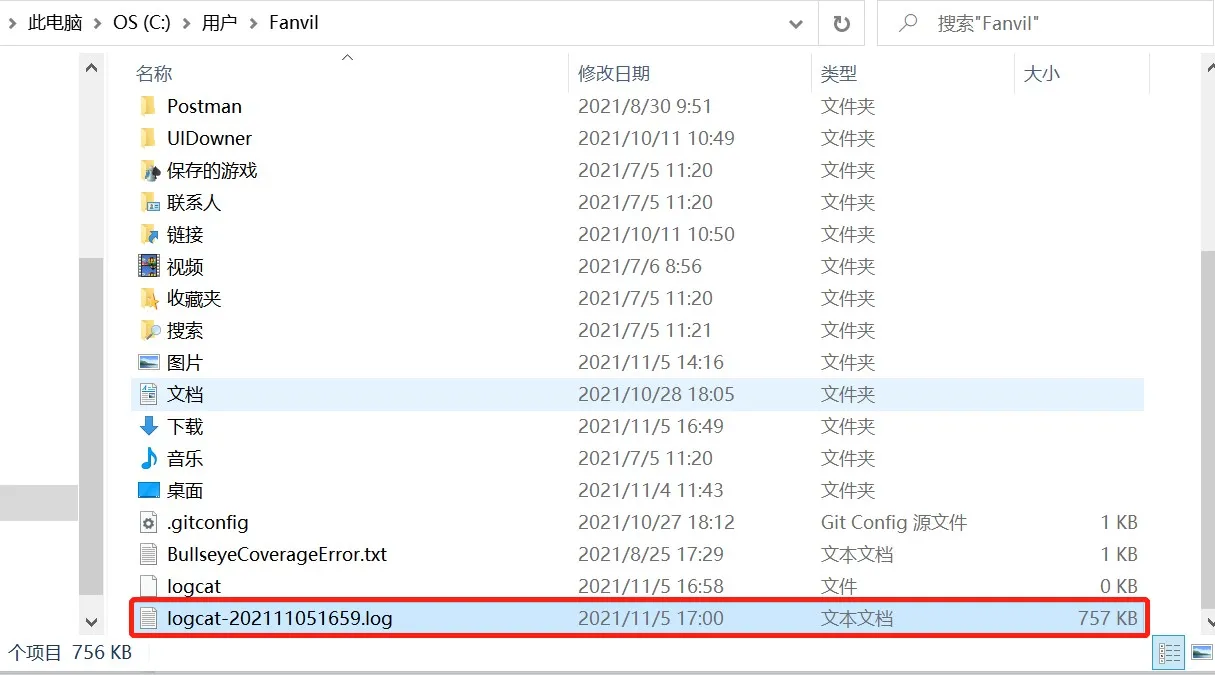
リアルタイムログファイルのパス

                                                                                                                   図11. リアルタイムログファイルのパス

画面関連の不具合

不具合がLCD画面または表示動作に関連する場合、スクリーンショットファイルも提出する必要があります。

電話機のWebインターフェースにログインし、システム > サポートページに移動し、画面キャプチャを見つけてください。画像を保存をクリックしてスクリーンショットをダウンロード・保存してください。
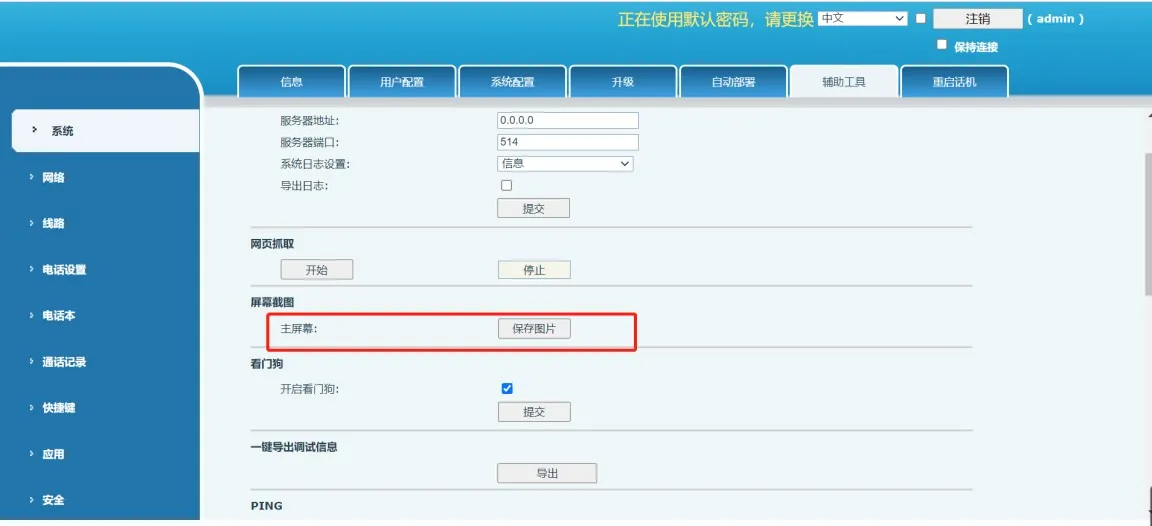
スクリーンショットの保存

                                                                                                                 図12. スクリーンショットの保存

カタログ
顧客サービス 電話
We use cookie to improve your online experience. By continuing to browse this website, you agree to our use of cookie.

Cookies

This Cookie Policy explains how we use cookies and similar technologies when you access or use our website and related services. Please read this Policy together with our Terms and Conditions and Privacy Policy so that you understand how we collect, use, and protect information.

By continuing to access or use our Services, you acknowledge that cookies and similar technologies may be used as described in this Policy, subject to applicable law and your available choices.

Updates to This Cookie Policy

We may revise this Cookie Policy from time to time to reflect changes in legal requirements, technology, or our business practices. When we make updates, the revised version will be posted on this page and will become effective from the date of publication unless otherwise required by law.

Where required, we will provide additional notice or request your consent before applying material changes that affect your rights or choices.

What Are Cookies?

Cookies are small text files placed on your device when you visit a website or interact with certain online content. They help websites recognize your browser or device, remember your preferences, support essential functionality, and improve the overall user experience.

In this Cookie Policy, the term “cookies” also includes similar technologies such as pixels, tags, web beacons, and other tracking tools that perform comparable functions.

Why We Use Cookies

We use cookies to help our website function properly, remember user preferences, enhance website performance, understand how visitors interact with our pages, and support security, analytics, and marketing activities where permitted by law.

We use cookies to keep our website functional, secure, efficient, and more relevant to your browsing experience.

Categories of Cookies We Use

Strictly Necessary Cookies

These cookies are essential for the operation of the website and cannot be disabled in our systems where they are required to provide the service you request. They are typically set in response to actions such as setting privacy preferences, signing in, or submitting forms.

Without these cookies, certain parts of the website may not function correctly.

Functional Cookies

Functional cookies enable enhanced features and personalization, such as remembering your preferences, language settings, or previously selected options. These cookies may be set by us or by third-party providers whose services are integrated into our website.

If you disable these cookies, some services or features may not work as intended.

Performance and Analytics Cookies

These cookies help us understand how visitors use our website by collecting information such as traffic sources, page visits, navigation behavior, and general interaction patterns. In many cases, this information is aggregated and does not directly identify individual users.

We use this information to improve website performance, usability, and content relevance.

Targeting and Advertising Cookies

These cookies may be placed by our advertising or marketing partners to help deliver more relevant ads and measure the effectiveness of campaigns. They may use information about your browsing activity across different websites and services to build a profile of your interests.

These cookies generally do not store directly identifying personal information, but they may identify your browser or device.

First-Party and Third-Party Cookies

Some cookies are set directly by our website and are referred to as first-party cookies. Other cookies are set by third-party services, such as analytics providers, embedded content providers, or advertising partners, and are referred to as third-party cookies.

Third-party providers may use their own cookies in accordance with their own privacy and cookie policies.

Information Collected Through Cookies

Depending on the type of cookie used, the information collected may include browser type, device type, IP address, referring website, pages viewed, time spent on pages, clickstream behavior, and general usage patterns.

This information helps us maintain the website, improve performance, enhance security, and provide a better user experience.

Your Cookie Choices

You can control or disable cookies through your browser settings and, where available, through our cookie consent or preference management tools. Depending on your location, you may also have the right to accept or reject certain categories of cookies, especially those used for analytics, personalization, or advertising purposes.

Please note that blocking or deleting certain cookies may affect the availability, functionality, or performance of some parts of the website.

Restricting cookies may limit certain features and reduce the quality of your experience on the website.

Cookies in Mobile Applications

Where our mobile applications use cookie-like technologies, they are generally limited to those required for core functionality, security, and service delivery. Disabling these essential technologies may affect the normal operation of the application.

We do not use essential mobile application cookies to store unnecessary personal information.

How to Manage Cookies

Most web browsers allow you to manage cookies through browser settings. You can usually choose to block, delete, or receive alerts before cookies are stored. Because browser controls vary, please refer to your browser provider’s support documentation for details on how to manage cookie settings.

Contact Us

If you have any questions about this Cookie Policy or our use of cookies and similar technologies, please contact us at support@becke.cc .