

A voice call may sound clear at first and then become choppy. A video meeting may start smoothly and later show delay, frozen frames, or lip-sync problems. The media stream itself may still be flowing, but the system needs another way to understand whether that stream is healthy. This is where Real-Time Transport Control Protocol, commonly known as RTCP, becomes important.
RTCP is a companion control protocol used with RTP, the Real-Time Transport Protocol. RTP carries the actual audio or video packets, while RTCP carries feedback and control information about the media session. In practical terms, RTP says “here is the media,” and RTCP helps answer “how well is the media being delivered, who is participating, how much loss or jitter exists, and how should endpoints adjust?”
In VoIP, video conferencing, WebRTC, SIP media sessions, IP intercom, streaming, online education, telemedicine, dispatch communication, and real-time collaboration platforms, RTCP supports quality monitoring, synchronization, diagnostics, participant reporting, and adaptive media behavior. It is not usually visible to end users, but it plays an important background role in keeping real-time communication manageable.
Control Data Behind Real-Time Media
Real-time media is different from file transfer. If a file packet arrives late, the system can often wait. If a voice packet arrives too late, it may already be useless because the listener needs the sound at that moment. This makes real-time transport sensitive to delay, jitter, packet loss, and clock differences.
RTP alone provides sequence numbers and timestamps inside media packets, but it does not provide a complete view of session quality. RTCP adds periodic reports so senders and receivers can evaluate delivery performance over time. These reports help applications detect whether the network is stable, whether packet loss is increasing, whether jitter is high, and whether audio and video need synchronization correction.
Without this control layer, many real-time systems would have less visibility. They might still transmit media, but troubleshooting and adaptation would be harder. RTCP gives endpoints and servers a feedback loop.
Relationship With RTP
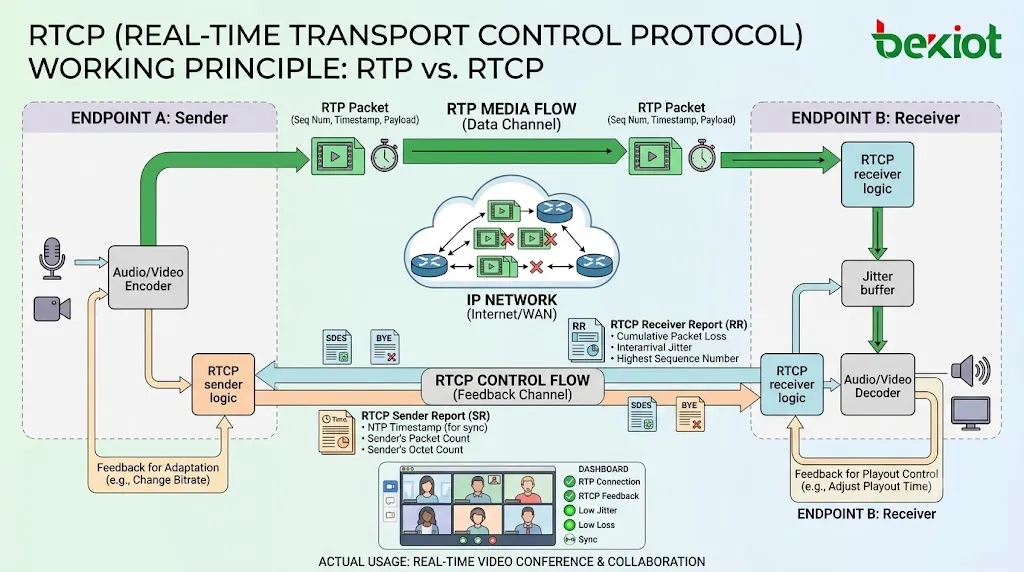
RTP and RTCP are designed to work together. RTP transports the media payload, such as encoded voice or video frames. RTCP transports control packets that describe reception quality and session information. They are usually associated with the same media session but use separate packet flows.
In many traditional RTP deployments, RTP uses one UDP port and RTCP uses the next higher UDP port. For example, if RTP uses port 5004, RTCP may use port 5005. In many modern environments, especially WebRTC or multiplexed media systems, RTP and RTCP may be carried on the same transport using multiplexing mechanisms.
This separation of roles is important. RTP must prioritize timely media delivery. RTCP does not carry the media itself; it carries measurement and control data that helps the application manage the session.
Core Purposes
Quality Feedback
The first purpose is quality feedback. Receivers can report how many RTP packets were lost, what jitter they observed, what sequence numbers were received, and how the stream is performing. This information helps senders, media servers, and monitoring tools understand whether the session is healthy.
For example, if packet loss rises sharply, the application may reduce bitrate, change codec behavior, enable stronger packet loss concealment, or alert a monitoring system. If jitter becomes unstable, the receiver may adjust its jitter buffer.
Timing and Synchronization
RTCP also helps synchronize media streams. A video call may have separate audio and video RTP streams. Each stream has its own RTP timestamp, but the system needs a way to align them with real-world time so the speaker’s lips match the sound.
Sender reports can include timing information that links RTP timestamps with wall-clock time. This allows receivers to synchronize related media streams and improve playback alignment.
Participant Identification
RTCP can carry source description information, such as canonical names and session identifiers. This helps systems identify participants and associate media streams with endpoints or users.
In multi-party sessions, participant identification becomes important because many streams may exist at the same time. Control information helps the system distinguish sources, display participant names, and manage stream relationships.
Session Control and Feedback
Some RTCP extensions allow more advanced feedback, such as reporting lost video packets, requesting keyframes, or supporting congestion control mechanisms. In interactive video systems, these feedback messages can strongly affect user experience.
For example, when video decoding becomes damaged because key data was lost, a receiver can request a new keyframe so the picture can recover faster.
Main Packet Types
RTCP is built from several packet types. Each type serves a different control purpose. The exact packet set used depends on the media application, profile, and extensions.
Sender Report
A Sender Report is sent by a participant that is actively sending RTP media. It includes information such as packet count, octet count, RTP timestamp, and an NTP-based time value. This helps receivers understand sender timing and media transmission behavior.
Sender reports are especially useful when audio and video streams must be synchronized. They help map RTP media time to real-world time.
Receiver Report
A Receiver Report is sent by a participant that receives RTP media. It describes reception quality for one or more RTP sources. Common report data includes fraction lost, cumulative packet loss, extended highest sequence number received, interarrival jitter, and timing information related to round-trip calculation.
Receiver reports are important for quality monitoring. They provide evidence of how the network and media path are performing from the receiver’s point of view.
Source Description
Source Description packets identify participants or streams. One important field is the canonical name, which helps associate RTP sources even when network addresses or synchronization source identifiers change.
This is useful in sessions where participants may have multiple media streams or where media servers need to manage stream identity.
Goodbye Packet
A Goodbye packet indicates that a participant is leaving the session. It helps other participants update session state and remove inactive sources more cleanly.
Not every session ends perfectly. Network failures, power loss, or application crashes may prevent a goodbye message from being sent. However, when it is available, it supports cleaner session management.
Application and Feedback Packets
RTCP can also support application-specific packets and feedback messages. These may be used for advanced media behavior, such as video recovery, congestion control, or application-defined reporting.
Feedback extensions are especially important in modern video and WebRTC systems because interactive video quality depends on rapid adaptation.
How Reports Are Generated
RTCP packets are usually sent periodically rather than for every media packet. If a receiver sent a control packet after every RTP packet, the overhead would be too high. Instead, endpoints send reports at controlled intervals.
The interval is influenced by session size, available bandwidth, participant role, and RTCP bandwidth rules. In larger sessions, report timing must be managed carefully so that control traffic does not overwhelm the network.
This design reflects a balance. Reports must be frequent enough to provide useful feedback, but not so frequent that they consume too much bandwidth or create unnecessary traffic.
Quality Metrics Explained
Packet Loss
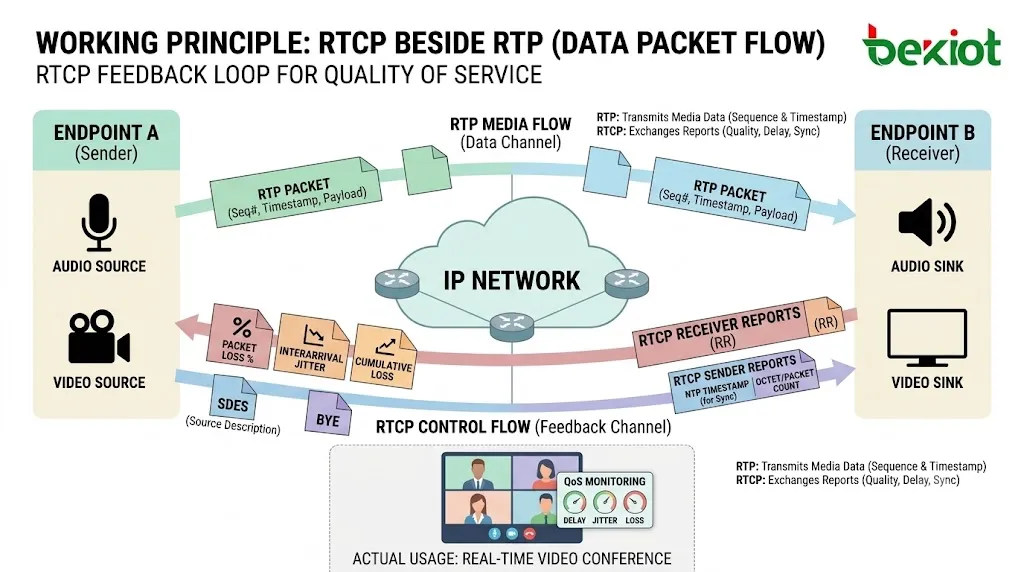
Packet loss measures how many RTP packets did not arrive at the receiver. In voice communication, small amounts of loss may be concealed by codec or jitter buffer techniques, but higher loss can cause audio gaps, robotic sound, missing syllables, or video artifacts.
RTCP receiver reports can show both fractional loss and cumulative loss. Fractional loss indicates recent loss behavior, while cumulative loss shows the total loss observed over time.
Jitter
Jitter describes variation in packet arrival timing. Even if packets are not lost, they may arrive unevenly. Real-time receivers use jitter buffers to smooth these variations, but excessive jitter increases delay or causes packet drops when packets arrive too late.
RTCP reports help indicate whether jitter is stable, increasing, or abnormal. This is useful for diagnosing network congestion, wireless instability, overloaded routers, or path changes.
Round-Trip Timing
RTCP timing fields can help estimate round-trip time between sender and receiver. Round-trip behavior affects interactive experience because high delay makes conversation less natural.
In voice and video meetings, latency can cause people to speak over each other. Monitoring timing helps systems evaluate whether the session is suitable for interactive communication.
Packet Count and Octet Count
Sender reports may include transmitted packet and byte counts. These help measure media transmission volume and can support monitoring, diagnostics, or session statistics.
When combined with receiver reports, this data helps determine whether loss is occurring in the network path or whether the sender itself is not transmitting as expected.
Role in Voice Communication
In VoIP and IP intercom systems, RTCP helps monitor call quality. A call may connect successfully at the signaling level, but the media may still suffer from loss, jitter, one-way audio, or delay. RTCP provides useful session-level evidence.
Voice systems can use RTCP reports for call quality records, troubleshooting, MOS estimation, jitter buffer adjustment, and network monitoring. Supervisors or administrators may review quality data to identify poor links, congested WAN paths, or endpoint problems.
In enterprise voice deployments, RTCP data is often part of broader voice quality monitoring. It can help separate signaling problems from media transport problems.
Role in Video Communication
Video communication depends heavily on feedback. If packets are lost, video may freeze, show blocks, or lose reference frames. RTCP feedback can help the receiver request recovery actions, such as keyframe refresh or retransmission depending on the media profile and system design.
Video systems also need synchronization between audio and video. Sender reports help map RTP timestamps to a common time base, supporting lip-sync and multi-stream alignment.
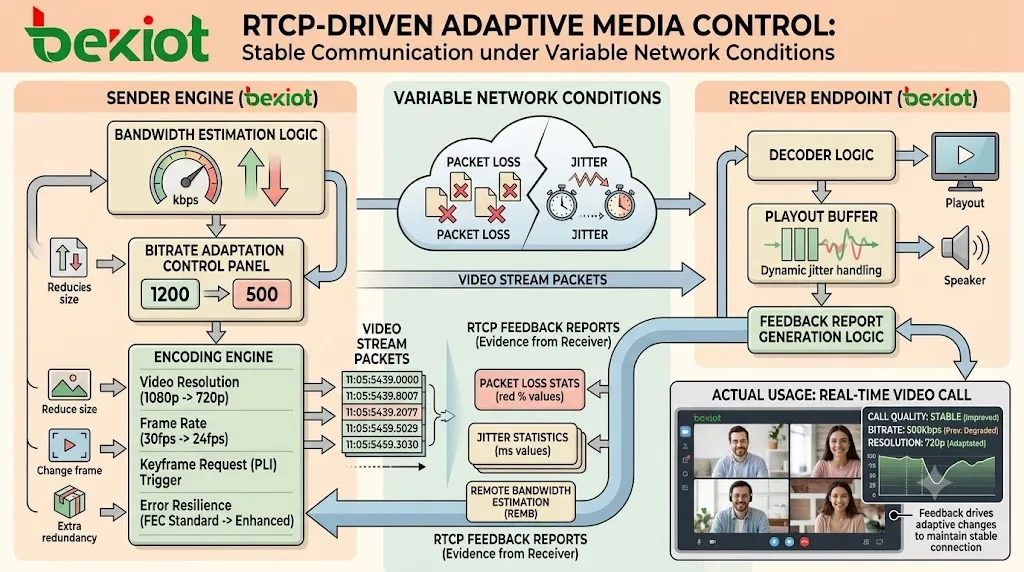
In adaptive video systems, RTCP-related feedback may help estimate bandwidth and guide bitrate changes. This keeps video usable when network capacity varies.
Role in WebRTC
WebRTC relies heavily on real-time feedback because it is often used across unpredictable networks such as home Wi-Fi, mobile networks, enterprise firewalls, and public internet paths. RTCP feedback supports congestion control, packet loss reporting, jitter estimation, video recovery, and media adaptation.
WebRTC commonly uses RTP and RTCP multiplexing, secure transport, and feedback extensions. The application may not expose RTCP directly to users, but browser and media engines use it internally to adjust sending rates and maintain session quality.
This is one reason modern browser-based meetings can adapt dynamically when bandwidth changes or when packet loss increases.
Role in Multi-Party Sessions
In multi-party conferencing, RTCP becomes more complex because many participants and media sources may exist. Reports may flow between endpoints and a media server, such as an MCU or SFU. The server may use this feedback to decide which streams to forward, which video layers to request, or how to adjust bandwidth allocation.
In large sessions, RTCP traffic must be controlled carefully. If every participant frequently sends reports to every other participant, overhead can increase. Media servers often aggregate or manage feedback to keep the session scalable.
Participant identity and source descriptions are also important in group calls because each audio or video stream must be associated with the correct user or endpoint.
RTCP and Adaptive Media
Adaptive media systems use feedback to adjust behavior. If loss increases, the sender may reduce bitrate, lower video resolution, change frame rate, or use stronger error resilience. If conditions improve, the sender may increase quality.
This adaptation is not based on RTCP alone in every system, but RTCP feedback is often one of the key inputs. It gives the media engine evidence from the receiver side, which is more useful than only looking at sender-side transmission statistics.
The goal is not always maximum quality. The goal is stable and understandable communication under changing network conditions.
Security Considerations
RTCP can reveal information about media sessions, participants, quality metrics, network behavior, and endpoint identity. In secure environments, control traffic should be protected along with media traffic.
Secure RTP environments often use SRTCP to protect RTCP packets. This can provide authentication, integrity protection, and encryption depending on the configuration. If RTP is protected but RTCP is left exposed, session metadata may still leak.
Firewall and NAT traversal design should also consider RTCP. If media packets pass but RTCP packets are blocked, calls may still work but quality monitoring and feedback may be degraded.
Bandwidth and Overhead
RTCP is designed to use only a small portion of session bandwidth. This prevents control traffic from competing heavily with media traffic. The report interval and bandwidth share are controlled by rules and implementation behavior.
In small sessions, overhead is usually not a major concern. In large conferences, many participants can generate significant control traffic if not managed properly. Media servers, report aggregation, and RTCP bandwidth management help avoid scaling problems.
Designers should remember that control traffic is not wasted traffic. It provides visibility and adaptation support. The goal is efficient control, not eliminating reports entirely.
NAT and Firewall Behavior
Many real-time sessions cross NAT devices and firewalls. RTP and RTCP must be allowed through the correct paths. If a firewall permits RTP but blocks RTCP, media may still be heard, but quality feedback, timing reports, and some recovery features may fail.
In modern systems using RTP/RTCP multiplexing, both media and control traffic may share a port, which simplifies traversal. In traditional deployments using separate ports, firewall rules must account for both flows.
When troubleshooting one-way audio, poor video recovery, or missing quality statistics, engineers should check whether RTCP is reaching the intended endpoint or media server.
Monitoring and Troubleshooting
RTCP data is useful for troubleshooting because it shows media quality from the receiver’s perspective. A sender may believe it is transmitting correctly, while the receiver reports packet loss or jitter. This difference can reveal network path problems.
Engineers can compare RTCP reports with packet captures, server logs, endpoint statistics, network monitoring data, and user complaints. If RTCP reports show high loss only for one branch, the issue may be local network congestion. If many users report jitter at the same time, the media server or WAN link may be overloaded.
RTCP also helps diagnose synchronization issues. If audio and video timestamps cannot be aligned correctly, users may experience lip-sync problems or playback drift.
Implementation Planning
When implementing real-time communication, developers and engineers should decide whether RTCP will use separate ports or multiplexing, whether secure control traffic is required, which feedback extensions are needed, how reports will be monitored, and how the application will react to quality changes.
For SIP-based systems, Session Description Protocol negotiation usually describes RTP and RTCP behavior. For WebRTC, browser engines handle much of the media stack, but application developers may still access statistics through APIs and monitoring tools.
For large conference platforms, RTCP design must consider media server architecture, participant count, report frequency, feedback aggregation, and adaptive bitrate control.
Common Misunderstandings
One misunderstanding is that RTCP carries voice or video. It does not. The media payload is carried by RTP. RTCP carries control and feedback information.
Another misunderstanding is that a connected call means RTCP is working. A call may have media flow while RTCP is blocked or incomplete. The user may hear audio, but quality reporting and feedback may be reduced.
A third misunderstanding is that RTCP fixes network problems by itself. It reports and supports adaptation, but it cannot magically remove congestion, packet loss, or poor routing. Network design and media policy still matter.
A fourth misunderstanding is that RTCP is useful only for video. It is also valuable for voice quality monitoring, jitter analysis, packet loss reports, and session diagnostics.
Best Practices
Enable and preserve RTCP wherever quality monitoring and adaptive media are needed. Blocking it may reduce the system’s ability to detect and respond to network problems.
Use secure RTCP when media confidentiality and session metadata protection are required. Voice and video security should include both media and control channels.
Monitor RTCP statistics over time rather than only during incidents. Historical trends can reveal branch network problems, overloaded links, endpoint issues, or configuration changes.
Test RTCP behavior in real network conditions. Include NAT traversal, firewalls, VPN paths, mobile networks, Wi-Fi, and multi-party sessions. Laboratory conditions may not reveal field issues.
For large systems, tune report frequency and media-server handling so that feedback remains useful without creating unnecessary overhead.
Future Development Direction
Real-time communication is becoming more adaptive and data-driven. Video platforms, WebRTC applications, online collaboration tools, and real-time service systems increasingly depend on feedback loops to adjust quality dynamically.
RTCP-related feedback will continue to support congestion control, bandwidth estimation, media recovery, and quality analytics. At the same time, platforms will combine RTCP data with application telemetry, endpoint health, user experience metrics, AI-based quality analysis, and network observability.
The future is not simply sending more control packets. It is using feedback intelligently to improve communication quality while preserving security, scalability, and interoperability.
RTCP is valuable because it gives real-time media systems a feedback and control channel, allowing endpoints and servers to measure quality, synchronize streams, identify participants, and adapt communication behavior during live sessions.
FAQ
Can RTP work without RTCP?
RTP media may still be transmitted without useful RTCP feedback, but quality monitoring, synchronization support, and adaptive control can be reduced or unavailable.
Why is RTCP important if users only care about audio?
Audio quality depends on packet loss, jitter, delay, and endpoint behavior. RTCP reports help systems measure these conditions and support better troubleshooting.
Does RTCP guarantee good call quality?
No. It provides feedback and control information. Actual quality still depends on network performance, codec behavior, endpoint processing, and system configuration.
Why might quality reports be missing?
Possible causes include blocked RTCP ports, disabled feedback, incompatible endpoints, multiplexing mismatch, firewall rules, NAT behavior, or unsupported monitoring integration.
Is RTCP used only in SIP systems?
No. It is used in many RTP-based real-time media systems, including SIP media sessions, WebRTC, video conferencing, streaming tools, and other interactive communication platforms.
把我这个html代码的文章用本地化的法语表述出来。给我可以复制的代码。