
SIP室内電話機のショートカットキー設定ガイド。Memory Key、Line、Event Key、DTMF、URL、BLF List、MCAST Paging、Action URLをi51W、i52W、i53W、i56A向けに説明します。
本書では、iシリーズ室内電話機で設定できるショートカットキーの定義と使用方法を詳しく説明します。
すべてのiシリーズ室内電話機に対応します。対象モデルは i51W、i52W、i53W、i56A です。
① iシリーズ室内電話機1台。PoEスイッチまたはDC電源で機器にネットワークと電源を供給します。
② デバッグ用PC1台。同じスイッチ配下に接続し、PCと室内電話機が通信できることを確認します。
PoEスイッチ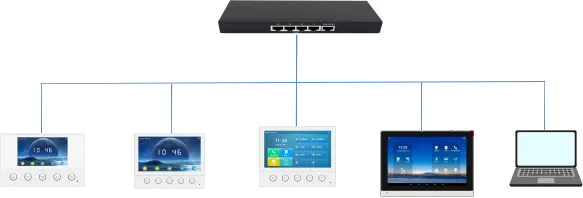
i51W i52W i53W i56A PC
機能別に見ると、ショートカットキーは次のカテゴリに分類できます。
Memory Key
Line
Event Key
DTMF
URL
BLF List Key
MCAST Paging/MCAST Listening
Action URL
XML Browser
Application
注:各室内電話機の製品位置付けやシステム構成が異なるため、利用できるキー分類も機種により異なります。i51W/i52W/i53WにはXML BrowserとApplicationがなく、i51W/i52WにはMCAST ListeningとBLF List Keyがありません。
具体的な機能により、Memory Keyは以下のサブタイプに分けられます。
1. None
2. BLF related configuration
3. Presence
4. Voice Mail
5. Speed Dial
6. Intercom
7. Call Park
8. Call Forward
i51Wとi52Wはタッチスクリーン非搭載のため、利用できるMemory KeyとEvent Keyのサブタイプがi53W/i56Aと異なります。i51W/i52WではMemory KeyはSpeed DialまたはIntercomのみ、Event KeyはDo-not-disturb、Handfree、OK、End、Intercomのみ設定できます。
3.1.1. BLF related configuration
機能説明: この機能はBLF can indicate the status of a subscribed extension and can pick up the call wに対応する操作を実行し、SIP回線、通話、連絡先、サービス機能を素早く扱うために使用します。
設定項目: タイプ: Memory Key
値: BLF related configuration / DSS value
回線: SIP account used for outgoing calls or subscription
サブタイプ: BLF related configuration
ピックアップ番号: optional server pickup code
使用方法: この機能はPress the configured key in standby, ringing or call status to execute the assigに対応する操作を実行し、SIP回線、通話、連絡先、サービス機能を素早く扱うために使用します。
3.1.2. Presence
機能説明: この機能はPresence shows line status through the indicator and can also show whether the oに対応する操作を実行し、SIP回線、通話、連絡先、サービス機能を素早く扱うために使用します。
設定項目: タイプ: Memory Key
値: Presence / DSS value
回線: SIP account used for outgoing calls or subscription
サブタイプ: Presence
ピックアップ番号: optional server pickup code
使用方法: この機能はPress the configured key in standby, ringing or call status to execute the assigに対応する操作を実行し、SIP回線、通話、連絡先、サービス機能を素早く扱うために使用します。
3.1.3. Voice Mail
機能説明: この機能はVoice Mail is used to listen to messagesに対応する操作を実行し、SIP回線、通話、連絡先、サービス機能を素早く扱うために使用します。
設定項目: タイプ: Memory Key
値: Voice Mail / DSS value
回線: SIP account used for outgoing calls or subscription
サブタイプ: Voice Mail
使用方法: この機能はPress the configured key in standby, ringing or call status to execute the assigに対応する操作を実行し、SIP回線、通話、連絡先、サービス機能を素早く扱うために使用します。
3.1.4. Speed Dial
機能説明: この機能はSpeed Dial is used for frequently dialed or hard-to-remember numbersに対応する操作を実行し、SIP回線、通話、連絡先、サービス機能を素早く扱うために使用します。
設定項目: タイプ: Memory Key
値: Speed Dial / DSS value
回線: SIP account used for outgoing calls or subscription
サブタイプ: Speed Dial
使用方法: この機能はPress the configured key in standby, ringing or call status to execute the assigに対応する操作を実行し、SIP回線、通話、連絡先、サービス機能を素早く扱うために使用します。
3.1.5. Intercom
機能説明: この機能はIntercom enables automatic answering and direct conversation with the configuredに対応する操作を実行し、SIP回線、通話、連絡先、サービス機能を素早く扱うために使用します。
設定項目: タイプ: Memory Key
値: Intercom / DSS value
回線: SIP account used for outgoing calls or subscription
サブタイプ: Intercom
使用方法: この機能はPress the configured key in standby, ringing or call status to execute the assigに対応する操作を実行し、SIP回線、通話、連絡先、サービス機能を素早く扱うために使用します。
3.1.6. Call Park
機能説明: この機能はCall Park temporarily parks a call on the server, so the user can retrieve the cに対応する操作を実行し、SIP回線、通話、連絡先、サービス機能を素早く扱うために使用します。
設定項目: タイプ: Memory Key
値: Call Park / DSS value
回線: SIP account used for outgoing calls or subscription
サブタイプ: Call Park
使用方法: この機能はPress the configured key in standby, ringing or call status to execute the assigに対応する操作を実行し、SIP回線、通話、連絡先、サービス機能を素早く扱うために使用します。
3.1.7. Call Forward
機能説明: この機能はCall Forward transfers an incoming call to the configured destination number witに対応する操作を実行し、SIP回線、通話、連絡先、サービス機能を素早く扱うために使用します。
設定項目: タイプ: Memory Key
値: Call Forward / DSS value
回線: SIP account used for outgoing calls or subscription
サブタイプ: Call Forward
使用方法: この機能はPress the configured key in standby, ringing or call status to execute the assigに対応する操作を実行し、SIP回線、通話、連絡先、サービス機能を素早く扱うために使用します。
Lineキーを押します。回線が未登録の場合は回線設定モードに入り、登録済みの場合はダイヤルモードに入り、番号を入力して発信できます。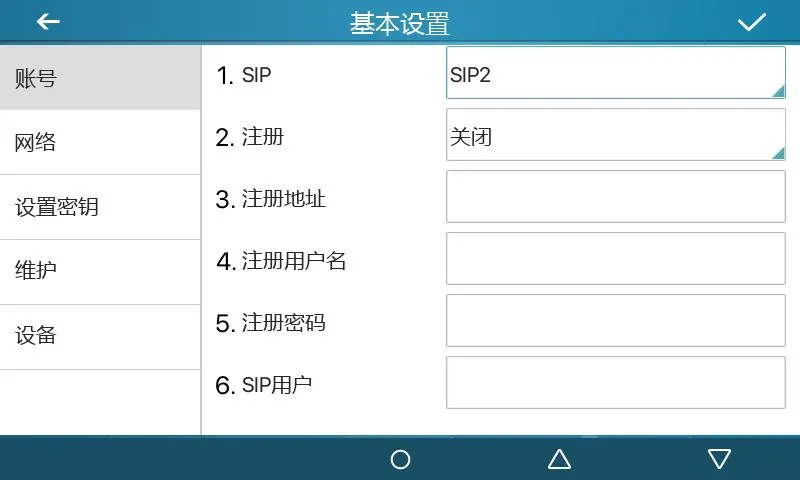
図 1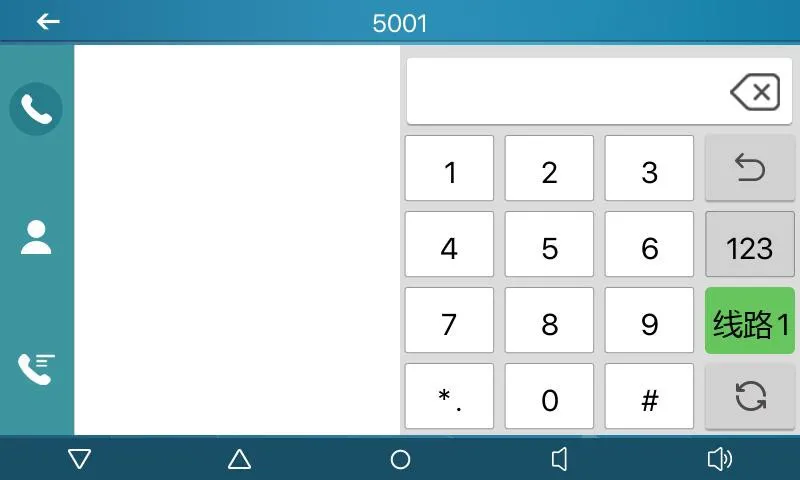
図 2
機能説明: サブタイプにより専用機能キーとして設定します。サブタイプごとに機能と操作方法が異なります。
設定項目: タイプ: Event Key
サブタイプ: selected function type
使用方法:
3.3.1 None:
機能なし。
3.3.2 Voice Mail:
この機能はChecks voice mail information for all SIP lines and can call the mailbox of the に対応する操作を実行し、SIP回線、通話、連絡先、サービス機能を素早く扱うために使用します。
3.3.3 Do-not-disturb:
この機能はEnables do-not-disturb for the whole device or for a selected SIP lineに対応する操作を実行し、SIP回線、通話、連絡先、サービス機能を素早く扱うために使用します。
3.3.4 Call Hold:
この機能はPlaces the current call on hold like a physical Hold keyに対応する操作を実行し、SIP回線、通話、連絡先、サービス機能を素早く扱うために使用します。
3.3.5 Transfer:
この機能はTransfers the current call like a Transfer key or Xfer softkeyに対応する操作を実行し、SIP回線、通話、連絡先、サービス機能を素早く扱うために使用します。
3.3.6 Phonebook:
この機能はOpens the contact directoryに対応する操作を実行し、SIP回線、通話、連絡先、サービス機能を素早く扱うために使用します。
3.3.7 Redial:
この機能はRedials the last outgoing number using the previous lineに対応する操作を実行し、SIP回線、通話、連絡先、サービス機能を素早く扱うために使用します。
3.3.8 Pick up:
この機能はAnswers an incoming call that is ringing on another phone after the ringing phonに対応する操作を実行し、SIP回線、通話、連絡先、サービス機能を素早く扱うために使用します。
3.3.9 Join:
この機能はAllows the test phone to join an existing call after entering the target phone nに対応する操作を実行し、SIP回線、通話、連絡先、サービス機能を素早く扱うために使用します。
3.3.10 Call Forward:
この機能はOpens call forwarding settings in standby modeに対応する操作を実行し、SIP回線、通話、連絡先、サービス機能を素早く扱うために使用します。
3.3.11 Call Logs:
この機能はOpens call history and call record informationに対応する操作を実行し、SIP回線、通話、連絡先、サービス機能を素早く扱うために使用します。
3.3.12 Flash:
この機能はHolds the current call and opens a new dialing state with dial toneに対応する操作を実行し、SIP回線、通話、連絡先、サービス機能を素早く扱うために使用します。
3.3.13 Memo:
この機能はOpens the memo application for note managementに対応する操作を実行し、SIP回線、通話、連絡先、サービス機能を素早く扱うために使用します。
3.3.14 Headset:
この機能はWorks like the physical headset key for answering and hanging up callsに対応する操作を実行し、SIP回線、通話、連絡先、サービス機能を素早く扱うために使用します。
3.3.15 Release:
この機能はExits the LCD menu or hangs up all calls and returns to standbyに対応する操作を実行し、SIP回線、通話、連絡先、サービス機能を素早く扱うために使用します。
3.3.16 Lock phone:
この機能はLocks the phone from standby modeに対応する操作を実行し、SIP回線、通話、連絡先、サービス機能を素早く扱うために使用します。
3.3.17 SMS:
この機能はOpens the SMS interface for sending, receiving and browsing messagesに対応する操作を実行し、SIP回線、通話、連絡先、サービス機能を素早く扱うために使用します。
3.3.18 Call Back:
この機能はCalls back the last incoming number after off-hookに対応する操作を実行し、SIP回線、通話、連絡先、サービス機能を素早く扱うために使用します。
3.3.19 Hide DTMF:
この機能はOpens the setting mode for DTMF hidden displayに対応する操作を実行し、SIP回線、通話、連絡先、サービス機能を素早く扱うために使用します。
3.3.20 Intercom:
この機能はEnables Intercom mode and automatic answering when no other call is activeに対応する操作を実行し、SIP回線、通話、連絡先、サービス機能を素早く扱うために使用します。
3.3.21 Group Listening:
この機能はEnables group listening during handset or headset calls; audio is played, while に対応する操作を実行し、SIP回線、通話、連絡先、サービス機能を素早く扱うために使用します。
3.3.22 Prefix:
この機能はAdds the configured outside-line prefix after off-hook, so users do not need to に対応する操作を実行し、SIP回線、通話、連絡先、サービス機能を素早く扱うために使用します。
3.3.23 Hot Desking:
この機能はClears all SIP configurations after the configured DSS key is pressed and OK is に対応する操作を実行し、SIP回線、通話、連絡先、サービス機能を素早く扱うために使用します。
3.3.24 Agent:
この機能はOpens the Agent interfaceに対応する操作を実行し、SIP回線、通話、連絡先、サービス機能を素早く扱うために使用します。
3.3.25 End:
この機能はPerforms the End function on the call interfaceに対応する操作を実行し、SIP回線、通話、連絡先、サービス機能を素早く扱うために使用します。
3.3.26 Disposition:
この機能はBroadsoft Call Center function that sends Disposition Code Info during and afterに対応する操作を実行し、SIP回線、通話、連絡先、サービス機能を素早く扱うために使用します。
3.3.27 Escalate:
この機能はBroadsoft Call Center function that sends SIP Info and selects a Supervisor autoに対応する操作を実行し、SIP回線、通話、連絡先、サービス機能を素早く扱うために使用します。
3.3.28 Trace:
この機能はBroadsoft function similar to Disposition, supporting information sending duringに対応する操作を実行し、SIP回線、通話、連絡先、サービス機能を素早く扱うために使用します。
3.3.29 Handfree:
この機能はEnters hands-free modeに対応する操作を実行し、SIP回線、通話、連絡先、サービス機能を素早く扱うために使用します。
3.3.30 Answer Key:
この機能はAnswers the incoming callに対応する操作を実行し、SIP回線、通話、連絡先、サービス機能を素早く扱うために使用します。
3.3.31 Private Hold:
この機能はBroadsoft function that prevents other users from retrieving the held callに対応する操作を実行し、SIP回線、通話、連絡先、サービス機能を素早く扱うために使用します。
3.3.32 Local Contacts:
この機能はOpens the local contacts interfaceに対応する操作を実行し、SIP回線、通話、連絡先、サービス機能を素早く扱うために使用します。
3.3.33 LDAP Group:
この機能はAccesses the LDAP network phonebook when LDAP phonebook is enabledに対応する操作を実行し、SIP回線、通話、連絡先、サービス機能を素早く扱うために使用します。
3.3.34 XML Group:
この機能はAccesses the selected XML network phonebook when XML phonebook is enabledに対応する操作を実行し、SIP回線、通話、連絡先、サービス機能を素早く扱うために使用します。
3.3.35 Broadsoft Group:
この機能はAccesses the Broadsoft network phonebook when it is enabledに対応する操作を実行し、SIP回線、通話、連絡先、サービス機能を素早く扱うために使用します。
3.3.36 Record:
この機能はStarts call recording when the phone has been configured for recordingに対応する操作を実行し、SIP回線、通話、連絡先、サービス機能を素早く扱うために使用します。
3.3.37 Auto Headset:
この機能はEnables or disables headset answering; the DSS key stays steady greenに対応する操作を実行し、SIP回線、通話、連絡先、サービス機能を素早く扱うために使用します。
機能説明: 二次ダイヤルを素早く行うために使用し、二次ダイヤル内容を記憶する必要がありません。通話中に押すと、設定された番号シーケンスを相手側へ送信します。
設定項目: タイプ: DTMF
値: DTMF secondary dialing key sequence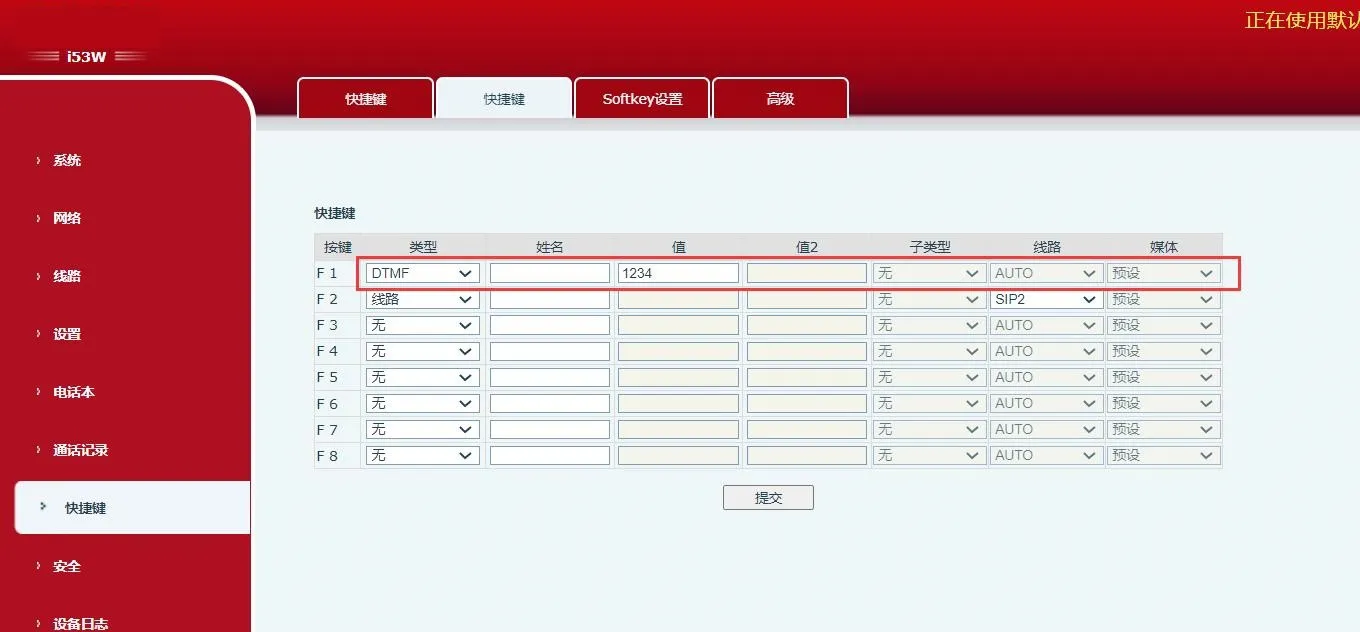 図 3
図 3
機能説明: 設定済みで有効なリモートURLへ直接アクセスするために使用します。
設定項目: タイプ: URL
値: complete remote URL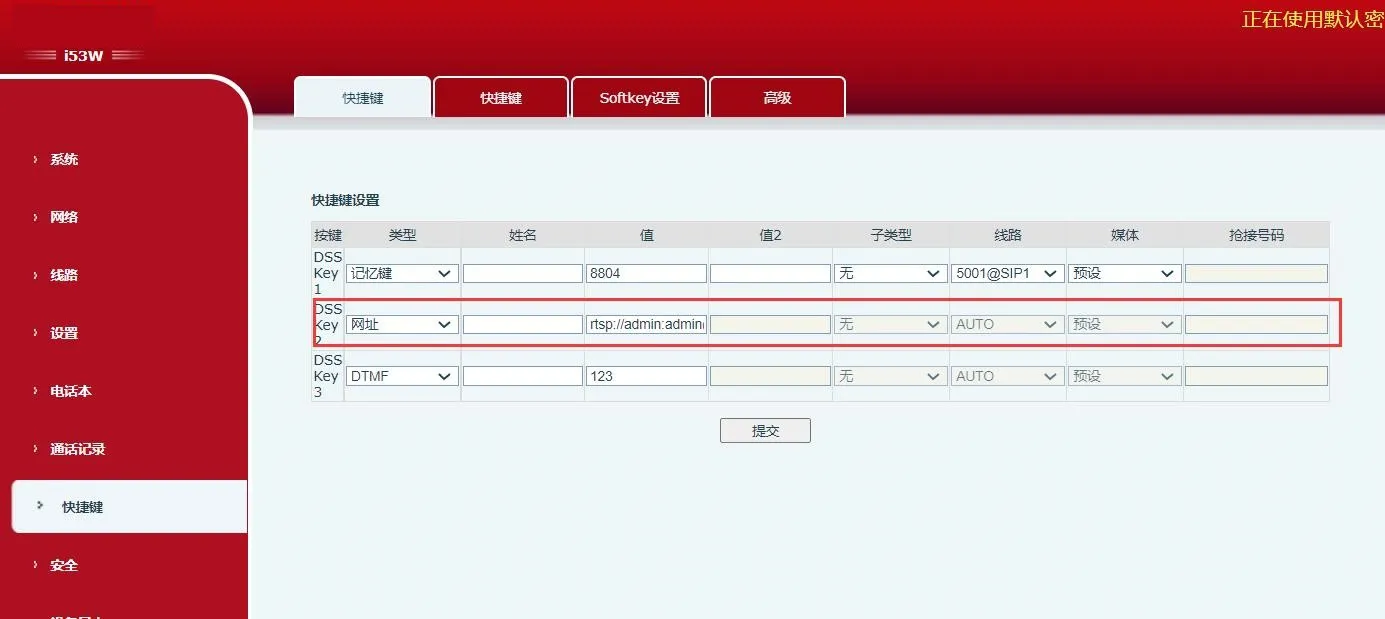 図 4
図 4
機能説明: サーバーと連携して使用します。従来のBLFは番号ごとにSubscribeを使用します。BLF List Keyではサーバー側で番号をグループ化し、グループURLで購読し、Notifyを解析してキーLEDに状態を表示します。
設定項目: タイプ: BLF List Key
使用方法: server automatically delivers subscribed number list to DSS keys.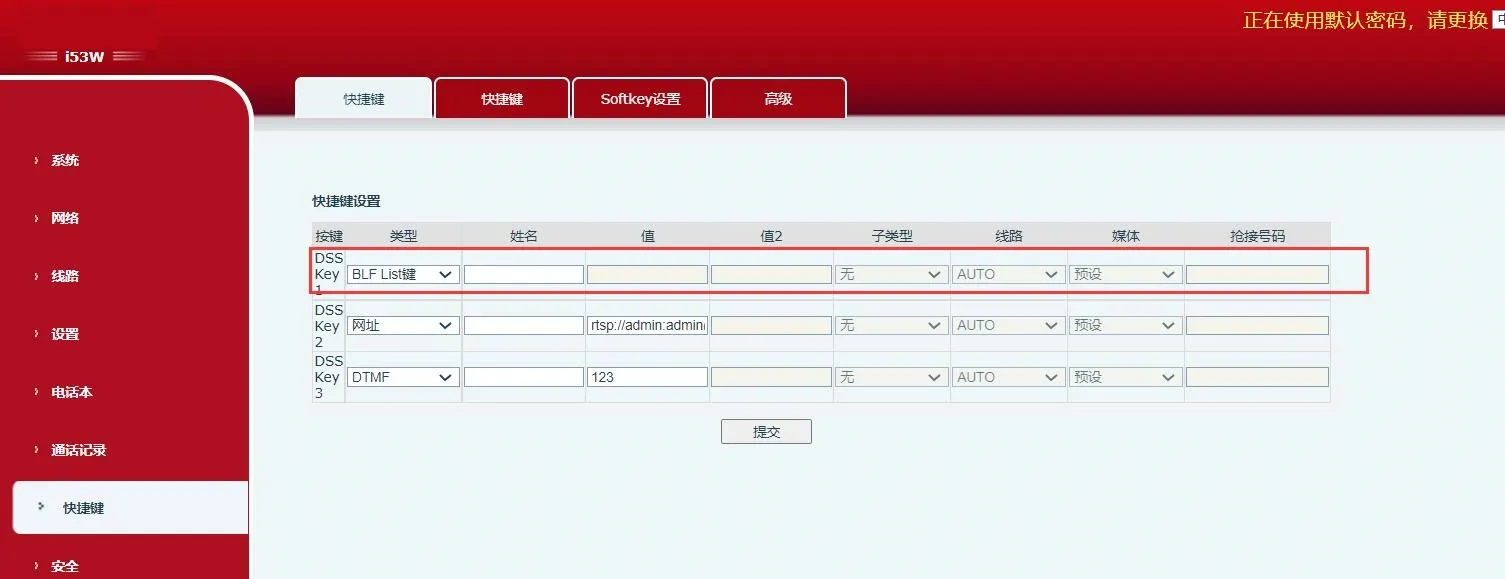 図 5
図 5
機能説明: マルチキャストアドレスと音声コーデックを設定した後、このキーを押すとマルチキャストRTPストリームを送信できます。もう一度押すと終了して切断します。
設定項目: タイプ: MCAST Paging / MCAST Listening
値: multicast listening address and port
サブタイプ: RTP audio codec used by sender and receiver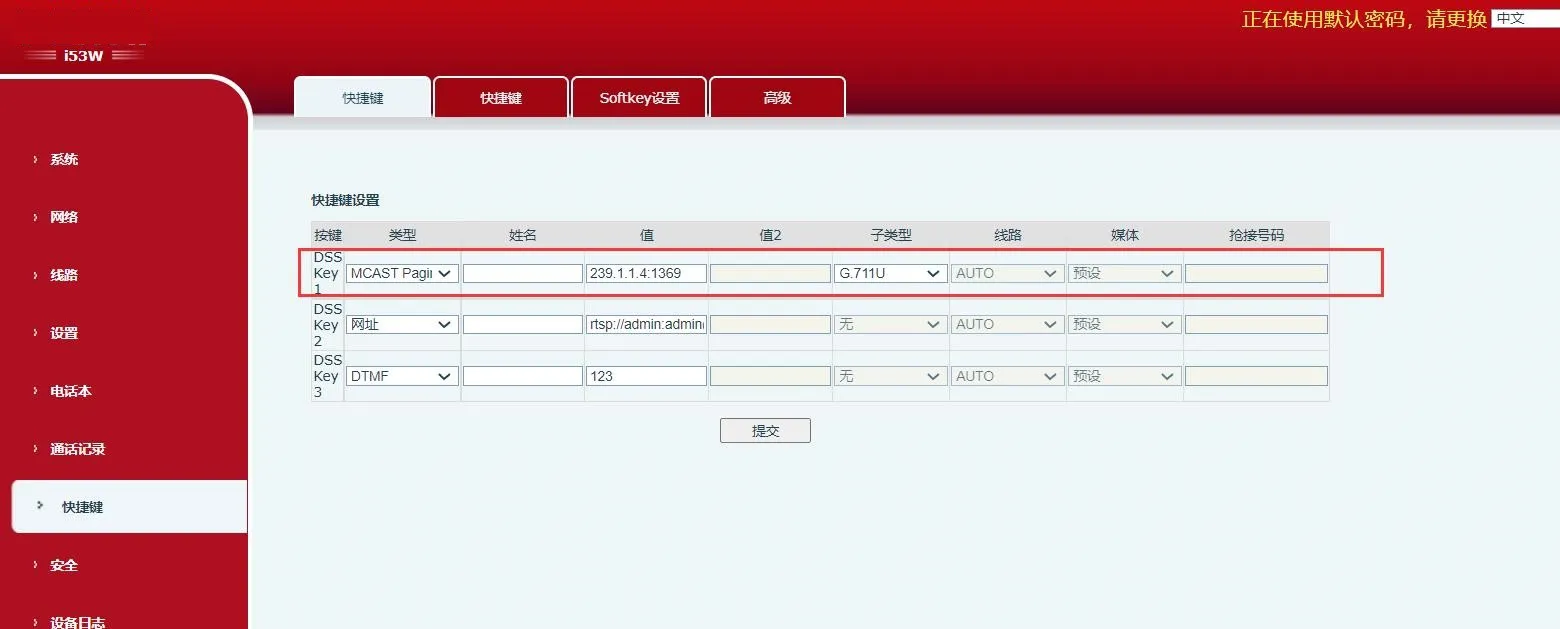
図 6
機能説明: 設定URLでは¥形式の変数パラメータをサポートします。DSSキーを押すと、システムはHTTP GETまたはPOSTリクエストを送信します。
設定項目: タイプ: Action URL
値: valid URL
サブタイプ: POST or GET